Ngx-bootstrap: dropdown dropup option appears well above where it should be
Bug description or feature request:
Starting with v1.9.0 (also tested with v1.9.3), with a dropdown with dropup=true. Ex:
<div dropdown container="body" [dropup]="'true'">
The dropdown content appears well above where it should be, relative to the content box's size. For instance, if the dropdown content is 100px high, the _bottom_ of that div appears 100px above its <input> box.
The position is correct in v1.8.1 and earlier.
Versions of ngx-bootstrap, Angular, and Bootstrap:
ngx-bootstrap: 1.9.3
Angular: 4.4.5
Bootstrap: 3.3.7
Build system: Angular CLI, System.js, webpack, starter seed:
Angular CLI.
 kernwig
All 21 comments
Works fine here https://valor-software.com/ngx-bootstrap/#/dropdowns#dropup
Please provide plunkr/stackblitz with reproduction
You can use one of starter templates:
Plunkr: https://plnkr.co/edit/0NipkZrnckZZROAcnjzB?p=preview
StackBlitz: https://stackblitz.com/edit/ngx-bootstrap-stack?file=app%2Fapp.module.ts
 IlyaSurmay
on 23 Oct 2017
IlyaSurmay
on 23 Oct 2017
Problem continues with Angular 5.0.0 and ngx-bootstrap 2.0.0-beta.7.
The plickr template doesn't run, emitting "Failed to load resource: net::ERR_BLOCKED_BY_CLIENT" to the console.
The stackblitz link is broken.
kernwig
on 2 Nov 2017
I stripped down my component to create a demo.
https://github.com/kernwig/ngxb-dropup
kernwig
on 2 Nov 2017
Issue is in binding [dropup]="'true'" and should be
[dropup]="true",
Illya please check repo above if you can reproduce,please reopen issue
 valorkin
on 5 Nov 2017
valorkin
on 5 Nov 2017
That was a mistake in my typing in of an example of the bug report. The repo example I provided correctly passes in a boolean value and demonstrates the bug.
kernwig
on 6 Nov 2017
Please reopen. This is a major regression.
kernwig
on 9 Nov 2017
Can't reproduce with latest version https://valor-software.com/ngx-bootstrap/#/dropdowns
valorkin
on 9 Nov 2017
If you can reproduce with latest version, we will reopen and mark as urgent
valorkin
on 9 Nov 2017
I provided a demo. https://github.com/kernwig/ngxb-dropup
Just because it works in one bare minimum use case doesn't mean there isn't a regression.
kernwig
on 9 Nov 2017
Usually it means some mess up with css
valorkin
on 9 Nov 2017
I removed the tiny amount of css that I had, updated to the latest beta, and deployed the demo live.
Repo: https://github.com/kernwig/ngxb-dropup
Live: http://fanello.net/ngxb-dropdown/index.html
kernwig
on 9 Nov 2017
Awesome, this is most helpful
valorkin
on 9 Nov 2017
Bs4 support in bs-dropdown-container.component.ts seems to break bs3.
https://github.com/zakki/ngx-bootstrap/commit/bdd7b99b606f943abb367fe9d8cc75c028fab3f5
 zakki
on 17 Nov 2017
zakki
on 17 Nov 2017
Seeing same issue.
 1-0-1
on 17 Nov 2017
1-0-1
on 17 Nov 2017
seems translateY should be added only for bs4
will be fixed shortly
valorkin
on 21 Nov 2017
I have the same issue but with the following versions:
Angular: 5.0.2
Bootstrap : 4.0.0-alpha.6
ngx-bootstrap: 2.0.0-beta.11
This was no issue in 2.0.0-beta.2 by the way.
 michaelfaisst
on 13 Dec 2017
michaelfaisst
on 13 Dec 2017
Css is a mess
valorkin
on 13 Dec 2017
I've got the same issue using Angular 6.1.1 and ngx-bootstrap 3.0.1 with Bootstrap 4.
Here's a screenshot:
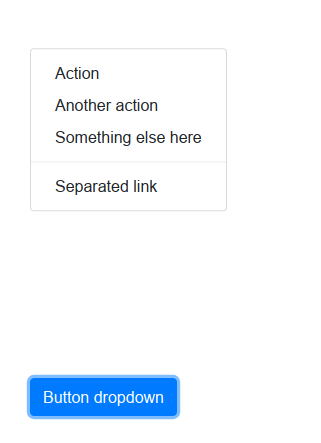
And here's the template code:
<div style="margin-top: 30rem" class="p-5" >
<div dropdown [dropup]="true">
<button dropdownToggle type="button" class="btn btn-primary dropup-toggle">
Button dropdown <span class="caret"></span>
</button>
<ul *dropdownMenu class="dropdown-menu" role="menu">
<li role="menuitem"><a class="dropdown-item" href="#">Action</a></li>
<li role="menuitem"><a class="dropdown-item" href="#">Another action</a></li>
<li role="menuitem"><a class="dropdown-item" href="#">Something else here</a></li>
<li class="divider dropdown-divider"></li>
<li role="menuitem"><a class="dropdown-item" href="#">Separated link</a>
</li>
</ul>
</div>
</div>
There's no custom style at all.
Please, reopen the issue.
 luisfpg
on 3 Aug 2018
luisfpg
on 3 Aug 2018
BTW, if I add the following style, it works again:
.dropdown-menu {
  transform: none !important;
}
I see this previous comment:
seems translateY should be added only for bs4
will be fixed shortly
Well, it seems translateY should never be added at all!
luisfpg
on 3 Aug 2018
+1. I also ran into this issue with bs4 and latest ngx-bootstrap. Had to add that transform: none to the css.
 hisham
on 18 Dec 2018
hisham
on 18 Dec 2018
+1. Having this issue in 2020, on [email protected]. Adding transform: none !important; helps!
 vvolodin
on 9 Jul 2020
vvolodin
on 9 Jul 2020
Related issues
 webdev48
·
3Comments
webdev48
·
3Comments
 PascalHonegger
·
3Comments
PascalHonegger
·
3Comments
 phmello
·
3Comments
phmello
·
3Comments
 YevheniiaMazur
·
3Comments
YevheniiaMazur
·
3Comments
 pgeyman
·
3Comments
pgeyman
·
3Comments
Most helpful comment
BTW, if I add the following style, it works again:
I see this previous comment:
Well, it seems translateY should never be added at all!