Ngx-bootstrap: Angular 4 How could I remove the warning "The <template> element is deprecated. Use <ng-template>
I have run:
npm install ngx-bootstrap@next
but it was NOT helpful, the warning message is keeping showing


 DrewTian
All 29 comments
did you delete package lock? Clear npm cache and node_modules? If I run npm install on new angular app I do not see the message
 isaacrlevin
on 11 Oct 2017
isaacrlevin
on 11 Oct 2017
- git clean –dfx
- npm install
- npm install ngx-bootstrap@next
- npm start
After running the above, NOT helpful, the warning is still displaying
DrewTian
on 11 Oct 2017
you have [email protected] and ngx-bootstrap@next together
 fchiumeo
on 11 Oct 2017
fchiumeo
on 11 Oct 2017
git clean –dfx
npm install
npm install [email protected] ngx-bootstrap@next
npm start
NOT helpful
DrewTian
on 11 Oct 2017
you need version 1.1.16 or next, not both !!!
fchiumeo
on 11 Oct 2017
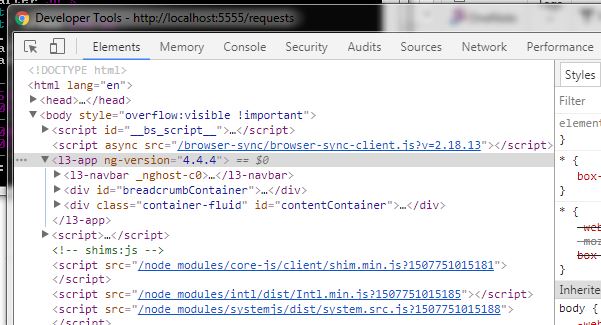
sorry, I do not understand.
Can you show me the detail steps, so I could have a better understanding ?
DrewTian
on 11 Oct 2017
git clean –dfx
npm remove ng2-bootstrap --save
npm remove ngx-bootstrap --save
npm install ngx-bootstrap@next --save
 Martin-Wegner
on 12 Oct 2017
Martin-Wegner
on 12 Oct 2017
just installing a new version is not enough. If you were using ng2-bootstrap then after installing a new version you should replace all references to ng2-bootstrap to ngx-bootstrap. 1.1.16 is a very old version and a lot of things have changed since it was released so you'll encounter some errors during the update, in this case just follow our demo.
 IlyaSurmay
on 12 Oct 2017
IlyaSurmay
on 12 Oct 2017
This is not an issue with version ^2.0.0-beta.6
 dsandi
on 13 Oct 2017
dsandi
on 13 Oct 2017
sorry, nothing of the above is working
DrewTian
on 15 Oct 2017
I just installed today the version 1.9.3. I run: ng serve --aot
The element is deprecated. Use
[WARNING ->]

Note: In about a week Angular 5 is to be released, and this warning becomes an error.
The <template> element is deprecated. Use <ng-template> instead ("
[WARNING ->]<template [ngIf]="!isClosed">
  <div [class]="'alert alert-' + type" role="alert" [ngClass]="classes""): ng:///AlertModule/AlertComponent.html@1:0
This is literally a three character replacement. Please add it to v1.9.4 so we can all move on.
 kernwig
on 15 Oct 2017
kernwig
on 15 Oct 2017
@arangelp @kernwig
[email protected] support angular 2 and angular 4
ngx-bootstrap@next suport angular 4 and angular 5
fchiumeo
on 16 Oct 2017
@DrewTian please show us your package.json so that we can help.
Martin-Wegner
on 17 Oct 2017
As @fchiumeo said:
[email protected] support angular 2 and angular 4
ngx-bootstrap@next suport angular 4 and angular 5
So <template> is not going to be changed to <ng-template> in [email protected]
Just use ngx-bootstrap@next to get rid of these warnings and that's all.
IlyaSurmay
on 17 Oct 2017
{
"name": "angular-seed",
"version": "0.0.0",
"description": "Modular starter project for Angular 2 (and beyond) with statically typed build and AoT compilation",
"repository": {
"url": "https://github.com/mgechev/angular-seed"
},
"scripts": {
"build.dev": "gulp build.dev --color --env-config dev",
"build.dev.watch": "gulp build.dev.watch --color",
"build.e2e": "gulp build.e2e --color",
"build.prod": "gulp build.prod --color --env-config prod --build-type prod",
"build.prod.exp": "gulp build.prod.aot --color --env-config prod --build-type prod",
"build.prod.rollup.aot": "gulp build.prod.rollup.aot --color --env-config prod --build-type prod",
"build.prod.aot": "gulp build.prod.aot --color --env-config prod --build-type prod",
"build.test": "gulp build.test --color",
"test.watch": "gulp test.watch --color",
"generate.manifest": "gulp generate.manifest --color",
"e2e": "protractor",
"e2e.live": "protractor --elementExplorer",
"gulp": "gulp",
"i18n": "ng-xi18n && gulp clean.i18n",
"lint": "gulp tslint",
"karma": "karma",
"karma.start": "karma start",
"postinstall": "gulp check.versions && gulp build.bundle.rxjs && npm prune && gulp webdriver && gulp print.banner",
"reinstall": "npm cache clean && npm install",
"serve.coverage": "gulp serve.coverage --color",
"serve.dev": "gulp serve.dev --color --env-config dev",
"serve.e2e": "gulp serve.e2e --color",
"serve.prod": "gulp serve.prod --color --env-config prod --build-type prod",
"serve.prod.aot": "gulp serve.prod.aot --color --env-config prod --build-type prod",
"serve.prod.exp": "gulp serve.prod.aot --color --env-config prod --build-type prod",
"serve.prod.rollup.aot": "gulp serve.prod.rollup.aot --color --env-config prod --build-type prod",
"start": "gulp serve.dev --color",
"start.deving": "gulp start.deving --color",
"tasks.list": "gulp --tasks-simple --color",
"test": "gulp test --color",
"e2e.ci": "gulp build.prod --color && gulp build.js.e2e --color && gulp e2e --color",
"tests.all": "npm test && npm run e2e.ci",
"webdriver-start": "webdriver-manager start",
"webdriver-update": "webdriver-manager update",
"compodoc": "node_modules/.bin/compodoc -p src/client/tsconfig.json",
"serve.compodoc": "node_modules/.bin/compodoc -s"
},
"author": "Minko Gechev
"license": "MIT",
"devDependencies": {
"@angular/compiler-cli": "~2.4.0",
"@angular/platform-server": "~2.4.0",
"@types/async": "^2.0.32",
"@types/browser-sync": "^0.0.34",
"@types/core-js": "^0.9.37",
"@types/express": "^4.0.33",
"@types/gulp": "^3.8.32",
"@types/gulp-filter": "^3.0.29",
"@types/gulp-load-plugins": "^0.0.28",
"@types/gulp-protractor": "^1.0.29",
"@types/gulp-sass": "^0.0.29",
"@types/gulp-util": "^3.0.29",
"@types/jasmine": "^2.5.38",
"@types/lodash": "^4.14.50",
"@types/node": "^6.0.45",
"@types/rimraf": "0.0.28",
"@types/run-sequence": "^0.0.28",
"@types/selenium-webdriver": "^2.53.39",
"@types/systemjs": "^0.19.31",
"@types/yargs": "^6.5.0",
"@types/zone.js": "^0.0.27",
"async": "^2.1.1",
"autoprefixer": "^6.5.1",
"browser-sync": "^2.17.3",
"codelyzer": "~2.0.0-beta.3",
"compodoc": "^0.0.29",
"connect-history-api-fallback": "^1.3.0",
"cssnano": "^3.7.7",
"deep-extend": "^0.4.1",
"event-stream": "^3.3.4",
"express": "~4.14.0",
"express-history-api-fallback": "^2.0.0",
"gulp": "^3.9.1",
"gulp-cached": "^1.1.0",
"gulp-concat": "^2.6.0",
"gulp-concat-css": "^2.3.0",
"gulp-filter": "^4.0.0",
"gulp-inject": "^4.1.0",
"gulp-inline-ng2-template": "^4.0.0",
"gulp-load-plugins": "^1.3.0",
"gulp-plumber": "~1.1.0",
"gulp-postcss": "^6.2.0",
"gulp-progeny": "^0.3.1",
"gulp-protractor": "^3.0.0",
"gulp-rename": "^1.2.2",
"gulp-replace": "^0.5.4",
"gulp-sass": "^3.0.0",
"gulp-sourcemaps": "2.2.0",
"gulp-template": "^4.0.0",
"gulp-tslint": "7.0.1",
"gulp-typescript": "^3.0.2",
"gulp-uglify": "^2.0.0",
"gulp-util": "^3.0.7",
"gulp-watch": "^4.3.10",
"is-ci": "^1.0.9",
"isstream": "^0.1.2",
"jasmine-core": "~2.5.2",
"jasmine-spec-reporter": "^3.0.0",
"karma": "~1.3.0",
"karma-chrome-launcher": "~2.0.0",
"karma-coverage": "^1.1.1",
"karma-jasmine": "~1.1.0",
"karma-mocha-reporter": "^2.2.0",
"karma-remap-istanbul": "^0.2.1",
"merge-stream": "^1.0.0",
"minimatch": "^3.0.3",
"open": "0.0.5",
"protractor": "^4.0.14",
"remap-istanbul": "^0.8.4",
"rimraf": "^2.5.4",
"rollup": "^0.41.4",
"rollup-plugin-commonjs": "^7.0.0",
"rollup-plugin-node-resolve": "^2.0.0",
"run-sequence": "^1.2.2",
"semver": "^5.3.0",
"serve-static": "^1.11.1",
"slash": "~1.0.0",
"supports-color": "^3.1.2",
"systemjs-builder": "0.15.34",
"tildify": "^1.2.0",
"traceur": "^0.0.111",
"ts-node": "^2.0.0",
"tslint": "^4.3.0",
"typescript": "~2.0.9",
"walk": "^2.3.9",
"yargs": "^6.0.0"
},
"dependencies": {
"@angular/animations": "^4.4.4",
"@angular/common": "^4.4.0-RC.0",
"@angular/compiler": "^4.4.0-RC.0",
"@angular/compiler-cli": "^4.4.0-RC.0",
"@angular/core": "^4.4.0-RC.0",
"@angular/forms": "^4.4.0-RC.0",
"@angular/http": "^4.4.0-RC.0",
"@angular/platform-browser": "^4.4.0-RC.0",
"@angular/platform-browser-dynamic": "^4.4.0-RC.0",
"@angular/platform-server": "^4.4.0-RC.0",
"@angular/router": "^4.4.0-RC.0",
"@types/core-js": "0.9.35",
"@types/jasmine": "2.5.38",
"@types/lodash": "4.14.50",
"angular-2-dropdown-multiselect": "1.0.5",
"angular2-draggable": "^1.0.6",
"angular2-infinite-scroll": "^0.3.0",
"core-js": "^2.4.1",
"font-awesome": "4.7.0",
"intl": "^1.2.5",
"lodash": "^4.16.2",
"moment": "^2.15.1",
"ng2-bootstrap": "1.1.16",
"ng2-breadcrumb": "^0.2.0",
"ng2-page-scroll": "^3.1.4",
"ng2-slim-loading-bar": "2.0.4",
"ng2-slimscroll": "1.2.1",
"ng2-toastr": "^4.1.2",
"ngx-clipboard": "^7.0.4",
"ngx-infinite-scroll": "^0.4.1",
"rxjs": "^5.4.3",
"systemjs": "0.19.41",
"ts-node": "^3.3.0",
"typescript": "^2.5.2",
"zone.js": "^0.7.2"
}
}
DrewTian
on 17 Oct 2017
I see ng2-bootstrap... Please open a terminal/command line and go into the directory of your package.json and run this 4 commands:
git clean –dfx
npm remove ng2-bootstrap --save
npm remove ngx-bootstrap --save
npm install ngx-bootstrap@next --save
Martin-Wegner
on 17 Oct 2017
Hi Martin, thanks for your response
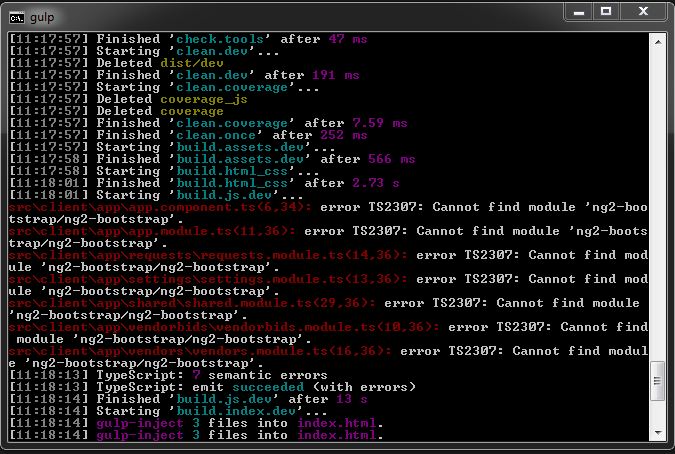
After running the 4 steps and then I run
npm start I got the following error
DrewTian
on 17 Oct 2017
There is no more ng2-bootstrap , but it is not compilable
"angular-2-dropdown-multiselect": "1.0.5",
"angular2-draggable": "^1.0.6",
"angular2-infinite-scroll": "^0.3.0",
"core-js": "^2.4.1",
"font-awesome": "4.7.0",
"intl": "^1.2.5",
"lodash": "^4.16.2",
"moment": "^2.15.1",
"ng2-breadcrumb": "^0.2.0",
"ng2-page-scroll": "^3.1.4",
"ng2-slim-loading-bar": "2.0.4",
"ng2-slimscroll": "1.2.1",
"ng2-toastr": "^4.1.2",
"ngx-bootstrap": "^2.0.0-beta.6",
"ngx-clipboard": "^7.0.4",
"ngx-infinite-scroll": "^0.4.1",
"rename": "^1.0.4",
"rxjs": "^5.4.3",
"systemjs": "0.19.41",
"ts-node": "^3.3.0",
"typescript": "^2.5.2",
"zone.js": "^0.7.2"
DrewTian
on 17 Oct 2017
ng2-bootstrap => ngx-bootstrap
fchiumeo
on 17 Oct 2017
npm install rename ng2-bootstrap ngx-bootstrap
I have run the above , but no luck
DrewTian
on 17 Oct 2017
@DrewTian you must edit your application code, too. All imports of ng2-bootstrap must be renamed to ngx-bootstrap. Some component APIs changed, too. Therefore it is possible that you must rewrite some code...
Martin-Wegner
on 17 Oct 2017
@Martin-Wegner thank you for keeping helping me
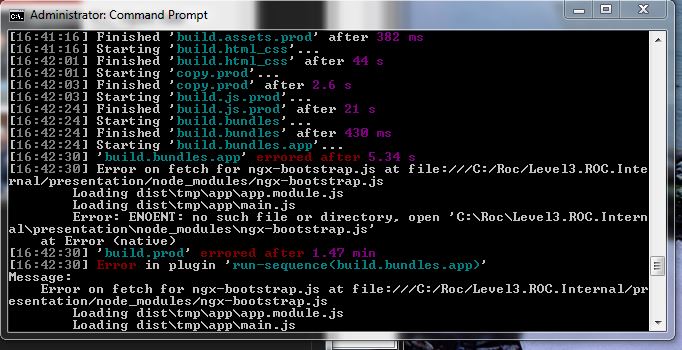
After renaming ng2-bootstrap to ngx-bootstrap, I run npm install and then npm run build.prod
I have another error, it cannot find ngx-bootstrap.js
DrewTian
on 17 Oct 2017
After I changed to :
import { Ng2BootstrapModule } from 'ngx-bootstrap/ng2-bootstrap';
The error message is changed to 404 Not Found traceur.js
Request URL:http://localhost:5555/node_modules/traceur.js
making some progress
DrewTian
on 17 Oct 2017
But it should be import { Ng2BootstrapModule } from 'ngx-bootstrap';...
Martin-Wegner
on 18 Oct 2017
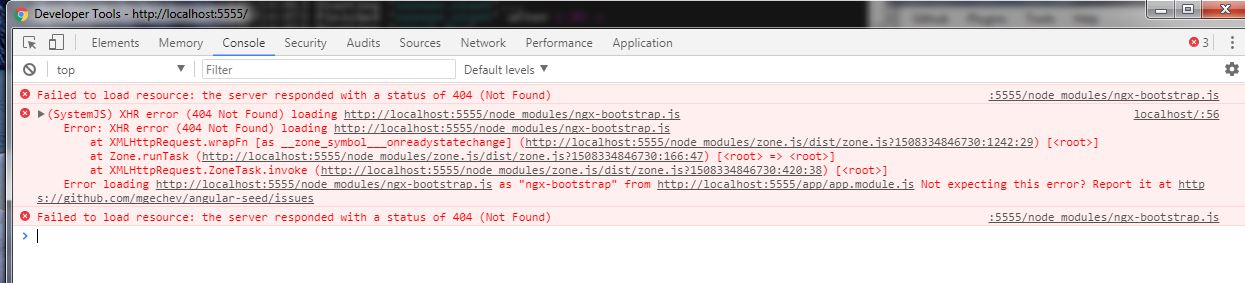
I got 404 not found error: ngx-bootstrap.js not found
import { Ng2BootstrapModule } from 'ngx-bootstrap';
package.json:
....
"intl": "^1.2.5",
"lodash": "^4.16.2",
"moment": "^2.15.1",
"ng2-breadcrumb": "^0.2.0",
"ng2-page-scroll": "^3.1.4",
"ng2-slim-loading-bar": "2.0.4",
"ng2-slimscroll": "1.2.1",
"ng2-toastr": "^4.1.2",
"ngx-bootstrap": "^2.0.0-beta.6",
"ngx-clipboard": "^7.0.4",
"ngx-infinite-scroll": "^0.4.1",
"rxjs": "^5.4.3",
"systemjs": "0.19.41",
..
DrewTian
on 18 Oct 2017
Maybe adding 'ngx-bootstrap': { defaultExtension: 'js' }, to the packages list in systemjs.config like mentioned here https://github.com/valor-software/ngx-bootstrap/issues/1035 ?
Martin-Wegner
on 18 Oct 2017
sorry, I do not have systemjs.config file
DrewTian
on 18 Oct 2017
@DrewTian I think your problem has nothing to do with this issue anymore, so I will close it. Sorry, but I can't help you with systemjs...
Martin-Wegner
on 18 Oct 2017
Related issues
 juanitavollmering
·
3Comments
juanitavollmering
·
3Comments
 ghiscoding
·
3Comments
ghiscoding
·
3Comments
 haisaco
·
3Comments
haisaco
·
3Comments
 tuoitrexuquang
·
3Comments
tuoitrexuquang
·
3Comments
 MihaiHoriaPopescu
·
3Comments
MihaiHoriaPopescu
·
3Comments
Most helpful comment
Note: In about a week Angular 5 is to be released, and this warning becomes an error.
This is literally a three character replacement. Please add it to v1.9.4 so we can all move on.