Ngx-bootstrap: Integration broken with v1.9.3 and Ionic 3 ?
Hello,
Firstly, thank you for your work.
I develop a project under Ionic 3 and I use your lib.
But when I use the last version (actually 1.9.3), I have this error message :
[10:45:59]  sass started ...
[10:45:59]  sass: node_modules/ngx-bootstrap/datepicker/bs-datepicker.scss, line: 1
            It's not clear which file to import for '@import "utils/scss/variables"'. Candidates:
            utils/scss/variables.scss utils/scss/variables.css Please delete or rename all but one of these files.

       L1:  @import 'utils/scss/variables';
       L2:  @import 'utils/scss/mixins';

[10:45:59]  ionic-app-script task: "build"
[10:45:59]  Error: Failed to render sass to css
If you check ngx-bootstrap-1.9.3.tgz was imported by npm, you can see both css/scss files in the datepicker/utils/scss/ directory.
While on the github release, only scss files are present.
If I use the version 1.7 with npm registry, it work correctly.
Anybody else have the same problem ?
Is it a ionic or ngx-bootstrap bug ?
Thank you in advance for your answers.
 sfauvart
All 10 comments
Thanks for feedback :)
Can you use css version of datepicker styles?
I suppose sass imports should be relative
 valorkin
on 16 Sep 2017
valorkin
on 16 Sep 2017
Try @next version of this package, it should fix an issue
valorkin
on 18 Sep 2017
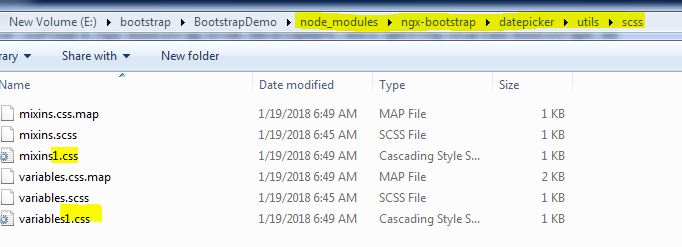
Mine working like this
 danialumair
on 20 Jan 2018
danialumair
on 20 Jan 2018
I am still having this issue after updating version 2.0.2
 JeremyLopez
on 21 Feb 2018
JeremyLopez
on 21 Feb 2018
@JeremyLopez did you manage to get this working?
 Hesesses
on 15 Mar 2018
Hesesses
on 15 Mar 2018
@Hesesses no I did not. I had to stop using the package altogether which is a shame.
JeremyLopez
on 16 Mar 2018
Im having this issue too, using Ionic 3
I've just tried to remove mixins.css and variables.css and now it works, but every time I reinstall the package, fails again.
 JorgeSanchezGr
on 22 Mar 2018
JorgeSanchezGr
on 22 Mar 2018
v2.0.5 has this problem
Hesesses
on 14 May 2018
v4.2.0 has this problem and so does v4.3.0
 ptrzyna
on 5 Jun 2019
ptrzyna
on 5 Jun 2019
I solved it like this:
- Open the file
your-project-root/node_modules/ngx-bootstrap/datepicker/bs-datepicker.scss - Change the first two lines:
@import './utils/scss/variables';👉@import './utils/scss/variables.scss';
@import './utils/scss/mixins';👉@import './utils/scss/mixins.scss';
Done. Now you can build.
This works for your local copy of the package... but what if you clone your project somewhere else? 🤔
...you'd need to do the same procedure.
That's why I made this script:
// ngx-bootstrap-patch.js
const fs = require('fs');

const filePath = 'node_modules/ngx-bootstrap/datepicker/bs-datepicker.scss';

console.log(`Patching file ${filePath}...`);

fs.readFile(filePath, 'utf8', function (err, data) {
  if (err) throw (err);

  const line1 = '@import \'./utils/scss/variables\';';
  const line2 = '@import \'./utils/scss/mixins\';';
  let result = data.replace(line1, '@import \'./utils/scss/variables.scss\';');
  result = result.replace(line2, '@import \'./utils/scss/mixins.scss\';');

  fs.writeFile(filePath, result, 'utf8', function (err) {
    if (err) throw err;
    console.log('File patched successfully.');
  });
});
and added it to my package.json as a postinstall script, so it will run everytime I update/install the project or its dependencies.
// package.json
{
  "postinstall": "node ngx-bootstrap-patch.js",
}
 RaschidJFR
on 14 Jan 2020
RaschidJFR
on 14 Jan 2020
Related issues
 ravirajhalli
·
3Comments
ravirajhalli
·
3Comments
 phmello
·
3Comments
phmello
·
3Comments
 MihaiHoriaPopescu
·
3Comments
MihaiHoriaPopescu
·
3Comments
 mounthorse-slns
·
3Comments
mounthorse-slns
·
3Comments
 juanitavollmering
·
3Comments
juanitavollmering
·
3Comments
Most helpful comment
I am still having this issue after updating version 2.0.2