Ngx-bootstrap: Setup startingDay/first day of week to monday
Hello,
I would like to ask how to set first day of the week to Monday. As I read through the library I can see that in the DatepickerConfig there is option to set up startingDay to something else as 0 (which defaults to Sunday).
However setting like:
gets me an error:
Can't bind to 'startingDay' since it isn't a known property of 'input'
and bsConfig has no such property as starting day or something similar.
Changing local does not effect this option. What am I missing ? Big thanks
 sanka2701
All 17 comments
In the UK we quite often use Monday as the first day of the week in calendars, so this is quite an important feature.
Some other calendar/date components i've used link it into the locale too, so locale en-gb would automatically set the start day of the week value to Monday.
(I think that DatepickerConfig is the old datepicker component)
 pgeyman
on 18 Sep 2017
pgeyman
on 18 Sep 2017
In fact, looking at the ngx-bootstrap locale source, first day of the week is defined in locale, and in the en-gb locale, but it does not change the first day to Monday when you change the locale to en-gb on the demo page.
pgeyman
on 18 Sep 2017
We use Czech locale with first day Monday, which is defined in the locale file, but datepicker shows Sunday as first day anyway. We would appreciate, if this could be fixed.
 frantisekjandos
on 22 Sep 2017
frantisekjandos
on 22 Sep 2017
same for ru locale
 aakldey
on 27 Sep 2017
aakldey
on 27 Sep 2017
same for es locale
 felixeu31
on 1 Oct 2017
felixeu31
on 1 Oct 2017
fixed with #2330
should be available in ngx-bootstrap@next
 valorkin
on 2 Oct 2017
valorkin
on 2 Oct 2017
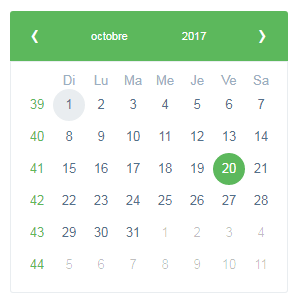
@valorkin I updated to ngx-bootstrap@next and still no changes even if I set locale fr. (language of day and months are ok but not the starting day)
angular : 4.3
angular-cli: 1.4.3
ngx-bootstrap: 2.0.0-beta.5
 HugoMarteau
on 3 Oct 2017
HugoMarteau
on 3 Oct 2017
Sorry I was closing a bunch of duplicated issue, to have clear roadmap. This issue is duplicate of older one, add starting day input is on roadmap
valorkin
on 3 Oct 2017
@valorkin
Is the said Roadmap visible anywhere? And could you please link the related Issue or re-open this one?
 SidekickJohn
on 23 Oct 2017
SidekickJohn
on 23 Oct 2017
reproducible again
valorkin
on 24 Oct 2017
fixed once and for all http://localhost:4200/#/datepicker#locales
:D
valorkin
on 27 Nov 2017
Will this be released as a bug fix to 1.9?
 pjarts
on 5 Dec 2017
pjarts
on 5 Dec 2017
has this been fixed?
 ssharm02
on 22 May 2018
ssharm02
on 22 May 2018
You can do this by changing dow:0 to dow:1 in
ngx-bootstrap\chronos\locale\locale.defaults.js. in file.
eg:
export var defaultLocaleWeek = {
//dow: 0
dow: 1,
// Sunday is the first day of the week.
doy: 6 // The week that contains Jan 1st is the first week of the year.
};
 userAbhi
on 18 Sep 2018
userAbhi
on 18 Sep 2018
@valorkin I can't find how I can set the startingDay with 5.2.x.
Any hints?
 AhsanAyaz
on 23 Sep 2019
AhsanAyaz
on 23 Sep 2019
How do you set this in the current version?
 lenichols
on 2 Dec 2019
lenichols
on 2 Dec 2019
seriously?
https://valor-software.com/ngx-bootstrap/#/datepicker#locales
 jkubiszewski
on 3 Dec 2019
jkubiszewski
on 3 Dec 2019
Related issues
 ctrl-brk
·
3Comments
ctrl-brk
·
3Comments
 Scooviese
·
3Comments
Scooviese
·
3Comments
 hugonne
·
3Comments
hugonne
·
3Comments
 RolfVeinoeSorensen
·
3Comments
pgeyman
·
3Comments
RolfVeinoeSorensen
·
3Comments
pgeyman
·
3Comments
Most helpful comment
@valorkin I can't find how I can set the
startingDaywith5.2.x.Any hints?