Ngx-bootstrap: Forcefully close all open modals
Is there a way to forcefully close all open modal popups? I want to interrupt the user and display an error modal for a background task, but I first want to close any modals that may be open. I have several modals in various components. I don't have a reference to all modals from a central location, so i can't call the hide() function. Does this functionality exist?
 pborunda
All 14 comments
Do you use modal service or modal directive?
 IlyaSurmay
on 12 Sep 2017
IlyaSurmay
on 12 Sep 2017
modal directive
pborunda
on 12 Sep 2017
I have a workaround that works for my needs. It's simulating a button click on close x. Might not work in the general case.
hideAll(): void {
//try to hide all active modals
var openModals = document.querySelectorAll(".modal.in");
if(openModals) {
for(let i = 0; i < openModals.length; i++) {
//Get the modal-header of the modal
var modalHeader = openModals[i].getElementsByClassName("modal-header");
if(modalHeader && modalHeader.length > 0) {
//Get the close button in the modal header
var closeButton : any = modalHeader[0].getElementsByTagName("BUTTON");
if(closeButton && closeButton.length > 0) {
//simulate click on close button
closeButton[0].click();
}
}
}
}
}
There's no such functionality for modals out of the box for now. You can try to store all references to modals somewhere and then call hide() for each one.
IlyaSurmay
on 13 Sep 2017
@pborunda , Thanks. Something is better than nothing
 azharuniverse
on 2 Feb 2018
azharuniverse
on 2 Feb 2018
I can't find documentation for these methods, so this may stop working, but it seem to do the trick for now:
private closeAllModals() {
    for (let i = 1; i <= this.modalService.getModalsCount(); i++) {
      this.modalService.hide(i);
    }
  }
Though I should note that I'm using the Modal service, not directive.
 tobiaspatton-s4
on 19 Jun 2018
tobiaspatton-s4
on 19 Jun 2018
@tobiaspatton-s4 @IlyaSurmay Is this.modalService.hide(level) an official API?
It's public and it the name doesn't start with an underscore, so I'm tempted to believe it belongs to the supported API. But then, it's undocumented. Do I risk breaking the API if I use this.modalService.hide(level)?
 stephanrauh
on 12 Jul 2018
stephanrauh
on 12 Jul 2018
I tried using this.modalService.hide(this.modalService.getModalsCount()) to do this, but it didn't clean up all the css classes. Ended up with the following hack:
// @ts-ignore: Accessing private variable as workaround for missing feature
          this.modalService.loaders.forEach(loader => {
            loader.instance.hide();
          });
Not done any extensive testing yet, but so far so good.
 dnyvik
on 5 Oct 2018
dnyvik
on 5 Oct 2018
Someone can explain to me about the loader.instance.hide() or this.modalService.hide(). Both of them work like a charm but I can't open my modal after use it
 vn425282
on 23 Oct 2018
vn425282
on 23 Oct 2018

Any idea what the level stands for ?
If I have modal + submodal, and I want to close only the submodal,
The level is 0 ? 1 ? 2 ?
 arturikoX
on 4 Nov 2018
arturikoX
on 4 Nov 2018
@pborunda @dnyvik @tobiaspatton-s4
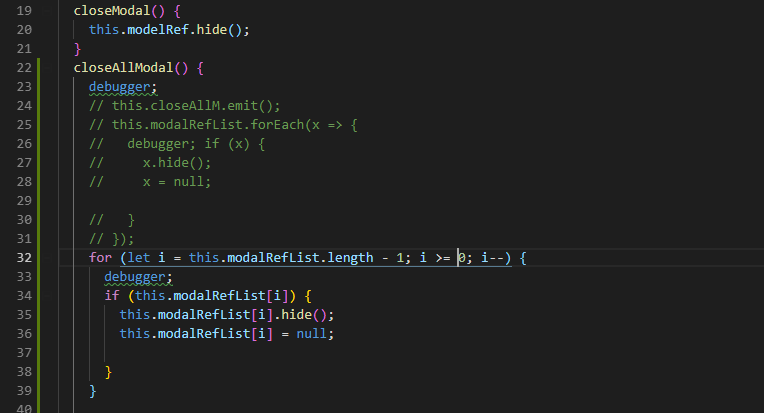
I've tried all the given problems and yours solution works to some extent but there is a critical mistake in my case that your solution closes the modal which opened first and that's why sometimes it didn't clean up all the components.
if you close the last modal first and like that other modals,this is the perfect current working solution
 syedyawar
on 25 Jun 2019
syedyawar
on 25 Jun 2019
As @IlyaSurmay suggested I tried to store all the references to the modals in common modal service that I use to open modals. I added method to close all the modals this way.
import { Injectable, TemplateRef } from '@angular/core';
import { ModalOptions, BsModalRef, BsModalService } from 'ngx-bootstrap';
@Injectable({
  providedIn: 'root'
})
export class CustomModalService {

  modalRefs: BsModalRef[] = [];
  constructor(private modalService: BsModalService) { }

  show(content: string | TemplateRef<any> | any, config?: ModalOptions) {
    const modalRef = this.modalService.show(content, config);
    this.modalRefs.push(modalRef);
    return modalRef;
  }

  closeAllModals() {
    this.modalRefs.forEach(modal => modal.hide());
  }
}
But there is one problem as discussed in https://github.com/valor-software/ngx-bootstrap/issues/2356
If we want to pass component of lazy loaded module to the modal service there needs to be ModalModule.forRoot() import inside lazy loaded module. That will obviously create different instances of the actual modalservice.
The common modal service I made to track all modal references is provided in root. so it will only have access to the one instance of the modal service that is available in root level. So opening lazyloaded component in modal using common modal service throws No component factory found for component error.
There needs to be this close all modals feature. But I guess this wont be implemented unless https://github.com/valor-software/ngx-bootstrap/issues/2356 is resolved
solution provided by @pborunda worked for me.
 shriniwassurve
on 26 Sep 2019
shriniwassurve
on 26 Sep 2019
@shriniwassurve your solution works fine, except one thing. You had to make modalRefs property static. The it is not instantiated again between different service instances.
Also it is wise to consider empty modalRef list after you close them. If I am not mistaken, then once you open it again it will create new modalRef instance. So there is no point in keeping old references after hiding in memory.
 jeserkin
on 1 Apr 2020
jeserkin
on 1 Apr 2020
`ts
import { Injectable, TemplateRef } from '@angular/core';
import { ModalOptions, BsModalRef, BsModalService } from 'ngx-bootstrap';
@Injectable({
providedIn: 'root'
})
export class CustomModalService {
constructor(private modalService: BsModalService) { }
show(content: string | TemplateRef
const modalRef = this.modalService.show(content, config);
}
closeAllModals() {
this.modalService.hide(1)
}
}
`
This should close all
 adedayojs
on 19 Apr 2020
adedayojs
on 19 Apr 2020
Related issues
 MihaiHoriaPopescu
·
3Comments
MihaiHoriaPopescu
·
3Comments
 Scooviese
·
3Comments
Scooviese
·
3Comments
 pgeyman
·
3Comments
pgeyman
·
3Comments
 YevheniiaMazur
·
3Comments
YevheniiaMazur
·
3Comments
 MrBlaise
·
3Comments
MrBlaise
·
3Comments
Most helpful comment
I can't find documentation for these methods, so this may stop working, but it seem to do the trick for now:
Though I should note that I'm using the Modal service, not directive.