Ngx-bootstrap: Cannot enable prod mode with v1.9.2
update by valorkin
blocked by angular issue: https://github.com/angular/angular/issues/12200
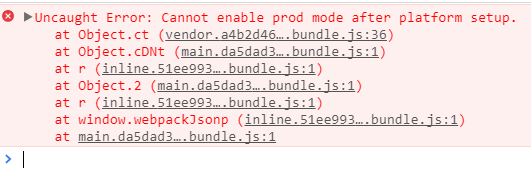
Just upgraded to 1.9.2 and the --prod build throws uncaught error "Cannot enable prod mode after platform setup". Downgrading to 1.9.1 fixes the issue.
This is on Agular 4.3.5 and bootstrap 4.0.0.-aplha.6.
 stefda
All 20 comments
I'm having the same problem
 f-teixeira
on 8 Sep 2017
f-teixeira
on 8 Sep 2017
 valorkin
on 8 Sep 2017
valorkin
on 8 Sep 2017
valorkin
on 8 Sep 2017
valorkin
on 8 Sep 2017
valorkin
on 8 Sep 2017
valorkin
on 8 Sep 2017
this is actually a good issue, showing that you are running modules before enabling prod mode
valorkin
on 8 Sep 2017
seems we have no options here, so I will have to remove usage of isDevMode
so you are using deprecated or experimental modules\components
you will see a warn message event in the production
valorkin
on 8 Sep 2017
@stefda I have updated topic, and fix is on the way
should land as 1.9.3
valorkin
on 8 Sep 2017
Downgraded to v1.9.0 works for me
 tommysitu
on 8 Sep 2017
tommysitu
on 8 Sep 2017
@valorkin Our team encountered the issue earlier today literally at the same time as you were merging the fix. We bumped to 1.9.3 once it was available and it solved the problem. Thanks! 👍
 adamrehill
on 8 Sep 2017
adamrehill
on 8 Sep 2017
I am using version 1.9.3 and still have the same problem
and I can't downgrade version because I am using BsDatepickerConfig that is not available in 1.9.1
 NenadJovicic
on 31 Oct 2017
NenadJovicic
on 31 Oct 2017
@NenadJovicic we using ngx bs and ng cli prod mode for a dozen of apps, and it works fine. Maybe you should ask your case on stack overflow
valorkin
on 1 Nov 2017
@valorkin I am using ng build --prod and then transfer everything from prod folder to server
and when I try to access it i get this
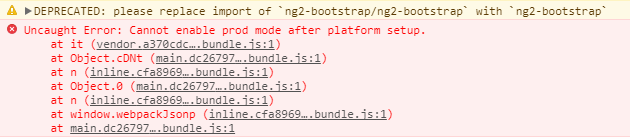
And this is my package.json from my project
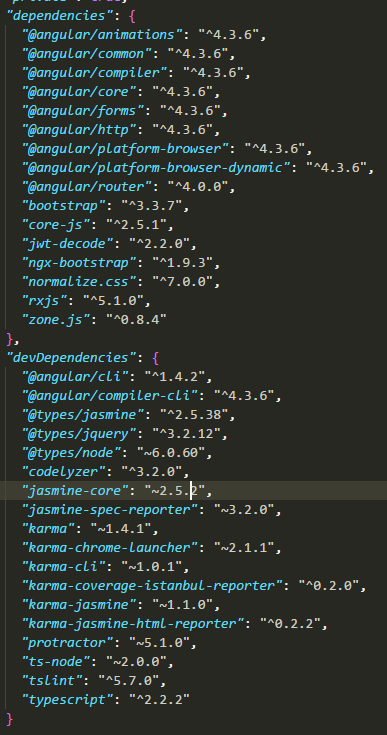
So, I don't have any specific dependency that could cause this problem. And when I google it, I get this issue.
NenadJovicic
on 13 Nov 2017
@NenadJovicic how do you include ngx-bootstrap in your project? it seems that you still using ng2-bootstrap instead of ngx-bootstrap
 IlyaSurmay
on 14 Nov 2017
IlyaSurmay
on 14 Nov 2017
@IlyaSurmay I import it from ngx
but this error is from some component in ngx-bootstrap module

NenadJovicic
on 14 Nov 2017
There are was such issue, upgrade to 1.9.3 or latest
valorkin
on 14 Nov 2017
@valorkin if you check my package.json from my previous comment, you will see that I am using version 1.9.3
NenadJovicic
on 14 Nov 2017
I even try with deleting node_modules and install everything again, because, maybe there were some leftovers, but even that thing did not help.
Still got the same issue with this error.
Any solution.
Or I have to change my whole project to something else?
And I don't want to stop using bootstrap
NenadJovicic
on 20 Nov 2017
I had the same problem.
I've checked all my imports and realized I was importing a module from 'ngx-bootstrap/ng2-bootstrap' while I should import from 'ngx-bootstrap'.
Have you done this (check all imports from ngx-bootstrap)?
 BeatrizFerreira
on 20 Nov 2017
BeatrizFerreira
on 20 Nov 2017
Sometimes an auto import plugin can mess with your code. Just make sure that you have the right importing and it should be good to go.
 arleypadua
on 20 Nov 2017
arleypadua
on 20 Nov 2017
@BeatrizFerreira Thx for the idea
Forgot to check other components (there is import for BsModalService)
I only checked app.module.ts
NenadJovicic
on 20 Nov 2017
Related issues
 tuoitrexuquang
·
3Comments
tuoitrexuquang
·
3Comments
 tpiros
·
3Comments
tpiros
·
3Comments
 webdev48
·
3Comments
webdev48
·
3Comments
 MrBlaise
·
3Comments
MrBlaise
·
3Comments
 srjkrl20011991
·
3Comments
srjkrl20011991
·
3Comments
Most helpful comment
I'm having the same problem