Ngx-bootstrap: [Datepicker]Can't bind to 'bsValue' since it isn't a known property of 'input'.
when i use datepicker, i have this error
import { BrowserModule } from '@angular/platform-browser';
import { NgModule } from '@angular/core';
import { AppComponent } from './app.component';
import {NavbarComponent} from './navbar/navbar.component';
import {DatepickerModule} from "ngx-bootstrap";
import {FormsModule} from "@angular/forms";
@NgModule({
declarations: [
AppComponent,
NavbarComponent
],
imports: [
BrowserModule,
DatepickerModule.forRoot(),
FormsModule
],
providers: [],
bootstrap: [AppComponent]
})
export class AppModule { }
value="{{ bsValue | date:'yMd'}}"
bsDatepicker `[(bsValue)]="bsValue">]
public bsValue: any ;
 BluesPeter
All 18 comments
having the same error
 Hesesses
on 28 Aug 2017
Hesesses
on 28 Aug 2017
Pay attention to docs, you need to import BsDatepickerModule.forRoot()
 valorkin
on 28 Aug 2017
valorkin
on 28 Aug 2017
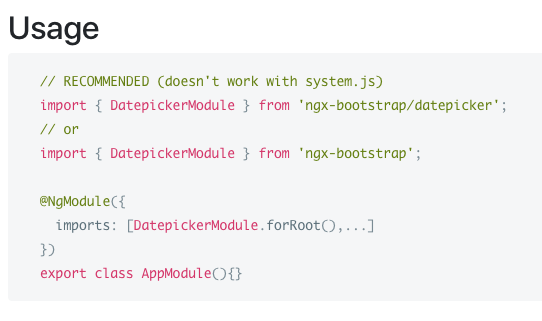
?
Hesesses
on 28 Aug 2017
http://valor-software.com/ngx-bootstrap/#/datepicker#examples
BsDatepickerModule is activily developed but you can use it already
valorkin
on 28 Aug 2017
when i include BsDatepickerModule, the datepicker shows,but it has none css,like this
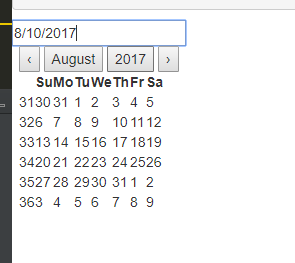
how can i include the bs-datepicker.css
BluesPeter
on 29 Aug 2017
@BluesPeter If you are using angular cli, insert the css path on styles section inside .angular-cli.json file.
How did you get the datepicker working? I am just getting errors:
import { BsDatepickerModule } from 'ngx-bootstrap/datepicker';
@NgModule({
imports: [BsDatepickerModule.forRoot(),...]
})
export class AppModule(){}
<input type="text"
value="{{ bsValue | date:'yMd'}}"
bsDatepicker [(bsValue)]="bsValue">
- - - - - - - - - -
ERROR Error: Uncaught (in promise): Error: Template parse errors:
Can't bind to 'bsValue' since it isn't a known property of 'input'. ("type="text"
value="{{ bsValue | date:'yMd'}}"
bsDatepicker [ERROR ->][(bsValue)]="bsValue">
@Hesesses which version ngx-bootstrap do you use, you must use version 1.9.1,and you must also
imports DatepickerModule.forRoot()
BluesPeter
on 29 Aug 2017
@BluesPeter i'm using 1.9.1 and I have tried to import both together and separately, but nothing seems to work =/
Update
Got it working, I had forgot to export it on my shared module 🙈
Hesesses
on 29 Aug 2017
I will add this to FAQ one day
90% issue like this:
- forgot to import
- forgot forRoot
- forgot to import in child\lazy module
- forgot to export from shared module
:)
valorkin
on 29 Aug 2017
@BluesPeter how did you include the bs-datepicker.css ?? I'm having the same problem
 EyaRhouma
on 3 Sep 2017
EyaRhouma
on 3 Sep 2017
same here. where to load those missing class
<bs-datepicker-view ng-reflect-months="[object Object]" ng-reflect-options="[object Object]">
<div class="bs-datepicker bs-timepicker theme-green">
<div class="bs-datepicker-head">
 wwyeong
on 3 Sep 2017
wwyeong
on 3 Sep 2017
bs-datepicker.css should be included same way you include bootstrap.css
valorkin
on 3 Sep 2017
i still don't see how :( i added "/datepicker/bs-datepicker.css" to .angular-cli.json like @Hesesses mentioned ( because i'm using angular-cli )
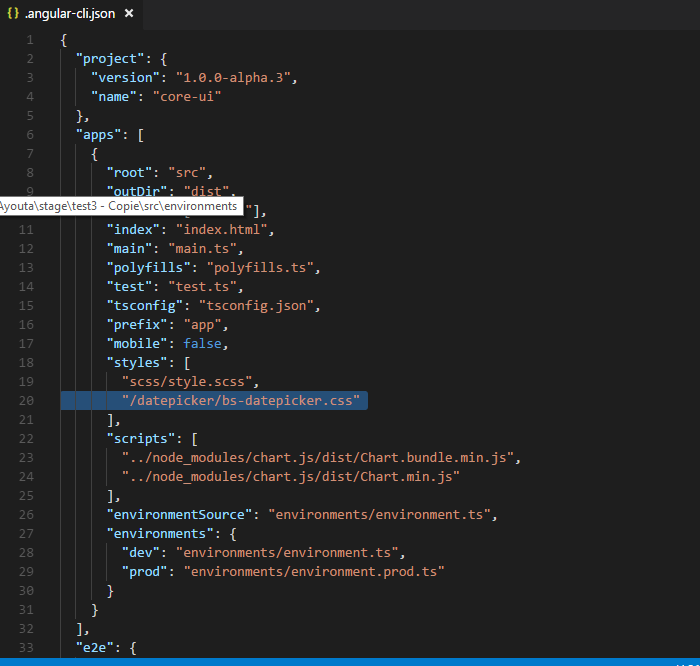
but i didn't add any styleUrl in the component that i'm using

should i add a styleUrl ??
EyaRhouma
on 4 Sep 2017
I have this on .angular-cli.json
"styles": [
    "../node_modules/bootstrap/dist/css/bootstrap.css",
    "../node_modules/ngx-bootstrap/datepicker/bs-datepicker.css",
    "styles.scss"
],
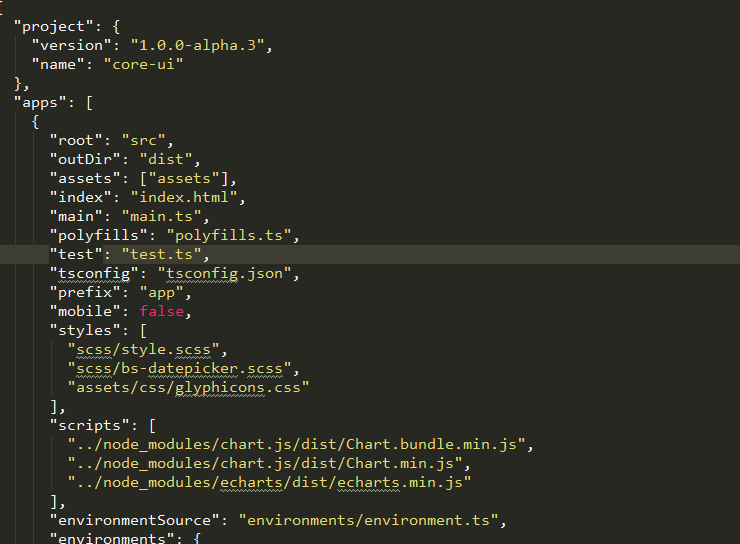
@EyaRhouma
I use like this,and i have solved this problem
BluesPeter
on 4 Sep 2017
@Hesesses @BluesPeter thannnks so much 💃 the path "../node_modules/ngx-bootstrap/datepicker/bs-datepicker.css" worked for me
EyaRhouma
on 4 Sep 2017
@Hesesses @BluesPeter thanks! :)
valorkin
on 4 Sep 2017
Angular 6:
step 1: npm install ngx-bootstrap@4 --save
step 2: In ./src/styles.css
@import '~bootstrap/dist/css/bootstrap.min.css';
@import '~open-iconic/font/css/open-iconic-bootstrap.css';
step 3: in app.module.ts
import { BsDatepickerModule } from 'ngx-bootstrap'; and addit to imports array
@NgModule({
declarations: [ ],
imports: [
BsDatepickerModule.forRoot()
]
 subhashissarangi
on 4 Sep 2018
subhashissarangi
on 4 Sep 2018
Related issues
 YevheniiaMazur
·
3Comments
YevheniiaMazur
·
3Comments
 haisaco
·
3Comments
haisaco
·
3Comments
 Scooviese
·
3Comments
Scooviese
·
3Comments
 tuoitrexuquang
·
3Comments
tuoitrexuquang
·
3Comments
 ghiscoding
·
3Comments
ghiscoding
·
3Comments
Most helpful comment
I have this on .angular-cli.json