Ngx-bootstrap: Combination of right aligned dropdown and container set to body
Hi,
I stumbled upon what I consider a bug and was able to reproduce it in the documentation's examples as well. When using a right aligned dropdown should the dropdown be positioned with the right edge aligned with the button's right edge. When setting container to "body" should the only difference be that the dropdown is added to the body rather than the button to allow the user to access it even though the button may be partially hidden.
However, when combining the two is the dropdown misaligned as shown in the image below.
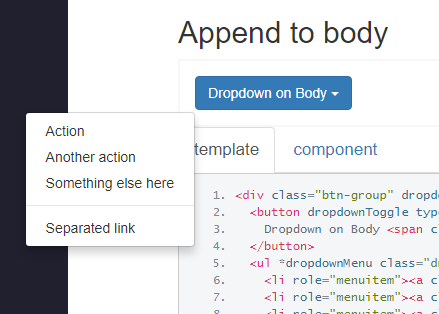
Code to reproduce:
<div class="btn-group" dropdown container="body">
  <button dropdownToggle type="button" class="btn btn-primary dropdownToggle">
    Dropdown on Body <span class="caret"></span>
  </button>
  <ul *dropdownMenu class="dropdown-menu dropdown-menu-right" role="menu">
    <li role="menuitem"><a class="dropdown-item" href="#">Action</a></li>
    <li role="menuitem"><a class="dropdown-item" href="#">Another action</a></li>
    <li role="menuitem"><a class="dropdown-item" href="#">Something else here</a></li>
    <li class="divider dropdown-divider"></li>
    <li role="menuitem"><a class="dropdown-item" href="#">Separated link</a>
    </li>
  </ul>
</div>
 DavidRutqvist
>All comments
in general: placement of dropdowns attached to body is a pain,
they are designed to be inline components
it differest a bit from getbootstrap docs, on how to achive this, but it is possible
but http://valor-software.com/ngx-bootstrap/#/dropdowns#alignment
missing part is placement="bottom right"

 valorkin
on 24 Aug 2017
valorkin
on 24 Aug 2017
Related issues
 juanitavollmering
·
3Comments
juanitavollmering
·
3Comments
 KimBum
·
3Comments
KimBum
·
3Comments
 RolfVeinoeSorensen
·
3Comments
RolfVeinoeSorensen
·
3Comments
 Scooviese
·
3Comments
Scooviese
·
3Comments
 webdev48
·
3Comments
webdev48
·
3Comments
Most helpful comment
in general: placement of dropdowns attached to body is a pain,
they are designed to be inline components
it differest a bit from getbootstrap docs, on how to achive this, but it is possible
but http://valor-software.com/ngx-bootstrap/#/dropdowns#alignment
missing part is
placement="bottom right"