Ngx-bootstrap: Modal keeps body class `modal-open` on after closing, causing scrollbars to disappear
Description
When you open and close modals, the <body> tag still has the CSS class modal-open.
This has the unfortunate effect of disabling scrolling in the page, because of the style
body.modal-open {overflow: hidden; }, which is correct when the modal is open, just not when it's closed.
How to reproduce
Generate an Angular CLI application, and add ngx-bootstrap 1.7.1.
Add a modal popup, show it and hide it, and inspect the <body> tag in browser devtools.
Notes
As mentioned in https://github.com/valor-software/ngx-bootstrap/pull/1987#issuecomment-311391785, I think this was introduced as part of implementing the nested modals support. It seems that when the modal is animated, which is the default, something happens and the component thinks it's nested, and does not clear the modal-open CSS class.
A possible workaround is to disable animations, which can be done globally by adding a directive like:
import { Directive } from '@angular/core';
import { ModalDirective } from 'ngx-bootstrap/modal/modal.component';

@Directive({
  // tslint:disable-next-line:directive-selector
  selector: '[bsModal]',
  exportAs: 'bs-modal-override'
})
export class BsModalOverrideDirective {
  constructor(private modal: ModalDirective) {
    modal.isAnimated = false;
  }
}
 Meligy
All 31 comments
Could you provide more precise information about how to reproduce this issue? I mean browser, OS, etc.
Right now I wasn't able to reproduce it in any scenario, with nested modals and without them.
 IlyaSurmay
on 28 Jun 2017
IlyaSurmay
on 28 Jun 2017
In my particular situation I had a few modals with backdrop: static, and had a method that would loop on them, calling modal.hide() for each, and then if it needs to open one of them, would call modal.open() just after that. I'll try to get an isolated repro repository over the weekend or something.
Meligy
on 29 Jun 2017
fixed in v1.8
 valorkin
on 20 Jul 2017
valorkin
on 20 Jul 2017
i still can see the issue in 1.8.1
 anasAsh
on 3 Aug 2017
anasAsh
on 3 Aug 2017
@anasAsh plunkr or sample repo, please
IlyaSurmay
on 4 Aug 2017
Same here, I can still see the issue
 johnRambo2k14
on 9 Aug 2017
johnRambo2k14
on 9 Aug 2017
I also see the issue in 1.8.1
 chubbard
on 19 Sep 2017
chubbard
on 19 Sep 2017
can you reproduce this now
https://valor-software.com/ngx-bootstrap/#/modals
?
valorkin
on 19 Sep 2017
No I can't reproduce it on that link. A couple of things to consider. I upgraded to 1.9.3 hoping it would get fixed. I see the code that could work, but it's not getting executed. So I'm still seeing it intermittently. I'm also dismissing a dialog in response to network calls. So I'm showing a please wait dialog then when the call ends I'm hiding it so the human isn't dismissing the dialog. I suspect this must have something to do with why I see it sometimes and sometimes not. I think it must be getting confused with the nested boolean flag somehow.
chubbard
on 19 Sep 2017
From looking at the code it looks like once you get into a nested dialog situation it never resets itself once modals are hidden. It doesn't know when to finally remove the class if two or more dialogs get on the screen. I suspect it might need to become a counter that counts up (showModal) and down (hideModal) then last one "out the door turns off the lights" (removes the class when counter == 0).
chubbard
on 19 Sep 2017
I know what the problem is. The code assumes dialogs will be dismissed in the reverse order they were opened: LIFO like a stack. However, if you show a dialog, like a please wait, that is controlled by the computer, then if you had 2 network calls back to back the nesting calculations will be off. In that case say a success call comes in from the network, the 1st dialog is dismissed, then another dialog is opened and that one gets marked as nested because modal.hide() uses a timeout() function before it actually dismisses the dialog so animations have time to run. Now the 2nd dialog is marked nested. When the 1st leaves that is the only chance for modal-open to be removed. Once the 2nd dialog is marked nested it won't remove modal-open from the document element. Then you are forever trapped without scrollbars whether a dialog is open or not. All future dialogs will be marked nested.
The BsModalService has a dialog counter which would be what you need to counteract the problem because whomever is the last dialog dismissed can remove modal-open class regardless of the order the dialogs are opened and closed. So it seems all of the pieces are there to fix it. I'd remove nested flag, inject BsModalService, and add code to remove the class when modelCount() reaches zero.
chubbard
on 20 Sep 2017
Any workarounds for this issue? Been bashing my head for 2 days now trying to make it work. I am setting backdrop to false (since it's also not hiding the backdrop when the .hide() method is called) I'm using the component approach, and I'm injecting data properly. However, even though the modal disappears, the backdrop never does, and the body maintains the modal-open class. The modal-container element also remains in the DOM.
 HOllarves
on 3 Oct 2017
HOllarves
on 3 Oct 2017
my solution was to use BsModalService to load only one modal template at
a time and to gain more control over events and triggers.
On Tue, Oct 3, 2017 at 3:19 PM, Henry Ollarves notifications@github.com
wrote:
Any workarounds for this issue? Been bashing my head for 2 days now trying
to make it work. I am setting backdrop to false (since it's also not hiding
the backdrop when the .hide() method is called) I'm using the component
approach, and I'm injecting data properly. However, even though the modal
disappears, the backdrop never does, and the body maintains the modal-open
class. The modal-container element also remains in the DOM.—
You are receiving this because you were mentioned.
Reply to this email directly, view it on GitHub
https://github.com/valor-software/ngx-bootstrap/issues/2137#issuecomment-333824335,
or mute the thread
https://github.com/notifications/unsubscribe-auth/ABvuMbcOxHgDAJiB9NqPpQuleDswVg6pks5soiZdgaJpZM4OHU-W
.
anasAsh
on 3 Oct 2017
I added this to my code that hides the modal. I'm also using a service architecture that routes all modal calls through a single component that displays them one at a time. I have this code added.
this.dynamicModal.hide();   // the modal hide call to remove the modal.
this.document.body.classList.remove('modal-open'); // work around a bug in ngx-bootstrap
This code is only going to work if you don't have nested dialogs on the screen at the same time. If you have that situation then this won't work correctly.
chubbard
on 3 Oct 2017
Can anyone provide a plunkr/stackblitz that shows this issue?
You can use one of starter templates:
Plunkr: https://plnkr.co/edit/0NipkZrnckZZROAcnjzB?p=preview
StackBlitz: https://stackblitz.com/edit/ngx-bootstrap?file=app%2Fapp.module.ts
IlyaSurmay
on 8 Nov 2017
Closing, until we have something reproducible :)
valorkin
on 9 Nov 2017
Possible workaround:
// default
this.modalRef.hide();

// additional
document.body.classList.remove('modal-open');
const modalContainer = document.querySelector('modal-container');
if (modalContainer !== null) {
  modalContainer.parentNode.removeChild(modalContainer);
}
 markusfalk
on 27 Dec 2017
markusfalk
on 27 Dec 2017
@valorkin you can use a button "one" to show modal A ,and have a button "two" in modal A, when you click the button "one" show modal A ,then click button "two" execute hide modal A and show modal B,now it is reproducible
 Kimalu
on 15 Jan 2018
Kimalu
on 15 Jan 2018
@valorkin
setTimeout(function () { return _this.hideModal(); }, TRANSITION_DURATION);
in 300ms ,the another modal show already(backdrop too)
Kimalu
on 15 Jan 2018
@chubbard thanks for your comments on this issue. I was having the same problem and you really help me understand what the issue was. Implementing the new BsModalService was key to resolving this issue for me. Thanks again!
 aarontoys
on 23 Feb 2018
aarontoys
on 23 Feb 2018
Hi!!
@valorkin here is a reproduction. (takes time to load)
https://stackblitz.com/edit/ngx-bootstrap-16sbr3
~And a quick question, I cant call hide() on my modal reference(BsModalRef object(?)) when I get reference to the ng-template using @ViewChild. is it something to do with viewChild?~
nevermind, I think read the example wrong.
 ichikareman2
on 2 Apr 2018
ichikareman2
on 2 Apr 2018
This problem happens to me when I have two modals open and I want to close them. I solved it in this way:
this.ngxSmartModalService.getModal('vTm').close();
this.ngxSmartModalService.getModal('turnoModal').close();

if (document.body.classList.contains('dialog-open')) {
  document.body.classList.remove('dialog-open');
}
 nicogaldo
on 28 Feb 2019
nicogaldo
on 28 Feb 2019
@valorkin
Closing, until we have something reproducible :)
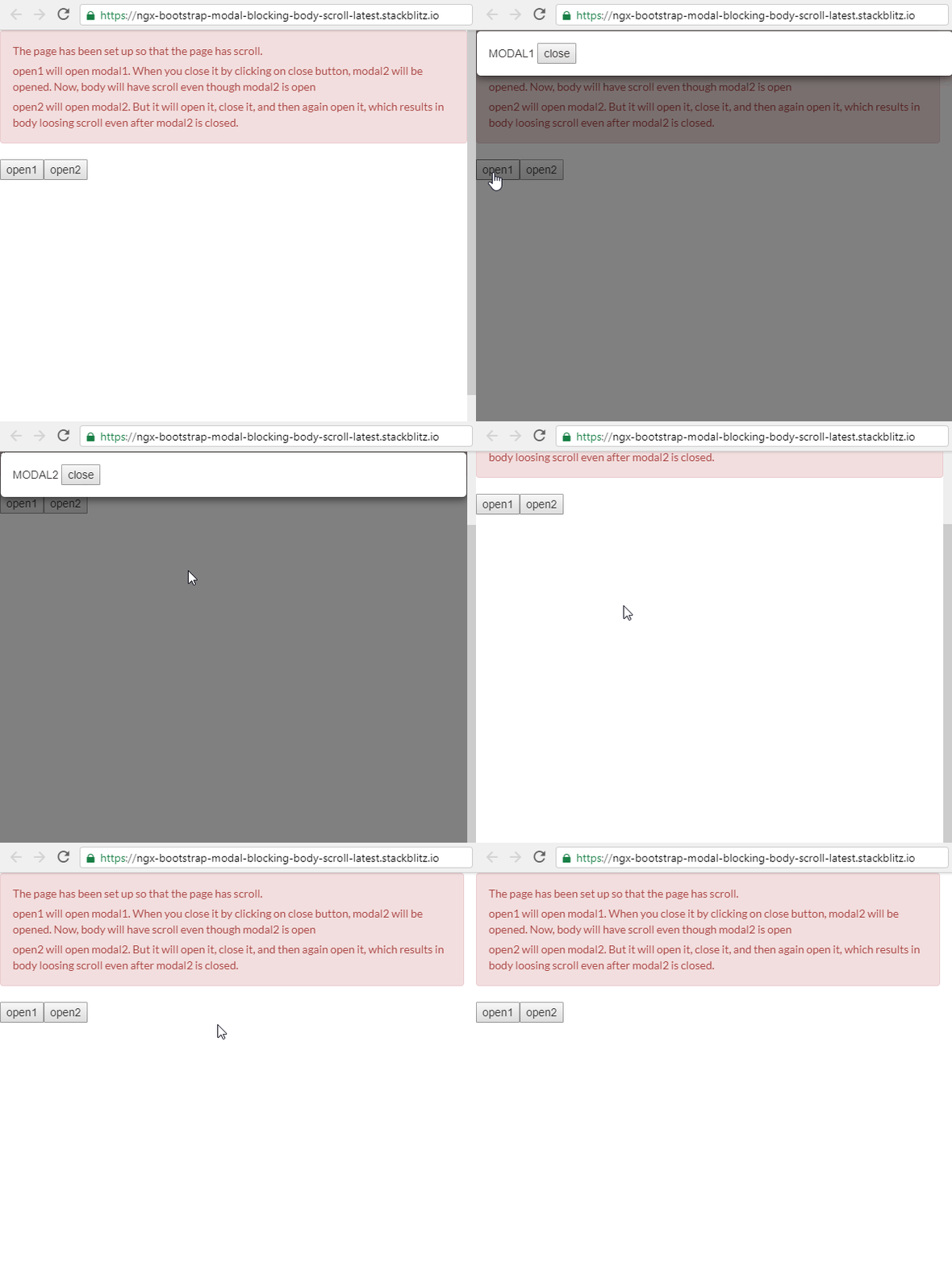
here is a reproducible stackblitz
https://stackblitz.com/edit/ngx-bootstrap-modal-blocking-body-scroll-latest
The page has been set up so that the page has scroll.
open1 will open modal1. When you close it by clicking on close button, modal2 will be opened. Now, body will have scroll even though modal2 is open
open2 will open modal2. But it will open it, close it, and then again open it, which results in body loosing scroll even after modal2 is closed.
(cases like this appear in real life applications when multiple modals are opened in succession)
 OmkarRajam
on 4 Oct 2019
OmkarRajam
on 4 Oct 2019
i had same problem. I think the problem is shown when you are using 2 differente instance of BsModalService. In my case, i solved passing in input to child component in the modal the service.
 calcagnom
on 21 Oct 2019
calcagnom
on 21 Oct 2019
at version 5.1.1 we still have this issue.
export class LoadingSpinnerComponent implements OnInit, OnChanges {
  @Input() enable: boolean;
  @Input() type = 'loading';
  @ViewChild('staticModal', { static: true }) staticModal: ModalDirective;
  constructor() {}

  ngOnInit() {}

  ngOnChanges(changes: SimpleChanges) {
    if (changes['enable'] && changes['enable'].currentValue === true) {
      if (this.staticModal.isShown) {
        this.staticModal.hide();
        document.body.classList.remove('modal-open');
      }

      this.staticModal.config = Object.assign(
        {},
        { backdrop: true, ignoreBackdropClick: true }
        );
        this.staticModal.show();
      } else {
        if (this.staticModal.isShown) {
          this.staticModal.hide();
          document.body.classList.remove('modal-open');
        }
      }
    }

}
this loader is being dynamically. we resulted to a work around which is being recommended. document.body.classList.remove('modal-open')
 artoodeeto
on 21 Jan 2020
artoodeeto
on 21 Jan 2020
I'm using version 5.1.2 and am also experiencing this issue. Updated to 5.5.0 and the issue still occurs.
 abatkins
on 10 Feb 2020
abatkins
on 10 Feb 2020
I still can see the issue in 5.6.1
 9you
on 10 Jun 2020
9you
on 10 Jun 2020
This issue is still present in 6.1.0. At this point I'm going to have to stop using this package. It's become unbearable for my users.
abatkins
on 10 Sep 2020
Confirmed. We are also seeing this issue with nested modals.
 michielkikkert
on 20 Oct 2020
michielkikkert
on 20 Oct 2020
Still have this issue using ngx-bootstrap using 6.2.0
My use case is slightly different than what is described above, but symptom is the same. The body tag is incorrectly marked with "model-open" class, when no modal is open.
My use case is:
1) Component A opens up a shared modal dialog A
2) User closes modal dialog A
3) Upon exiting modal, app is immediately routed to Component B which in turn immediately opens up shared modal dialog A again.
4) User closes modal dialog A again
5) The body tag still has "modal-open" class
After tracing through the ngx-bootstrap-modal.js, I discovered that even though the 2nd modal dialog is NOT nested, ngx-bootstrap thinks it is because in the "show()" method, the "modal-open" class is still attached to the body element as a result of the opening of the 1st modal dialog.
And when that 2nd modal is closed, because it has been marked as isNested = true, the "hideModal()" method does not remove the "modal-open" class or call resetScrollbar(). Now you are stuck, because both modal dialogs are closed, but the class is still applied.
I think the root of the issue is that the existence of the class "modal-open" is essentially the arbiter of whether or not a modal is considered to be nested. Problem is, that class only gets removed as part of the hideModal() method. And that method gets executed inside of the hide() method on a 300 ms delay, if config.animated == true (which it is by default). And the execution of hideModal() actually gets cancelled by the show() method call of the 2nd modal.
So the upshot is, if you call show() on a modal dialog within 300 ms of calling hide() on a modal dialog. You willl end up with this problem.
I can workaround this by setting config.animated = false, because it effectively gets rid of that 300 ms delay.
 noxborough
on 1 Feb 2021
noxborough
on 1 Feb 2021
Everyone sees this issue, and we all agree that the timeout is causing the nested logic to get tripped up and mark dialogs nested when they aren't. I'm going to repost this solution I outlined years ago:
The BsModalService has a dialog counter which would be what you need to counteract the problem because whomever is the last dialog dismissed can remove modal-open class regardless of the order the dialogs are opened and closed. So it seems all of the pieces are there to fix it. I'd remove the nested flag, inject BsModalService, and add code to remove the class when modalCount() reaches zero.
chubbard
on 2 Feb 2021
Related issues
 MihaiHoriaPopescu
·
3Comments
MihaiHoriaPopescu
·
3Comments
 Scooviese
·
3Comments
Scooviese
·
3Comments
 KimBum
·
3Comments
KimBum
·
3Comments
 tpiros
·
3Comments
tpiros
·
3Comments
 ghiscoding
·
3Comments
ghiscoding
·
3Comments
Most helpful comment
i still can see the issue in 1.8.1