Ngx-bootstrap: Style not working on tabs
I have the following setup:
```
Tab1
Tab2
And my styling is:
.tab-style {
background-color: red;
}
// other styling
```
Now it seems that the customClass "tab-style" is correctly set on the "li" element, but the styling doesn't seem to work at all.
Picture:
http://imgur.com/a/wLk3f
 jdeblander
All 20 comments
this should help: http://valor-software.com/ng2-bootstrap/#/tabs#styling
 valorkin
on 1 Mar 2017
valorkin
on 1 Mar 2017
👎21
+1 not working
In my case it'd work if the styling are set in the global styles.css file, but not when they're set inside the component's own style file. Could be something related to angular's css encapsulation.
existing issue: #1410
 myeung58
on 1 Mar 2017
myeung58
on 1 Mar 2017
👍1
Well I simplified my code to the following:
<tabset>
<tab heading="Tab1" customClass="tab-style">
<div class="tab-page-content">
<!-- content-->
</div>
</tab>
<tab heading="Tab2" customClass="tab-style">
<div class="tab-page-content">
<!-- content-->
</div>
</tab>
<tabset>
And I've tried putting styling in de css of te component and in the css of my app aswell.
Both doesn't change a thing.
I've been looking carefully at the docs, but I can't spot any possible mistake at the moment.
jdeblander
on 2 Mar 2017
It seems my issue is solved, but I can't really explain how.
I'd read a little more about the CSS encapsulation of Angular2 and decided to test some things.
I added ViewEncapsulation.None to my component who's containing the tabset and it seemed that the styling then worked correctly.
But the change broke some other things, so I removed the line again from the component. And to my surprise, the styling kept working. Still my code looks exactly the same as mentioned before.
I'm not sure what has been triggered end why the problem is suddenly fixed. At least it doens't seem to be a problem with your provided component. Thanks for the help anyways and for providing the Angular components.
jdeblander
on 15 Mar 2017
👍1
Awesome, glad to hear.:)
valorkin
on 15 Mar 2017
This is still an issue, should not have to set ViewEncapsulation to None, that will definitely break some other things.
Its caused by the outputted html not having the _ngcontent attribute for the component
<tabset _ngcontent-ahn-19="" class="tabs checkout-tabs tab-container" ng-reflect-justified="true">
<ul class="nav nav-justified nav-tabs" ng-reflect-klass="nav" ng-reflect-ng-class="[object Object]">
<li ng-reflect-ng-class="nav-item,tab" class="nav-item tab">
<a class="nav-link" href="javascript:void(0);">
<span>Log in</span>
</a>
</li>
<li ng-reflect-ng-class="nav-item," class="nav-item active">
<a class="nav-link active" href="javascript:void(0);">
<span>Checkout as Guest</span>
</a>
</li>
</ul>
</tabset>
The encapsulation for a component always appends that _ng_content to generated css:
.checkout-tabs[_ngcontent-ahn-19] > ul[_ngcontent-ahn-19] > li[_ngcontent-ahn-19] { background: red !important; }
So without the _ngcontent attribute appended to the generated tab elements the CSS won't match.
 Captnwalker1
on 11 Apr 2017
Captnwalker1
on 11 Apr 2017
👍4
@Captnwalker1 @Tommytoe that is how angular works with styles. You can reach your purpose via using special selectors such as :host /deep/ .
:host /deep/ .tab-style {
background-color: red;
}
but be careful of using /deep/. It has deprecated status.
More: https://www.chromestatus.com/features/6750456638341120
 dpereverzev
on 12 Apr 2017
dpereverzev
on 12 Apr 2017
Yep, using :host /deep/ .some-class { /* styling*/ } works for me.
This syntax is deprecated in Chrome, but Angular has is own version, using ViewEncapsulation.Emulated, which is the default ViewEncapsulation.
Also a small hint for those who are using VS Code. The/deep/ syntax will be supported in the April release (1.12+).
jdeblander
on 24 Apr 2017
This is still an issue, and investigation shows that @Captnwalker1 is correct, li items doesnt have _ng_content atribute
 RezaRahmati
on 10 May 2017
RezaRahmati
on 10 May 2017
Still having this issue. Any chance of this being fixed?
Can you force _ng_content on an attribute?
 jrymer
on 18 Jul 2017
jrymer
on 18 Jul 2017
Hi, @Tommytoe ! If using angular, you need add style.css in .angular-cli.json

and add you class in style.css.
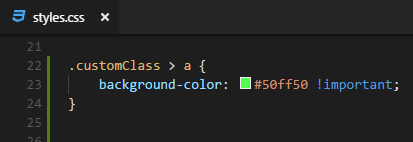
After you was complete this stage you need add you custom class in tabs component.
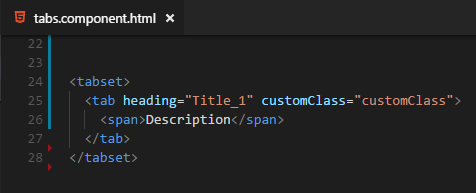
Result :)

 devfomichov
on 23 Jul 2017
devfomichov
on 23 Jul 2017
👎8
+1 not working....
My customclass is adding in both, <li class="nav-item"> and <tab>
and it effects in <tab></tab> but not in main <li>.
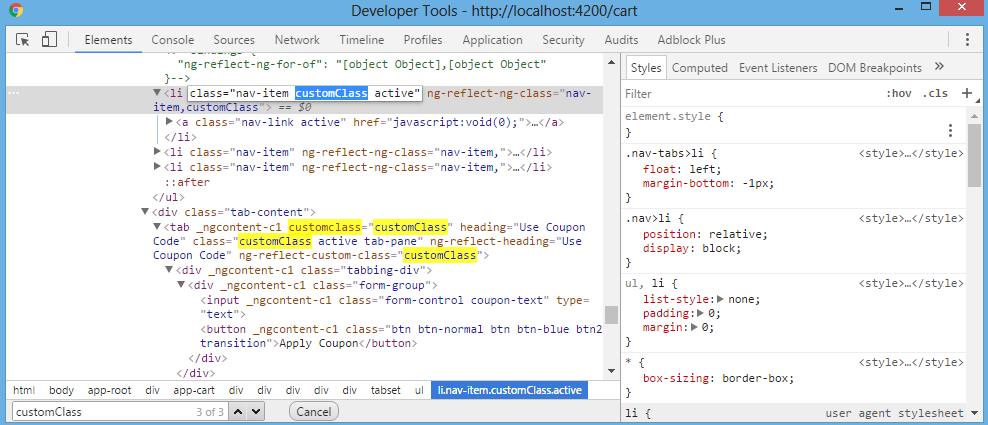
 shurvirmori
on 25 Oct 2017
shurvirmori
on 25 Oct 2017
👍2
😕1
I had a same issue, but after reading all of above comments, I was able to work around and resolve my issue.
Here is what I have and what I see for this specific component.
- I have bootstrap-sass in my project, and I am overriding it.
- If I try to override tabs on the component css file or style.scss, it wont work, but when I introduce a new rule like
.tab-style { background-color: red; }, it works since there in no bootstrap rule for it.
Workaround:
- Since I am overriding bootstrap-sas library in my project to have my personal theme. I created a new
_nave.scsswhere I override bootstrap-sass, and I put all overriding rules in it.
It works! :sparkles:
ps: as a side note: I dont understand why overriding bootstrap rule on the component style file, and style.scss dont answer.
 alireza-saberi
on 16 Nov 2017
alireza-saberi
on 16 Nov 2017
🎉4
👍1
@jdeblander
I think you are not using single quotes for using class name
<tabset>
<tab customClass="'tab-style'">
required code...
</tab>
<tabset>
 northoutIshan
on 4 Dec 2017
northoutIshan
on 4 Dec 2017
I resolved it like this:
Inside the ".angular-cli.json" under "styles" you have to put "styles.scss" after "bootstrap.css" so it can override the class of bootstrap.

and then you can set the colors of the tabs like this:
.nav-tabs .nav-link.active, .nav-tabs .nav-item.show .nav-link {
color: black;
background-color: red;
}
.nav-tabs .nav-link, .nav-tabs .nav-item.show .nav-link {
color: white;
background-color: blue;
}
 ortmann64
on 6 Jan 2018
ortmann64
on 6 Jan 2018
👍2
❤1
If you want to overriding bootstrap rule on the component style file, add this on your component
encapsulation: ViewEncapsulation.None
import {ViewEncapsulation} from '@angular/core';

@Component({
  selector: 'app',
  styleUrls: ['./bootstrap.scss'],
  encapsulation: ViewEncapsulation.None,
  ...
})
https://github.com/gdi2290/angular-starter/wiki/How-to-include-SCSS-in-components
 jechazelle
on 12 Jan 2018
jechazelle
on 12 Jan 2018
👍16
❤5
@jechazelle it works for me, thanks!
 felipevegners
on 19 Jul 2018
felipevegners
on 19 Jul 2018
@jechazelle Also works for me. Thanks.
It's extremely inconvenient to be unable to style tabs as easy as the documentation suggests. Why this isn't considered a bug?
 majorsaaam
on 9 Aug 2018
majorsaaam
on 9 Aug 2018
👍3
Works for me too.
 skyzito
on 15 Aug 2018
skyzito
on 15 Aug 2018
Either a bug, or include adding encapsulation: ViewEncapsulation.None to the component.ts in Docs.
@jechazelle 's answer worked for me
 abhishekalai
on 13 Nov 2018
abhishekalai
on 13 Nov 2018
Was this page helpful?
0 / 5 - 0 ratings
Related issues
 haisaco
·
3Comments
haisaco
·
3Comments
 hugonne
·
3Comments
hugonne
·
3Comments
 YevheniiaMazur
·
3Comments
YevheniiaMazur
·
3Comments
 srjkrl20011991
·
3Comments
srjkrl20011991
·
3Comments
 ghiscoding
·
3Comments
ghiscoding
·
3Comments
Most helpful comment
If you want to overriding bootstrap rule on the component style file, add this on your component
https://github.com/gdi2290/angular-starter/wiki/How-to-include-SCSS-in-components