Ngx-bootstrap: Collapse with several collapse contents on one page
Hi,
I want to build a page with some listed documents and provide some meta information if clicked on them. My idea was to implement that via the collapse feature in the following way with NgFor:
`
  <div class="panel-heading" (click)="isCollapsed = !isCollapsed">
    tbd
  </div>
  <div (collapsed)="collapsed($event)"
       (expanded)="expanded($event)"
       [collapse]="isCollapsed"
       class="card card-block card-header">
    tbd
  </div>
</div> `
However, the problem is now that if I click on one panel-heading all collapse divs are opened and for closing vice versa. Is there a way to specify the collapse just for one single panel-heading?
Thanks!
 KevKo1990
All 6 comments
Looks like you need to use tabs?
 valorkin
on 2 Jan 2017
valorkin
on 2 Jan 2017
No tabs was wrong... however Accordion was the one I searched for... Didn't think of that. Cheers mate!
KevKo1990
on 2 Jan 2017
Cheers :)
valorkin
on 2 Jan 2017
How you are implementing accordion for this above example ? Can you please tell me. I am having same situation .
 webkhushboo
on 8 Feb 2018
webkhushboo
on 8 Feb 2018
I have same problem.
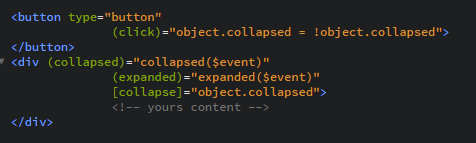
This works for me
For example:
If you have some ngFor="let object of objects"
you can add some boolean property ("collapsed") on object model, and implement collapse like
 DejanVeljkov
on 23 Feb 2018
DejanVeljkov
on 23 Feb 2018
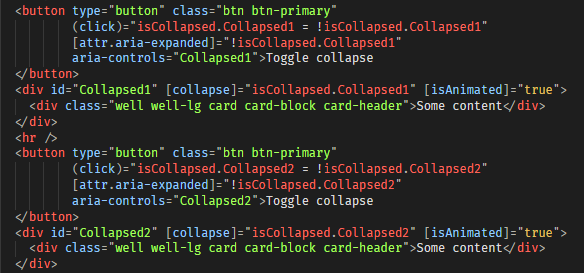
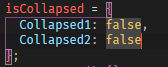
This worked for me
 sidjai09
on 24 Jan 2020
sidjai09
on 24 Jan 2020
Related issues
 ravirajhalli
·
3Comments
ravirajhalli
·
3Comments
 srjkrl20011991
·
3Comments
srjkrl20011991
·
3Comments
 mounthorse-slns
·
3Comments
mounthorse-slns
·
3Comments
 juanitavollmering
·
3Comments
juanitavollmering
·
3Comments
 PascalHonegger
·
3Comments
PascalHonegger
·
3Comments
Most helpful comment
I have same problem.

This works for me
For example:
If you have some ngFor="let object of objects"
you can add some boolean property ("collapsed") on object model, and implement collapse like