Ngx-admin: npm start throw Data path ".builders['app-shell']" should have required property 'class'
Issue description
Current behavior: Not able to start the project.
Expected behavior: Project started
Steps to reproduce: npm start
Other information:
npm, node, OS, Browser
Schema validation failed with the following errors:
  Data path ".builders['app-shell']" should have required property 'class'.
Error: Schema validation failed with the following errors:
  Data path ".builders['app-shell']" should have required property 'class'.
Node, npm: `v10.15.0` and `6.9.0`
OS: macOS (Mojave)
 certong0507
All 22 comments
Exact same problem when trying to start an Angular project using npm start. My specs:
Node v10.15.1
NPM v6.7.0
Windows 10
 webcourse-ng
on 24 Jun 2019
webcourse-ng
on 24 Jun 2019
Hey maybe you can try this fix, hope this helps :)
this link
certong0507
on 24 Jun 2019
Thanks! I think I had a package conflict, which is one of the suggested areas to check which fixed my problem.
webcourse-ng
on 24 Jun 2019
worked for me thanks! package conflict
 Geared4IT
on 26 Jun 2019
Geared4IT
on 26 Jun 2019
How exactly did you resolve this guys?
 bretonio
on 27 Jun 2019
bretonio
on 27 Jun 2019
Hey @bretonio, I've deleted the package-lock.json and then I ran npm install.
After that, everything looks fine, probably in my case It was update conflict
I hope it helps you
 ferreiraandy
on 2 Jul 2019
ferreiraandy
on 2 Jul 2019
Easy, thanks. And yes! Good!
 gringolalia
on 2 Aug 2019
gringolalia
on 2 Aug 2019
Angular CLI: 7.3.7
Node: 11.5.0
OS: win32 x64
Angular:
...
Package Version
@angular-devkit/architect 0.13.7
@angular-devkit/core 7.3.7
@angular-devkit/schematics 7.3.7
@schematics/angular 7.3.7
@schematics/update 0.13.7
rxjs 6.3.3
typescript 3.2.4
Showing error
Schema validation failed with the following errors:
Data path ".builders['app-shell']" should have required property 'class'.
Schema validation failed with the following errors:
Data path ".builders['app-shell']" should have required property 'class'.
Error: Schema validation failed with the following errors:
Data path ".builders['app-shell']" should have required property 'class'.
 Arafullahi
on 3 Aug 2019
Arafullahi
on 3 Aug 2019
Angular CLI: 7.3.7
Node: 11.5.0
OS: win32 x64
Angular:
...Package Version
@angular-devkit/architect 0.13.7
@angular-devkit/core 7.3.7
@angular-devkit/schematics 7.3.7
@schematics/angular 7.3.7
@schematics/update 0.13.7
rxjs 6.3.3
typescript 3.2.4Showing error
Schema validation failed with the following errors:
Data path ".builders['app-shell']" should have required property 'class'.Schema validation failed with the following errors:
Data path ".builders['app-shell']" should have required property 'class'.
Error: Schema validation failed with the following errors:
Data path ".builders['app-shell']" should have required property 'class'.
Changing from "@angular-devkit/build-angular": "^0.802.1"
to "@angular-devkit/build-angular": "^0.13.9",
solved my problem
 naordah69
on 14 Aug 2019
naordah69
on 14 Aug 2019
Changing from "@angular-devkit/build-angular": "^0.802.1"
to "@angular-devkit/build-angular": "^0.13.9",
solved my problem, thank you
 AlexanderStasyuk
on 17 Aug 2019
AlexanderStasyuk
on 17 Aug 2019
Changing from "@angular-devkit/build-angular": "^0.802.1"
to "@angular-devkit/build-angular": "^0.13.9",solved my problem, thank you
Works like a charm!
 lsuresh-k
on 19 Aug 2019
lsuresh-k
on 19 Aug 2019
Angular CLI: 7.3.3
Node: 8.15.0
OS: linux x64
Angular: 8.2.2
... animations, cli, common, compiler, compiler-cli, core, forms
... language-service, platform-browser, platform-browser-dynamic
... router
Package Version
@angular-devkit/architect 0.802.2
@angular-devkit/build-angular 0.802.2
@angular-devkit/build-optimizer 0.802.2
@angular-devkit/build-webpack 0.802.2
@angular-devkit/core 8.2.2
@angular-devkit/schematics 8.2.2
@angular/cdk 8.1.3
@ngtools/webpack 8.2.2
@schematics/angular 8.2.2
@schematics/update 0.802.2
rxjs 6.5.2
typescript 3.5.3
webpack 4.38.0
----------------------- error --------------------------
Schema validation failed with the following errors:
Data path ".builders['app-shell']" should have required property 'class'.
Error: Schema validation failed with the following errors:
Data path ".builders['app-shell']" should have required property 'class'.
at MergeMapSubscriber._registry.compile.pipe.operators_1.concatMap.validatorResult [as project] (/usr/local/lib/node_modules/@angular/cli/node_modules/@angular-devkit/core/src/workspace/workspace.js:215:42)
at MergeMapSubscriber._tryNext (/usr/local/lib/node_modules/@angular/cli/node_modules/rxjs/internal/operators/mergeMap.js:69:27)
at MergeMapSubscriber._next (/usr/local/lib/node_modules/@angular/cli/node_modules/rxjs/internal/operators/mergeMap.js:59:18)
at MergeMapSubscriber.Subscriber.next (/usr/local/lib/node_modules/@angular/cli/node_modules/rxjs/internal/Subscriber.js:67:18)
at MergeMapSubscriber.notifyNext (/usr/local/lib/node_modules/@angular/cli/node_modules/rxjs/internal/operators/mergeMap.js:92:26)
at InnerSubscriber._next (/usr/local/lib/node_modules/@angular/cli/node_modules/rxjs/internal/InnerSubscriber.js:28:21)
at InnerSubscriber.Subscriber.next (/usr/local/lib/node_modules/@angular/cli/node_modules/rxjs/internal/Subscriber.js:67:18)
at MapSubscriber._next (/usr/local/lib/node_modules/@angular/cli/node_modules/rxjs/internal/operators/map.js:55:26)
at MapSubscriber.Subscriber.next (/usr/local/lib/node_modules/@angular/cli/node_modules/rxjs/internal/Subscriber.js:67:18)
at SwitchMapSubscriber.notifyNext (/usr/local/lib/node_modules/@angular/cli/node_modules/rxjs/internal/operators/switchMap.js:86:26)
at InnerSubscriber._next (/usr/local/lib/node_modules/@angular/cli/node_modules/rxjs/internal/InnerSubscriber.js:28:21)
at InnerSubscriber.Subscriber.next (/usr/local/lib/node_modules/@angular/cli/node_modules/rxjs/internal/Subscriber.js:67:18)
at /usr/local/lib/node_modules/@angular/cli/node_modules/rxjs/internal/util/subscribeTo.js:17:28
at Object.subscribeToResult (/usr/local/lib/node_modules/@angular/cli/node_modules/rxjs/internal/util/subscribeToResult.js:10:45)
at SwitchMapSubscriber._innerSub (/usr/local/lib/node_modules/@angular/cli/node_modules/rxjs/internal/operators/switchMap.js:65:54)
at SwitchMapSubscriber._next (/usr/local/lib/node_modules/@angular/cli/node_modules/rxjs/internal/operators/switchMap.js:55:14)
Please help
TIA
 bmsitaws
on 21 Aug 2019
bmsitaws
on 21 Aug 2019
Changing from "@angular-devkit/build-angular": "^0.802.1"
to "@angular-devkit/build-angular": "^0.13.9",
.
.
.
The application works fine for me but a potential security vulnerability warning is found with high priority.
 yuvarajjonna
on 5 Sep 2019
yuvarajjonna
on 5 Sep 2019
how to change from "@angular-devkit/build-angular": "^0.802.1"
to "@angular-devkit/build-angular": "^0.13.9",
please help
 Ramu37
on 12 Sep 2019
Ramu37
on 12 Sep 2019
Hey @bretonio, I've deleted the package-lock.json and then I ran npm install.
After that, everything looks fine, probably in my case It was update conflict
I hope it helps you
Its work for me. Thanks alot
 Vishnuneelancheri
on 15 Sep 2019
Vishnuneelancheri
on 15 Sep 2019
This worked for me:
- Opened package.json
- Changed "@angular-devkit/build-angular": "^0.800.0" to
"@angular-devkit/build-angular": "^0.10.0" - Run npm install
- Run ng serve
 elmHere
on 17 Sep 2019
elmHere
on 17 Sep 2019
This worked for me:
- Opened package.json
- Changed "@angular-devkit/build-angular": "^0.800.0" to
"@angular-devkit/build-angular": "^0.10.0"- Run npm install
- Run ng serve
thanks! its work
 ghost
on 22 Sep 2019
ghost
on 22 Sep 2019
Changing from "@angular-devkit/build-angular": "^0.802.1"
to "@angular-devkit/build-angular": "^0.13.9",
.
.
.
The application works fine for me but a potential security vulnerability warning is found with high priority.
This was also my issue, I ran npm audit and found the vulnerability. I ran npm audit fix and then my app would not run because It reverted to "^0.803.6".
EDIT: Setting it to "^0.13.9" solved the vulnerability issue ! :)
 YeseniaEC
on 28 Sep 2019
YeseniaEC
on 28 Sep 2019
Changing from "@angular-devkit/build-angular": "^0.802.1"
to "@angular-devkit/build-angular": "^0.13.9",solved my problem, thank you
This really worked for me... Thanks
 nandgreat
on 19 Nov 2019
nandgreat
on 19 Nov 2019
Changing from "@angular-devkit/build-angular": "^0.802.1"
to "@angular-devkit/build-angular": "^0.13.9",
.
.
.
The application works fine for me but a potential security vulnerability warning is found with high priority.This was also my issue, I ran
npm auditand found the vulnerability. I rannpm audit fixand then my app would not run because It reverted to "^0.803.6".EDIT: Setting it to "^0.13.9" solved the vulnerability issue ! :)
Same, problems started after "npm audit fix". All is good now. I still have 3 low severity vulnerabilities - but will live with that for now.
 mpolutta
on 26 Nov 2019
mpolutta
on 26 Nov 2019
I mean what is this package and why are we reverting it back to an earlier version? The audit-fix does not revert to earlier version, it actually updates it. Latest version as of today is 0.803.22 https://www.npmjs.com/package/@angular-devkit/build-angular
 nfgallimore
on 13 Jan 2020
nfgallimore
on 13 Jan 2020
No need to perform any changes in package-lock.json or other files just rum command npm install --save-dev @angular/cli@latest. See attached image for final result
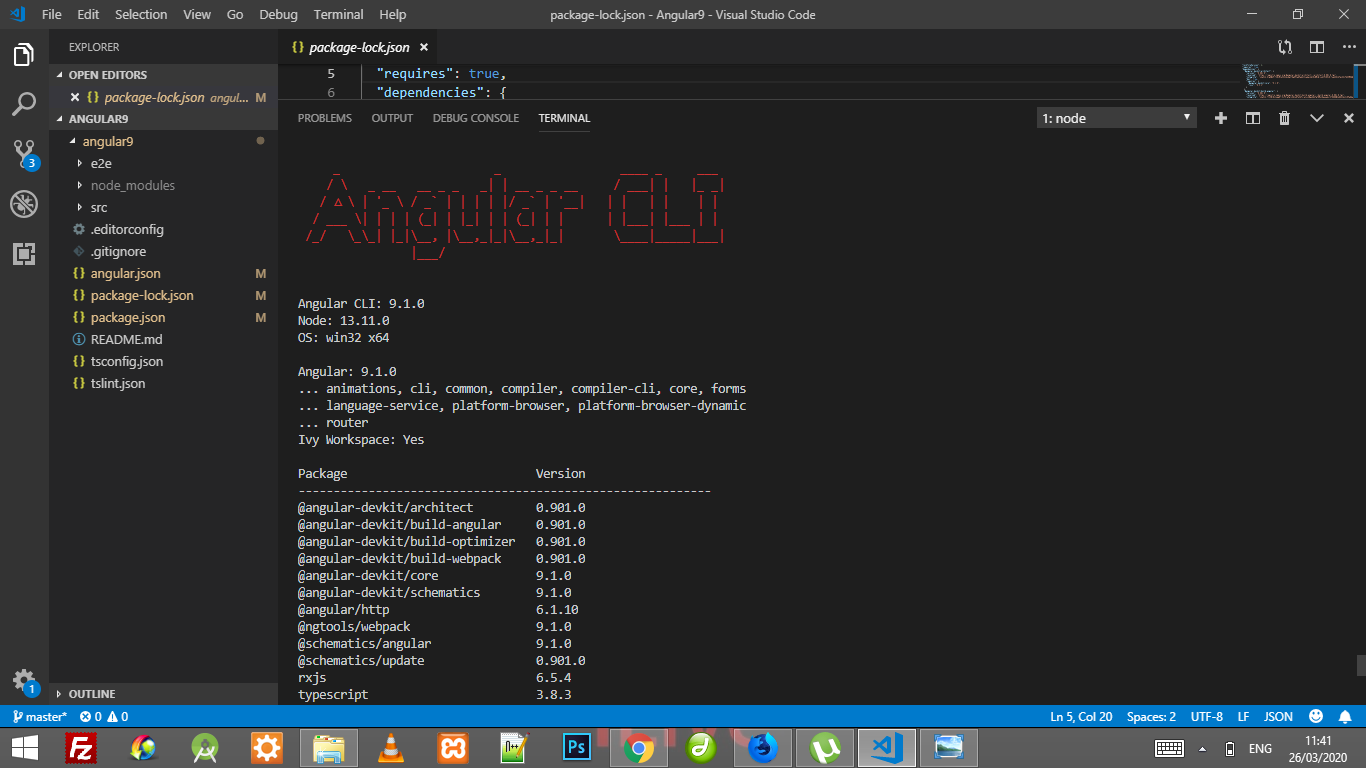
 pratikbokey007
on 26 Mar 2020
pratikbokey007
on 26 Mar 2020
Related issues
 nfdavenport
·
3Comments
nfdavenport
·
3Comments
 lopn
·
4Comments
lopn
·
4Comments
 maxlein
·
3Comments
maxlein
·
3Comments
 yanyim
·
3Comments
yanyim
·
3Comments
 myurAgarwal
·
3Comments
myurAgarwal
·
3Comments
Most helpful comment
Hey maybe you can try this fix, hope this helps :)
this link