Ngx-admin: Auth Guards not working for some reason
Issue type
I'm submitting a ... (check one with "x")
- [x] bug report
- [ ] feature request
- [ ] question about the decisions made in the repository
Issue description
Current behavior:
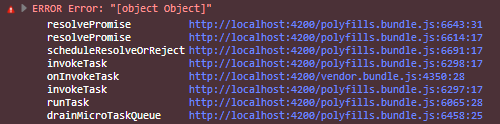
When I add AuthGuard service with 'canActivate' on routes, the app crashes when I try to login and gives this error:
ERROR Error: "[object Object]"
Expected behavior:
The AuthGuard works properly and redirect with successful authentication
Steps to reproduce:
Create an auth.guard.ts that implements canActivate with just "return true;" and try to use it on any routes. I've declared AuthGuard service on pages.module.ts (as a provider) and pages.routing.ts (imported and declared on route).
Related code:
pages.routing.ts
import { Routes, RouterModule }  from '@angular/router';
import { Pages } from './pages.component';
import { ModuleWithProviders } from '@angular/core';
import { AuthGuard } from '../auth/auth.guard';

export const routes: Routes = [
  {
    path: 'login',
    loadChildren: 'app/pages/login/login.module#LoginModule'
  },
  {
    path: 'register',
    loadChildren: 'app/pages/register/register.module#RegisterModule'
  },
  {
    path: 'pages',
    component: Pages,
    canActivateChild: [AuthGuard],
    children: [
      { path: '', redirectTo: 'dashboard', pathMatch: 'full' },
pages.module.ts
import { NgModule }      from '@angular/core';
import { CommonModule }  from '@angular/common';

import { routing }       from './pages.routing';
import { NgaModule } from '../theme/nga.module';
import { AppTranslationModule } from '../app.translation.module';

import { AuthGuard } from '../auth/auth.guard';

import { Pages } from './pages.component';

@NgModule({
  imports: [CommonModule, AppTranslationModule, NgaModule, routing],
  declarations: [Pages],
  providers: [AuthGuard]
})
export class PagesModule {
}
auth.guard.ts
import { Component, Injectable } from '@angular/core';
import { Router, CanActivate, CanActivateChild } from '@angular/router';

@Injectable()
export class AuthGuard implements CanActivate, CanActivateChild {

    constructor(private router: Router, private authService: AuthService) {}

    canActivate() {
        return true;
    }

    canActivateChild(){
        return true;
    }
}
Other information:
I'm using ng2-admin template with default settings.
 Platiplus
All 6 comments
Please I seem to be stuck on this problem, auth guard seems to be working (it's redirecting), but the loading svg isn't going away.
How did you resolve the issue
 markoghifo
on 4 Jun 2018
markoghifo
on 4 Jun 2018
@markoghifo you need to add your guard to your provider list, either within app.module.ts or routing.module.ts https://gist.github.com/jassok/8c43f6bfbbebf19da4e51434503c6004
 jassok
on 10 Jul 2018
jassok
on 10 Jul 2018
@nnixaa
I also have the issue. I think auth.guard.ts works as it supposed to. but when logout, it redirect to login which is ok. The problem is that you have to refresh login page to make token expired since the page redirected by link is not refresh the page. Here is my setting:
In heade.component.ts
userMenu = [{ title: 'Profile' }, { title: 'Log out' , link: '/auth/login'}];
and put localStorage.removeItem('auth_app_token'); in login.component.js beginning
How to refresh login page after redirecting or make the token expire in logout service?
 joeyjin
on 29 Aug 2018
joeyjin
on 29 Aug 2018
@nnixaa if i understand you correctly, you might have to create some sort of listener in your header.component.ts to detect when a user is logged out.
You can create an emitter in the service that handles logout, after a successful logout, cause that emitter to emit.
Then in your header.component.ts, you subscribe to that emitter, thereby changing the state of user logged in to false after a logout
markoghifo
on 29 Aug 2018
@markoghifo is this complicated? I think there is a easy/standard way to do it...
joeyjin
on 29 Aug 2018
problem solved...
userMenu = [{ title: 'Profile' }, { title: 'Log out', link: '/auth/logout' }];
function NbLogoutComponent(service, options, router) {
console.log("in NbLogoutComponent");
console.log("localStorage.removeItem in logout start");
localStorage.removeItem('auth_app_token');
console.log("localStorage.removeItem in logout end");
joeyjin
on 29 Aug 2018
Related issues
 mignam
·
3Comments
mignam
·
3Comments
 lopn
·
4Comments
lopn
·
4Comments
 nsankaranarayanan
·
3Comments
nsankaranarayanan
·
3Comments
 argnist
·
4Comments
argnist
·
4Comments
 hoswey
·
3Comments
hoswey
·
3Comments
Most helpful comment
@markoghifo you need to add your guard to your provider list, either within
app.module.tsorrouting.module.tshttps://gist.github.com/jassok/8c43f6bfbbebf19da4e51434503c6004