Ngx-admin: Issue with Auth Module in ngx-admin
i am following this tutorial ... https://akveo.github.io/nebular/#/docs/auth/installation but when i copy the source code of all the componenets that you have mentioned i get error as auth service not found since in the nebular example it is mentioned locally , and i am using ngx-admin for building my project . so how do i get the auth module working .. also i am not sure how do i configure the providers.
 sonali-parekh22
All 11 comments
What exactly you're going to do ?
Can you post the error here ?
 genz10
on 25 Nov 2017
genz10
on 25 Nov 2017
I have similar issues. I follow the guide from Custom UI Components https://akveo.github.io/nebular/#/docs/auth/configuring-ui
but I become the error
Template parse errors:
'router-outlet' is not a known element:
1. If 'router-outlet' is an Angular component, then verify that it is part of this module.
2. If 'router-outlet' is a Web Component then add 'CUSTOM_ELEMENTS_SCHEMA' to the '@NgModule.schemas' of this component to suppress this message. ("        <nb-card-body>
            <div class="col-xl-4 col-lg-6 col-md-8 col-sm-12">
              [ERROR ->]<router-outlet></router-outlet>
            </div>
          </nb-card-body>
"): ng:///ThemeModule/NgxAuthComponent.html@6:14
Do I have to make an adjustment in core.module or somethink?
core.module:
const NB_CORE_PROVIDERS = [
  ...DataModule.forRoot().providers,
  ...NbAuthModule.forRoot({
    providers: {
      email: {
        service: NbDummyAuthProvider,
        config: {
          delay: 3000,
          login: {
            rememberMe: true,
          },
        },
      },
    },
  }).providers,
edit, fixed:
add RouterModule to theme.module.ts
 Newan
on 4 Dec 2017
Newan
on 4 Dec 2017
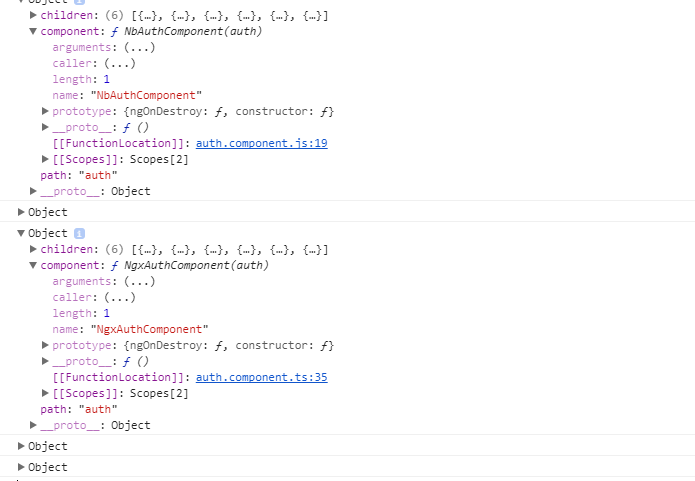
if I load NbAuthModule the default routes are added so that the /auth/login route is twice:
Newan
on 4 Dec 2017
Glad you fixed it!
 nnixaa
on 19 Dec 2017
nnixaa
on 19 Dec 2017
I have same issue. Even adding routerModule its not getting solved
 mudunuriRaju
on 25 Dec 2017
mudunuriRaju
on 25 Dec 2017
Error: Template parse errors:
'router-outlet' is not a known element:
- If 'router-outlet' is an Angular component, then verify that it is part of this module.
- If 'router-outlet' is a Web Component then add 'CUSTOM_ELEMENTS_SCHEMA' to the '@NgModule.schemas' of this component to suppress this message. ("rd-body>
[ERROR ->]
"): ng:///ThemeModule/NgxAuthComponent.html@6:14
mudunuriRaju
on 25 Dec 2017
If you have te error: 'router-outlet' is not a known element:
You need import import RouterModule in theme.module.ts
import { RouterModule } from '@angular/router';
and in
@NgModule({
imports:[... , RouterModule],
})
 CesarHipolito
on 9 Mar 2018
CesarHipolito
on 9 Mar 2018
bro i get have error: 'router-outlet' is not a known element:
when i write
i get error
'nb-auth-block' is not a known element:
- If 'nb-auth-block' is an Angular component, then verify that it is part of this module.
 sheikpeer
on 21 Mar 2018
sheikpeer
on 21 Mar 2018
you probably change the name of the selector in "auth-block.component.ts". Either rename it as it was 'nb-auth-block' or change the call to this directive with the new name you have chosen in the other compoments (register.components.ts , request-password..... ).
 napster101
on 3 May 2018
napster101
on 3 May 2018
@CesarHipolito thanks, I have my problem fixed.
 Yeeler
on 16 May 2018
Yeeler
on 16 May 2018
core.js:15724 ERROR Error: Uncaught (in promise): Error: Template parse errors:
Can't bind to 'type' since it isn't a known property of 'ngx-status-card'.
- If 'ngx-status-card' is an Angular component and it has 'type' input, then verify that it is part of this module.
- If 'ngx-status-card' is a Web Component then add 'CUSTOM_ELEMENTS_SCHEMA' to the '@NgModule.schemas' of this component to suppress this message.
- To allow any property add 'NO_ERRORS_SCHEMA' to the '@NgModule.schemas' of this component. ("et statusCard of statusCards">
[ERROR ->][type]="statusCard.type">
"): ng:///PagesModule/IotComponent.html@4:21
'ngx-status-card' is not a known element: - If 'ngx-status-card' is an Angular component, then verify that it is part of this module.
- If 'ngx-status-card' is a Web Component then add 'CUSTOM_ELEMENTS_SCHEMA' to the '@NgModule.schemas' of this component to suppress this message. ("
[ERROR ->][type]="statusCard.type">
html@3:4
Error: Template parse errors:
Can't bind to 'type' since it isn't a known property of 'ngx-status-card'.- If 'ngx-status-card' is an Angular component and it has 'type' input, then verify that it is part of this module.
- If 'ngx-status-card' is a Web Component then add 'CUSTOM_ELEMENTS_SCHEMA' to the '@NgModule.schemas' of this component to suppress this message.
- To allow any property add 'NO_ERRORS_SCHEMA' to the '@NgModule.schemas' of this component. ("et statusCard of statusCards">
[ERROR ->][type]="statusCard.type">
"): ng:///PagesModule/IotComponent.html@4:21
'ngx-status-card' is not a known element:- If 'ngx-status-card' is an Angular component, then verify that it is part of this module.
- If 'ngx-status-card' is a Web Component then add 'CUSTOM_ELEMENTS_SCHEMA' to the '@NgModule.schemas' of this component to suppress this message. ("
[ERROR ->][type]="statusCard.type">
html@3:4
at syntaxError (compiler.js:2430)
at TemplateParser.push../node_modules/@angular/compiler/fesm5/compiler.js.TemplateParser.parse (compiler.js:20605)
at JitCompiler.push../node_modules/@angular/compiler/fesm5/compiler.js.JitCompiler._parseTemplate (compiler.js:26171)
at JitCompiler.push../node_modules/@angular/compiler/fesm5/compiler.js.JitCompiler._compileTemplate (compiler.js:26158)
at compiler.js:26101
at Set.forEach ()
at JitCompiler.push../node_modules/@angular/compiler/fesm5/compiler.js.JitCompiler._compileComponents (compiler.js:26101)
at compiler.js:26011
at Object.then (compiler.js:2421)
at JitCompiler.push../node_modules/@angular/compiler/fesm5/compiler.js.JitCompiler._compileModuleAndComponents (compiler.js:26010)
at resolvePromise (zone.js:831)
at resolvePromise (zone.js:788)
at zone.js:892
at ZoneDelegate.push../node_modules/zone.js/dist/zone.js.ZoneDelegate.invokeTask (zone.js:423)
at Object.onInvokeTask (core.js:17290)
at ZoneDelegate.push../node_modules/zone.js/dist/zone.js.ZoneDelegate.invokeTask (zone.js:422)
at Zone.push../node_modules/zone.js/dist/zone.js.Zone.runTask (zone.js:195)
at drainMicroTaskQueue (zone.js:601)
defaultErrorLogger @ core.js:15724
push../node_modules/@angular/core/fesm5/core.js.ErrorHandler.handleError @ core.js:15772
next @ core.js:17771
schedulerFn @ core.js:13515
push../node_modules/rxjs/_esm5/internal/Subscriber.js.SafeSubscriber.__tryOrUnsub @ Subscriber.js:196
push../node_modules/rxjs/_esm5/internal/Subscriber.js.SafeSubscriber.next @ Subscriber.js:134
push../node_modules/rxjs/_esm5/internal/Subscriber.js.Subscriber._next @ Subscriber.js:77
push../node_modules/rxjs/_esm5/internal/Subscriber.js.Subscriber.next @ Subscriber.js:54
push../node_modules/rxjs/_esm5/internal/Subject.js.Subject.next @ Subject.js:47
push../node_modules/@angular/core/fesm5/core.js.EventEmitter.emit @ core.js:13499
(anonymous) @ core.js:17321
push../node_modules/zone.js/dist/zone.js.ZoneDelegate.invoke @ zone.js:391
push../node_modules/zone.js/dist/zone.js.Zone.run @ zone.js:150
push../node_modules/@angular/core/fesm5/core.js.NgZone.runOutsideAngular @ core.js:17258
onHandleError @ core.js:17321
push../node_modules/zone.js/dist/zone.js.ZoneDelegate.handleError @ zone.js:395
push../node_modules/zone.js/dist/zone.js.Zone.runGuarded @ zone.js:164
_loop_1 @ zone.js:694
api.microtaskDrainDone @ zone.js:703
drainMicroTaskQueue @ zone.js:608
Promise.then (async)
scheduleMicroTask @ zone.js:584
push../node_modules/zone.js/dist/zone.js.ZoneDelegate.scheduleTask @ zone.js:413
onScheduleTask @ zone.js:301
push../node_modules/zone.js/dist/zone.js.ZoneDelegate.scheduleTask @ zone.js:404
push../node_modules/zone.js/dist/zone.js.Zone.scheduleTask @ zone.js:238
push../node_modules/zone.js/dist/zone.js.Zone.scheduleMicroTask @ zone.js:258
scheduleResolveOrReject @ zone.js:879
resolvePromise @ zone.js:825
(anonymous) @ zone.js:741
webpackJsonpCallback @ bootstrap:25
(anonymous) @ pages-pages-module.js:1pabbojuvikram on 27 Jun 2019
Was this page helpful?0 / 5 - 0 ratings
Related issues
 nfdavenport
·
3Comments
nfdavenport
·
3Comments
 nsankaranarayanan
·
3Comments
nsankaranarayanan
·
3Comments
 tal-shahar
·
3Comments
tal-shahar
·
3Comments
 mignam
·
3Comments
mignam
·
3Comments
 argnist
·
4Comments
argnist
·
4Comments
Most helpful comment
I have similar issues. I follow the guide from Custom UI Components https://akveo.github.io/nebular/#/docs/auth/configuring-ui
but I become the error
Do I have to make an adjustment in core.module or somethink?
core.module:
edit, fixed:
add RouterModule to theme.module.ts