Ngx-admin: How to Dynamically display page title / breadcrumb?
- I'm submitting a ...
[ ] bug report
[ ] feature request
[x] question about the decisions made in the repository
So I am wondering if it is possible to dynamically load the page title / breadcrumb, without having it manually populated in the Pages.menu.ts (the page will be hidden from the Side menu). Something like importing the page title from a services.ts file or something of the sort? The page would be dynamically generated, like the PieChart component is, on the dashboard.
 Bengejd
All 12 comments
@Bengejd I'm managed to achieve this by calling the following in my Component when I get the return back from the service:
this.state.notifyDataChanged('menu.activeLink', {title: this.product.title});
The entire Component looks like this:
import 'rxjs/add/operator/switchMap';
import {Component} from '@angular/core';
import {ActivatedRoute, Params} from '@angular/router';
import {GlobalState} from '../../../../global.state';
import {ApiService} from '../../../../theme/services/api/api.service';
@Component({
selector: 'product-details',
templateUrl: 'details.html'
})
export class Details {
private product: any;
constructor(private route: ActivatedRoute, private service: ApiService, private state: GlobalState) {
}
ngOnInit(): void {
this.route.params
.switchMap((params: Params) => this.service.get('details.php?objectID=' + +params['objectID']))
.subscribe(product => {
this.product = product;
this.state.notifyDataChanged('menu.activeLink', {title: this.product.title});
});
}
}
 daveykane
on 22 Feb 2017
daveykane
on 22 Feb 2017
Bengejd can you set your title with any method? I use the method was mention daveykane, but this is remplaced by the old value preseted in menuiItem (var) and need set a timer to set the title force.
I dont know how change the object with the menu active to set like null then can skip this on promise.
 gemins
on 30 Mar 2017
gemins
on 30 Mar 2017
Please use pathMatch: 'prefix':
  children: [
          {
            path: 'page',
            data: {
              menu: {
                title: 'page.title',
                pathMatch: 'prefix',
                hidden: true,
              },
            },
          },
 Newan
on 28 Jun 2017
Newan
on 28 Jun 2017
Hi there,
@Newan : what if all the children are hidden and I want to navigate to a default child when I click on the father link in the menu? It doesn't seem to work, even if I have a redirect entry for the default child in the routing file.
 pulfabio
on 18 Aug 2017
pulfabio
on 18 Aug 2017
Sorry this scenario don't test it. have you an example, then I can look at this. My case was , that only one children what should not be shown
Newan
on 19 Aug 2017
Hi @Newan,
thanks for your reply. Here is a better explanation of my scenario.
I got a main/father element with some children. I don't want any of the children to show on the menu-bar (they are reached using tabs with routerLink within the father page), but I want to use their titles and breadcrumbs. Plus I want to navigate to a default child when the father link in the menu sidebar is clicked, this should be guaranteed by a redirect entry in the routing component.
I used "pathMatch: 'prefix' and hidden: true" but I didn't quite achieve my goal: children pages titles and breadcrumbs are correctly working in the children views but when I click on the father's entry in the menubar the app doesn't navigate to the default child view, it just seems to be opening and closing an empty sub-menu (as all che children are hidden).
On the other hand, if I don't include the children in pages.menu.ts at all, the father entry link in the menu is correctly navigating to the default child view, but titles and breadcrumbs obviously don't work.
Please find below some code snippets.
pages.menu.ts
{
    path: 'balance',
    data: {
      menu: {
        title: 'Bilancio',
        icon: 'fa fa-bar-chart fa-lg', //'ion-stats-bars',
        selected: false,
        expanded: false,
        order: 50,
      }
    },
    children: [
      {
        path: 'monthly',
        data: {
          menu: {
            title: 'Bilancio-Mensile',
            hidden: true,
            pathMatch: 'prefix',
          }
        }
      },
      {
        path: 'annual',
        data: {
          menu: {
            title: 'Bilancio-Annuale',
            hidden: true,
            pathMatch: 'prefix',
          }
        }
      },
    ]
  },
balance.routing.ts
export const routes: Routes = [
  {
    path: '',
    component: Balance,
    children: [
      { path: '', redirectTo: 'monthly', pathMatch: 'full' },
      { path: 'monthly', component: Monthly },
      { path: 'annual', component: Annual }
    ]
  }
];
Any ideas?
pulfabio
on 22 Aug 2017
At first all my routes have an path, because the submenu must find ist in the route tree.
for the default i have an redirect:
{ path: '', redirectTo: 'dashboard', pathMatch: 'full' },
an my parent-page have children inside:
{ path: 'parent', loadChildren: './parent/parent.module#ParentModule', canActivate: [AuthGuard] },
import { routing } from './parent.routing';
this is like the template showing.
children routing:
{ path: parent/child', component: ChildrenComponent
sorry i don't have more information
Newan
on 22 Aug 2017
@Newan
Yeah, that's a nice improvement. Still, I guess it solves my issue only in part, as the father link in the sidebar won't navigate to any page if all the children are hidden. I need the user to be branched to a default child (as per the redirect statement in the routing.ts file) when the father link in the sidebar is clicked. Unfortunately, as per the current behavior, it only opens and closes an empty menu.
Thanks.
pulfabio
on 22 Aug 2017
try?
i have a parennt in submenu with 2 hidden children:
        path: 'parent',
        data: {
          menu: {
            title: 'general.menu.parent',
            icon: 'fa fa-gears',
            selected: false,
            expanded: false,
            order: 100,
          },
        },
        children: [
          {
            path: 'child1',
            data: {
              menu: {
                title: 'child1.title',
                pathMatch: 'prefix',
                hidden: true,
                showingParent: true,
              },
            },
            children: [
              {
                path: 'child2',
                data: {
                  menu: {
                    title: 'child2.title',
                    pathMatch: 'prefix',
                    hidden: true,
                    showingParent: true,
                  },
                },
              },
            ],
          },
        ],
i can navigate to parent tith http://localhost:4200/#/pages/parent and inside this page to the children with http://localhost:4200/#/pages/devices/child1/X http://localhost:4200/#/pages/devices/child1/X/child2/Y
x and y are the id from the child. is that what your are looking for?
Newan
on 22 Aug 2017
@Newan
Yes. You got it. The problem is that I can navigate to the parent only by manually typing the path in the address bar, and it works fine. Yet, this is not a feasible solution in production. The user must be able to navigate to the default page by clicking on the parent link in the sidebar, which won't happen. See the screenshot below.
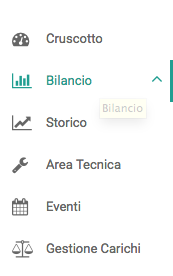
The chevron next to the link ("Bilancio") will switch from up to down, but no navigation to the relevant page takes place.
Thanks.
pulfabio
on 22 Aug 2017
@pulfabio same issue. This will require a change in the code in order to fix this. Looking into how.
 devakone
on 20 Sep 2017
devakone
on 20 Sep 2017
@devakone Thanks.
As this seems to be a different topic that needs a dedicated solution I've opened a separate issue: #1255
pulfabio
on 21 Sep 2017
Related issues
 igorls
·
3Comments
igorls
·
3Comments
 Kalaijagdai
·
4Comments
Kalaijagdai
·
4Comments
 yanyim
·
3Comments
yanyim
·
3Comments
 fabltd
·
3Comments
fabltd
·
3Comments
 hoswey
·
3Comments
hoswey
·
3Comments
Most helpful comment
Please use pathMatch: 'prefix':