Ngrok: Failed to complete tunnel connection
I have a Django server running inside a Docker instance exposed on port 8000. I can access the server from my mobile phone (connected on the same network) too.
I ran ngrok http 8000. However, ngrok doesn't seem to work and throws the following error though I could access http://localhost:8000/,
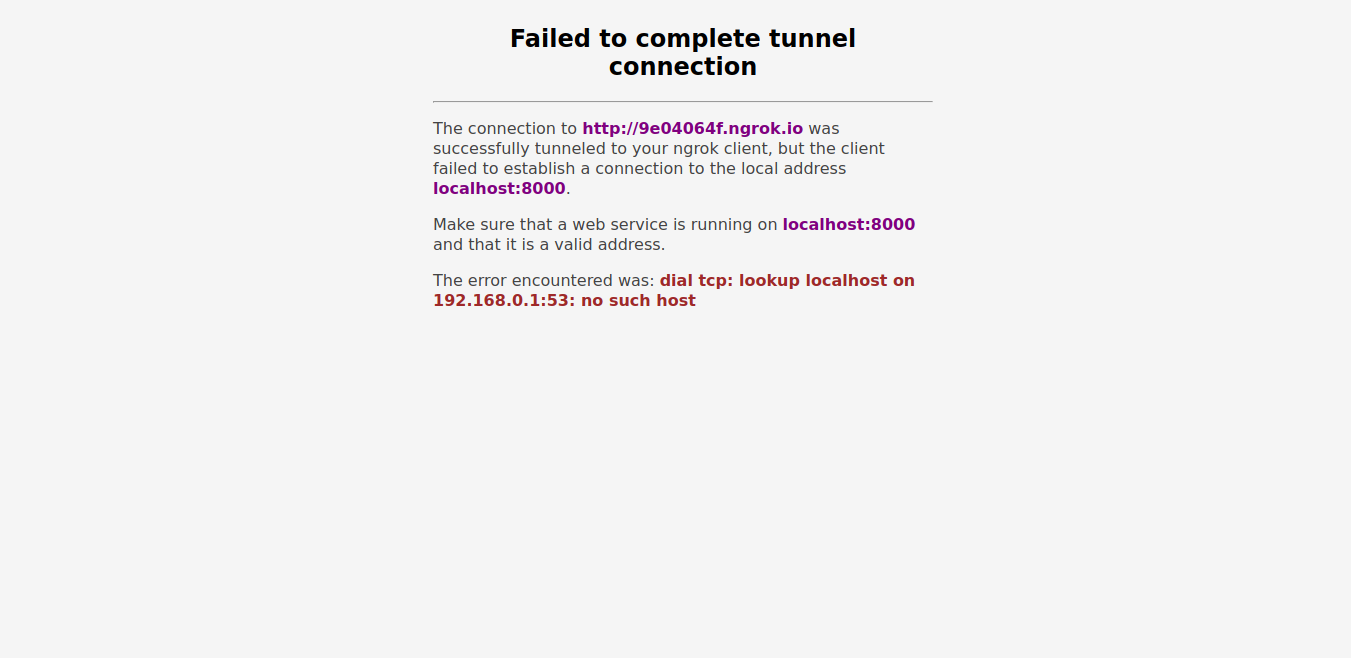
Not only Django, even when I ran a simple Python server (outside Docker) running on port 8080, ngrok still gave the same error.
Version
ngrok: 2.2.8
OS: Arch Linux (updated)
 tejasjadhav
All 22 comments
I'm having this same issue on my Arch system.
 siddhartpai
on 28 Feb 2018
siddhartpai
on 28 Feb 2018
Weirdly today ngrok worked fine all morning, and now it's back on the same error.
I'm using the same version 2.2.8 .
Also my ngrok window looks like this :
siddhartpai
on 1 Mar 2018
start your local server
For example mine is WampSever yours can be Xampp, Lamp, Mamp.
Local server itself starts automatically http 80 port.
 sanchitverma168
on 8 Mar 2018
sanchitverma168
on 8 Mar 2018
I am having the same problem with port 80 anybody having solutions
 raazulhaq
on 13 Aug 2018
raazulhaq
on 13 Aug 2018
Actually when i run beef with the ngrok port i get the same error at port 80
raazulhaq
on 13 Aug 2018
ngrok shows this error when the local server is not running
start your server first and also check the server port as well as ngrok port
For example: i am using two servers WAMP && XAMPP
WAMP is on port 80
While
XAMPP is on port 8012
therefore the command will be
ngrok http 80 for WAMP folder
ngrok http 8012 for xampp folder
sanchitverma168
on 13 Aug 2018
My server is running i think.My ngork http 80 is showing bad gateway
raazulhaq
on 13 Aug 2018
Do i have to use apache to start the server..sorry im a beginner
raazulhaq
on 14 Aug 2018
yes that what i was saying you have to start the Apache
and i think location of the ngrok application also matters
so put it there where all your projects are located of their respected server
sanchitverma168
on 14 Aug 2018
yes that what i was saying you have to start the Apache
and i think location of the ngrok application also matters
so put it there where all your projects are located of their respected server
sanchitverma168
on 14 Aug 2018
Plzzz tell me if i have to use beef do i have to put port80 and port 3000???how do I do that???
raazulhaq
on 14 Aug 2018
Worked for me after change region (EU) with laragon
 Mibiki
on 31 Oct 2018
Mibiki
on 31 Oct 2018
I think this is because of u stopped ur local server.
first u start ur local server (xampp,wampp,or npm start)
second open ngrok.exe and type(ngrok http (ur server port))
 yeyintnaung135
on 23 Aug 2019
yeyintnaung135
on 23 Aug 2019
im a begginer, can someone tell me how to start a server?
 GODUGOLLAKARTHIK
on 4 Jan 2020
GODUGOLLAKARTHIK
on 4 Jan 2020
I was running a simple NodeJS server on 3000, and I ran across this issue for two cases.
- My server was stopped.
- I was not using the correct "ngrok http 3000" command.
 swateek
on 3 Mar 2020
swateek
on 3 Mar 2020
I had the same issue. It was fixed by starting my local server using npm run dev and then running ngrok command ngrok http 3000 (in my case)
 farreal
on 27 Apr 2020
farreal
on 27 Apr 2020
How to start a server can anyone tell me!!
 PlanetHackers-YT
on 1 Aug 2020
PlanetHackers-YT
on 1 Aug 2020
@PlanetHackers-YT starting your local server is easy, depending on your environment. Are you working with nodeJS?
 IkkyOdufade
on 15 Sep 2020
IkkyOdufade
on 15 Sep 2020
I have faced the same issue and i have to start xampp server but it gives me a same error so what I need to do?
 snspankti
on 15 Oct 2020
snspankti
on 15 Oct 2020
I have faced the same issue and i have to start xampp server but it gives me a same error so what I need to do?
start your local server
whatever You are using.
For example WAMP,LAMP MAMP OR XAMPP
- Start your Apache server.
- Restart ngrok .
sanchitverma168
on 16 Oct 2020
ok thank you.
On Fri, 16 Oct 2020 at 10:29, Sanchit Verma notifications@github.com
wrote:
I have faced the same issue and i have to start xampp server but it gives
me a same error so what I need to do?start your local server
whatever You are using.
For example WAMP,LAMP MAMP OR XAMPP
- Start your Apache server.
- Restart ngrok .
—
You are receiving this because you commented.
Reply to this email directly, view it on GitHub
https://github.com/inconshreveable/ngrok/issues/478#issuecomment-709778193,
or unsubscribe
https://github.com/notifications/unsubscribe-auth/APSRJ4H6XKQSOOUHJSY7JYTSK7HMHANCNFSM4ERVOIBQ
.
snspankti
on 16 Oct 2020
 soumya997
on 30 Nov 2020
soumya997
on 30 Nov 2020
Related issues
 megapctr
·
4Comments
megapctr
·
4Comments
 ricardopieper
·
3Comments
ricardopieper
·
3Comments
 asukiaaa
·
5Comments
asukiaaa
·
5Comments
 IngwiePhoenix
·
7Comments
IngwiePhoenix
·
7Comments
 zero-master
·
6Comments
zero-master
·
6Comments
Most helpful comment
start your local server
For example mine is WampSever yours can be Xampp, Lamp, Mamp.
Local server itself starts automatically http 80 port.