Nginx-proxy-manager: Cannot use "Custom Certificate"
Checklist
- Have you pulled and found the error with
jc21/nginx-proxy-manager:latestdocker image?
Yes
- Are you sure you're not using someone else's docker image?
Yes
Describe the bug
Tried to add custom-certificate in Certifcates > Add SSL Certificate > Custom.
After pressing "Save" nothing seems to happen, but Browser/JS Console logs this error:
17.bundle.17.js:1 Uncaught TypeError: Cannot read property 'cloudflare_use' of undefined
    at i.click @ui.save (17.bundle.17.js:1)
    at HTMLDivElement.dispatch (main.bundle.js?v=2.5.0:27)
    at HTMLDivElement.p.handle (main.bundle.js?v=2.5.0:27)
To Reproduce
Steps to reproduce the behavior:
See -> Describe the bug
Expected behavior
Being able to save the custom certificate or being able to toggle cloudflare-usage (missing form-field?!).
Screenshots
If applicable, add screenshots to help explain your problem.

Operating System
Ubuntu Linux, Google Chrome
Additional context
Just in case you're wondering about the TLD in screenshot. It's a private-lan and I made a self-signed certificate using mkcert on my laptop trying to deploy it on nginx-proxy-manager (private-lan server). The cert is required for docker-registry (which requires SSL even in private-lan for docker & portainer container management).
 typoworx-de
All 52 comments
Same problem.
 RainCat1998
on 4 Sep 2020
RainCat1998
on 4 Sep 2020
Same problem here.
 PlasmatikSteak
on 8 Sep 2020
PlasmatikSteak
on 8 Sep 2020
Hi, I confirm this behavior since 2.5.0 release, reverting to 2.4.0 release, fixes the upload bug.
Kind Regards
 ugoviti
on 9 Sep 2020
ugoviti
on 9 Sep 2020
I am having this problem with 2.4.0 and 2.5.0. I get this error Uncaught TypeError: s.meta is undefined
 r3draid3r04
on 9 Sep 2020
r3draid3r04
on 9 Sep 2020
i had this problem yesterday and reinstalled all system with 2.4.0 and its working perfect.
 ananiasfilho
on 11 Sep 2020
ananiasfilho
on 11 Sep 2020
i had this problem yesterday and reinstalled all system with 2.4.0 and its working perfect.
Hello I'm trying in 2.4.0 but, still not working .. I tried to create another user but not working too... So, how do you do ??
 Mr-icat59
on 16 Sep 2020
Mr-icat59
on 16 Sep 2020
i had this problem yesterday and reinstalled all system with 2.4.0 and its working perfect.
Hello I'm trying in 2.4.0 but, still not working .. I tried to create another user but not working too... So, how do you do ??
Ok, i found something, in 2.4.0 version, I sent my certificate in .pem and all is work fine.
Mr-icat59
on 17 Sep 2020
I have the same issue, but it's unresolved by either redeploying 2.4.0 or using a .pem key.
 mcx808
on 21 Sep 2020
mcx808
on 21 Sep 2020
Same issue. It does not go away with 2.4.0 or with .pem key.
 mshuflin
on 22 Sep 2020
mshuflin
on 22 Sep 2020
Version v2.5.0 and the same issue
 Valdri
on 22 Sep 2020
Valdri
on 22 Sep 2020
Same Issue here
 inventorematto
on 22 Sep 2020
inventorematto
on 22 Sep 2020
Hello all, to add custom SSL in 2.4.0 version, check to remove data/ directory and docker-compose up -d again. Then when you try to add your custom ssl, let the field empty and click on save, a message will say to fill out the field, then put your name in the field and click to browse the certificate key and certificate.
Mr-icat59
on 23 Sep 2020
i try in firefox but
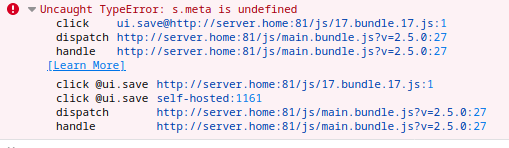
 centralhardware
on 23 Sep 2020
centralhardware
on 23 Sep 2020
i try in firefox but
Hello @centralhardware , look the line "dispatch" & "handle". It's 2.5.0 version, no ?
Mr-icat59
on 23 Sep 2020
i try in firefox but
Same issue on 2.5.0. Revert to 2.4.0 and clear cache worked for me
 Na0mir
on 24 Sep 2020
Na0mir
on 24 Sep 2020
same issue here.
will try with 2.4.0
 toxic0berliner
on 28 Sep 2020
toxic0berliner
on 28 Sep 2020
Thanks for all these replies.
Trying release 2.4.0 I'm getting this response (AJAX Response captured from Chrome Network inspector).
I've rolled out using docker with 'jc21/nginx-proxy-manager:2.4.0'.
I've been trying to upload self-signed cert created using mk-cert (#593)
The submit of this is quit with alert "Error 500"

// 20200928123906
// http://ssl.typoworx.lan:81/api/nginx/certificates/1/upload

{
  "error": {
    "code": 404,
    "message": "Item Not Found - /nginx/certificates/1/upload"
  }
}
May be the docker-provided configuration for nginx & upload path is screwed?
typoworx-de
on 28 Sep 2020
Same here. I cannot import Custom SSL certs in either 2.4.0 or 2.5.0. Just broke a whole bunch of stuff. GREAT.

I even blew these containers away and started from scratch. STILL CAN'T upload custom SSL certs on 2.5.0. What gives?!
 MisterBaz
on 28 Sep 2020
MisterBaz
on 28 Sep 2020
Hello all, to add custom SSL in 2.4.0 version, check to remove data/ directory and docker-compose up -d again. Then when you try to add your custom ssl, let the field empty and click on save, a message will say to fill out the field, then put your name in the field and click to browse the certificate key and certificate.
Still doesn't work.
MisterBaz
on 29 Sep 2020
Still Doesn't Work
 MapGuy11
on 30 Sep 2020
MapGuy11
on 30 Sep 2020
Hi!
any news on this bug ?
any help will be greatly appreciated ;)
 maty974
on 2 Oct 2020
maty974
on 2 Oct 2020
Hey,
same for me
 IIPoliII
on 2 Oct 2020
IIPoliII
on 2 Oct 2020
hey
same for me
 justfor-it
on 3 Oct 2020
justfor-it
on 3 Oct 2020
and for me too.
 Strizz02
on 3 Oct 2020
Strizz02
on 3 Oct 2020
The only thing that sometimes worked for me was to stop the stack (or docker-compose down to remove the container) and remove the data directory. Then make sure you are pulling 2.4.0. Then, clear your browser everything - cache, history, everything. Then docker-compose up. The, it MIGHT work.
MisterBaz
on 3 Oct 2020
Same here.
Because I have only a hand full of reverse proxies I'm using SQLite and shouldn't go back to 2.4.0 regarding the recent fixes for SQLite.
As workaround I added the ssl part at my configs by hand and reference certificate/key mapped from container host.
 BlackF09
on 4 Oct 2020
BlackF09
on 4 Oct 2020
I see lots of people complaining and no one savvy enough to start a fix... Gonna try Traefik to replace nginx for my part.
toxic0berliner
on 4 Oct 2020
I try with safari without problems, I see this bug on chrome.
 truongmanhsang
on 7 Oct 2020
truongmanhsang
on 7 Oct 2020
good news I'm not alone here...
bad news no workaround for 2.5.0 ... maybe need to try with Internet Explorer :->
 mcnahum
on 7 Oct 2020
mcnahum
on 7 Oct 2020
I just changed to using the actual NGINX Reverse Proxy solved all my problems!
MapGuy11
on 7 Oct 2020
Any link you can share with me?
On Wed, 7 Oct 2020 at 17:03, MapGuy11 notifications@github.com wrote:
I just changed to using the actual NGINX Reverse Proxy solved all my
problems!—
You are receiving this because you commented.
Reply to this email directly, view it on GitHub
https://github.com/jc21/nginx-proxy-manager/issues/594#issuecomment-704997894,
or unsubscribe
https://github.com/notifications/unsubscribe-auth/AHMHRFXXA2FM7YX7UJZRKBLSJR7NTANCNFSM4QXZFQWA
.
mcnahum
on 7 Oct 2020
Same error here. Running in docker container from hassio / Home Assistant
 RedUlf
on 8 Oct 2020
RedUlf
on 8 Oct 2020
so, first off, for those using sqlite, you're SOL.
With sqlite, you can only use either 2.4.0 and up (prior versions doesn't support sqlite). 2.4.0 doesn't work because of bug https://github.com/jc21/nginx-proxy-manager/issues/557, and 2.5.0 doesn't work because of this bug.
I had to switch to mysql AND downgrade to 2.4.0 in order to get this working.
As for those saying it doesn't work in chrome after downgrading to 2.4.0, its most likely because you still have the 2.5.0 javascript files cached on your browser. Try wiping out your cache, or open it in incognito mode.
 defungt
on 13 Oct 2020
defungt
on 13 Oct 2020
This should be fixed in #656 (so since v2.6.1) and most likely can be closed @jc21
 chaptergy
on 6 Nov 2020
chaptergy
on 6 Nov 2020
It doesn't look fixed to me: the UI remains stuck at "Please wait" while the validate request runs forever ending in a 504 timeout.
Weird enough, the validate request carries the certificate and certificate_key parameters but no nice_name , anyway the issue doesn't seem related to the UI as submitting the same request via Postman produces the same never ending request.
BTW, I'm running version 2.6.2 and both my certificate and key are PEM format, no intermediate. Nothing is logged in the NPM container console
 rlogiacco
on 13 Nov 2020
rlogiacco
on 13 Nov 2020
Can anyone please verify if this is still a problem in 2.7.1?
I have been unable to replicate this using a mkcert generated certificate both with and without the root CA file. I've spun up a dev environment and used a production one and still getting no hassle.


 jc21
on 22 Nov 2020
jc21
on 22 Nov 2020
Sadly it is not working for me :-(
My process gets stuck at the validate call... is it possible this step requires a connection to the internet? I'm doing all this in a private network where the root CA is pre-installed on clients via windows policy, I wonder if it is trying to contact something to validate the certificate...
rlogiacco
on 23 Nov 2020
I would like to be able to inspect the process but I see nothing printed out in the docker logs: is there any way to enable a higher level of logging?
rlogiacco
on 23 Nov 2020
If you are using the env configuration option and add another environment variable to it, you should see the debug output. The env var and value is:
NODE_ENV: 'development'
Apologies, I feel stupid... this is what I have in my compose file, but I see nothing more than the usual in the logs:
  proxy:
    image: jc21/nginx-proxy-manager:2.7.1
    deploy:
      restart_policy:
        delay: 5s
        max_attempts: 3
        window: 120s
    ports:
      - '9001:81'
    environment:
      NODE_ENV: 'development'
      DB_MYSQL_HOST: "proxy-db"
      DB_MYSQL_PORT: 3306
      DB_MYSQL_USER: "npm"
      DB_MYSQL_PASSWORD: "npm"
      DB_MYSQL_NAME: "npm"
    networks:
      - srv
      - dmz
      - default
    configs:
      - source: proxy.config
        target: /app/config/production.json.orig
    volumes:
      - proxy-data:/data
      - proxy-letsencrypt:/etc/letsencrypt
    depends_on:
      - proxy-db
  proxy-db:
    image: mariadb:10.5
    deploy:
      restart_policy:
        delay: 5s
        max_attempts: 3
        window: 120s
    environment:
      MYSQL_ROOT_PASSWORD: 'npm'
      MYSQL_DATABASE: 'npm'
      MYSQL_USER: 'npm'
      MYSQL_PASSWORD: 'npm'
    volumes:
      - proxy-mysql:/var/lib/mysql
Logs contents after a restart:
[s6-init] making user provided files available at /var/run/s6/etc...exited 0.,
[s6-init] ensuring user provided files have correct perms...exited 0.,
[fix-attrs.d] applying ownership & permissions fixes...,
[fix-attrs.d] done.,
[cont-init.d] executing container initialization scripts...,
[cont-init.d] done.,
[services.d] starting services,
[services.d] done.,
❯ Enabling IPV6 in hosts: /etc/nginx/conf.d,
  ❯ /etc/nginx/conf.d/default.conf,
  ❯ /etc/nginx/conf.d/include/assets.conf,
  ❯ /etc/nginx/conf.d/include/block-exploits.conf,
  ❯ /etc/nginx/conf.d/include/force-ssl.conf,
  ❯ /etc/nginx/conf.d/include/ip_ranges.conf,
  ❯ /etc/nginx/conf.d/include/letsencrypt-acme-challenge.conf,
  ❯ /etc/nginx/conf.d/include/proxy.conf,
  ❯ /etc/nginx/conf.d/include/ssl-ciphers.conf,
  ❯ /etc/nginx/conf.d/include/resolvers.conf,
  ❯ /etc/nginx/conf.d/production.conf,
❯ Enabling IPV6 in hosts: /data/nginx,
  ❯ /data/nginx/proxy_host/1.conf,
  ❯ /data/nginx/proxy_host/2.conf,
[11/23/2020] [3:41:09 PM] [Global   ] › ℹ  info      Generating MySQL db configuration from environment variables,
[11/23/2020] [3:41:09 PM] [Global   ] › ℹ  info      Wrote db configuration to config file: ./config/development.json,
[11/23/2020] [3:41:11 PM] [Migrate  ] › ℹ  info      Current database version: 20201014143841,
[11/23/2020] [3:41:11 PM] [Setup    ] › ℹ  info      Creating a new JWT key pair...,
[11/23/2020] [3:41:19 PM] [Setup    ] › ℹ  info      Wrote JWT key pair to config file: /app/config/development.json,
[11/23/2020] [3:41:19 PM] [Setup    ] › ⚠  warning   Restarting interface to apply new configuration,
[11/23/2020] [3:41:23 PM] [Migrate  ] › ℹ  info      Current database version: 20201014143841,
[11/23/2020] [3:41:23 PM] [Setup    ] › ⬤  debug     JWT Keypair already exists,
[11/23/2020] [3:41:23 PM] [Setup    ] › ⬤  debug     Admin user setup not required,
[11/23/2020] [3:41:23 PM] [Setup    ] › ⬤  debug     Default setting setup not required,
[11/23/2020] [3:41:23 PM] [IP Ranges] › ℹ  info      Fetching IP Ranges from online services...,
[11/23/2020] [3:41:23 PM] [IP Ranges] › ℹ  info      Fetching https://ip-ranges.amazonaws.com/ip-ranges.json,
[11/23/2020] [3:41:23 PM] [IP Ranges] › ✖  error     getaddrinfo ENOTFOUND ip-ranges.amazonaws.com,
[11/23/2020] [3:41:23 PM] [SSL      ] › ℹ  info      Let's Encrypt Renewal Timer initialized,
[11/23/2020] [3:41:23 PM] [SSL      ] › ℹ  info      Renewing SSL certs close to expiry...,
[11/23/2020] [3:41:23 PM] [IP Ranges] › ℹ  info      IP Ranges Renewal Timer initialized,
[11/23/2020] [3:41:23 PM] [Global   ] › ℹ  info      Backend PID 272 listening on port 3000 ...,
[11/23/2020] [3:41:24 PM] [Nginx    ] › ℹ  info      Testing Nginx configuration,
[11/23/2020] [3:41:25 PM] [Nginx    ] › ℹ  info      Reloading Nginx,
[11/23/2020] [3:41:25 PM] [SSL      ] › ℹ  info      Renew Complete,
[11/23/2020] [3:41:25 PM] [Express  ] › ⬤  debug     JsonWebTokenError: invalid signature,
    at /app/node_modules/jsonwebtoken/verify.js:133:19,
    at getSecret (/app/node_modules/jsonwebtoken/verify.js:90:14),
    at Object.module.exports [as verify] (/app/node_modules/jsonwebtoken/verify.js:94:10),
    at /app/models/token.js:60:11,
    at new Promise (<anonymous>),
    at Object.load (/app/models/token.js:55:11),
    at /app/lib/access.js:228:20,
    at new Promise (<anonymous>),
    at Object.load (/app/lib/access.js:226:11),
    at /app/lib/express/jwt-decode.js:7:10,
[11/23/2020] [3:59:10 PM] [Express  ] › ⬤  debug     Error: read ECONNRESET,
    at TCP.onStreamRead (internal/stream_base_commons.js:207:27),
    --------------------,
    at Protocol._enqueue (/app/node_modules/mysql/lib/protocol/Protocol.js:144:48),
    at Connection.query (/app/node_modules/mysql/lib/Connection.js:198:25),
    at /app/node_modules/knex/lib/dialects/mysql/index.js:134:18,
    at new Promise (<anonymous>),
    at Client_MySQL._query (/app/node_modules/knex/lib/dialects/mysql/index.js:128:12),
    at Client_MySQL.query (/app/node_modules/knex/lib/client.js:167:17),
    at Runner.query (/app/node_modules/knex/lib/runner.js:134:36),
    at /app/node_modules/knex/lib/runner.js:40:23,
    at /app/node_modules/knex/lib/runner.js:260:24,
    at processTicksAndRejections (internal/process/task_queues.js:93:5),
`QueryBuilder#allowEager` method is deprecated. You should use `allowGraph` instead. `allowEager` method will be removed in 3.0,
`QueryBuilder#eager` method is deprecated. You should use the `withGraphFetched` method instead. `eager` method will be removed in 3.0,
QueryBuilder#omit is deprecated. This method will be removed in version 3.0,
Along with the classic: 504 upload failed
rlogiacco
on 23 Nov 2020
I've created a docker image specifically for you to see more debug information. Use the following image:
jc21/nginx-proxy-manager:github-certdebug
and instead of the previous NODE_ENV, use these env vars:
NODE_ENV: 'production'
DEBUG: '1'
and see what the output is when you upload your custom certs.
jc21
on 24 Nov 2020
Still Doesn't Work
[s6-init] making user provided files available at /var/run/s6/etc...exited 0.
[s6-init] ensuring user provided files have correct perms...exited 0.
[fix-attrs.d] applying ownership & permissions fixes...
[fix-attrs.d] done.
[cont-init.d] executing container initialization scripts...
[cont-init.d] done.
[services.d] starting services
[services.d] done.
❯ Enabling IPV6 in hosts: /etc/nginx/conf.d
❯ /etc/nginx/conf.d/include/force-ssl.conf
❯ /etc/nginx/conf.d/include/ssl-ciphers.conf
❯ /etc/nginx/conf.d/include/proxy.conf
❯ /etc/nginx/conf.d/include/ip_ranges.conf
❯ /etc/nginx/conf.d/include/block-exploits.conf
❯ /etc/nginx/conf.d/include/letsencrypt-acme-challenge.conf
❯ /etc/nginx/conf.d/include/assets.conf
❯ /etc/nginx/conf.d/include/resolvers.conf
❯ /etc/nginx/conf.d/default.conf
❯ /etc/nginx/conf.d/production.conf
❯ Enabling IPV6 in hosts: /data/nginx
❯ /data/nginx/proxy_host/6.conf
nginx: [warn] server name "smartgrid.cmru.ac.th/mqttmonitor" has suspicious symbols in /data/nginx/proxy_host/6.conf:15
[11/26/2020] [1:19:21 PM] [Migrate ] › ℹ info Current database version: 20201014143841
[11/26/2020] [1:19:21 PM] [Setup ] › ℹ info Creating a new JWT key pair...
[11/26/2020] [1:19:21 PM] [Setup ] › ⬤ debug /app/config/development.json config file could not be required
[11/26/2020] [1:19:39 PM] [Setup ] › ℹ info Wrote JWT key pair to config file: /app/config/development.json
[11/26/2020] [1:19:39 PM] [Setup ] › ⚠ warning Restarting interface to apply new configuration
[11/26/2020] [1:19:42 PM] [Migrate ] › ℹ info Current database version: 20201014143841
[11/26/2020] [1:19:42 PM] [Setup ] › ⬤ debug JWT Keypair already exists
[11/26/2020] [1:19:42 PM] [Setup ] › ⬤ debug Admin user setup not required
[11/26/2020] [1:19:42 PM] [Setup ] › ⬤ debug Default setting setup not required
[11/26/2020] [1:19:42 PM] [IP Ranges] › ℹ info Fetching IP Ranges from online services...
[11/26/2020] [1:19:42 PM] [IP Ranges] › ℹ info Fetching https://ip-ranges.amazonaws.com/ip-ranges.json
[11/26/2020] [1:19:43 PM] [IP Ranges] › ℹ info Fetching https://www.cloudflare.com/ips-v4
[11/26/2020] [1:19:43 PM] [IP Ranges] › ℹ info Fetching https://www.cloudflare.com/ips-v6
[11/26/2020] [1:19:44 PM] [SSL ] › ℹ info Let's Encrypt Renewal Timer initialized
[11/26/2020] [1:19:44 PM] [SSL ] › ℹ info Renewing SSL certs close to expiry...
[11/26/2020] [1:19:44 PM] [IP Ranges] › ℹ info IP Ranges Renewal Timer initialized
[11/26/2020] [1:19:44 PM] [Global ] › ℹ info Backend PID 288 listening on port 3000 ...
[11/26/2020] [1:19:45 PM] [Nginx ] › ℹ info Testing Nginx configuration
[11/26/2020] [1:19:45 PM] [Nginx ] › ℹ info Reloading Nginx
[11/26/2020] [1:19:45 PM] [SSL ] › ℹ info Renew Complete
[11/26/2020] [1:19:59 PM] [Express ] › ⬤ debug JsonWebTokenError: invalid signature
at /app/node_modules/jsonwebtoken/verify.js:133:19
at getSecret (/app/node_modules/jsonwebtoken/verify.js:90:14)
at Object.module.exports [as verify] (/app/node_modules/jsonwebtoken/verify.js:94:10)
at /app/models/token.js:60:11
at new Promise (
at Object.load (/app/models/token.js:55:11)
at /app/lib/access.js:228:20
at new Promise (
at Object.load (/app/lib/access.js:226:11)
at /app/lib/express/jwt-decode.js:7:10
QueryBuilder#allowEager method is deprecated. You should use allowGraph instead. allowEager method will be removed in 3.0
QueryBuilder#eager method is deprecated. You should use the withGraphFetched method instead. eager method will be removed in 3.0
QueryBuilder#omit is deprecated. This method will be removed in version 3.0
[11/26/2020] [1:21:31 PM] [Express ] › ⬤ debug ValidationError: Certificate Key is not valid (Command failed: openssl ec -in /tmp/f3f729ba-c1ca-44f0-8535-b0c01884fd91/tmp -check -noout 2>&1
)
at /app/internal/certificate.js:628:13
at async Promise.all (index 1)
 narakornnick212
on 26 Nov 2020
narakornnick212
on 26 Nov 2020
Working fine for me with v2.7.1
Custom cert created with Win-Acme and added via the UI.
Would be awesome if npm could just pull the cert files from the same location everytime, so I don't have to upload them again every 3 months
-or-
if I could talk to npm via api and upload them when win-acme has renewed the cert.
PlasmatikSteak
on 26 Nov 2020
@narakornnick212 it's very very strange that you don't see a log of the certificate file being written to disk. It should spit out the entire certificate, with all 2 or 3 parts concatenated for the file. Are you able to verify that the tmp file that the openssl command was checking actually exists inside the docker container?
jc21
on 27 Nov 2020
@narakornnick212 it's very very strange that you don't see a log of the certificate file being written to disk. It should spit out the entire certificate, with all 2 or 3 parts concatenated for the file. Are you able to verify that the tmp file that the openssl command was checking actually exists inside the docker container?
@jc21 Not who you were asking, but having the same issue, and the tmp file does not exist. The directory exists, but is empty.
If it helps, Firefox shows a POST to http://_npmIP_:81/api/nginx/certificates/validate with a status 400. No other activity or requests upon clicking "Save."
 neightwulf
on 30 Nov 2020
neightwulf
on 30 Nov 2020
Sorry if I'm overstepping here, had some time to kill. Thinking this is related to the key file, maybe in a format not quite what you're expecting.
My certificate key file (privkey.pem) starts with "-----BEGIN PRIVATE KEY-----" and ends with "-----END PRIVATE KEY-----". Nothing else human-readable. Upload failed with the message "Certificate Key is not valid (Command failed: openssl ec -in /tmp/edb44990-c1cf-4b56-b6a5-9be58ba004c3/tmp -check -noout 2>&1 )".
Running openssl manually gave an error, "expecting a ec key". However, the same command using 'rsa' instead of 'ec' was successful.
Interestingly, adding the string "----- BEGIN RSA" to my file to force key_type to be 'rsa' in certificate.js line 618 and uploading was also successful, and produced a valid key (per assigning it to a host and validating the expiration date in Firefox). Not sure I suggest this method for anyone else, YMMV. Just throwing more info out.
neightwulf
on 30 Nov 2020
Hi,
I have the same problem. I want my own certifikate wildcard type add by npm GUI, but i received monit like at picture bellow

My docker compose is
version: '3'
services:
  app:
    image: 'jc21/nginx-proxy-manager:github-certdebug'
    ports:
      - '980:80'
      - '981:81'
      - '9443:443'
    environment:
      DB_MYSQL_HOST: "db"
      DB_MYSQL_PORT: 3306
      DB_MYSQL_USER: "npm"
      DB_MYSQL_PASSWORD: "passdb"
      DB_MYSQL_NAME: "npm"
    volumes:
       - /share/nginx/data:/data
       - /share/nginx/letsencrypt:/etc/letsencrypt
    depends_on:
      - db
  db:
    image: webhippie/mariadb:latest
    restart: always
    environment:
      MARIADB_ROOT_PASSWORD: 'passroot'
      MARIADB_DATABASE: 'npm'
      MARIADB_USERNAME: 'npm'
      MARIADB_PASSWORD: 'passdb'
    volumes:
       - /share/nginx/data/mysql:/var/lib/mysql
My docker is running at Qnap NAS container station.
 gorus1
on 30 Nov 2020
gorus1
on 30 Nov 2020
@gorus1 the advice from @neightwulf solved your issue for me and I wish to thank @neightwulf immensely for sharing and solving my daring problem
If I may suggest something on this for future:
- add a piece of advice against dumbasses (like me) who try to upload password encrypted key files (:huge-facepalm-emoji-here:)
- add a warning regarding the key format being explicitly set
- create a page on the project wiki describing the process
- add a reference to such wiki page in the popup
rlogiacco
on 1 Dec 2020
@gorus1 see #759.
 Likqez
on 11 Dec 2020
Likqez
on 11 Dec 2020
will this fixed in the next update? I also facing the same problem, had to reverted backup to version jlesage/nginx-proxy-manager:v1.10.2
 BobWs
on 12 Dec 2020
BobWs
on 12 Dec 2020
To be clear: the issue has been fixed already, if anything needs to be
improved are the messages returned by the system and the documentation.
The proposed workaround is simple and straightforward: there’s absolutely
no need to revert back to previous versions.
Il giorno sab 12 dic 2020 alle 18:26 Bob notifications@github.com ha
scritto:
will this fixed in the next update? I also facing the same problem, had to
reverted backup to version jlesage/nginx-proxy-manager:v1.10.2—
You are receiving this because you were mentioned.
Reply to this email directly, view it on GitHub
https://github.com/jc21/nginx-proxy-manager/issues/594#issuecomment-743787363,
or unsubscribe
https://github.com/notifications/unsubscribe-auth/AABQWMMBHS7P6BEWCQIWFQDSUORSXANCNFSM4QXZFQWA
.
rlogiacco
on 14 Dec 2020
Could you please check whether the warnings and errors in this pull requests are sufficient? And whether the RSA header now no longer throws an error?
Use image jc21/nginx-proxy-manager:github-pr-774 for this. Just change the tag from :latest to :github-pr-774 in your docker-compose file.
chaptergy
on 14 Dec 2020
Related issues
 jiatao99
·
6Comments
jiatao99
·
6Comments
 dgeordgy21
·
3Comments
dgeordgy21
·
3Comments
 scv-m
·
5Comments
scv-m
·
5Comments
 ck003
·
6Comments
ck003
·
6Comments
 edouardkleinhans
·
6Comments
edouardkleinhans
·
6Comments
Most helpful comment
Sorry if I'm overstepping here, had some time to kill. Thinking this is related to the key file, maybe in a format not quite what you're expecting.
My certificate key file (privkey.pem) starts with "-----BEGIN PRIVATE KEY-----" and ends with "-----END PRIVATE KEY-----". Nothing else human-readable. Upload failed with the message "Certificate Key is not valid (Command failed: openssl ec -in /tmp/edb44990-c1cf-4b56-b6a5-9be58ba004c3/tmp -check -noout 2>&1 )".
Running openssl manually gave an error, "expecting a ec key". However, the same command using 'rsa' instead of 'ec' was successful.
Interestingly, adding the string "----- BEGIN RSA" to my file to force key_type to be 'rsa' in certificate.js line 618 and uploading was also successful, and produced a valid key (per assigning it to a host and validating the expiration date in Firefox). Not sure I suggest this method for anyone else, YMMV. Just throwing more info out.