Nginx-proxy-manager: How do i forward to a folder?
I'd like to have something like
https://sub.domain.com forward to https://192.168.1.1:8080/sub
is that currently possible? I can't find a way to achieve it.. I've tried searching issues but i think i'm missing some fundamental vocabulary to find my answer..
 danmed
All 38 comments
I guess it depends on the upstream service. What is "sub"? Does https://192.168.1.1:8080/ redirect to sub alone? If so, just forward to / and let it do it's thing.
FWIW this project isn't trying to solve these types of problems. It's just trying to expose upstream services, not redirect their paths.
 jc21
on 18 Mar 2019
jc21
on 18 Mar 2019
sub can be anything... so http://jeff.mydomain.com forward to http://192.168.1.1/sonarr
for example..
danmed
on 18 Mar 2019
So in that example, http://192.168.1.1/sonarr is another reverse proxy for http://192.168.1.1:8989 so why not just create http://sonarr.mydomain.com -> http://192.168.1.1:8989
jc21
on 18 Mar 2019
I dont think i'm explaining myself very well..
Say for example i have a system that hosts many things... each of them available in different sub folders..
http://192.168.1.1/sonarr
http://192.168.1.1/randomsite
http://192.168.1.1/cameras
now i'd like, in nginx proxy manager to set up a subdomain for each one of those.
http://sonarr.domain.com
http://randomsite.domain.com
http://cameras.domain.com
i currently can't do this, yet it can be done in the config files that i used to use...
Now, if i'm being a dumbass here, it's because of a lack of vocabulary to fully explain myself..
danmed
on 19 Mar 2019
http://192.168.1.1/sonarr what does this mean? Do you already have a running web server that serves the sonar at that URL?
By the way, are you sure this project is that tool what you need?
To serve sonar, camera platform or any other things just set a standalone NGINX up.
 kolbii
on 19 Mar 2019
kolbii
on 19 Mar 2019
Sonarr is installed on another server, a Windows one.. that is the URL that
it serves it's interface on.. it's already available... I want it on an
external address which is what nginx-proxy-manager does... I can very
easily point sonarr.domain.com to 192.168.2.2 on whatever Port.. but not
all applications (sonarr is just an example.. it really doesn't matter what
it is) only use a port.. they also have a folder as part of the URL.. how
do I send sonarr.domain.com to this URL folder...
Your project is exactly what I need.. I've been using NGINX to do this for
years.. but I cannot find a way to to do this in the nginx-proxy-manager
There is an example of a working config for NGINX here :
https://www.reddit.com/r/nginx/comments/6gbg9i/reverse_proxy_a_subdomain_to_a_folder_reward/dipf0x7/
On Tue, Mar 19, 2019, 6:35 PM kolbii notifications@github.com wrote:
http://192.168.1.1/sonarr what does this mean? Do you already have a
running web server that serves the sonar at that URL?By the way, are you sure this project is that tool what you need?
To serve sonar, camera platform or any other things just set a standalone
NGINX up.—
You are receiving this because you authored the thread.
Reply to this email directly, view it on GitHub
https://github.com/jc21/nginx-proxy-manager/issues/104#issuecomment-474516786,
or mute the thread
https://github.com/notifications/unsubscribe-auth/ADsuWpGLb-MeXqX_iZp_R1vMenMkp8l4ks5vYS4HgaJpZM4b2Qt4
.
danmed
on 19 Mar 2019
I think you're explaining yourself ok, but I don't think you're understanding that you are already running a webserver as a reverse proxy on that windows machine that sits in front of your services. Since this project is just that, you don't need both. Whatever is running on port 80 on 192.168.1.1 is what you need to skip over and connect directly to the service.
FWIW the sonarr instructions for windows do in fact listen on port 8989 on the box you're running it on.
Just try it. Create a proxy hist in NPM that points to the machine running Sonarr on port 8989 and see what happens.
jc21
on 19 Mar 2019
Sonarr was just an example.. I know it runs on that Port.. don't worry,
I'll figure out a way to do what I'm talking about.. thanks for getting
back to me though.
On Tue, Mar 19, 2019, 10:20 PM jc21 notifications@github.com wrote:
I think you're explaining yourself ok, but I don't think you're
understanding that you are already running a webserver as a reverse proxy
on that windows machine that sits in front of your services. Since this
project is just that, you don't need both. Whatever is running on port 80
on 192.168.1.1 is what you need to skip over and connect directly to the
service.FWIW the sonarr instructions https://sonarr.tv/ for windows do in fact
listen on port 8989 on the box you're running it on.Just try it. Create a proxy hist in NPM that points to the machine running
Sonarr on port 8989 and see what happens.—
You are receiving this because you authored the thread.
Reply to this email directly, view it on GitHub
https://github.com/jc21/nginx-proxy-manager/issues/104#issuecomment-474607127,
or mute the thread
https://github.com/notifications/unsubscribe-auth/ADsuWh1pt7Z9-jLHXczhuxGT-d_7HQYTks5vYWKwgaJpZM4b2Qt4
.
danmed
on 20 Mar 2019
Hello,
I am having the same problem here.
I can serve my "Guacamole" installation out from "192.168.1.10:8080/guacamole" with clasic Nginx.
But impossible to join in Nginx Proxy Manager, I have tryed everything,
I just get to the "192.168.1.10:8080" wich is the Tomcat root and not the application root.
will you extend this functionallity in the near future?
 ursus69
on 30 Apr 2019
ursus69
on 30 Apr 2019
Hopefully you can make the Dev understand the issue.. I wasn't able to
articulate the problem I was having even though I can achieve it perfectly
in plain old NGINX
On Tue, 30 Apr 2019, 10:39 Jose, notifications@github.com wrote:
Hello,
I am having the same problem here.
I can serve my "Guacamole" installation out from "
192.168.1.10:8080/guacamole" with clasic Nginx.
But impossible to join in Nginx Proxy Manager, I have tryed everything,
I just get to the "192.168.1.10:8080" wich is the Tomcat root and not the
application root.will you extend this functionallity in the near future?
—
You are receiving this because you authored the thread.
Reply to this email directly, view it on GitHub
https://github.com/jc21/nginx-proxy-manager/issues/104#issuecomment-487889184,
or mute the thread
https://github.com/notifications/unsubscribe-auth/AA5S4WU7LIEEIGE47DXXGU3PTAHULANCNFSM4G6ZBN4A
.
danmed
on 30 Apr 2019
Here is an example that may help clarify things.
I am running PHPMyadmin on a MySQL box..
I have set up a proxy host in Nginx Proxy Manager as so :

The problem is, that to actually access Phpmyadmin, i have to visit
https://sub.domain.co.uk/phpmyadmin
i want to be able to access it by JUST visiting
danmed
on 3 May 2019
I was able to accomplish your situation with the existing interface. However there is a problem that I'll have to solve before it will work for everyone. Stay tuned.
jc21
on 8 May 2019
That's awesome, thank you so much. Look forward to hearing from you
On Wed, 8 May 2019, 01:39 jc21, notifications@github.com wrote:
I was able to accomplish your situation with the existing interface.
However there is a problem that I'll have to solve before it will work for
everyone. Stay tuned.—
You are receiving this because you authored the thread.
Reply to this email directly, view it on GitHub
https://github.com/jc21/nginx-proxy-manager/issues/104#issuecomment-490303874,
or mute the thread
https://github.com/notifications/unsubscribe-auth/AA5S4WSHKRLQSUEU6RH5OJLPUIOKRANCNFSM4G6ZBN4A
.
danmed
on 8 May 2019
I notice you've pushed a fix.. how would i go about getting hold of that fix?
danmed
on 8 May 2019
I'm in the middle of testing it along with a few other fixes. Should be releasing within a day
jc21
on 9 May 2019
v2.0.13 is up with the fix. Here's how you would setup:
http://example.com -> http://192.168.0.10/phpmyadmin/
- Create a proxy host
- On the details tab, enter any ip address and port, it's required for the form but it won't actually be used, so it can be anything
- On the Custom Locations tab, create a location with
/as the location path and for the Forward Hostname / IP enter192.168.0.10/phpmyadmin/making sure you have that trailing slash, it's important. - Save, and test.
jc21
on 9 May 2019
Hello,
could you put your changes in the latest-armhf so I can test them, is the
one that I use in a RasPi, and I just pulled the latest is from:
jc21/nginx-proxy-manager:latest-armhf 522.3 MB 2019-03-05 05:56:03
Many Thanks
On Thu, May 9, 2019 at 4:37 AM jc21 notifications@github.com wrote:
v2.0.13 is up with the fix. Here's how you would setup:
http://example.com -> http://192.168.0.10/phpmyadmin/
- Create a proxy host
- On the details tab, enter any ip address and port, it's required
for the form but it won't actually be used, so it can be anything- On the Custom Locations tab, create a location with / as the
location path and for the Forward Hostname / IP enter
192.168.0.10/phpmyadmin/ making sure you have that trailing slash,
it's important.- Save, and test.
—
You are receiving this because you commented.
Reply to this email directly, view it on GitHub
https://github.com/jc21/nginx-proxy-manager/issues/104#issuecomment-490720849,
or mute the thread
https://github.com/notifications/unsubscribe-auth/ABFXWB4NWDPMV3B3TIZ5NM3PUOE7VANCNFSM4G6ZBN4A
.
ursus69
on 9 May 2019
The latest-armhf tag is deprecated. You should be able to use the latest tag and because of docker manifests, you'll get the image applicable for your Pi, which is probably going to be latest-armv7l
jc21
on 10 May 2019
Thanks for this.. works great (As long as you read the instructions and add the trailing / ) :)
thanks again
danmed
on 10 May 2019
Great Work!
Exactly what I needed !
Sent from my iPhone
On 10 May 2019, at 09:55, danmed notifications@github.com wrote:
Thanks for this.. works great (As long as you read the instructions and add the trailing / ) :)
thanks again
—
You are receiving this because you commented.
Reply to this email directly, view it on GitHub, or mute the thread.
ursus69
on 10 May 2019
Hi.
What when we have some Services in folder but don't on default port:
ie:
panel.dom.local -> https://192.168.1.55:48443 Works fine
webmail.dom.local -> https://192.168.1.55/SOGo/:48443 not working

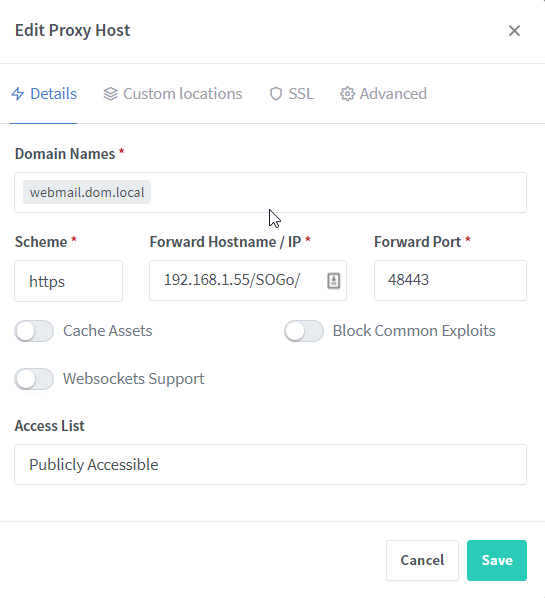
but when i point browser to http://192.168.1.55:48443/SOGo/ it works fine.
Is it possibile to make this working??
 bba-dvhk
on 18 Jan 2020
bba-dvhk
on 18 Jan 2020
You're putting the Folder Path in the Hostname/IP section which is not the right place. Furthermore, your non-working upstream https://192.168.1.55/SOGo/:48443 is not a valid URL, it should be https://192.168.1.55:48443/SOGo/.
The Custom Locations tab is for sub-folders of your domains.
jc21
on 19 Jan 2020
As I understand Custom Locations work like:
Broswer -> panel.dom.local -> https://192.168.1.55:48443
Broswer -> panel.dom.local/SOGo -> http//192.168.1.55:48443/SOGo
Broswer -> panel.dom.local/admin -> http://192.168.1.55:8080/admin
Broswer -> panel.dom.local/something -> http://156.1.55.6:80/something

I look to achieve:
Broswer -> panel.dom.local -> https://192.168.1.55:48443
Broswer -> webmail.dom.local -> http//192.168.1.55:48443/SOGo
Broswer -> admin.dom.local -> http://192.168.1.55:8080/admin
Broswer -> something.dom.local-> http://156.1.55.6:80/something

bba-dvhk
on 20 Jan 2020
I have a similar setup, I would like to achieve the following:
Broswer -> sw.domain.org -> http://192.168.1.55:8000/sw
Broswer -> m1.domain.org -> http://192.168.1.55:8000/m1
Broswer -> m2.domain.org -> http://192.168.1.55:8000/m2
I that possible an If how?
 MartinKuhl
on 1 May 2020
MartinKuhl
on 1 May 2020
I too would like to achieve this.
 OptimusGREEN
on 29 Jun 2020
OptimusGREEN
on 29 Jun 2020
Hi.
What when we have some Services in folder but don't on default port:
ie:
panel.dom.local -> https://192.168.1.55:48443 Works fine
webmail.dom.local -> https://192.168.1.55/SOGo/:48443 not working
but when i point browser to http://192.168.1.55:48443/SOGo/ it works fine.
Is it possibile to make this working??
Hello Were you able to get this to work? i am actually trying the same thing but no luck so far.
I installed Mailcow and Mailcow webmail is being served at
mail.example.com/SOGo/
Now mail.example.com is pointing at say 192.168.1.5 and is serving the admin page for the mail server.
I want to make it so that webmail.example.com will point to
https://192.168.1.5/SOGo/
I followed the instructions here https://github.com/jc21/nginx-proxy-manager/issues/104#issuecomment-490720849 but no luck so far
This is what my setup looks like now
Any ideas what I may be doing wrong, any help is very appreciated.
Thank you
 kaushikray1
on 19 Aug 2020
kaushikray1
on 19 Aug 2020
Thanks for this.. works great (As long as you read the instructions and add the trailing / ) :)
thanks again
Hello I understand you got thi to work, could you please help me with my setup. I am definitely doing something wrong. Thank you.
Hello Were you able to get this to work? i am actually trying the same thing but no luck so far.
I installed Mailcow and Mailcow webmail is being served at
mail.example.com/SOGo/
Now mail.example.com is pointing at say 192.168.1.5 and is serving the admin page for the mail server.
I want to make it so that webmail.example.com will point to
https://192.168.1.5/SOGo/
I followed the instructions here #104 (comment) but no luck so far
This is what my setup looks like now
Any ideas what I may be doing wrong, any help is very appreciated.
Thank you
kaushikray1
on 19 Aug 2020
Hello,
Is there something new about this ?
I need that as well!
As example redirect from example.domain.de -> 192.168.2.97:6060/?instance=87ed0a9
If I try the things above I can only get this to work: 192.168.2.97/?instance=87ed0a9:6060 which is wrong :/
 WolfsWelpe
on 31 Oct 2020
WolfsWelpe
on 31 Oct 2020
Try 192.168.2.97/?instance=87ed0a9/ with the port in the port box. The trailing slash is required.
OptimusGREEN
on 31 Oct 2020
Try 192.168.2.97/?instance=87ed0a9/ with the port in the port box. The trailing slash is required.
Hey thanks four your reply, I tried it like that:
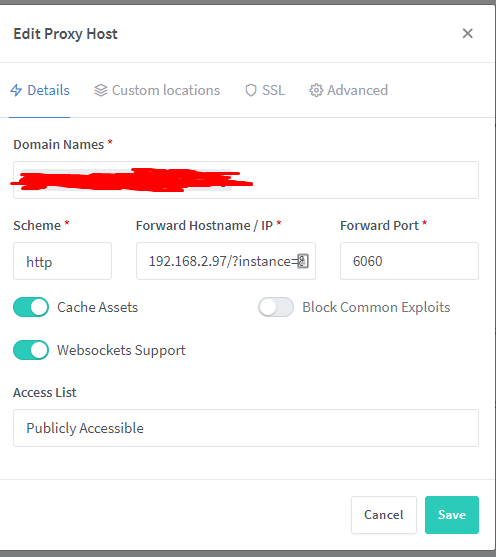
Sadly the Destination is still wrong:

I need the port before the /?instance=87ed0a9/ like that: http://192.168.2.97:6060/?instance=87ed0a9/
WolfsWelpe
on 31 Oct 2020
Its not the details tab it goes in, it goes in the custom location tab.
The details tab still needs filled out but I believe it gets ignored.
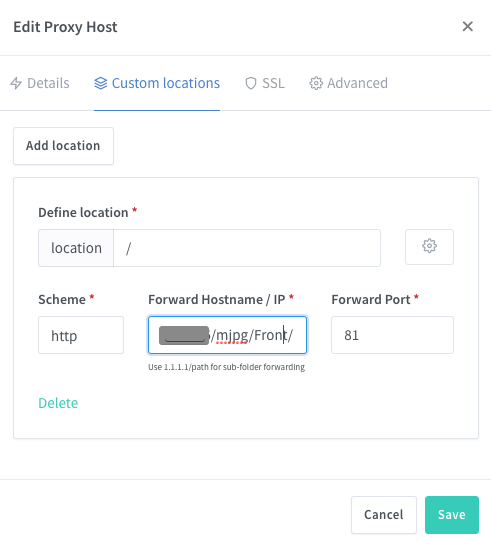
OptimusGREEN
on 31 Oct 2020
Is the above example working, for me i am getting so unlucky i guess, its still not working for me. :(
kaushikray1
on 1 Nov 2020
Is the above example working, for me i am getting so unlucky i guess, its still not working for me. :(
No sadly it is not working for me :(
WolfsWelpe
on 1 Nov 2020
Thanks for the update. hopefully it will be working soon in some newer version or someone will post the rit config. I will keep trying different config and if i get it to work I will post.
kaushikray1
on 1 Nov 2020
Is the above example working, for me i am getting so unlucky i guess, its still not working for me. :(
No sadly it is not working for me :(
For me is working:
Look at screens
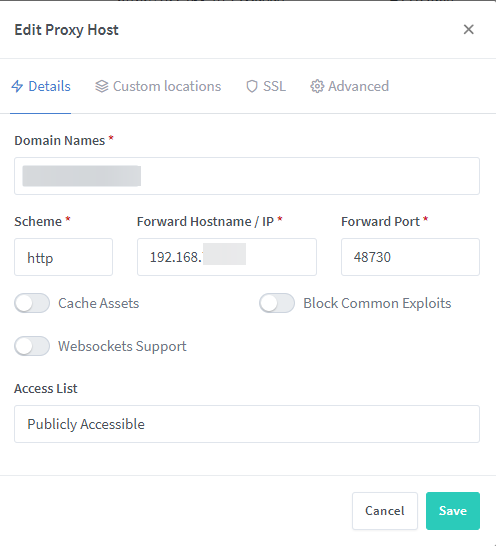
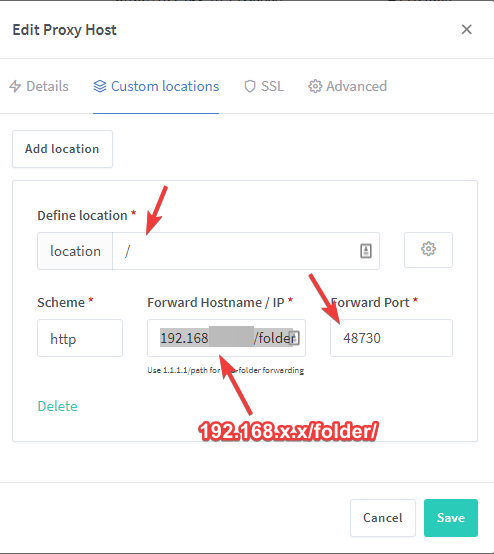
bba-dvhk
on 1 Nov 2020
yes mines working.
OptimusGREEN
on 1 Nov 2020
Unfortunately the access list doesn't work if you use it like that.
 fischdenflo
on 28 Nov 2020
fischdenflo
on 28 Nov 2020
Could you please share what to do in order for it to work. I have been trying for a while.
Get Outlook for Androidhttps://aka.ms/ghei36
From: fischdenflo notifications@github.com
Sent: Friday, November 27, 2020 7:32:06 PM
To: jc21/nginx-proxy-manager nginx-proxy-manager@noreply.github.com
Cc: Kaushik Ray ray.1_1@live.com; Comment comment@noreply.github.com
Subject: Re: [jc21/nginx-proxy-manager] How do i forward to a folder? (#104)
Unfortunately the access list doesn't work if you use it like that.
—
You are receiving this because you commented.
Reply to this email directly, view it on GitHubhttps://github.com/jc21/nginx-proxy-manager/issues/104#issuecomment-735018126, or unsubscribehttps://github.com/notifications/unsubscribe-auth/ABGA5GU2AASCRU7DGRB4IOLSSBAINANCNFSM4G6ZBN4A.
kaushikray1
on 30 Nov 2020
Related issues
 edouardkleinhans
·
6Comments
edouardkleinhans
·
6Comments
 MatijaTerzic
·
6Comments
MatijaTerzic
·
6Comments
 Sigri44
·
3Comments
Sigri44
·
3Comments
 varunsridharan
·
4Comments
varunsridharan
·
4Comments
 Kranzy
·
7Comments
Kranzy
·
7Comments
Most helpful comment
v2.0.13 is up with the fix. Here's how you would setup:
/as the location path and for the Forward Hostname / IP enter192.168.0.10/phpmyadmin/making sure you have that trailing slash, it's important.