Ng2-pdf-viewer: Several errors while building app with --prod flag
Bug Report or Feature Request (mark with an x)
- [ ] Regression (a behavior that used to work and stopped working in a new release)
- [x] Bug report -> please search issues before submitting
- [ ] Feature request
- [ ] Documentation issue or request
When I try to build my app for production, I get the following errors:
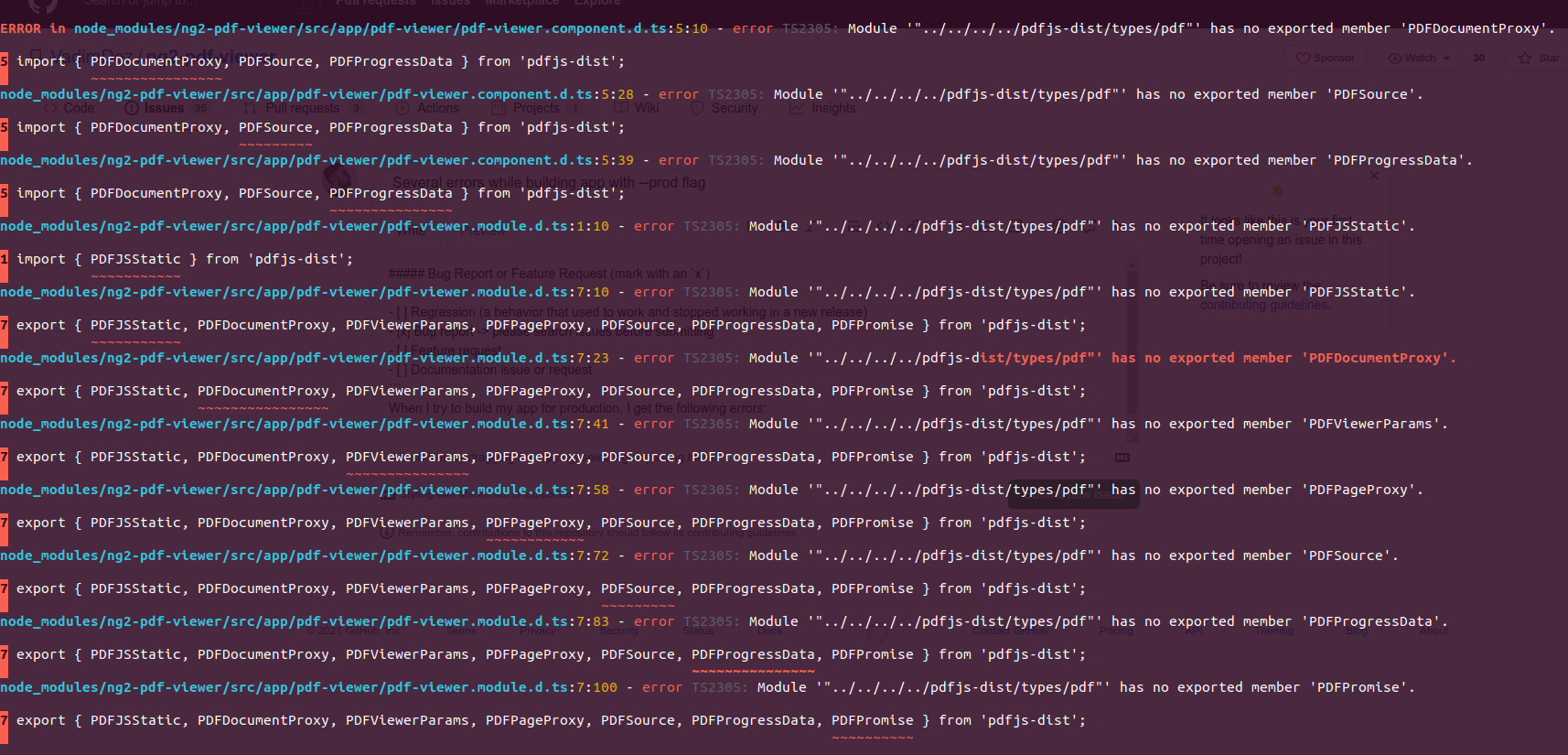
I'm using the 6.3.2 version.
I'm importing it on a shared module, and exporting it to the other modules:

Even if I don't use it on any component/page, I get the error just from importing it.
Weird things:
- It was working at least until last week (last successful deploy);
- It works on Windows machines, but I get these error in Linux environments;
Searched a lot and got nothing.
Any help?
Thanks in advance.
 dionisioleonardo
All 23 comments
I got this error today as well.
It looks like the "latest" version of the pdfjs-dist npm went from version 2.5.207 to 2.6.347 a day ago.
Setting pdfjs-dist back to the previous version fixed the errors for me i.e. add this line to your package.json dependencies:
"pdfjs-dist": "2.5.207",
 markabrahams
on 26 Jan 2021
markabrahams
on 26 Jan 2021
I got this error today as well.
It looks like the "latest" version of the pdfjs-dist npm went from version 2.5.207 to 2.6.347 a day ago.
Setting pdfjs-dist back to the previous version fixed the errors for me i.e. add this line to your package.json dependencies:
"pdfjs-dist": "2.5.207",
you're my savior thank you..
 finzero
on 26 Jan 2021
finzero
on 26 Jan 2021
Same here
@markabrahams unfortunately that doesn't solve it because it still installed pdfjs-dist under ng2-pdf-viewer separately
 danzrou
on 26 Jan 2021
danzrou
on 26 Jan 2021
Same here
@markabrahams unfortunately that doesn't solve it because it still installedpdfjs-distunderng2-pdf-viewerseparately
I only found pdfjs-dist on package-lock.json
 hafizihamid
on 26 Jan 2021
hafizihamid
on 26 Jan 2021
well, its probably a difference between how yarn and npm resolve dependencies.
Using npm actually did not add an additional pdfjs-dist dependency under ng2-pdf-viewer, however, yarn did
danzrou
on 26 Jan 2021
well, its probably a difference between how yarn and npm resolve dependencies.
Using npm actually did not add an additionalpdfjs-distdependency underng2-pdf-viewer, however, yarn did
noted try to installed pdfjs-dist separately, got error on importing ng2-pdf-viewer as Cannot find module 'ng2-pdf-viewer' or its corresponding type declarations.```
hafizihamid
on 26 Jan 2021
the real solution here would be moving them from dependencies into peerDependencies and exact version
danzrou
on 26 Jan 2021
I got the same issue, adding "pdfjs-dist": "2.5.207", to package.json with npm solved my issue, what I did exactly is I added this, remove the package-lock.json file and node_modules folder, then I did run npm i, that did fix my issue.
 almothafar
on 26 Jan 2021
almothafar
on 26 Jan 2021
I got the same issue, adding
"pdfjs-dist": "2.5.207",to package.json with npm solved my issue, what I did exactly is I added this, remove thepackage-lock.jsonfile andnode_modulesfolder, then I did runnpm i, that did fix my issue.
tried, but still got error on importing PdfViewerModule, as Cannot find module 'ng2-pdf-viewer' or its corresponding type declarations.ts(2307) in module, how did you import it in module ?
hafizihamid
on 26 Jan 2021
@hafizihamid just like what documentations says:
import { PdfViewerModule } from 'ng2-pdf-viewer';

almothafar
on 26 Jan 2021
@danzrou Did you find a solution for yarn?
Is it possible to fix depencies in a project with yarn?
In yarn.lock I have:
ng2-pdf-viewer@^6.3.2:
  version "6.3.2"
  resolved "https://registry.yarnpkg.com/ng2-pdf-viewer/-/ng2-pdf-viewer-6.3.2.tgz#07189207893ceb4c086e9b6ebd74fdbb31982af1"
  integrity sha512-H2tBhDd+Lq6CUzK2g54HsCcZDR2wTn1sDjYqKY3yF0Ydasl2R5ppCKynZBU/zge4EKvmHglJI120FbQMpJKDYQ==
  dependencies:
    "@types/pdfjs-dist" "^2.1.4"
    pdfjs-dist "^2.4.456"
    tslib "^1.10.0"
And it is installing:
pdfjs-dist@^2.4.456:
  version "2.6.347"
  resolved "https://registry.yarnpkg.com/pdfjs-dist/-/pdfjs-dist-2.6.347.tgz#f257ed66e83be900cd0fd28524a2187fb9e25cd5"
  integrity sha512-QC+h7hG2su9v/nU1wEI3SnpPIrqJODL7GTDFvR74ANKGq1AFJW16PH8VWnhpiTi9YcLSFV9xLeWSgq+ckHLdVQ==
 sandu2d
on 26 Jan 2021
sandu2d
on 26 Jan 2021
@sandu2d in yarn I think there is something called "resolutions":
Try:
"resolutions": {
    "pdfjs-dist": "2.5.207"
  }
Docs: https://classic.yarnpkg.com/en/docs/selective-version-resolutions/
almothafar
on 26 Jan 2021
I got this error today as well.
It looks like the "latest" version of the pdfjs-dist npm went from version 2.5.207 to 2.6.347 a day ago.
Setting pdfjs-dist back to the previous version fixed the errors for me i.e. add this line to your package.json dependencies:
"pdfjs-dist": "2.5.207",
This! This solves the issue when using npm. Thank you very much @markabrahams
But it would be interesting if ng2-pdf-viewer solved it out of the box.
I'm guessing if the correct version is set on the package.json file it would fix it.
dionisioleonardo
on 26 Jan 2021
@almothafar Yes, it worked. Thank you!
sandu2d
on 26 Jan 2021
Hi, I have folllowed all the instruction in which I have done
added "pdfjs-dist" on package.json as below
{
  "name": "project-test",
  "version": "0.0.0",
  "scripts": {
    "ng": "ng",
    "start": "ng serve",
    "build": "ng build",
    "test": "ng test",
    "lint": "ng lint",
    "e2e": "ng e2e"
  },
  "private": true,
  "dependencies": {
    "@angular-builders/custom-webpack": "^8.0.0-RC.1",
    "@angular/animations": "~10.0.4",
    "@angular/cdk": "^10.2.7",
    "@angular/common": "~10.0.4",
    "@angular/compiler": "~10.0.4",
    "@angular/core": "~10.0.4",
    "@angular/forms": "~10.0.4",
    "@angular/platform-browser": "~10.0.4",
    "@angular/platform-browser-dynamic": "~10.0.4",
    "@angular/router": "~10.0.4",
    "@fullcalendar/angular": "^5.4.0",
    "@fullcalendar/daygrid": "^5.4.0",
    "@fullcalendar/interaction": "^5.4.0",
    "@fullcalendar/list": "^5.4.0",
    "@fullcalendar/resource-timegrid": "^5.4.0",
    "cleave.js": "^1.6.0",
    "file-saver": "^2.0.5",
    "moment": "^2.24.0",
    "ng2-pdf-viewer": "^6.3.2",
    "ngx-cleave-directive": "^1.1.3",
    "ngx-extended-pdf-viewer": "^8.0.0-beta.2",
    "pdfjs-dist": "^2.5.207",
    "rxjs": "~6.5.5",
    "tslib": "^2.0.0",
    "zone.js": "~0.10.3",
    "zxcvbn": "^4.4.2"
  },
  "devDependencies": {
    "@angular-devkit/build-angular": "~0.1000.3",
    "@angular/cli": "~10.0.3",
    "@angular/compiler-cli": "~10.0.4",
    "@types/node": "^12.11.1",
    "@types/jasmine": "~3.5.0",
    "@types/jasminewd2": "~2.0.3",
    "codelyzer": "^6.0.0",
    "jasmine-core": "~3.5.0",
    "jasmine-spec-reporter": "~5.0.0",
    "karma": "~5.0.0",
    "karma-chrome-launcher": "~3.1.0",
    "karma-coverage-istanbul-reporter": "~3.0.2",
    "karma-jasmine": "~3.3.0",
    "karma-jasmine-html-reporter": "^1.5.0",
    "protractor": "~7.0.0",
    "ts-node": "~8.3.0",
    "tslint": "~6.1.0",
    "typescript": "~3.9.5"
  }
}
importing this code on a shared module
import { PdfViewerModule } from 'ng2-pdf-viewer'
@NgModule({
  declarations: [
    AdminComponent,
    DashboardComponent,
    CreateRoleComponent,
    RoleListingComponent,
    UpdateRoleComponent,
    CreateUserComponent,
    UpdateUserComponent,
    UserListingComponent,
    AddNewLocationComponent,
    EditLocationComponent,
    OffDayComponent,
    NewHolidayComponent,
    ApplicantComponent,
    AppointmentListComponent,
    EditAppointmentComponent,
    ReportComponent,
    LocationComponent,
    StaffComponent,
    AddStaffComponent,
    EditStaffComponent,
    ResultComponent,
    ResultListComponent,
  ],
  imports: [
    CommonModule,
    AdminRoutingModule,
    SharedModule,
    ReactiveFormsModule,
    FullCalendarModule,
    FormsModule,
    PdfViewerModule,
  ],
})
export class AdminModule {}
I have
- deleted package-lock.json file
- deleted entire node_modules folder
- reinstall npm
on my local upon running ng build --prod the warning message as below appear

don't think as a big issue as it is just warning
I am deploying this code on gitlab pipeline, and upon building pipeline, error as below appear

I am not sure what seems to be the problem during this build pipeline as my local seems to be working fine,
kindly help
 farhanramli-work
on 27 Jan 2021
farhanramli-work
on 27 Jan 2021
@farhanramli-work
Before you do your steps, which what exactly I did, did you specify or "force" package pdfjs-dist to version 2.5.207?
npm install [email protected] --save
You should be having this ("pdfjs-dist": "2.5.207") in your dependencies in package.json.
almothafar
on 27 Jan 2021
@almothafar
already done the given steps
farhanramli-work
on 27 Jan 2021
@farhanramli-work
You added:
"pdfjs-dist": "^2.5.207",but you have to add:
"pdfjs-dist": "2.5.207",
And I would add it before 'ng2-pdf-viewer'
 brainwind-software
on 27 Jan 2021
brainwind-software
on 27 Jan 2021
@farhanramli-work Oh I didn't see the package.json file you posted, but yes as what @brainwind-software said, you need to remove ^, this will install the latest of 2.x so it will install 2.6.347, the problem in 2.6.347 and you need 2.5.207 to fix it.
almothafar
on 27 Jan 2021
I got the same issue, Need to add a dependencies library, and the issue will be fixed for me.
"@types/pdfjs-dist": "~2.0.1",
"ng2-pdf-viewer": "^6.3.2"
OR else decrease ng2-pdf-viewer version number and add pdfjs-dist
"pdfjs-dist": "~2.5.207",
"ng2-pdf-viewer": "~5.3.4",
 Rahul-kalsha
on 28 Jan 2021
Rahul-kalsha
on 28 Jan 2021
@Rahul-kalsha The fix you have provided worked properly. Thanks for saving our lot of time.
 rahul-network
on 28 Jan 2021
rahul-network
on 28 Jan 2021
@markabrahams Thanks bro you saved my day
 sraza295
on 2 Feb 2021
sraza295
on 2 Feb 2021
I got the same issue, Need to add a dependencies library, and the issue will be fixed for me.
"@types/pdfjs-dist": "~2.0.1", "ng2-pdf-viewer": "^6.3.2"OR else decrease ng2-pdf-viewer version number and add pdfjs-dist
"pdfjs-dist": "~2.5.207", "ng2-pdf-viewer": "~5.3.4",
Not working.
 narendrasinghrathore
on 3 Feb 2021
narendrasinghrathore
on 3 Feb 2021
Related issues
 yashwanth493
·
7Comments
yashwanth493
·
7Comments
 fncamm
·
4Comments
fncamm
·
4Comments
 kevinariasf
·
6Comments
kevinariasf
·
6Comments
 VadimDez
·
5Comments
VadimDez
·
5Comments
 GarciaFreelancer
·
6Comments
GarciaFreelancer
·
6Comments
Most helpful comment
I got this error today as well.
It looks like the "latest" version of the pdfjs-dist npm went from version 2.5.207 to 2.6.347 a day ago.
Setting pdfjs-dist back to the previous version fixed the errors for me i.e. add this line to your package.json dependencies:
"pdfjs-dist": "2.5.207",