Ng2-pdf-viewer: Angular 9 for Internet Explorer 11 dont work vendor.js compile error
Bug Report or Feature Request (mark with an x)
- [ ] Regression (a behavior that used to work and stopped working in a new release)
- [x ] Bug report -> please search issues before submitting
- [ ] Feature request
- [ ] Documentation issue or request
I use "ng2-pdf-viewer": "^6.3.0" and upgraded my project to "@angular/core": "^9.1.9",
In Chrome i have no Problems but when I try to compile the project in es5 and start IE11 locally I get a error from the vendor.js
SCRIPT1010: Indentifier expected
vendor.js (158998,9)
{
  const { <--- Breaks here
    isNodeJS
  } = __w_pdfjs_require__(7);

  if (isNodeJS) {
    const PDFNodeStream = __w_pdfjs_require__(19).PDFNodeStream;

    pdfjsDisplayAPI.setPDFNetworkStreamFactory(params => {
      return new PDFNodeStream(params);
    });
  } else {
    const PDFNetworkStream = __w_pdfjs_require__(22).PDFNetworkStream;

    let PDFFetchStream;

    if (pdfjsDisplayDisplayUtils.isFetchSupported()) {
      PDFFetchStream = __w_pdfjs_require__(23).PDFFetchStream;
    }

    pdfjsDisplayAPI.setPDFNetworkStreamFactory(params => {
      if (PDFFetchStream && pdfjsDisplayDisplayUtils.isValidFetchUrl(params.url)) {
        return new PDFFetchStream(params);
      }

      return new PDFNetworkStream(params);
    });
  }
}
Has anybody an idea what the problem is?
 dark0ni
All 12 comments
I am using "ng2-pdf-viewer": "6.0.2" with angular 9.0.5 and I recently started to see the exact same error in IE11.
pdfs also no longer render properly for me in Edge, it ends up rendering the correct amount of pages, but they are all blank and show the loading spinner forever.
Chrome, as usual, works fine.
a version of my artifact built last week is working, but newer versions are not and it is the exact same code. expecting that it is the pdfjs-dist dependency that potentially pulled in a new version?
 skyleguy
on 3 Jun 2020
skyleguy
on 3 Jun 2020
After adding the following dependencies to my own package.json i was able to get past this issue:
"pdfjs-dist": "2.2.228"
You may need this one as well in the dev-dependencies:
"@types/pdfjs-dist": "2.1.0",
but im pretty sure it isnt necessary
skyleguy
on 3 Jun 2020
Hi Team, It not working. facing below issue in IE 11

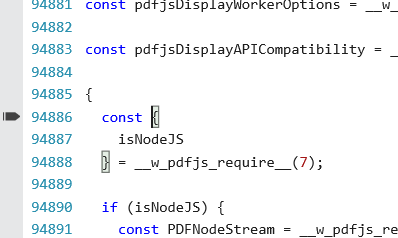
 chintan3100
on 4 Jun 2020
chintan3100
on 4 Jun 2020
I did some research on this issue and found out that it's because pdfjs-dist provides a separate -es5 build for older browsers since v2.4.456 and which is the minimum version required by ng2-pdf-viewer since v2.3.0 and
As a workaround you can use [email protected] and setting [email protected] as fixed version in your package.json.
 StuMx
on 5 Jun 2020
StuMx
on 5 Jun 2020
I tried to use a fixed Version but get errors when i want compile for IE with:
ng serve --configuration es5
ERROR in ./node_modules/ng2-pdf-viewer/__ivy_ngcc__/node_modules/pdfjs-dist/build/pdf.js
Module not found: Error: Can't resolve 'fs' in 'C:\Users\...\node_modules\ng2-pdf-viewer\__ivy_ngcc__\node_modules\pdfjs-dist\build'
ERROR in ./node_modules/ng2-pdf-viewer/__ivy_ngcc__/node_modules/pdfjs-dist/build/pdf.js
Module not found: Error: Can't resolve 'http' in 'C:\Users\...\node_modules\ng2-pdf-viewer\__ivy_ngcc__\node_modules\pdfjs-dist\build'
ERROR in ./node_modules/ng2-pdf-viewer/__ivy_ngcc__/node_modules/pdfjs-dist/build/pdf.js
Module not found: Error: Can't resolve 'https' in 'C:\Users\...\node_modules\ng2-pdf-viewer\__ivy_ngcc__\node_modules\pdfjs-dist\build'
Add below package
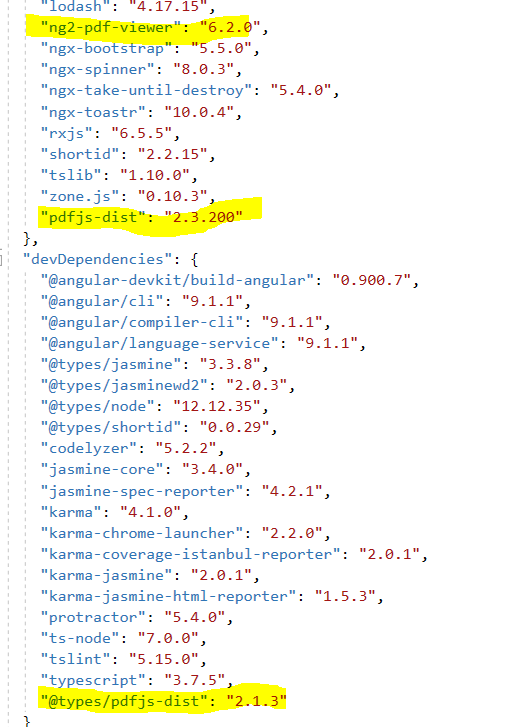

Set worker js in App component
(
Do not use above code to load worker. It will create performance issue to navigate pdf pages. User below
(window as any).pdfWorkerSrc = import('pdfjs-dist/webpack');
chintan3100
on 9 Jun 2020
Add below package
Set worker js in App component
(window).pdfWorkerSrc = './scripts/pdf.worker.js';
It works for me without any problems! Thanks!!!
 m0py
on 9 Jun 2020
m0py
on 9 Jun 2020
npm i [email protected]
Was looking into this issue since last 2 days, finally worked for me, Thanks a lot.
 Suhas-Nadarge
on 17 Jun 2020
Suhas-Nadarge
on 17 Jun 2020
Add below package
Set worker js in App component
(window).pdfWorkerSrc = './scripts/pdf.worker.js';
I LOVE YOU!
 glappsi
on 7 Jul 2020
glappsi
on 7 Jul 2020
@VadimDez Does not this mean that folks who want to support "older" (but still widely used) browsers are bound to 6.2.0 forever? I do not think this is good news. Maybe there is a way around it?
 dmytro-gokun
on 16 Jul 2020
dmytro-gokun
on 16 Jul 2020
Add below package
Set worker js in App component
(window).pdfWorkerSrc = './scripts/pdf.worker.js';
Do not use above code to load worker. It will create performance issue to navigate pdf pages. User below
(window as any).pdfWorkerSrc = import('pdfjs-dist/webpack');
Hi, I tried using (window as any).pdfWorkerSrc = import('pdfjs-dist/webpack'), but there is a problem changing programmaticaly the src to the pdfComponent, sometimes the file changes other times it doesn't. Do u have any suggestions?
Thanks
 salvoimpspindox
on 21 Jul 2020
salvoimpspindox
on 21 Jul 2020
This issue has been automatically marked as stale because it has not had recent activity. It will be closed if no further activity occurs. Thank you for your contributions.
![stale[bot] picture](https://avatars.githubusercontent.com/in/1724?v=4&s=40) stale[bot]
on 19 Sep 2020
stale[bot]
on 19 Sep 2020
Related issues
 kuba007
·
3Comments
kuba007
·
3Comments
 jgrant95
·
6Comments
jgrant95
·
6Comments
 sabarinathancs
·
4Comments
sabarinathancs
·
4Comments
 quentinmachard-niji
·
3Comments
quentinmachard-niji
·
3Comments
 roginneil
·
3Comments
roginneil
·
3Comments
Most helpful comment
Add below package

Set worker js in App componentwindow).pdfWorkerSrc = './scripts/pdf.worker.js';
(
Do not use above code to load worker. It will create performance issue to navigate pdf pages. User below
(window as any).pdfWorkerSrc = import('pdfjs-dist/webpack');