Ng2-charts: Pie Chart not showing labels added dynamically
Hi
First of all I really like this project, very easy to integrate!
I am having the same issue reported in #420 I am running version 1.5.0.
Pie charts show labels when they are specified as constants at design time but when I add them dynamically I get "undefined" as the item label, the data points show up correctly though.
public weeklypiechartData(incomingArray : any[]):void {
    this.weeklypieChartLabels = [];
    this.weeklypieChartData = [];
    for(var i in incomingArray)
    {
        this.weeklypieChartData.push(incomingArray[i]);
        this.weeklypieChartLabels.push(i);
        console.log(incomingArray[i], i);
    }
    console.log(this.weeklypieChartData);
    console.log(this.weeklypieChartLabels);
  }
The last console log prints: ["Coffee", "Lunch", "Groceries"]
But my chart shows:

 ChrisAllisonMalta
All 14 comments
I believe I am having a similar issue
In my plunkr example, after initialization if you overwrite the labels or datasets array with new data and if the new array is shorter or longer than the original labels or datasets arrays, the data wont' display correctly.
In my plunkr if you click the button "change2" in the view, the datasets array length increases by 2 and the new datasets[1...2].labels aren't added to the chart canvas
Anyone have a work around?
 jakeNesom
on 2 Mar 2017
jakeNesom
on 2 Mar 2017
See this fix: https://github.com/valor-software/ng2-charts/pull/661
 Neir0
on 7 Mar 2017
Neir0
on 7 Mar 2017
@Neir0 I apologize for a misguided question - I'm very junior with programming - How can I test your fix with my app? Would I need to copy the contents of your chart.ts file, transpile it to javascript, and insert it into my ng2-charts/bundles folder? Would i need to rename it ng2-charts.umd.js?
Thanks again for your time and efforts
jakeNesom
on 14 Mar 2017
@jakeNesom I just transpile it and put to the ng2-charts/charts
Neir0
on 14 Mar 2017
@Neir0 - you trans-piled it and put it into the production ng2-charts/charts/ directory? I did that and still had my issue so i'm not sure if i am missing a step or if the solution didn't work for me. Based on the typescript it looks like it should work.
I don't have to somehow convert the charts.js file to ng2-charts.umd.js? Based on the valore software site - it would appear systemjs.config.js is setup to read the ng2-charts.umd.js file with the angular module
jakeNesom
on 15 Mar 2017
Well, if you are using SystemJS probably you need to convert it to the UMD. I'm not an expert with all these mess with modules, so I couldn't say you exactly what to do in your case. I'm using webpack and I believe it doesn't touch umd files at all.
Neir0
on 15 Mar 2017
I had a similar kind of issue, i have a work around for this. If you are getting the labels and data from a backend response. Then just empty the ChartData (variable used in the front end for data or datasets attribute) just before calling the api. Incase, if you dont have a call to API, then use timeout function and load the ChartData variable.
Example:
var datas = ['label1','label2'];
setTimeout(function () {
doughnutChartData = datas;
}, 0);
 AmareshB
on 26 May 2017
AmareshB
on 26 May 2017
@Neir0 is your feature available in v1.6.0? I think not. I am having the issue in latest version. I am also using webpack. How can i get this fix so my chart work properly?
 dgpuranik
on 13 Jun 2017
dgpuranik
on 13 Jun 2017
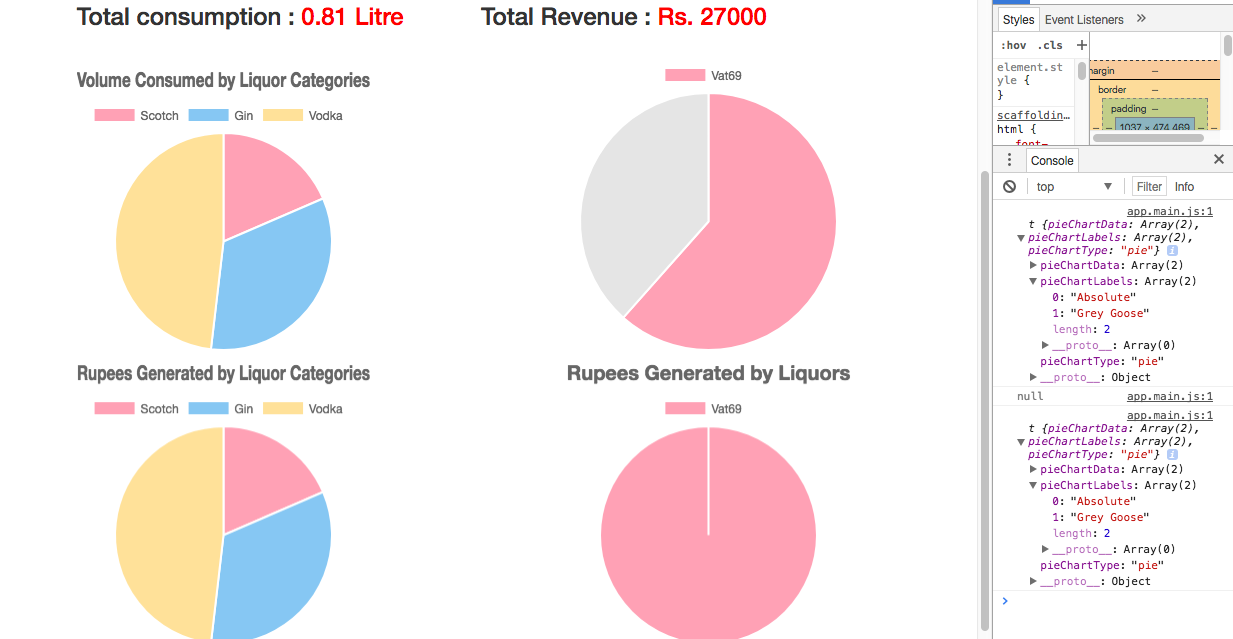
@AmareshB I am accessing the data from backend. I tried something similar I guess. I tried setting [] to my data and lables variable, then populated with backend data but it didnt work.
my code look like this:
var data = new PieChartData();
data.pieChartData = volumeVals;
data.pieChartLabels = liqKeys;
data.pieChartType = 'pie';
console.log (this._pieChartData);
this._pieChartData = null;
console.log (this._pieChartData);
this._pieChartData = data;
console.log (this._pieChartData);
Console output is as expected but doesnt reflect in graph as you see in image below.
dgpuranik
on 13 Jun 2017
@dgpuranik In my case, data was reflected but not the tables. I think its because you have a single binding object instead of different binding objects. Can you just try a timeout and set the object ?
setTimeout(function () {
this._pieChartData = data;
}, 0);
I think, this should work.
AmareshB
on 13 Jun 2017
@AmareshB I tried the exact line of code but forgot to mention. My graph completely disappeared.
dgpuranik
on 13 Jun 2017
@Neir0 I tried your code. I have attached the modified file here. Please let me know if I am missing something.
I compiled the code with these changes in charts.ts. I put updated transpiled files in my app's ng-modules/ng2-charts. But, now, my all charts disappeared. I am seeing following error in browser console:
ERROR TypeError: Cannot read property 'length' of undefined
at Object.acquireContext (app.main.js:1)
at t.construct (app.main.js:1)
at new t (app.main.js:1)
at t.getChartBuilder (app.main.js:1)
at t.refresh (app.main.js:1)
at t.ngOnChanges (app.main.js:1)
at an (app.main.js:1)
at Gn (app.main.js:1)
at Wn (app.main.js:1)
at fr (app.main.js:1)
@AmareshB _setTimeout()_ functions works but you have to do data and lables separately. I found this on stackoverflow. Code looks as follows:
this._pieChartData.data = vals;
setTimeout (() => this._pieChartData.labels = labels);
We still need fix for this.
dgpuranik
on 14 Jun 2017
This package has been updated for Angular 7, with many bugs fixed and features added. I believe this issue is now resolved. If not, please provide a stackblitz/codepen/... example showing it.
 paviad
on 6 Mar 2019
paviad
on 6 Mar 2019
Related issues
 martinpinto
·
3Comments
martinpinto
·
3Comments
 sarn3792
·
4Comments
sarn3792
·
4Comments
 SteeledSlagle13
·
3Comments
SteeledSlagle13
·
3Comments
 tssobe
·
4Comments
tssobe
·
4Comments
 brandonreid
·
3Comments
brandonreid
·
3Comments
Most helpful comment
@AmareshB _setTimeout()_ functions works but you have to do data and lables separately. I found this on stackoverflow. Code looks as follows:
We still need fix for this.