Reproduction link
https://stackblitz.com/edit/ng-zorro-antd-start-mgn5yd
Steps to reproduce
Rating does not work correctly with fractional numbers.
Look in the console - https://ng-zorro-antd-start-mgn5yd.stackblitz.io
What is expected?
value 3.0 = 3 star
value 4.8 = 5 star
What is actually happening?
Rating value "3.0" != 3 star :(

| Environment | Info |
|---|---|
| ng-zorro-antd | 8.0.3 |
| Browser | Chrome 75.0.3770.100 |
JS
value <= 0.5        // 🌗
value >= 4.5        // 🌕🌕🌕🌕🌕
 4val0v
All 4 comments
Also remove the margin for the last element.
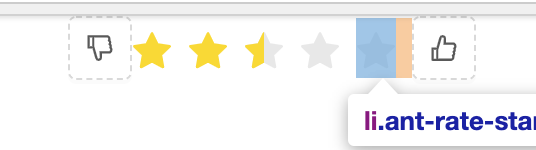
_Solution:_
li:not(:last-child) {
    margin-right: 8px;
}
it is quite clear that the rate only accept number, but you pass a string to the ngModel
The string is obviously not equal to a number
https://stackblitz.com/edit/ng-zorro-antd-start-ab1fc3?file=src/app/app.component.ts
 vthinkxie
on 18 Jul 2019
vthinkxie
on 18 Jul 2019
The string is obviously not equal to a number
Oh yes, indeed, my carelessness😔, thanks🤝
And about the margin, my message is higher
Create a new issues about this ?
_Now I use:_
::ng-deep .ant-rate {
  li {
    margin: 0 4px 0 4px
  }
}
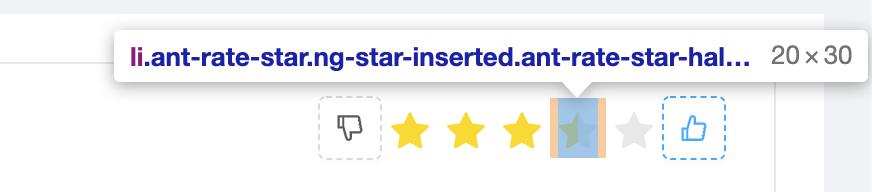
You can do it in the source code approximately as I said above.
4val0v
on 18 Jul 2019
For style problems, maybe you should send a pull request to ant design first because style files are synced from there.
 wendellhu95
on 19 Jul 2019
wendellhu95
on 19 Jul 2019
Related issues
 devpei
·
16Comments
devpei
·
16Comments
 JCqiu
·
20Comments
JCqiu
·
20Comments
 Svetomechc
·
20Comments
Svetomechc
·
20Comments
 wisdomfusion
·
18Comments
wisdomfusion
·
18Comments
 Cyclone77
·
19Comments
Cyclone77
·
19Comments
Most helpful comment
it is quite clear that the rate only accept
number, but you pass astringto thengModelThe string is obviously not equal to a number
https://stackblitz.com/edit/ng-zorro-antd-start-ab1fc3?file=src/app/app.component.ts