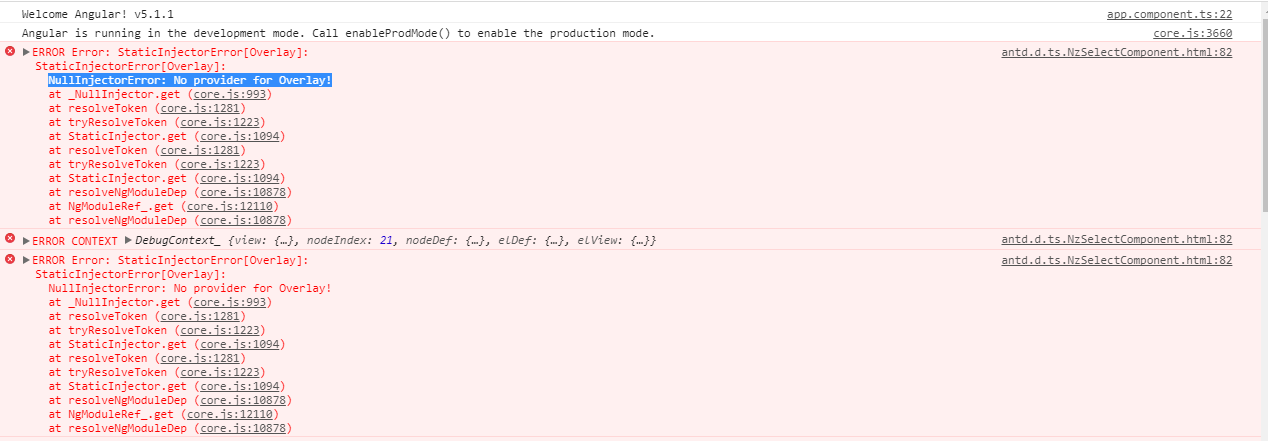
Ng-zorro-antd: NullInjectorError: No provider for Overlay!
Version
0.6.6
Environment
windows7、Google Chrome版本 63.0.3239.84、
Reproduction link
https://ng.ant.design/issue-helper/#/new-issue
Steps to reproduce
启动报错
What is expected?
不报错
What is actually happening?
报错
Other?

 xiongyayun428
All 14 comments
just try removing all the node_modules and reinstall, if you are using cnpm or tnpm, please use --by=npm option.
 vthinkxie
on 15 Dec 2017
vthinkxie
on 15 Dec 2017
@vthinkxie Still the same
xiongyayun428
on 15 Dec 2017
@xiongyayun428
everything works fine in our integration test here https://travis-ci.org/NG-ZORRO/ng-zorro-antd/jobs/316302861,
if there is anything wrong in your project, please reproduce it or check your environment, we CAN NOT help you only with your one screenshot.
and please do not ask the question that can not be answered https://zhuanlan.zhihu.com/p/25795393
vthinkxie
on 15 Dec 2017
@xiongyayun428 check your cdk again, you must have install wrong cdk version.
https://github.com/NG-ZORRO/ng-zorro-antd/blob/master/package.json#L43
vthinkxie
on 15 Dec 2017
@vthinkxie
Angular CLI: 1.6.1
Node: 9.3.0
OS: win32 x64
Angular: 5.1.1
... animations, common, compiler, compiler-cli, core, forms
... http, language-service, platform-browser
... platform-browser-dynamic, platform-server, router

@angular/cdk: 5.0.0
@angular/cli: 1.6.1
@angular/material: 5.0.1
@angular-devkit/build-optimizer: 0.0.36
@angular-devkit/core: 0.0.22
@angular-devkit/schematics: 0.0.42
@ngtools/json-schema: 1.1.0
@ngtools/webpack: 1.9.1
@schematics/angular: 0.1.11
@schematics/schematics: 0.0.11
typescript: 2.6.2
webpack: 3.10.0
@xiongyayun428 cdk version is the same as material design, it has conflict with ng-zorro-antd version 0.6.6, since 0.6.6 only support the cdk 5.0.0. there must be a warning when you install your node_modules.
vthinkxie
on 15 Dec 2017
Solved this problem by removing node_modules/ under ng-zorro-antd/.
 xwHoward
on 20 Nov 2018
xwHoward
on 20 Nov 2018
Solved this problem by removing node_modules/ under ng-zorro-antd/.
although i solved too by ur way,i still don`t know why. this node_modules effect the global?
 imAcityman
on 14 Mar 2019
imAcityman
on 14 Mar 2019
Solved this problem by removing node_modules/ under ng-zorro-antd/.
works for me too.
[email protected]
[email protected]
 wgjtyu
on 11 Jul 2019
wgjtyu
on 11 Jul 2019
run this command can also solve this:
rm -rf node_modules && rm package-lock.json && npm install
wgjtyu
on 11 Jul 2019
It works for me.Thx @wgjtyu
 kerwin-ly
on 18 Jul 2019
kerwin-ly
on 18 Jul 2019
Solved this problem by removing node_modules/ under ng-zorro-antd/.
Worked for me. Thanks, @xwHoward.
 jacobswain
on 23 Jul 2019
jacobswain
on 23 Jul 2019
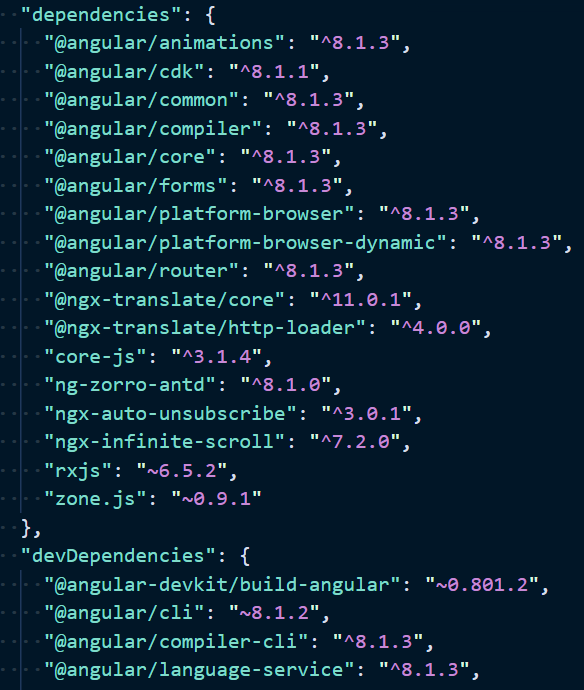
Same problem here :(
My versions:
 Svetomechc
on 26 Jul 2019
Svetomechc
on 26 Jul 2019
Quick note that I just had a similar issue on my project and it turns out the @angular/cdk dependency I had in my project was old than the one ng-zorro-antd declares as a dependency and it seemed to create an issue with the injector for Overlay.
If anyone gets a similar issue, my first advice would be to ensure the @angular/cdk version you use in your project (if you do declare one explicitly) matches the version ng-zorro-antd uses. In my particular case, for [email protected], I needed @angular/[email protected].
 davidmarquis
on 13 Nov 2020
davidmarquis
on 13 Nov 2020
Related issues
 saeedrahimi
·
28Comments
saeedrahimi
·
28Comments
 ultshift
·
15Comments
vthinkxie
·
77Comments
ultshift
·
15Comments
vthinkxie
·
77Comments
 WeslleyDeSouza
·
24Comments
vthinkxie
·
17Comments
WeslleyDeSouza
·
24Comments
vthinkxie
·
17Comments
Most helpful comment
Solved this problem by removing node_modules/ under ng-zorro-antd/.