Nexus-plugin-prisma: Cannot find name 'NexusPrisma'
when running type check on my project I get the following:
$ tsc
generated/typegen.ts:29:11 - error TS2304: Cannot find name 'NexusPrisma'.

29     crud: NexusPrisma<TypeName, 'crud'>
             ~~~~~~~~~~~

generated/typegen.ts:30:12 - error TS2304: Cannot find name 'NexusPrisma'.

30     model: NexusPrisma<TypeName, 'model'>
              ~~~~~~~~~~~
Should these be imported from somewhere? or am I missing a step?
 chrisdrackett
All 20 comments
Yesterday, I've updated to
"nexus": "^0.12.0-rc.4",
"nexus-prisma": "^0.5.2",
"prisma2": "2.0.0-preview016.2",
and now I am seeing the same issue.
 benjixx
on 15 Nov 2019
benjixx
on 15 Nov 2019
I had to run the following to get this solved:
- Generate Photon client again:
prisma2 generate
Run application so makeSchema(...) gets called again which takes care of updating the typegen.ts file
Wait for VSCode to pick up the changes ... this sometimes takes a few seconds (restart may help)
benjixx
on 15 Nov 2019
I'm experiencing the same issue.NexusPrisma type should be coming from node_modules/@types/nexus-prisma-typegen/index.d.ts. It is there:
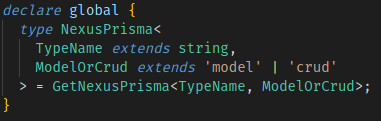
But generated nexus.ts still can't find it.
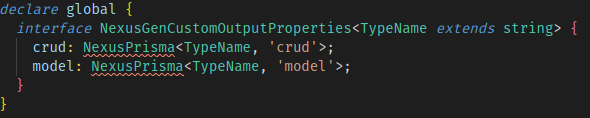
Any suggestion, please?
 cypcz
on 23 Mar 2020
cypcz
on 23 Mar 2020
@cypcz I ran into this because I had added in my tsconfig.json a definition for types: ["node"]. After removing the types key, it compiled fine. If you need your types defined there, there is likely a way to make this work too - but that's a pointer in the right direction at least.
 radicand
on 31 Mar 2020
radicand
on 31 Mar 2020
@radicand thanks, but it didn't work for me. I temporarily fixed it by generating the types again to the folder, where nexus.ts lives.
I had to adjust nexusPrismaPlugin like this:
  plugins: [
    nexusPrismaPlugin({
      // Fixes the Cannot find NexusPrisma issue
      outputs: { typegen: __dirname + '/generated/index.ts' },
    }),
  ],
Here was the solve for me:
Set "skipLibCheck": true in the compilerOptions property in the tsconfig.json file and run tsc again.
 dborstelmann
on 17 Apr 2020
dborstelmann
on 17 Apr 2020
@radicand try to add "types": ["nexus-prisma-typegen"] in your tsconfig.json?
 mingchuno
on 10 Jul 2020
mingchuno
on 10 Jul 2020
Closing this issue as there’s nothing really actionable for us. It is usually due to tsconfig issues. In the framework we solved this issue completely by managing everything including the tsconfig.
 jasonkuhrt
on 10 Jul 2020
jasonkuhrt
on 10 Jul 2020
did anyone manage to get around this issue?
tried adding outputs: { typegen: path.join(process.cwd(), 'pages', 'api', 'index.ts') } but getting the same error
 bogdancss
on 12 Aug 2020
bogdancss
on 12 Aug 2020
Can you provide more of your code? I currently don't have issues and I just followed the official getting started guide. Like already mentioned it may be because of an invalid tsconfig.
 mohe2015
on 12 Aug 2020
mohe2015
on 12 Aug 2020
@mohe2015 here's a stripped-down repo that has the issue.
It's mainly following this prisma example, with a few changes:
- upgraded to latest @apollo/client and removed all old dependencies, according to the official migration guide
- installed the nexus-plugin-prisma and replaced the GraphQl Queries and Mutations to use
t.crud.... - replaced the SQLite database to a Postgres one
The app connects to a Postgres Heroku dataset (used solely for testing - that's why I included the credentials in the repo above).
If you clone the repo, npm i and npm run dev, you should get it up and running locally. It works perfectly fine locally - all mutations and queries work fine.
However, once deployed to Heroku, during build I get the Cannot find name 'NexusPrisma' error and deployment stops.
bogdancss
on 12 Aug 2020
@bogdancss are you using heroku-prebuild task when deploying to heroku?
 jorgenskogas
on 13 Aug 2020
jorgenskogas
on 13 Aug 2020
@jorgenskogas no, here's my scripts block:
```
"scripts": {
"dev": "next dev",
"build": "next build",
"start": "next start -p $PORT",
"export": "next export",
"generate": "npm -s run generate:prisma && npm -s run generate:nexus",
"generate:prisma": "npx prisma generate",
"generate:nexus": "ts-node --transpile-only -P nexus.tsconfig.json pages/api",
"migrate": "npm -s run migrate:save && npm -s run migrate:up",
"migrate:save": "npx prisma migrate save --experimental",
"migrate:up": "npx prisma migrate up --experimental"
}
bogdancss
on 13 Aug 2020
Can't test because it's really late but the following parts in tsconfig.json may help (honestly I have no idea):
{
  "compilerOptions": {
    "plugins": [
      {
        "name": "nexus/typescript-language-service"
      }
    ],
    "typeRoots": ["node_modules/@types", "types"],
  },
  "include": ["types.d.ts", "."]
}
Also I neither use next.js nor heroku so I can't help more.
mohe2015
on 13 Aug 2020
@mohe2015 will give that a shot
bogdancss
on 13 Aug 2020
@bogdancss this fixed it for me (if you test this locally, clean/delete your node_modules first)
import { makeSchema } from '@nexus/schema';
import { nexusSchemaPrisma } from 'nexus-plugin-prisma/schema';
import * as types from './types';

export const schema = makeSchema({
    types,
-   plugins: [nexusSchemaPrisma()],
+   plugins: [nexusSchemaPrisma({ outputs: { typegen: __dirname + '/generated/typegen-nexus-plugin-prisma.d.ts' } })],
    outputs: {
        schema: __dirname + '/generated/schema.graphql',
        typegen: __dirname + '/generated/nexus.ts',
    },
    typegenAutoConfig: {
        sources: [
            {
                source: '@prisma/client',
                alias: 'client',
            },
            {
                source: require.resolve('./context'),
                alias: 'Context',
            },
        ],
        contextType: 'Context.Context',
    },
});
@jorgenskogas doing that, it builds fine now. However, I am getting this error while trying to call the api:
Error: EROFS: read-only file system, mkdir '/generated'
bogdancss
on 13 Aug 2020
@jorgenskogas ok, changed that to
outputs: { typegen: path.join(process.cwd(), 'pages', 'api', 'generated', 'typegen-nexus-plugin-prisma.d.ts') }
And it seems to be working fine now.
bogdancss
on 13 Aug 2020
I ended up here after googling the same type error and I would like to mention that when NODE_ENV is set to production, type files are not generated.
In the case where you need to compile typescript on production environment, you need to specify shouldGenerateArtifacts option like below.
 plugins: [
    nexusSchemaPrisma({
     // Generate typefiles on any occasions
      shouldGenerateArtifacts : true,
      outputs : {
        typegen: __dirname + '/generated/typegen-nexus-plugin-prisma.d.ts'
      }
    })
  ],
 oviavo-ts
on 19 Nov 2020
oviavo-ts
on 19 Nov 2020
{
  "compilerOptions": {
    // "types": ["node"], // breaks Nexus
    "target": "ESNEXT",
    "module": "commonjs",
 shkolyar
on 31 Dec 2020
shkolyar
on 31 Dec 2020
Related issues
jasonkuhrt
·
4Comments
 malekjaroslav
·
5Comments
malekjaroslav
·
5Comments
 antonbramsen
·
4Comments
antonbramsen
·
4Comments
 ndom91
·
4Comments
ndom91
·
4Comments
 colinhacks
·
5Comments
colinhacks
·
5Comments
Most helpful comment
@radicand thanks, but it didn't work for me. I temporarily fixed it by generating the types again to the folder, where
nexus.tslives.I had to adjust
nexusPrismaPluginlike this: