Nexus-plugin-prisma: t.model does not exist
I am trying to upgrade to Prisma 2 with photon and @prisma/nexus based on this documentation, but am running into this error:
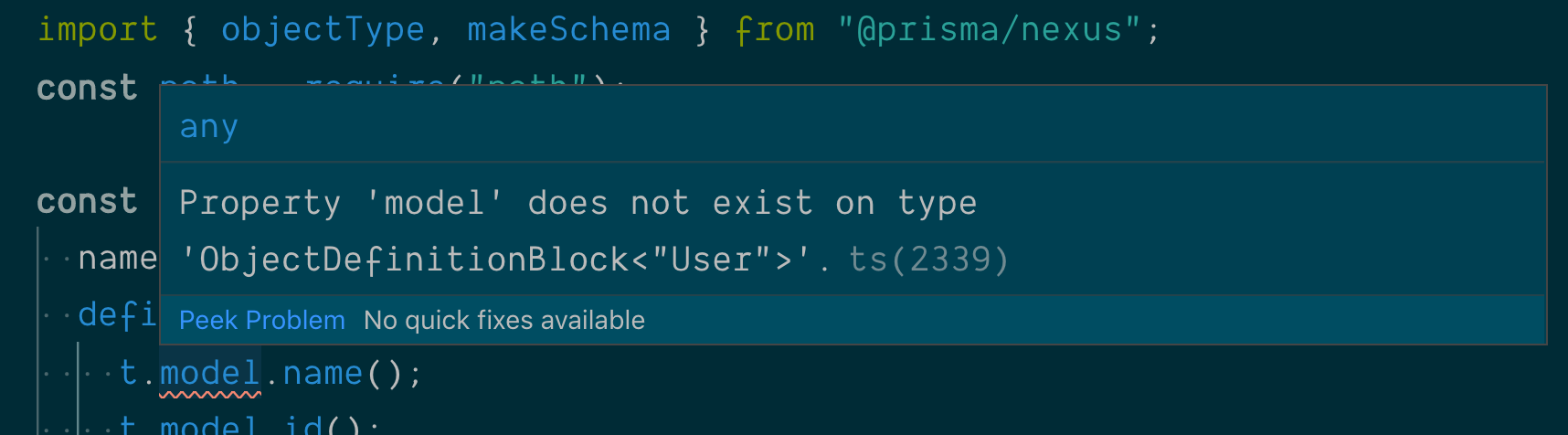
How do I use them together now?
 mxstbr
All 28 comments
Hey @mxstbr! I am currently focused on https://github.com/prisma/nexus/pull/205. After that I will jump on this. I believe resolving the former issue will assist on addressing issues like this one.
 jasonkuhrt
on 25 Aug 2019
jasonkuhrt
on 25 Aug 2019
I am also running into this issue but with t.crud
 divyenduz
on 26 Aug 2019
divyenduz
on 26 Aug 2019
Same issue here.
337 seems to be the same or at least a very similar issue.
 iherger
on 27 Aug 2019
iherger
on 27 Aug 2019
Same issue only "@prisma/nexus": "^0.0.1", works for me
 mazzaker
on 27 Aug 2019
mazzaker
on 27 Aug 2019
Ok, focusing on this now. Started updating the example to something working/useful tonight in #368. Able to repro this issue there now. Will continue the investigation throughout the week. I start full-time with Prisma next week so that will help a lot with regard to time allocation :)
The JS-side is OK, e.g. making queries with the GraphQL api is working. The issue seems limited to a matter of improper typegen.
jasonkuhrt
on 28 Aug 2019
I'm getting the same issue with t.crud right now. It's so strange because I've rebuilt my docker environment many times throughout the day today and then all of a sudden I started having this issue. I can't seem to fix it by going through the suggestion made by @chenfanggm in that other thread by setting:
"nexus": "0.11.7"
and
"ts-node-dev": "^1.0.0-pre.40",
My current setup is:
"nexus": "^0.12.0-beta.6"
"@prisma/nexus": "^0.0.1",
"ts-node": "^8.3.0",
Has anyone figured out a winning combination? :)
 CaptainChemist
on 29 Aug 2019
CaptainChemist
on 29 Aug 2019
Facing this issue after upgrading prisma2 to preview 9 this morning, hope it will be solved soon.
 lednhatkhanh
on 30 Aug 2019
lednhatkhanh
on 30 Aug 2019
I am also facing this issue after upgrading to Preview 9.1 this morning.
 alexthegoodman
on 31 Aug 2019
alexthegoodman
on 31 Aug 2019
The dynamicOutputProperty we [thought we] [fixed in nexus](https://github.com/prisma/nexus/pull/205) did not include updates to the typegen module. Using dynamicInputMethod or dynamicOutputMethod results in typegen like:
declare global {
interface NexusGenCustomInputMethods<TypeName extends string> {
bar(...args: any): void
}
}
declare global {
interface NexusGenCustomOutputMethods<TypeName extends string> {
foo(...args: any): void
}
}
However not for for dynamicOutputProperty.
jasonkuhrt
on 1 Sep 2019
I will release a fix Sunday night EST (ci-cd automated releases & pre-releases are coming soon 🤞). Sorry for the trouble everyone!
jasonkuhrt
on 1 Sep 2019
[email protected] has been published
jasonkuhrt
on 1 Sep 2019
Did your latest release fix the Property 'model' does not exist on type 'ObjectDefinitionBlock<"User">' error? This error exists for some TypeScript users at least.
alexthegoodman
on 2 Sep 2019
Hey @alexthegoodman, there can be different reasons for that error message (like not having the typegen present in a place findable by TS config) but an underling library issue has been resolved, yes.
Are you still facing this issue? A working example can be found here.
jasonkuhrt
on 2 Sep 2019
The example works for me.
like not having the typegen present in a place findable by TS config
I assume you mean the nexus.d.ts and schema.graphql files inside example/src/generated? I understand the example works because the file exists.
But where and how do I generate these typings? Is this something Nexus should do automatically? Where is this configured?
edit: I tested the prisma-examples/typescript/graphql-auth example from the prisma2 branch and it works for me now.
 schnerring
on 2 Sep 2019
schnerring
on 2 Sep 2019
But where and how do I generate these typings?
It occurs async during the makeSchema step. Exposing more control around this and removing need for developers to be aware of the mechanics (so lowering the floor _and_ increasing the ceiling) are anticipated improvements over coming weeks.
jasonkuhrt
on 2 Sep 2019
Nice :)
Also, @prisma/nexus, nexus-prisma and nexus got me quite confused. The docs are quite outdated but I came to the understanding that nexus-prisma is the Nexus _plugin_, nexus is Nexus _core_ and @prisma/nexus is _deprecated_, right?
What place regarding docs get updated most frequently? prisma/prisma-examples@prisma2, nexus.js.org or prisma/nexus-prisma's README.md?
schnerring
on 2 Sep 2019
The docs are quite outdated but I came to the understanding that nexus-prisma is the Nexus plugin, nexus is Nexus core and @prisma/nexus is deprecated, right?
Congratulations you navigated the confusion well!
What place regarding docs get updated most frequently? prisma/prisma-examples@prisma2, nexus.js.org or prisma/nexus-prisma's README.md?
Stay tuned, we'll be doing a sanity pass on docs soon 👍
jasonkuhrt
on 2 Sep 2019
add --transpile-only flag to ts-node resolved the issue. However, I don't know what that flag is doing.
 chenfanggm
on 3 Sep 2019
chenfanggm
on 3 Sep 2019
Found the --transpile-only flag skip type-check, which so make sense now why you guys don't get the error. --transpile-only is for the product to not fully support typescript but still can run, so please help fix this.
chenfanggm
on 3 Sep 2019
@chenfanggm you shouldn't need the flag. Or, you may need it once to generate the types needed to typecheck (🐔 🥚 situation).
jasonkuhrt
on 3 Sep 2019
Hi,
tried [email protected] tonight and it won't recognize t.model nor t.crud. Revert to [email protected] and everything worked again (as it was before the update). Hope this will help, don't hesitate to ask for more details. Good luck, and nice job by the way :-)
 storkweb
on 23 Oct 2019
storkweb
on 23 Oct 2019
Hey @storkweb, you can use 0.5.0 now by the way. You can compare against the examples in this repo which work. If your issue persists we'd be happy to look at a repro repo.
jasonkuhrt
on 25 Oct 2019
@jasonkuhrt FYI when running the blog example with the following dependencies for me causes this above error:
"dependencies": {
"graphql-yoga": "^1.18.2",
"nexus-prisma": "^0.5.0"
},
"devDependencies": {
"@types/faker": "^4.1.5",
"@types/ws": "^6.0.3",
"faker": "^4.1.0",
"prettier": "^1.18.2",
"prisma2": "^2.0.0-preview015",
"ts-node-dev": "^1.0.0-pre.41",
"typescript": "^3.5.3"
},
when I run with the values in the example by default things were fine. I'm going to see if I can track down the exact issue, but wanted to at least raise this.
 chrisdrackett
on 7 Nov 2019
chrisdrackett
on 7 Nov 2019
I had the same error for example project. Additionally, nexus warned that there is no outputs field in object argument passed to makeSchema. So, firstly, I added that field in src/schema.ts:
export const schema = makeSchema({
  //...
  outputs: {
    typegen: __dirname + '/../generated/typings.ts',
    schema: __dirname + '/../generated/schema.graphql',
  },
})
After npm run generate:nexus it created specified files. The wanted definiton was in generated/typings.ts:
declare global {
  interface NexusGenCustomOutputProperties<TypeName extends string> {
    crud: NexusPrisma<TypeName, 'crud'>
    model: NexusPrisma<TypeName, 'model'>
  }
}
So adding the line
/// <reference path="../generated/typings.ts" />
on the top of src/schema.ts resolved type errors.
Anyway, i am not sure this is correct solution)
 evilandfox
on 7 Nov 2019
evilandfox
on 7 Nov 2019
Oh, just saw this comment https://github.com/prisma-labs/nexus-prisma/issues/332#issuecomment-522909480
evilandfox
on 7 Nov 2019
Yep, adding the outputs worked for
me as well!
chrisdrackett
on 8 Nov 2019
The solution for me was adding the following
  outputs: {
    typegen: path.join(
      __dirname,
      '../node_modules/@types/nexus-typegen/index.d.ts',
    ),
  },
 schrapel
on 19 Nov 2019
schrapel
on 19 Nov 2019
Reinstalling node_modules did the job for me.
 bmoby
on 25 Dec 2020
bmoby
on 25 Dec 2020
Related issues
 sachaw
·
3Comments
sachaw
·
3Comments
 antonbramsen
·
4Comments
antonbramsen
·
4Comments
 mateja176
·
5Comments
mateja176
·
5Comments
 jamesopti
·
4Comments
jamesopti
·
4Comments
 aqwert
·
3Comments
aqwert
·
3Comments
Most helpful comment
I had the same error for example project. Additionally,
nexuswarned that there is nooutputsfield in object argument passed tomakeSchema. So, firstly, I added that field insrc/schema.ts:After
npm run generate:nexusit created specified files. The wanted definiton was ingenerated/typings.ts:So adding the line
on the top of
src/schema.tsresolved type errors.Anyway, i am not sure this is correct solution)