Nextjs-auth0: Updating documentation for common use cases
Describe the problem you'd like to have solved
I would love if the documentation for the beta library included a better explanation for a couple common use cases. 100% willing to open a PR to help if I'm able to get some clarification.
After a couple of days of playing around with the library, I'm unsure what the recommended implementation would look like for:
- Enabling refresh tokens
- Redirecting a user to login upon access token expiration
- Enabling MFA on an elective basis
Describe the ideal solution
1. Refresh tokens
It took me an embarrassing amount of time to realize that with this implementation, the refresh token is only created if _all_ of the following things are true:
- In the Auth0 dashboard, Applications --> Applications --> Application Details --> Advanced Settings --> Grant Types,
Refresh Tokenis checked. - In the Auth0 dashboard, Applications --> API --> API Settings --> Access Settings, "Allow Offline Access" toggle is set to true
- In your environment variables,
scopeneeds to includeoffline_access
If any of those three are not true, it will fail silently.
However, even when it's created, I still have questions. The documentation mentions that you can pass { refresh: true } as an option on getAccessToken calls however, the description is not exactly self explanatory (at least not to me).
If set to true, a new Access Token will be requested with the Refresh Token grant, regardless of whether the Access Token has expired or not.
I can read the logic here that essentially says there must be a session.refreshToken && the session.accessToken is expired OR there must be a session.refreshToken && { refresh: true } was passed on the getAccessToken call, but isn't it the case that all access tokens are requested with the refresh token grant once it has been set in the Auth0 Dashboard --> Applications --> Application Details --> Advanced Settings --> Grant Types area? Is that just a confusing way of saying that you're rotating the access token if you pass { refresh: true }?
Additionally, even if I did all the three things above and I am successfully creating a refresh token, how long does that last? There seems to be no way of passing any sort of token_lifetime option. Does that mean the refresh token only lasts as long as the session? From what I can piece together on session, you have three levers on SessionConfig to modify that timeline: absoluteDuration, rolling, and rollingDuration.
Defaults are set to 7 days for the absoluteDuration, rolling is set to true, and rollingDuration is set to 1 day. Which per my layman's understanding would mean that IF you enable / create a refresh token in the session, without changing any defaults, your users have a rolling session that refreshes as long as they are active (any call to Auth0 tenant URL?) once per day. It's not clear whether this rolling session overrides the absoluteDuration or vice versa. I am _assuming_ that absoluteDuration overrides, which would mean that as long as it has a value, then rolling and rollingDuration are ignored?
If all those things are true, then by enabling refresh tokens & setting absoluteDuration to 30 days, would that make it so a user only needed to log in every 30 days?
2. Redirecting a user to login upon token expiration
From other issues I've read, https://github.com/auth0/nextjs-auth0/issues/206 it seems reasonable that profileHandler shouldn't throw a not_authenticated response because of the refresh token. However, if an access token expires, shouldn't there be some way that useUser and withPageAuthRequired catch that & redirect to login? How else would the user know that's why the app just started randomly failing? Is there something I'm missing in terms of config / best practice to make sure that's not happening to end users?
3. Elective or Optional MFA
From reading the community forums, this seems to typically go unanswered, though I'm not sure why since it seems to be a feature that's required more and more these days. Per my understanding if you want optional MFA, you need to do the following:
- Set up at least 1 Factor in Auth0 Dashboard --> Multi-factor Auth
- Make sure the policy is set to "Never"
- Create a Rule that looks something like
function multifactorAuthentication(user, context, callback) {
  // Only trigger MFA for this specific application client
  if (context.clientID === {cliendId}) {
  // if user meta data exists & user has MFA set up
    if (user.user_metadata && user.user_metadata.use_mfa) {
      context.multifactor = {
        provider: 'any',

        // optional, defaults to true. Set to false to force authentication every time.
        // See https://auth0.com/docs/multifactor-authentication/custom#change-the-frequency-of-authentication-requests for details
        allowRememberBrowser: true
      };
     }
}
  callback(null, user, context);
}
- Either create our own MFA dashboard within our apps OR trigger an enrollment invite via email which would then redirect the user to the Universal Login page, presumably with the
prompt:mfa
Outside of the super obvious question of why the only options in MFA Configuration are "Never" and "Always", my second question is, am I missing something way easier? Is there some way to trigger the Universal Login w/ the MFA screen prompt so that a user who wants to secure their account can easily do so without triggering an email, going to their email client, finding the email, clicking the link, etc.?
Setting MFA to "Always" is absolutely terrible UX for signups but "Never" in today's day and age is not an option. The UX for the email trigger is super not cool, but if that's the best we can get for now, then that's what we'll do.
 austinhale
All 8 comments
Hi @austinhale - thanks for looking through the Beta and sharing your detailed feedback.
- Refresh tokens
'Refresh Token' grant is enabled by default so you shouldn't need to change that (unless you previously disabled it)
Configuring the API for Offline Access is a good point, although this SDK is for the client and this configuration is for the resource/api - we could probably reference it somewhere.
We should definitely add an example for using the offline_access scope, I thought it was in the docs but it's not - I'll raise some work to resolve this.
I can read the logic here that essentially says there must be a session.refreshToken && the session.accessToken is expired OR there must be a session.refreshToken && { refresh: true } was passed on the getAccessToken call, but isn't it the case that all access tokens are requested with the refresh token grant once it has been set in the Auth0 Dashboard --> Applications --> Application Details --> Advanced Settings --> Grant Types area? Is that just a confusing way of saying that you're rotating the access token if you pass { refresh: true }?
I'm not sure what you're getting at here - you might need to give me an example
Additionally, even if I did all the three things above and I am successfully creating a refresh token, how long does that last? There seems to be no way of passing any sort of token_lifetime option. Does that mean the refresh token only lasts as long as the session? From what I can piece together on session, you have three levers on SessionConfig to modify that timeline: absoluteDuration, rolling, and rollingDuration.
Non rotating Refresh Tokens (the default for web apps) never expire. But they are stored in your session, so the user will only be able to make use of them as long as your session lasts. The default expiration of the session is after 24hr of inactivity (rolling: true and rollingDuration: 24hrs in seconds) or 7 days since they last logged in, regardless of activity (absoluteDuration: 7 days in seconds), whichever comes first.
If all those things are true, then by enabling refresh tokens & setting absoluteDuration to 30 days, would that make it so a user only needed to log in every 30 days?
Correct - you'd also want to set rolling: false so they weren't logged out after 24hrs of inactivity
- Redirecting a user to login upon token expiration
However, if an access token expires, shouldn't there be some way that useUser and withPageAuthRequired catch that & redirect to login? How else would the user know that's why the app just started randomly failing? Is there something I'm missing in terms of config / best practice to make sure that's not happening to end users?
We can't assume that you don't want your session anymore because your access token has expired. A user may be using this library just for login, not for accessing an external API. So it may be perfectly valid for the Access Token that came with the code exchange to expire whilst the user should still be logged in.
If your app needs to access an External API it should handle 401 errors from the api accordingly (eg. by prompting the user to login again).
- Elective or Optional MFA
This is beyond the scope of this SDK - I don't think it would be useful to have a long discussion about it here. I recommend you ask this in the Community Forums and check Auth0's docs on MFA https://auth0.com/docs/mfa
 adamjmcgrath
on 1 Feb 2021
adamjmcgrath
on 1 Feb 2021
Hey @adamjmcgrath really, truly appreciate the detailed reply. Incredibly excited about this library. Seems like it'll make Nextjs + Auth0 quite a bit more simple, which as I'm working to get a new Nextjs app launched, is fantastic.
- Refresh tokens
We should definitely add an example for using the offline_access scope, I thought it was in the docs but it's not - I'll raise some work to resolve this.
Awesome. Maybe I'll write a blog post on this whole integration process and some of the pitfalls I ran into -- hopefully help a couple others from falling into the same.
I'm not sure what you're getting at here - you might need to give me an example
I'm asking if I pass the refresh option like, const { accessToken } = await getAccessToken(req, res, { refresh: true }); is the ELI5 that every time this method is called, that I'm asking Auth0 to create a new accessToken?
The docs say:
If set to true, a new Access Token will be requested with the Refresh Token grant, regardless of whether the Access Token has expired or not.
Other than perhaps referring to Application Settings --> Grant Types, I'm not sure what this is talking about, since as you say, isn't the Refresh Token grant enabled by default & controlled in the Client settings? Does this option override that setting?
Non rotating Refresh Tokens (the default for web apps) never expire. But they are stored in your session, so the user will only be able to make use of them as long as your session lasts.
Perfect. Confirms what I was thinking. Is there any way to customize this currently in terms of keeping the session configured to:
absoluteDuration: 7 days (in seconds)rolling: truerollingDuration: 24 hours (in seconds)
UNLESS someone checks a "Remember Me" box on the Universal Login page, in which case we set:
rolling: falseabsoluteDuration: 30 days
If not, that's ok -- just trying to replicate common patterns users are used to seeing.
- Expiration & Auth Error Handling
If your app needs to access an External API it should handle 401 errors from the api accordingly (eg. by prompting the user to login again).
Totally understand and agree. What I was hoping for was a helpful push in terms of example code or some sort of documentation, since I'm assuming this will be an incredibly common use case of this library.
I need to do some experimenting, but my initial thought is to try something like (borrowed this example from the kitchen sink),
import { withApiAuthRequired, getAccessToken } from '@auth0/nextjs-auth0';
import { useRouter } from 'next/router';

export default withApiAuthRequired(async function shows(req, res) {
  const router = useRouter();
  try {
    const { accessToken } = await getAccessToken(req, res, {
      scopes: ['read:shows']
    });

    const baseURL =
      process.env.AUTH0_BASE_URL?.indexOf('http') === 0
        ? process.env.AUTH0_BASE_URL
        : `https://${process.env.AUTH0_BASE_URL}`;

    // This is a contrived example, normally your external API would exist on another domain.
    const response = await fetch(baseURL + '/api/my/shows', {
      headers: {
        Authorization: `Bearer ${accessToken}`
      }
    }).then(response => {
        // Check if status in the range 200 to 299
        if (response.ok) {
          return response;
        } else if (response.status === 401) {
          // If accessToken is expired and causing a 401
          // redirect to logout, to force user to log in again
          router.push('/api/auth/logout')
        } else {
          throw Error(response.statusText);
        }
    });

    const shows = await response.json();
    res.status(response.status || 200).json(shows);
  } catch (error) {
    res.status(error.status || 500).json({
      code: error.code,
      error: error.message
    });
  }
});
Note: If you're reading this and you're having an issue with CORS, you should check out this issue on catching 401's with fetch https://github.com/github/fetch/issues/201.
- MFA Enrollment
This is beyond the scope of this SDK - I don't think it would be useful to have a long discussion about it here. I recommend you ask this in the Community Forums and check Auth0's docs on MFA https://auth0.com/docs/mfa
That's fair. I have read all the available docs & tried to find as many Community Posts as possible, but I'm running into a wall when it comes to finding an easy solution. It appears there isn't one.
I was hoping there was some simple way to forward a user to the Universal Login page with a prompt:mfa option or some sort of path created by pages/api/auth/[...auth0].js where we could send a user to trigger enrollment. Looks like I'll be pursuing triggering the email enrollment, even if it's the poorer UX.
austinhale
on 1 Feb 2021
I'm asking if I pass the refresh option like, const { accessToken } = await getAccessToken(req, res, { refresh: true }); is the ELI5 that every time this method is called, that I'm asking Auth0 to create a new accessToken?
Correct getAccessToken(req, res); will give you the existing AT that's stored in the session providing it hasn't expired, getAccessToken(req, res, { refresh: true }) will ignore the AT in the session and get you a new one, regardless of the current ATs expiry. You might want to do this to guarantee you have AT_EXPIRY seconds remaining to use the AT.
Other than perhaps referring to Application Settings --> Grant Types, I'm not sure what this is talking about, since as you say, isn't the Refresh Token grant enabled by default & controlled in the Client settings? Does this option override that setting?
The refetch option overrides the behaviour of checking the local cache first, when it checks the server it always uses the Refresh Token grant (regardless of the refetch option)
UNLESS someone checks a "Remember Me" box on the Universal Login page, in which case we set:
There isn't a "Remember Me" box on the Universal Login page, but I kind of get what you mean - there isn't a way currently to set the session duration per user.
Totally understand and agree. What I was hoping for was a helpful push in terms of example code or some sort of documentation, since I'm assuming this will be an incredibly common use case of this library.
That's good feedback, thanks - we should probably beef up the Access an API example
I need to do some experimenting, but my initial thought is to try something like (borrowed this example from the kitchen sink),
Your example is of an API route so instead of router.push you want res.status(401), then your frontend should handle the 401 from your API and prompt the user or redirect them to the login
adamjmcgrath
on 2 Feb 2021
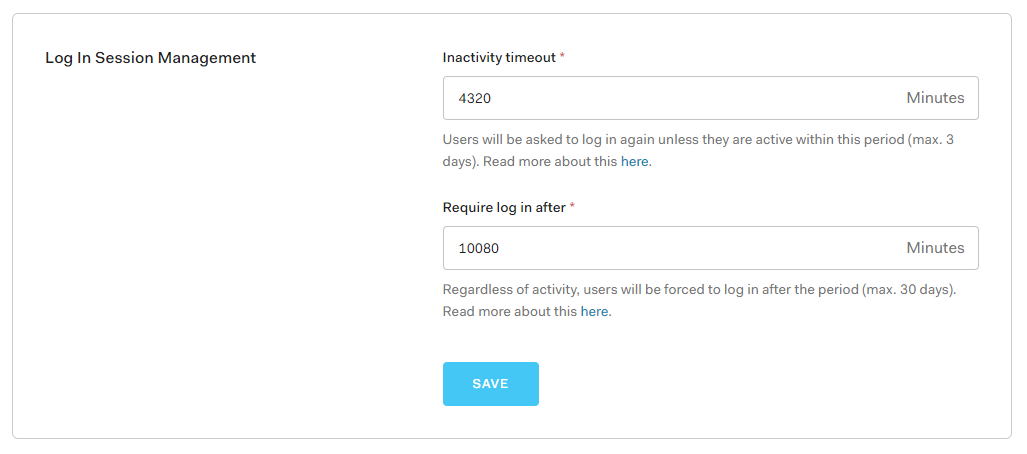
@adamjmcgrath do you know if setting AUTH0_SESSION_ROLLING=false and AUTH0_SESSION_ABSOLUTE_DURATION=2592000 will work for 30 days or will Auth0 Tenant settings dictating session inactivity override and force everyone to log in again after 3 days?
austinhale
on 2 Feb 2021
Hi all, thanks for the incredible detailed answers and discussion. I'm new to Auth0 and auth in general, so I was wondering if my attempted use case is a common/correct method. Might be worth adding as an example in these new docs if so:
My Use Case:
- I have some
user_metadataI wanted accessible on the client side, so I created a custom rule that inserts that metadata as custom claims into the ID token. Is this a correct/common use case? If not, is there a better way to expose user_metadata to the user since it's not exposed in the access token by default? - I have an endpoint that modifies the
user_metadataby using the Management client. However, after that metadata is modified, I'm struggling on how to refresh the session's token to see those updated claim values in the ID token. How do I do this withnextjs-auth0?
Other Info:
- Using
v1.0.0-beta.0
In general, is the above a correct/reasonable approach? I'm completely new to this so I really appreciate your time and guidance!
 mvxt
on 3 Feb 2021
mvxt
on 3 Feb 2021
@austinhale
@adamjmcgrath do you know if setting AUTH0_SESSION_ROLLING=false and AUTH0_SESSION_ABSOLUTE_DURATION=2592000 will work for 30 days or will Auth0 Tenant settings dictating session inactivity override and force everyone to log in again after 3 days?
No, your users will remain logged in for 30 days.
AUTH0_SESSION_ABSOLUTE_DURATION will tell you how long users are logged in to your app, the Auth0 Tenant settings will tell you how long your users are logged in to auth0.com.
Eg. Ignoring inactivity timeout - if AUTH0_SESSION_ABSOLUTE_DURATION is 15 days and the Auth0 Tenant settings "Require Login after" is set to 30 days. A user will be logged out of your app after 15 days, but when they go to login again - they wont be prompted for their credentials on auth0.com, because they'll still be logged in to auth0.com
adamjmcgrath
on 3 Feb 2021
@mvxt
I have some user_metadata I wanted accessible on the client side, so I created a custom rule that inserts that metadata as custom claims into the ID token. Is this a correct/common use case?
Yep - absolutely fine. The alternative would be to get an Access Token for the Management API and use https://auth0.com/docs/api/management/v2#!/Users/get_users with the scope read:current_user
I have an endpoint that modifies the user_metadata by using the Management client. However, after that metadata is modified, I'm struggling on how to refresh the session's token to see those updated claim values in the ID token. How do I do this with nextjs-auth0?
If you want a new ID token you need to login again, you could do this non interactively using the prompt=none auth param, eg
// pages/api/auth/[...auth0].js
import { handleAuth, handleLogin } from '@auth0/nextjs-auth0';

export default handleAuth({
  async login(req, res) {
    await handleLogin(req, res, {
        authorizationParams: {
          prompt: 'none'
        }
      });
  }
});
Alternatively, since you have the new user_metadata, you can just update the session with it yourself:
// pages/api/my-api-route.js
import { withApiAuthRequired } from '@auth0/nextjs-auth0';

export default withApiAuthRequired(async function myApiRoute(req, res) {
  const { user } = getSession(req, res);
  await setUserMetaData(newUserMetaData);
  user.user_metadata = newUserMetaData; // <= updates to the session are persisted
});
Closing this, feel free to ping me if you want me to reopen
adamjmcgrath
on 4 Feb 2021
Related issues
 synoptase
·
6Comments
synoptase
·
6Comments
 davemaier
·
4Comments
davemaier
·
4Comments
 RyanPayso13
·
4Comments
RyanPayso13
·
4Comments
 jvorcak
·
4Comments
jvorcak
·
4Comments
 shicholas
·
5Comments
shicholas
·
5Comments