Nextjs-auth0: Invalid request, an initial state could not be found
When I try to login, and the auth0 page redirects to the callback url I have this error:
START RequestId: f18c995e-e7e1-4305-a623-3f8cc1f4193c Version: $LATEST
2020-01-03T02:11:45.970Z    f18c995e-e7e1-4305-a623-3f8cc1f4193c    ERROR   Error: Invalid request, an initial state could not be found
    at Object.<anonymous> (/var/task/node_modules/@auth0/nextjs-auth0/dist/handlers/callback.js:18:19)
    at Generator.next (<anonymous>)
    at /var/task/node_modules/tslib/tslib.js:110:75
    at new Promise (<anonymous>)
    at Object.__awaiter (/var/task/node_modules/tslib/tslib.js:106:16)
    at Object.handleCallback (/var/task/node_modules/@auth0/nextjs-auth0/dist/handlers/callback.js:6:43)
    at callback (/var/task/.next/serverless/pages/api/user/callback.js:127:70)
    at apiResolver (/var/task/node_modules/next/dist/next-server/server/api-utils.js:41:9)
    at process._tickCallback (internal/process/next_tick.js:68:7)
END RequestId: f18c995e-e7e1-4305-a623-3f8cc1f4193c
REPORT RequestId: f18c995e-e7e1-4305-a623-3f8cc1f4193c  Duration: 473.67 ms Billed Duration: 500 ms Memory Size: 1024 MB    Max Memory Used: 94 MB  Init Duration: 202.36 ms

START RequestId: e8146182-4fb9-47f8-bb34-04053eb80d0a Version: $LATEST
END RequestId: e8146182-4fb9-47f8-bb34-04053eb80d0a
REPORT RequestId: e8146182-4fb9-47f8-bb34-04053eb80d0a  Duration: 81.24 ms  Billed Duration: 100 ms Memory Size: 1024 MB    Max Memory Used: 97 MB  Init Duration: 422.52 ms
This is the code I'm using for the Login url:
import { NextApiRequest, NextApiResponse } from "next";

import auth0 from "../../../lib/auth0";

async function login(req: NextApiRequest, res: NextApiResponse) {
  try {
    await auth0.handleLogin(req, res, {});
  } catch (error) {
    console.error(error);
    res.status(error.status || 500).end(error.message);
  }
}

export default login;
This is the code from the Callback and where the error comes:
import { NextApiRequest, NextApiResponse } from "next";

import auth0 from "../../../lib/auth0";

async function callback(req: NextApiRequest, res: NextApiResponse) {
  try {
    await auth0.handleCallback(req, res, { redirectTo: "/" });
  } catch (error) {
    console.error(error);
    res.status(error.status || 500).end(error.message);
  }
}

export default callback;
The Auth0 file that in each function I'm importing is this:
import { initAuth0 } from "@auth0/nextjs-auth0";

export default initAuth0({
  clientId: process.env.AUTH0_CLIENT_ID,
  clientSecret: process.env.AUTH0_CLIENT_SECRET,
  scope: process.env.AUTH0_SCOPE,
  domain: process.env.AUTH0_DOMAIN,
  redirectUri: process.env.REDIRECT_URI,
  postLogoutRedirectUri: process.env.POST_LOGOUT_REDIRECT_URI,
  session: {
    cookieSecret: process.env.SESSION_COOKIE_SECRET,
    cookieLifetime: parseInt(process.env.SESSION_COOKIE_LIFETIME),
    storeIdToken: true,
    storeRefreshToken: true,
    storeAccessToken: true
  }
});
And the variables are configured like this (from the now.json file):
{
  "version": 2,
  "build": {
    "env": {
      "MONGODB_URI": "mongodb://test:[email protected]:1234/test",
      "AUTH0_DOMAIN": "dev-98h51dru.auth0.com",
      "AUTH0_CLIENT_ID": "",
      "AUTH0_CLIENT_SECRET": "",
      "AUTH0_SCOPE": "openid profile offline_access",
      "REDIRECT_URI": "https://tevi.now.sh/api/user/callback",
      "POST_LOGOUT_REDIRECT_URI": "https://tevi.now.sh/",
      "SESSION_COOKIE_SECRET": "",
      "SESSION_COOKIE_LIFETIME": "28800"
    }
  }
}
You can test the app here.
This error happens when is in production with Now, and in development mode, with the command now dev (http://localhost:3000/)
The config in the Auth0 Application is this:
Allowed Callback Urls: http://localhost:3000/api/user/callback, https://tevi.now.sh/api/user/callback
Allowed Web Origins: http://localhost:3000/, https://tevi.now.sh/
Allowed Logout URLs: http://localhost:3000/, https://tevi.now.sh/
Allowed Origins (CORS): http://localhost:3000/, https://tevi.now.sh/
- Version of this library used: latest
- Version of the platform or framework used, if applicable: Next.js latest version and Now Api
- Other relevant versions (language, server software, OS, browser): TypeScript, Linux, Firefox and Chrome latest version
 MontoyaAndres
All 37 comments
What exactly does the Login button do in your example? On the client side, you should just redirect to /api/login since the API route will require to establish a state on the server side (with a HTTP only cookie).
Is it possible that you're trying to use the SDK from the client side?
 sandrinodimattia
on 8 Jan 2020
sandrinodimattia
on 8 Jan 2020
The Login button just call the method Login.
import React from "react";
import { useAuth } from "use-auth0-hooks";
import { createStyles, makeStyles, Theme } from "@material-ui/core/styles";
import AppBar from "@material-ui/core/AppBar";
import Toolbar from "@material-ui/core/Toolbar";
import Typography from "@material-ui/core/Typography";
import Button from "@material-ui/core/Button";
import IconButton from "@material-ui/core/IconButton";
import MenuIcon from "@material-ui/icons/Menu";

const useStyles = makeStyles((theme: Theme) =>
  createStyles({
    root: {
      flexGrow: 1
    },
    menuButton: {
      marginRight: theme.spacing(2)
    },
    title: {
      flexGrow: 1
    }
  })
);

export function NavBar() {
  const classes = useStyles({});
  const { login } = useAuth();

  return (
    <div className={classes.root}>
      <AppBar position="static">
        <Toolbar>
          <IconButton
            edge="start"
            className={classes.menuButton}
            color="inherit"
            aria-label="menu"
          >
            <MenuIcon />
          </IconButton>
          <Typography variant="h6" className={classes.title}>
            Te Vi
          </Typography>
          <Button color="inherit" onClick={() => login({})}>
            Login
          </Button>
        </Toolbar>
      </AppBar>
    </div>
  );
}
Maybe in the auth0 config should I add in "Application Login URI" the login url, which is /api/login?
MontoyaAndres
on 8 Jan 2020
So I was looking into this and the issue is that you're using the use-auth0-hooks whilst also using nextjs-auth0 to fix it replace the onClick handler with href="/api/login" and it should work.
 Lapz
on 16 Feb 2020
Lapz
on 16 Feb 2020
I set up my login route at /login/auth0 and my callback route at /oauth2/callback and ran into this same error. Turns out the cookiePath is not set in the login handler so those cookies exist at the directory above the current uri according to the algorithm defined by RFC 6265 causing my state cookie to be stored at the path /login and hence not sent to the callback route causing Error: Invalid request, an initial state could not be found. I'm not sure if this is by design or a bug but it seems counterintuitive that the state cookie should not exist at the same path as the session and redirect cookie. Also, the fragility surrounding the fact that the login handler route must be a parent or sibling of the callback route should probably be documented.
 imaccallum
on 2 Apr 2020
imaccallum
on 2 Apr 2020
It seems like this can also be caused by having more than ~512b of custom claims and/or user_metadata in the ID token returned to auth0. (I didn't verify the exact number, but it seems to happen somewhere around there.)
This project sets the session information in a cookie called a0:session, which includes the access_token, id_token, refresh_token, scopes, user object, and created_at. If the encoded size of that (plus the cookie metadata) exceeds 4k, the browsers will drop it, and your session won't get started, then the redirect loop causes an attempt to login with a different state.
There is no current method in this library to store the session anywhere but in the cookie, unfortunately.
 tylermenezes
on 25 Apr 2020
tylermenezes
on 25 Apr 2020
auth0.getSession() works getInitialProps, but when you swap getSession out for a fetch you get this error.
Looks like Auth0 stopped working on this about a month ago. Auth0 full/modern NextJS support when?
 corysimmons
on 27 Apr 2020
corysimmons
on 27 Apr 2020
I see "Error: Invalid request, an initial state could not be found" in my logs in the catch of /api/callback.js but it is infrequent so I can't figure out why it is happening to some users.
 nodabladam
on 27 Apr 2020
nodabladam
on 27 Apr 2020
I see "Error: Invalid request, an initial state could not be found" in my logs in the catch of
/api/callback.jsbut it is infrequent so I can't figure out why it is happening to some users.
Could be because you aren't forcing HTTPS when hitting the initial /login page.
Another reason could be if your site is available from multiple domains, but the callback URL is always a fixed domain. (eg, https://foo.example.com/api/login -> auth0 -> https://bar.example.com/api/callback)
tylermenezes
on 27 Apr 2020
I'm getting the same message every time a new user tries to log in and I'm using the example found in this repository.
Here is the response I'm getting:
Invoke-WebRequest -Uri "https://wrecking.now.sh/api/callback?code=OqkoMeNbtN-vCglu&state=3HIgmnJYWlE4OyUV1DrHUBo-R16Eg9Nbp0M1s_ydRm6p5_Vzn8sTg6w-KL3KoCFE" -Headers @{
"method"="GET"
  "authority"="wrecking.now.sh"
  "scheme"="https"
  "path"="/api/callback?code=OqkoMeNbtN-vCglu&state=3HIgmnJYWlE4OyUV1DrHUBo-R16Eg9Nbp0M1s_ydRm6p5_Vzn8sTg6w-KL3KoCFE"
  "cache-control"="max-age=0"
  "dnt"="1"
  "upgrade-insecure-requests"="1"
  "user-agent"="Mozilla/5.0 (Windows NT 10.0; Win64; x64) AppleWebKit/537.36 (KHTML, like Gecko) Chrome/81.0.4044.122 Safari/537.36"
  "accept"="text/html,application/xhtml+xml,application/xml;q=0.9,image/webp,image/apng,*/*;q=0.8,application/signed-exchange;v=b3;q=0.9"
  "sec-fetch-site"="cross-site"
  "sec-fetch-mode"="navigate"
  "sec-fetch-user"="?1"
  "sec-fetch-dest"="document"
  "accept-encoding"="gzip, deflate, br"
  "accept-language"="en,es-419;q=0.9,es;q=0.8"
}
For more information I'm attaching the HAR file.
And you can test it deployed in Now using this link https://wrecking-iw5k8yaz5.now.sh/
 davegomez
on 29 Apr 2020
davegomez
on 29 Apr 2020
If you include the full logs it may be more helpful (in Firefox you have to tick "Persist Logs," not sure about Chrome). I can definitely say that your browser is not sending back the correct cookies when it hits /callback, but I have no idea as to why without seeing the Set-Cookie header from the /login request.
tylermenezes
on 29 Apr 2020
Ok @tylermenezes I made the test using FF in the Now deployed version and saved the HAR files.
The first time I got the Invalid request, an initial state could not be found response.
The second time I tried I got id_token not present in TokenSet.
davegomez
on 29 Apr 2020
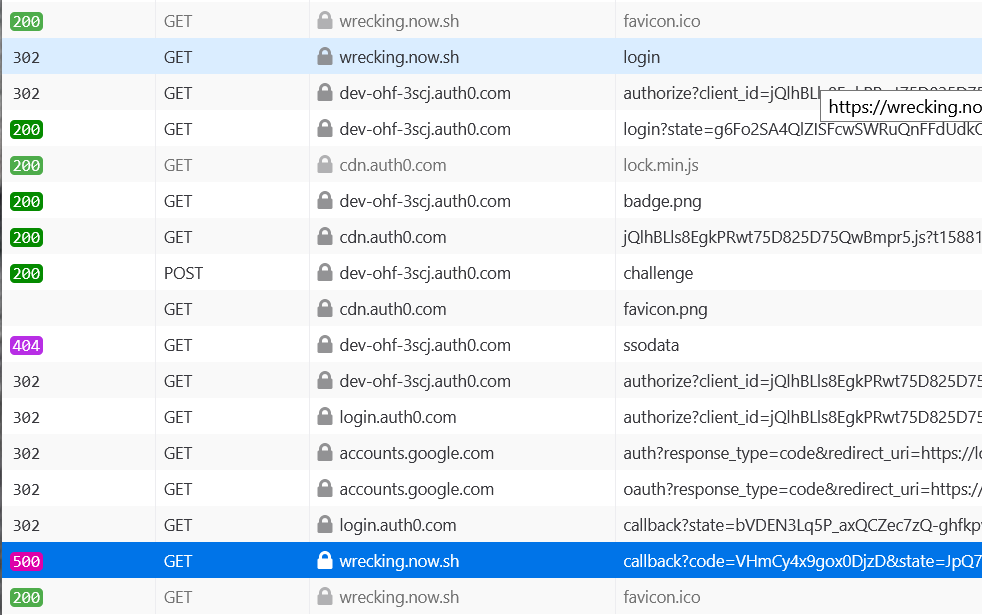
Again for any future problems you might have, this needs to include the _full_ logs including /login to be helpful. You only captured the part _after_ /login, but the /login response is the problem with this error code.
Anyway I tried registering for myself on the site. Your site is available from multiple domains, but the callback URL is always a fixed domain. Here you can see the problem in the web logs:

The domain which the cookie is being set on, is different from the domain you're telling Auth0 to redirect to.
tylermenezes
on 29 Apr 2020
@tylermenezes that makes sense, but that is the domain Now generates with the continuous deployment. Is there a way to fix this or it would be impossible to use the system with this feature from Now?
Update
Here is going and coming to the same URL with the same result "_id_token not present in TokenSet_":
davegomez
on 29 Apr 2020
Is there a way to fix this or it would be impossible to use the system with this feature from Now?
You have to set redirectUri and postLogoutRedirectUri in initAuth0 based on the current domain.
You could do this by either:
- Calling initAuth0 within your API routes directly, and getting the current domain from
req - Having Now/Vercel set the
VERCEL_URLenvironment variable, adding that to yournext.config.js, and then usinggetConfig().serverRuntimeConfigwhen you're initializing Auth0.
You also have to whitelist your callback domains using a wildcard in Auth0: https://auth0.com/docs/applications/reference/wildcard-subdomains
id_token not present in TokenSet
I'm pretty sure that's a different problem, maybe related to this? https://github.com/auth0/nextjs-auth0#calling-an-api I haven't played around with this much.
tylermenezes
on 29 Apr 2020
I'm using nextjs-auth0 with a custom domain, and in one specific type of user login interaction I was seeing this same error:
ERROR Error: Invalid request, an initial state could not be found
Our users don't sign up using Auth0, instead they get invited to our application and they accept the invitation by clicking a link. The invitation link brings them to the Next.js app, to a page where they create a password and fill out a few other things. When they submit the form, we create their account in Auth0 and then redirect them to the /api/login route to initiate a normal Universal Login.
That's when I'd see the error message above, instead of the normal redirectUri page. I can't explain why that particular flow caused that error, but it was reproducible every time. And no other flows caused that error, users were able to login normally. It was only when they were going through that "accept invitation" flow that the error occurred.
I ended up "fixing" it by ensuring that my user had reloaded the application after they created their account by using window.location.href = https://your-app-domain-here.com. After reloading, they can navigate to /api/login as usual and were no longer seeing the error.
It's not really a true fix, but perhaps it'll be a stopgap until we have a better fix for this.
 kiley0
on 18 May 2020
kiley0
on 18 May 2020
When I have encountered id_token not present in TokenSet, it's usually because of an error in the scope option passed to initAuth0().
For example, accidentally leaving a trailing comma at the end of a .env line like auth0Scope='openid profile email',.
 sir-dunxalot
on 27 May 2020
sir-dunxalot
on 27 May 2020
I am also experiencing Invalid request, an initial state could not be found error occasionally. I cannot reproduce it myself but a number of users have seen it occur. Similar to above to appears to be originating from the handleCallback function.
When it does work for me I can see the a0:state cookie is being seen at the root of the site, securely, and over http with sameSite set to lax.
Login is handled by an anchor tag pointing directly towards api/login.
As I said, I haven't personally been able to reproduce in dev or prod, but this is definitely something that has occurred to a number of people who have been using my app. The catch statement is as per the docs and returns the error if unsuccessful.
Strangely in the Auth0 logs I can see that all the users have successfully signed in / registered.
Any ideas to this ?
 alex-windett
on 2 Jun 2020
alex-windett
on 2 Jun 2020
After some debugging I found the same as @alex-windett. isSecureEnvironment() causes Secure to be added to the Set-Cookie header.
This means you must either use HTTPS or set NODE_ENV to something different than production when using a host that's not localhost or 127.0.0.1.
NODE_ENV=development solved the issue for me.
 mauvm
on 7 Jun 2020
mauvm
on 7 Jun 2020
I had the same issue--thanks to everyone here, I went digging into my setting of the env variable AUTH0_SCOPE. In case it helps future travelers, I'll be super pedantic below.
Turns out that simply adding
AUTH0_SCOPE="openid profile email" # change per your requirements
to my .env file did the trick for me.
 thinkjrs
on 15 Jun 2020
thinkjrs
on 15 Jun 2020
any updates for this? what's the best alternative of this package for nextjs social authentication?
 prettydev
on 22 Jun 2020
prettydev
on 22 Jun 2020
I'm getting the same message every time a new user tries to log in and I'm using the example found in this repository.
Here is the response I'm getting:
Invoke-WebRequest -Uri "https://wrecking.now.sh/api/callback?code=OqkoMeNbtN-vCglu&state=3HIgmnJYWlE4OyUV1DrHUBo-R16Eg9Nbp0M1s_ydRm6p5_Vzn8sTg6w-KL3KoCFE" -Headers @{
"method"="GET"
  "authority"="wrecking.now.sh"
  "scheme"="https"
  "path"="/api/callback?code=OqkoMeNbtN-vCglu&state=3HIgmnJYWlE4OyUV1DrHUBo-R16Eg9Nbp0M1s_ydRm6p5_Vzn8sTg6w-KL3KoCFE"
  "cache-control"="max-age=0"
  "dnt"="1"
  "upgrade-insecure-requests"="1"
  "user-agent"="Mozilla/5.0 (Windows NT 10.0; Win64; x64) AppleWebKit/537.36 (KHTML, like Gecko) Chrome/81.0.4044.122 Safari/537.36"
  "accept"="text/html,application/xhtml+xml,application/xml;q=0.9,image/webp,image/apng,*/*;q=0.8,application/signed-exchange;v=b3;q=0.9"
  "sec-fetch-site"="cross-site"
  "sec-fetch-mode"="navigate"
  "sec-fetch-user"="?1"
  "sec-fetch-dest"="document"
  "accept-encoding"="gzip, deflate, br"
  "accept-language"="en,es-419;q=0.9,es;q=0.8"
}
For more information I'm attaching the HAR file.
And you can test it deployed in Now using this link https://wrecking-iw5k8yaz5.now.sh/
Same issue here, but is very random, in my local machine is working well, but in my server (aws) is working randomly :(
 sebaestel
on 1 Jul 2020
sebaestel
on 1 Jul 2020
I think i have solved my problem and it might be the case for others.
It is as @tylermenezes mentioned, the cookie being sent back was very large - just under the 4000 bytes mark. I removed the need to have id token, refresh token and access token being sent back in the encrypted cookie and now all are being set at around 100 bytes and as of yet come across no issues.
Just set the relevant attributes to false in initAuth0 function
alex-windett
on 2 Jul 2020
@alex-windett can you elaborate or provide an example on how to "need to have id token, refresh token and access token being sent back in the encrypted cookie". I'm having the same issue, seemingly, as everyone else.
 hichana
on 9 Jul 2020
hichana
on 9 Jul 2020
@hichana
In the initAuth function there are a number of session options will pass additional information in the auth0 cookie, for example storeIdToken, storeAccessToken, and storeRefreshToken.
If these are set as true the cookie that is returned can become very large (above the browsers storage limit), so instead set them to false and it should all work.
Here is an example of my initAuth function
```import { initAuth0 } from "@auth0/nextjs-auth0";
export default initAuth0({
audience: https://${process.env.AUTH0_DOMAIN}/api/v2/,
clientId: process.env.AUTH0_APP_CLIENT_ID,
clientSecret: process.env.AUTH0_APP_CLIENT_SECRET,
scope: "openid profile email",
domain: process.env.AUTH0_DOMAIN,
redirectUri: ${AUTH0_CALLBACK_DOMAIN}/api/auth/callback,
postLogoutRedirectUri: AUTH0_CALLBACK_DOMAIN,
session: {
cookieSecret: process.env.AUTH0_APP_COOKIE_SECRET,
cookieLifetime: 60 * 60 * 8,
cookieSameSite: "none",
storeIdToken: false,
storeAccessToken: false,
storeRefreshToken: false
}
});```
alex-windett
on 9 Jul 2020
Thanks @alex-windett, I didn't have these set at all, but I added them set to false as you indicated and I still get the same '
Invalid request, an initial state could not be found' error. In my case logging in works fine but when signing a new user up I get the error. The new user is actually signed up and shows up in the Auth0 admin panel as a user, and can log in, but it's just that after signing up and being redirected to the callback api endpoint they are shown a white page with the '
Invalid request, an initial state could not be found' error.
Seems like Auth0 isn't really helping us get to the bottom of this. I'm considering abandoning Auth0 on this one. They say this library is 'experimental'. I'm investigating using 'Magic' now, which has a Next.js integration
https://docs.magic.link/technologies/next-js-integration
They also have a boilerplate project here: https://github.com/vercel/next.js/tree/canary/examples/with-magic
hichana
on 10 Jul 2020
I believe I was getting this error from Safari users that were clicking deeplinks back to the app from emails in in a gmail tab. I switched to refresh token rotation and I believe my errors in sentry have stopped showing up:
https://auth0.com/docs/api-auth/token-renewal-in-safari
Magic looks cool. I have not used it but firebase could be a good option for some that can't make auth0 work:
https://github.com/vercel/next.js/tree/canary/examples/with-firebase-authentication
Update: I just got another invalid request, so refresh token rotation didn't seem to completely make them go away.
nodabladam
on 10 Jul 2020
I was debugging this for a bit with a small app I'm working on. It only happened on new devices logging in, which seemed weird. I worked through most of this thread and no dice.
My API auth0 handlers: /api/auth/login and /api/auth/callback
Turned out, my issue was pretty embarrassing but I'll own up to it here in case anyone else makes a similar mistake! My app, deployed to heroku, wasn't redirecting to HTTPS from HTTP. So if a user accidentally navigated to the site over HTTP, the browser would refuse to set the state cookie in the response to http://myapp.herokuapp.com/api/auth/login (my app simply had an <a> relative link to href="/api/auth/login" so _that_ request was also HTTP. The whole flow would fail after bringing the user back to https://myapp.herokuapp.com/api/auth/callback with the error Invalid request, an initial state could not be found... I imagine because that first state cookie was never set but it was still expected. After this redirect back, the user is operating in HTTPS land (because the callback URL in auth0 is correctly https://....) and everything works if the login is retried.
Anyways, that was a long winded way to say "make sure you're using HTTPS redirects because that can cause a similar behavior".
 nherson
on 23 Jul 2020
nherson
on 23 Jul 2020
A couple of things to double check if you've been banging your head on this issue like I was -- note this may only be useful if you're using Cloudflare & Vercel.
- Under SSL --> Edge Certificates in Cloudflare, verify "Always Use HTTPS" is toggled off
- Add separate custom domains in Vercel for your main production branch & the feature branch you're working on e.g.
staging.yourdomain.com. * - Add Page Rules in Cloudflare excluding the explicit
http://path to/well-known-- one for your production branch, one for your preview / staging branch. This is a known workaround. - Add a final Page Rule in
Lastposition forcinghttpsonhttp://*yourdomain.com/* - Verify when you're adding your environment variables to Vercel that you're not copy/pasting double quotes around the
scopevalue into the input. Sanity check by hard coding thescopeoninitAuth0 - Set your environment variables in Vercel under the
Previewtab with the custom domain you created earlier e.g.AUTH0_REDIRECT_URI=https://staging.yourdomain.com/api/callback - Check the size of the cookie attempting to be stored. Set
storeIdToken,storeRefreshToken, andstoreAccessTokento false to verify if that's the issue.
* This gives you a consistent domain to build on. This will need to be added to Auth0 under allowed callback URL's. You can swap which branch this points to in Vercel after you merge into main. Auth0 won't work on the dynamically generated Vercel URL's.
 austinhale
on 27 Jul 2020
austinhale
on 27 Jul 2020
In my case it was : https://nextjs.org/docs/api-reference/next.config.js/trailing-slash
I have to set trailingSlash: false
 vanduc1102
on 16 Aug 2020
vanduc1102
on 16 Aug 2020
I have the exact same error though with a different use case - when I sign in on a machine and try to sign in again using the same credential on a different computer I get the error: "Invalid request, an initial state could not be found"
Can someone shed some light on this issue? thanks
 madeinspace
on 8 Sep 2020
madeinspace
on 8 Sep 2020
I have this issue but only when the user tried to verify their email.
 dartmoordunbar
on 16 Sep 2020
dartmoordunbar
on 16 Sep 2020
https://github.com/auth0/nextjs-auth0/issues/60#issuecomment-674507011
Yep we had same error with trailingSlash: true
Is there a way to get this working with trailing slash enabled?
 jonlow
on 23 Sep 2020
jonlow
on 23 Sep 2020
In my case, I was adding the environment variable for the scope in the Vercel UI with double quotes "openid profile email" but changing it to simple openid profile email solved this issue.
 samuanv
on 23 Sep 2020
samuanv
on 23 Sep 2020
I've posted this. But i suppose the problem may as well be on Auth0's end. Or both.
https://github.com/vercel/next.js/issues/19313
Would be great if it could be fixed or if there is a work-around.
 olaj
on 19 Nov 2020
olaj
on 19 Nov 2020
I cleared the cookies for http://localhost:3000 then I could login. I was seeing this error "ERR_TOO_MANY_REDIRECTS" for api call to "/api/v1/me". So I google about this error, saw a suggestion to delete the cookies and it worked.
 yilmazbingo
on 15 Jan 2021
yilmazbingo
on 15 Jan 2021
Hi everyone, to troubleshoot these issues please make sure:
- The environment variables and their values are correctly set.
- The login, logout and callback URLs are correctly set in your Auth0 application settings. These must exactly match the corresponding URLs in your app.
- Your production app is served over HTTPS.
WRT the issues caused by overly large cookies, that got fixed in the 1.0.0 beta release.
 Widcket
on 16 Jan 2021
Widcket
on 16 Jan 2021
Just tested with trailingSlash: false, the issue is caused by Webpack's hot module reload in dev mode. With a hard reload it works normally. So I'll close this issue, as that was the only one that remained unanswered.
Widcket
on 17 Jan 2021
Related issues
 lunchboxav
·
5Comments
lunchboxav
·
5Comments
 RyGuyM
·
5Comments
RyGuyM
·
5Comments
 jvorcak
·
4Comments
jvorcak
·
4Comments
 GeeWee
·
5Comments
GeeWee
·
5Comments
 davemaier
·
4Comments
davemaier
·
4Comments
Most helpful comment
I set up my login route at
/login/auth0and my callback route at/oauth2/callbackand ran into this same error. Turns out thecookiePathis not set in the login handler so those cookies exist at the directory above the current uri according to the algorithm defined by RFC 6265 causing mystatecookie to be stored at the path/loginand hence not sent to the callback route causingError: Invalid request, an initial state could not be found. I'm not sure if this is by design or a bug but it seems counterintuitive that the state cookie should not exist at the same path as the session and redirect cookie. Also, the fragility surrounding the fact that the login handler route must be a parent or sibling of the callback route should probably be documented.