Nextflow: Add notification message on workflow completion
The goal of this enhancement is allow the automatic notification when a workflow run has completed.
The message recipients can be specified by using a new command line option -notify <email address> or by using a configuration setting as shown below:
notification {
   to = '[email protected]'
   from = '[email protected]'
}
 pditommaso
All 13 comments
This is an example of the notification message sent my NF on workflow completion:
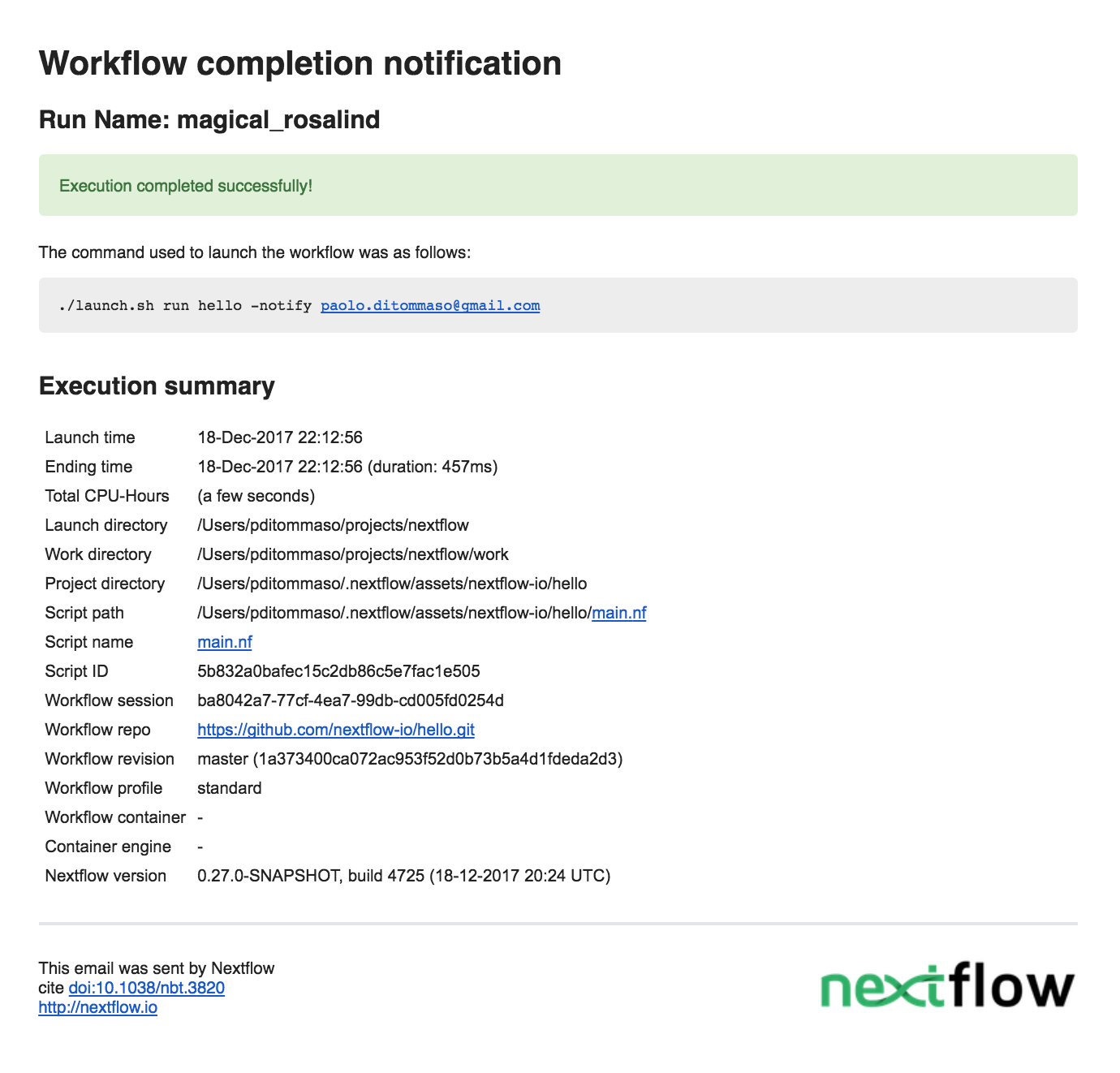
I had to struggle a bit to have images in the email notification, but at the I've managed to have it working. Thanks to @ewels for the support.
pditommaso
on 18 Dec 2017
Forgot to add, the notification can be enabled with the command line option -notify <address>, tho I'm thinking to change to -with-notication <address> (for consistency) or just -N.
The following configuration settings are available:
notification {
   to = '[email protected]'
   from = '[email protected]'
   template = <file path | List of file path>
   binding = <associative array modelling the template variables>
}
Brilliant stuff! Looking forward to trying this 😁
Any reason to use notification instead of email? -with-email sounds more natural to me somehow. Love how easy it will be to use this though...
Still more questions:
- If the notification config is all set within the pipeline, but
tois omitted, will-with-notificationuse the rest of the config that was set? - What happens if you _don't_ specify
from? Does it still work?
 ewels
on 18 Dec 2017
ewels
on 18 Dec 2017
Any reason to use notification instead of email?
Because at some point it could be possible to have other channel eg. slack, gitter, .. too nerd? :)
Also because the mail scope is used to the (optional) mail server configuration.
If the notification config is all set within the pipeline, but to is omitted
Actually you can't access the notification config from within the pipeline. But you can still send your own custom notification with the sendMail function
What happens if you don't specify from? Does it still work?
Yes if your subsystem (ie. sendmail) is able to send it with a default sender.
pditommaso
on 18 Dec 2017
I understand that notification will be shorter information. Just a small piece of your final email. (Link to the HTML report?)
What happens if we don't have the config? Plain text ?
Looks great and light to use
Congrats?!!
 edgano
on 18 Dec 2017
edgano
on 18 Dec 2017
I understand that notification will be shorter information. Just a small piece of your final email. (Link to the HTML report?)
I was thinking that, but for real workflow can be a too big file (Evan has reports > 200 MB..)
What happens if we don't have the config? Plain text ?
The default notification is send both a text/plain and html. If you only provide the HTML it try to convert it to only text.
pditommaso
on 19 Dec 2017
Actually you can't access the notification config from within the pipeline. But you can still send your own custom notification with the
sendMailfunction.
Ah shame - I was thinking of overwriting the default variables / template in the pipeline (eg. to have the pipeline logo and additional information such as software versions). Then if the user specifies -with-notification or has their config set up then the mail would go out customised. Make sense?
For example, we could have in our pipeline nextflow.config:
notification {
   binding {
      header = 'NGI-RNAseq'
      header_img = "$baseDir/assets/logo.png"
      footer_text = 'This pipeline was written at... Find more info at: <a href="">fubar.com</a>'
      footer_logos = [
          "$baseDir/assets/scilifelab.png",
          "$baseDir/assets/ngi.png"
      ]
   }
}
(or whatever). Also it'd be nice to be able to dynamically add content into the notification binding from the pipeline itself. For example, we like to put the software versions (generated by a task) into the email. eg something like:
main.nf:
workflow.notification.binding.extra_sections['Software Versions'] = '<ul><li>' + software_versions.join('</li><li>') + '</li></ul>'
Am I being too ambitious..? ;)
ewels
on 19 Dec 2017
That should work, the problem are the images. What is happening now is that the template engine, replaces the variables with the actual value, that is that file path. It cannot know that you want to attach it.
Maybe we could use the convention that when a binding value is a File it is supposed to be included as an attachment. But I would keep as an enhancement.
For your use case, maybe it would be better to use to use the sendMail function instead. You can still use it in the config file as described here.
pditommaso
on 19 Dec 2017
I was thinking of not making it that flexible - just have a couple of specific named variables which take only images. eg. header_img and footer_img. Of course, it's only a matter of time before someone asks to embed images in the main part of the email, but this would at least be an easy start...
Phil
ewels
on 19 Dec 2017
I like pragmatic solution, but hardcoding magic variable names it's not a good idea IMO.
pditommaso
on 19 Dec 2017
haha, welcome to my world 😈
I'm mainly just extrapolating from how I handle report customisation in MultiQC (logo stuff here). I quite like having a handful of magic variables for simple customisation, but the possibility to have complete control if wanted (custom templates in the case of MultiQC). But yeah, I can see how this goes against the Nextflow ethos.. No worries :)
ewels
on 19 Dec 2017
It makes sense with MultiQC because it's specific for report generation. In NF it's should be more generic.
pditommaso
on 19 Dec 2017
Are there more examples of how to use custom binding and template? I am not sure what to put in these fields, what format the values should be in, what values are available, etc.
 stevekm
on 22 Feb 2018
stevekm
on 22 Feb 2018
Related issues
 mfoll
·
6Comments
mfoll
·
6Comments
 Crabime
·
6Comments
Crabime
·
6Comments
 wikiselev
·
8Comments
wikiselev
·
8Comments
 MaxUlysse
·
3Comments
MaxUlysse
·
3Comments
 rsuchecki
·
3Comments
rsuchecki
·
3Comments
Most helpful comment
This is an example of the notification message sent my NF on workflow completion:
I had to struggle a bit to have images in the email notification, but at the I've managed to have it working. Thanks to @ewels for the support.