Nextcloud-snap: Connecting to webdav with snap install?
Hello,
I have just followed the digital ocean tutorial on how to install nextcloud with snap on a clean Ubuntu server.
I have installed it just fine and seems to all be working great, my only issue is I can’t seem to webdav from Windows creating a new network share to my server. The servers running locally and I’m using the internal IP to connect. I thought it was an issue with windows at first but I started a next cloud trial from the home page and connected to that with WebDAV just fine, I am now thinking maybe because I install it with snap I need a different path when adding my share?
Thanks.
TLDR: Whats the Webdav URL for snap installs of NextCloud?
 LDWme
LDWme
All 33 comments
I'm in Linux, but I can mount davs (since I have HTTPS enabled) from the snap just fine by using davs://example.com/remote.php/dav/files/USERNAME/.
 kyrofa
on 17 Apr 2018
kyrofa
on 17 Apr 2018
On Windows I use this:
net use z: https://example.com/remote.php/dav/files/<USERNAME> /user:<USERNAME> <PASSWORD>
 QuaySo
on 17 Apr 2018
QuaySo
on 17 Apr 2018
When I do the windows command I get:
"System error 1244 has occurred.
The operation being requested was not performed because the user has not been authenticated."
I have tried adding as a network drive with many different paths such as:
davs://example.com/remote.php/dav/files/USERNAME/
https://example.com/remote.php/dav/files/
Nothing seems to be working.
LDWme
on 17 Apr 2018
Any chance you have two factor authentication enabled? That has bitten me in the past with similar error messages, I needed to use a token ("app password") instead.
kyrofa
on 17 Apr 2018
No, it's a fresh install all settings are still at default.
It's really got me stumped.
LDWme
on 17 Apr 2018
@LDWme I'm really sorry, I simply don't have a Windows box with which to test. Perhaps @QuaySo can be of more assistance.
kyrofa
on 17 Apr 2018
@kyrofa Well thanks for attempting haha, im still trying to look my end. Think maybe it's something to do with my firewall? I run pfsense maybe somethings stopping it there?
I made a trial next cloud on their website and can webdav to that just fine.
LDWme
on 17 Apr 2018
I doubt it has anything to do with the firewall if you're able to do it with the trial (assuming the snap is using standard ports, is it?). Make sure you're not including the /nextcloud folder name as part of the URL, the snap doesn't use that, but I seem to remember the trial does.
Have you read this? Do you have HTTPS setup on the snap? If so, how? Are you using the domain on the cert when trying to mount it? Can you verify the passive FTP thing?
kyrofa
on 17 Apr 2018
I set up my server the same as spoke about in this DO guide.
Yes, it uses default ports and it does use self-signed SSL which the setup is also in the guide above.
LDWme
on 17 Apr 2018
Ah, I bet the fact that it's self-signed is throwing things off, in that article someone mentioned that using an invalid cert resulted in this error. Any chance you can use Let's Encrypt instead? You can also try disabling HTTPS just to test, if you can change your password to something garbage and don't have anything overly important there.
kyrofa
on 17 Apr 2018
There's this article as well. Might need to import your cert to get this to work properly with self-signed.
kyrofa
on 17 Apr 2018
I actually did use let's encrypt to make it, think it's worth deploying a new server and reinstalling and just trying without an SSL? I have a local VM server so I could just do that to test?
LDWme
on 17 Apr 2018
Wait, I'm confused-- is it self-signed, or using Let's Encrypt?
kyrofa
on 17 Apr 2018
Ugh sorry its lets encrypt
LDWme
on 17 Apr 2018
So when you visit Nextcloud in a browser, you get no warnings?
kyrofa
on 17 Apr 2018
It does appear as "not secure" but was made with let's encrypt in that tutorial. Gonna be honest SSLs are not my strong point.
LDWme
on 17 Apr 2018
I suspect that's your issue. Mind giving us your domain? If you're not comfortable giving that publicly (I wouldn't be), on my profile there's an email address. Email it to me and I'll take a look.
kyrofa
on 17 Apr 2018
It works for me with LetsEncrypt and a app password generated in Nextcloud. I do use TOTP...
There must be something wrong with your certificate.
QuaySo
on 17 Apr 2018
@kyrofa Ill shoot it over in an email now.
Thank you!
LDWme
on 17 Apr 2018
@LDWme it seems that the cert is indeed self-signed, so try this:
Disable HTTPS:
$ sudo nextcloud.disable-httpsEnable HTTPS using Let's Encrypt:
$ sudo nextcloud.enable-https lets-encrypt
Does that succeed? Let me know once you've done that and I'll take another look.
kyrofa
on 17 Apr 2018
@kyrofa Thanks I have done this but still don't seem to be getting anything.
LDWme
on 17 Apr 2018
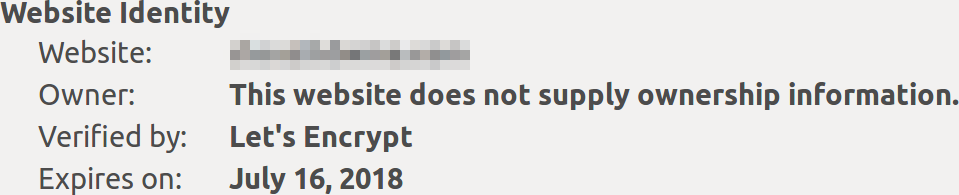
The cert looks good to me, it comes from Let's Encrypt now, and I get no warnings. Still no love from Windows, though?
kyrofa
on 17 Apr 2018
Nope, what path do you recommend entering into windows for webdav?
LDWme
on 17 Apr 2018
@LDWme Do you use the net use command, or are you trying to connect the webdav share using the Explorer interface?
QuaySo
on 17 Apr 2018
@QuaySo Iv tried both
LDWme
on 17 Apr 2018
what is the URL you're using? davs:// will not work on windows. Can you share the full URL?
QuaySo
on 17 Apr 2018
@QuaySo I have mainly been trying the one nextcloud gives me:
https://example.com/remote.php/webdav/
and:
https://example.com/nextcloud/remote.php/dav/files/USERNAME/
LDWme
on 17 Apr 2018
You should use the second, and leave out the nextcloud part. USERNAME should be substituted with lewis, or whatever username you use. For example:
QuaySo
on 17 Apr 2018
Yea, sorry that's what Iv been using.
Honestly, iv tried every path I could find multiple times.
LDWme
on 17 Apr 2018
@QuaySo I have no idea what changed but I just tried it again and it seems to connect! But it's not displaying any files from the server or letting me upload files, it's giving me an unexpected error when moving the file. This is a good start!
LDWme
on 17 Apr 2018
Any updates on this (or similar issues)? I'm having the same issue, but I'm definitely using a self-signed certificate.
 fpernice518
on 8 Aug 2018
fpernice518
on 8 Aug 2018
Any chance you have two factor authentication enabled? That has bitten me in the past with similar error messages, I needed to use a token ("app password") instead.
Thank you for this, I know its old but damn it was driving me nuts! thank you again
 Koltsz
on 13 Aug 2019
Koltsz
on 13 Aug 2019
https://example.com/remote.php/webdav/ didn't worked for me https://example.com/remote.php/dav/files/USERNAME/ worked!
 jumoog
on 14 Sep 2019
jumoog
on 14 Sep 2019
Related issues
 nihil21
·
6Comments
nihil21
·
6Comments
 WereCatf
·
3Comments
WereCatf
·
3Comments
 tinokizis
·
8Comments
tinokizis
·
8Comments
 aptanet
·
7Comments
aptanet
·
7Comments
 DAMONSTA360
·
3Comments
DAMONSTA360
·
3Comments
Most helpful comment
On Windows I use this:
net use z: https://example.com/remote.php/dav/files/<USERNAME> /user:<USERNAME> <PASSWORD>