Nextcloud-snap: Allow to change the max upload file size from the webgui.
Hi there,
I don´t know if this kind of issue was opened before (could not find a issue about this).
I have tried the snap package for Nextcloud, seems to be working fine and looking good so far.
The only issue I encounter is that i cannot change the Max Upload file size from the webgui (is now 10gb).
It seems that the .htaccess is readonly.
Will there be and option, to edit the Upload size with an Utility or will the edit function work in the admin panel in the future (make the .htaccess writable)?
Thanks, and keep up the good work.
Kind regards,
Bons.
 bonsje
All 20 comments
Actually, this has nothing to do with .htaccess, but it's the same problem. The Snap doesn't have write access yet to the .user.ini file.
One problem with .htaccess is the performance penalty associated with its use and I need to look it up, but I suspect the same thing is true with .user.ini.
The planned solution is to allow users to make modifications to config files, but it will first only be available to users who can use the shell.
 oparoz
on 3 Oct 2016
oparoz
on 3 Oct 2016
This kind of depends upon Apache and PHP settings changing in concert. The admin interface can't change them both, so I don't believe this issue can be solved quite so nicely.
 kyrofa
on 3 Oct 2016
kyrofa
on 3 Oct 2016
Thnx for explaining :), hope to see this kind of feature in the future.
(command line option/setting or webgui).
bonsje
on 3 Oct 2016
This kind of depends upon Apache and PHP settings changing in concert
For some settings, yes, but not for this one per example. We only need to touch the PHP file.
The one thing we need to discuss is whether it's safe to edit these files from the admin zone, since everything is run as root, but I think we discussed about using a daemon of sort for such requests?
oparoz
on 3 Oct 2016
Both .htaccess and .user.ini seems to have the maximum file upload size to 511M, but yet my GUI says 10 GB. Is it reporting incorrectly, or is the limit set somewhere else?

 lindhe
on 27 Mar 2017
lindhe
on 27 Mar 2017
Hi, a question.
I see with the latest snap update, that you can change the port numbers now, and i see this page: https://github.com/nextcloud/nextcloud-snap/issues/374
@kyrofa Is it possible to get some kind of a function to increase the max file upload value with a CLI command, like the port number change command ?
That could be a great solution for users like me that have files bigger than the 10 GB limit :)
bonsje
on 23 Oct 2017
@bonsje definitely. However, I'm a little confused by something. I have the max upload file currently set to 16G, not 10. But 10 is being shown in the admin UI. Why? I have no idea where the 10 is coming from. If the settings don't work the way we expect (I followed this documentation), then we won't be able to make them configurable. If anyone has any clues that would be helpful.
kyrofa
on 23 Oct 2017
@kyrofa that is strange indeed. so far i can remember in the past with owncloud. you needed to modify the .htaccess file that overruled the php max upload size value and owncloud looked in/after this setting.
(if you edited the setting in the admin panel the value in the .htaccess file got updated).
its like mentioned in your linked documentation,
But when i look in the .htaccess files on the nextcloud folder it see the settings are default like they came from a clean install:
/snap/nextcloud/3317/htdocs/.htaccess

</IfModule>
<IfModule mod_php7.c>
  php_value upload_max_filesize 511M
  php_value post_max_size 511M
  php_value memory_limit 512M
  php_value mbstring.func_overload 0
  php_value default_charset 'UTF-8'
  php_value output_buffering 0
  <IfModule mod_env.c>
    SetEnv htaccessWorking true
  </IfModule>
Maybe nextcloud stores the value in an other file?
So far i cannot find traces where the value of 10G is stored, sadly :(
bonsje
on 23 Oct 2017
Yeah we disable those anyway. I'll have to investigate this, but I'm afraid it's only as I find time. Please feel free to investigate on your own if you're up for it. If someone figures out exactly what values need to be configurable, I'm happy to do the work to make it so.
kyrofa
on 23 Oct 2017
Chiming in to say I have not messed with settings other than the HTTP port (I'm running on localhost only behind a proxy) and it is showing 10GB for me as well.
 TangentFoxy
on 13 Jan 2018
TangentFoxy
on 13 Jan 2018
Edit: I had posted a comment asking how to increase the limit, but now I'm not even sure what the limit is.
In the snap source I found these references:
src/php/config/php.ini:             upload_max_filesize = 2M
src/php/config/php-fpm.d/www.conf:  php_value[upload_max_filesize] = 16G
And in the upstream source, these additional ones:
htdocs/.htaccess:     php_value upload_max_filesize 511M
htdocs/.htaccess:     php_value upload_max_filesize 511M
htdocs/.user.ini:     upload_max_filesize=511M
htdocs/lib/base.php:  @ini_set('upload_max_filesize', '10G');
Seeing as they are all over the place, I tried uploading larger and larger files with Curl:
- Create a test folder, share it with public link allowing uploads
- Create a large file on the server itself (to bypass network speed):
dd if=/dev/zero of=/tmp/50GB.bin bs=1GB count=50 - Post it with Curl, replacing HOST and SECRET with your server's hostname and the secret at the end of the share URL, after
/s/(plus a colon):
curl -k -o /dev/null -T /tmp/50GB.bin -u SECRET: -H X-Requested-With:XMLHttpRequest \
     https://HOST/public.php/webdav/50GB.bin
I have yet to see it fail. I stopped testing at 50GB, which were uploaded correctly. Could it be that all those upload_max_filesize are ignored? I don't understand.
 tobia
on 13 Feb 2018
tobia
on 13 Feb 2018
@tobia Could easily be that the limits specified are a per-request limit, but uploads can be done over multiple requests. (That's actually something I need to work on myself for an unrelated project.)
TangentFoxy
on 14 Feb 2018
@tobia honestly I have no idea either. Good find on this one though:
htdocs/lib/base.php: @ini_set('upload_max_filesize', '10G');
I bet that's where the "10" in the UI is coming from.
kyrofa
on 14 Feb 2018
@Guard13007 Yes, the sync client purposefully uploads all files in 10MB chunks, to support the pause/resume functionality, auto-resuming after network errors or reboot, and to support _unlimited_ file size (which is an awesome, but little known feature of the OC/NC sync client)
In my test I specifically used Curl to perform a single HTTP PUT to Apache from localhost, to test the limits of a _browser_ upload, and I still was able to upload a 50GB file. So the real limit remains a mystery.
tobia
on 14 Feb 2018
@tobia I was actually referring to browser uploading. Many sites implement a system for uploading in chunks through a browser, and is something I will be implementing as well.
TangentFoxy
on 15 Feb 2018
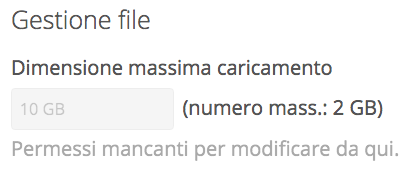
The max upload size is not solved in 13.0.2 I get this message in the Admin GUI with 10GB max upload and 2GB max.. I don't understand the real limit, I always get an error trying to upload files up to 7GB the images says: "Max upload size 10GB" and max number 2GB..
 newmediologo
on 16 May 2018
newmediologo
on 16 May 2018
Since snap manages the app, one is not able to directly commit changes, it has to do through snap itself. Given the options and commands available in this app, one can just replace underscores with dashes after php in the name of the parameter, like:
- php.upload-max-filesize
- php.post-max-size
- php.max-input-time
- php.max-execution-time
And then for the upload size: snap set nextcloud php.post-max-size=16G or sudo if is system-wide.
 eespitiarea
on 28 Jun 2019
eespitiarea
on 28 Jun 2019
[...] one can just replace underscores with dashes after php in the name of the parameter [...]
The way you said that (and given #1054) gives the impression that this is available today. I just want to clarify by saying that it's not. We're not really looking to expose every configuration option of every dependency here, particularly given that it looks like that limit is hard-coded (i.e. changing these options won't actually fix it).
kyrofa
on 9 Jul 2019
@kyrofa how is it that sudo snap set nextcloud php.upload-max-filesize=16G does change the settings persistently while using nextcloud.occ doesn't and this is reflected in the web UI?
Appreciate your comments, just trying to understand, cause just like @bonsje I am not able to edit this option in the web UI or following the docs.
eespitiarea
on 9 Jul 2019
You should update the manual and mention the snap method.
 YamiYukiSenpai
on 6 Sep 2019
YamiYukiSenpai
on 6 Sep 2019
Related issues
 hwiorn
·
5Comments
hwiorn
·
5Comments
 edrohler
·
3Comments
edrohler
·
3Comments
 mo-seph
·
6Comments
mo-seph
·
6Comments
 dutchievj
·
4Comments
dutchievj
·
4Comments
 JWise1203
·
5Comments
JWise1203
·
5Comments
Most helpful comment
@tobia honestly I have no idea either. Good find on this one though:
I bet that's where the "10" in the UI is coming from.