Nextcloud-notes: Notes are not grouped by category
How to use GitHub
- Please use the 👍 reaction to show that you are interested into the same feature.
- Please don't comment if you have no relevant information to add. It's just extra noise for everyone subscribed to this issue.
- Subscribe to receive notifications on status change and new comments.
Describe the bug
No matter which sorting method is chosen (chronological or alphabetical) the notes are not grouped into their respective folders. Their folders are only displayed above them.
To Reproduce
Steps to reproduce the behavior:
- Open the sidebar
- Pick a category
- Notes are displayed "flat" instead of categorised
Expected behavior
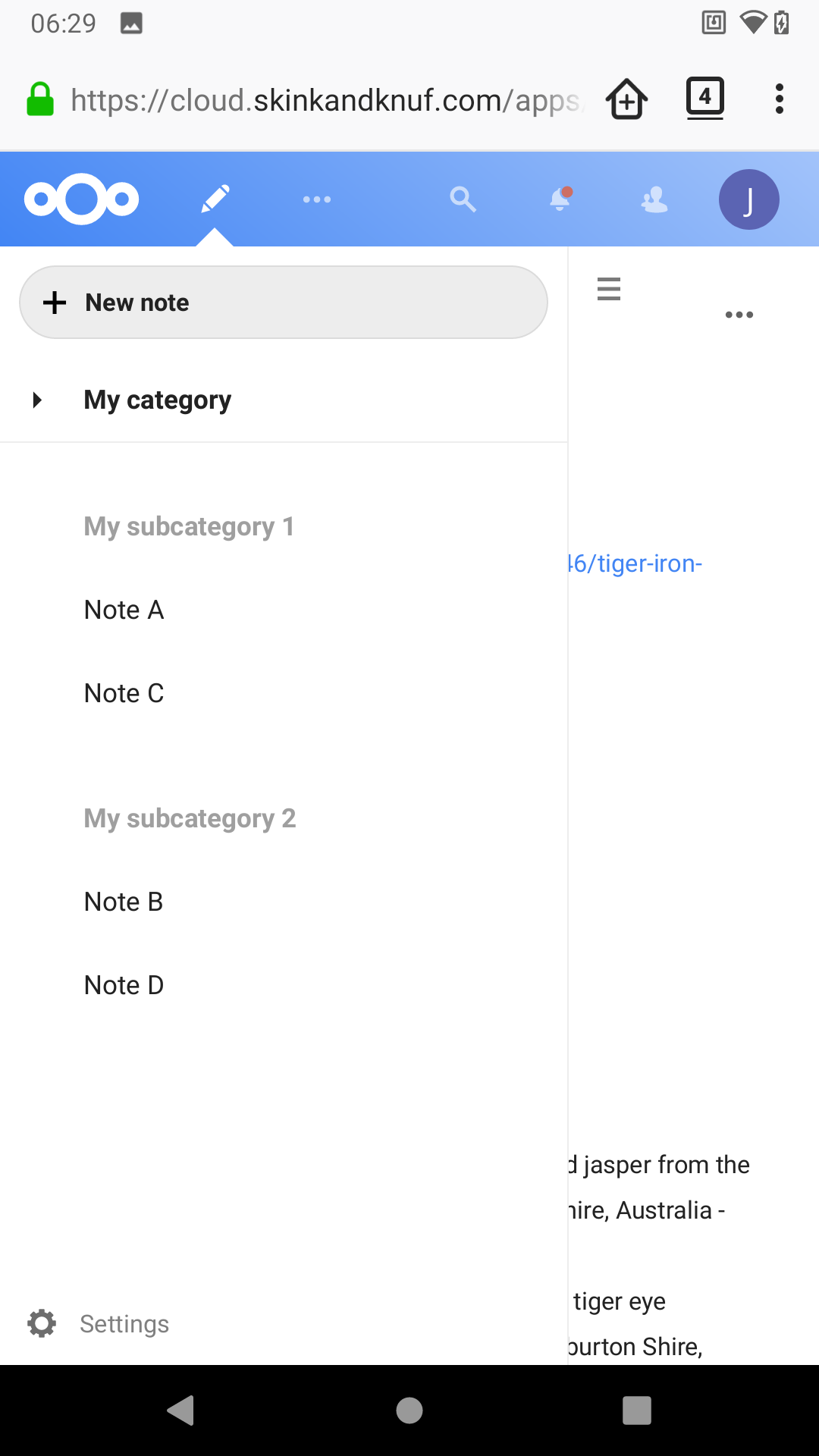
The notes should be grouped into the categories they belong to, like in the web app.
Smartphone (please complete the following information):
- Nextcloud Notes-Version (android app): 2.16.2
- F-Droid or Play Store: F-Droid
- Android-Version: 10
- Device: Moto G5S Plus
Server
- Nextcloud version: 19
- Nextcloud Notes version (server app): (latest)
 mrzapp
All 12 comments
Sorry, but i have no idea what you are trying to tell me 😄
Categorization and sorting are in no way related. You can choose whether the notes in one category are sorted by modified date or by alphabet. For example you can set all Notes in the category "Music" are sorted alphabetically and all Notes which are displayed in the category "ToDo" are sorted by last modified.
Please provide exact steps to reproduce, describe what exactly you are clicking (each step) and what you are expecting.
Ideally with screenshots 😉
 stefan-niedermann
on 26 Jun 2020
stefan-niedermann
on 26 Jun 2020
Do you mean that in the categories there are no sections between e.g. "A", and " B" like on "All notes" view?
stefan-niedermann
on 26 Jun 2020
Sorry for the confusing description 😅 Maybe this clears it up.
This is the web app (sectioned in categories):
This is the Android app (ignoring categories):
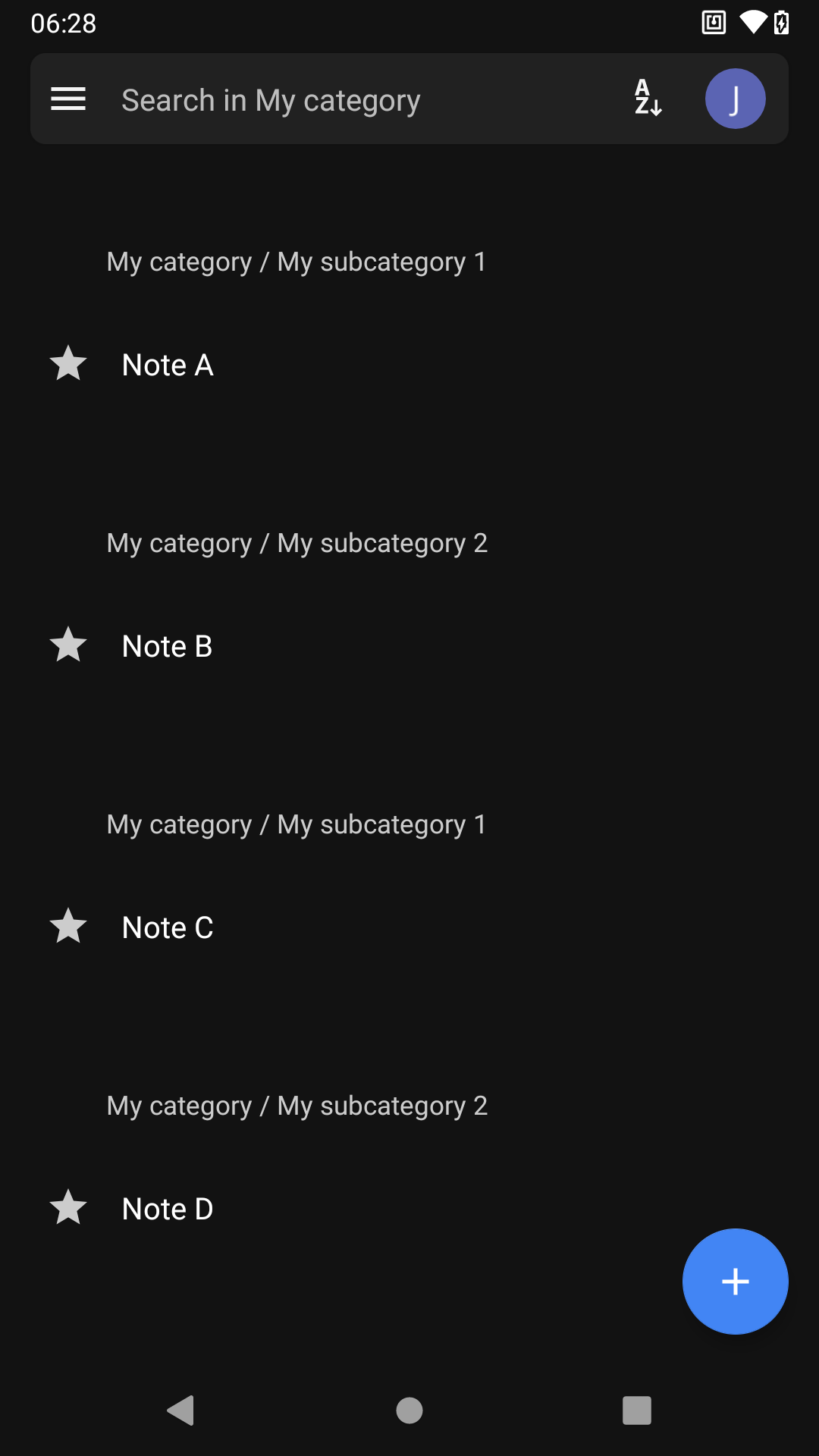
I get how the alphabetical or chronological "flat" views can be handy, but as of right now, there seems to be no way to explore notes by category, which makes the feature kind of meaningless. I have categories because I don't remember what my notes are called or when I last updated them.
Thank you for this amazing app, though, I use it very frequently 😁 If you'd prefer, I can look into making a pull request fixing this.
mrzapp
on 27 Jun 2020
IMO the sectioned categories should be in the alphabetical view, but it might also be something worth implementing as a third view option, so the "flat" view will still be available to those who like it.
mrzapp
on 27 Jun 2020
I think this is a bug, since the alphabetical view was grouped by (sub) categories before (exactly like you want). Maybe, the bug was introduced while adding the sorting option?
I didn't noticed before, since I just upgraded to that version.
 korelstar
on 27 Jun 2020
korelstar
on 27 Jun 2020
"All notes" view is fine. But in category view, there is another issue: sorting by date should include date/time headers (like in "All notes" view) instead of category headers.
korelstar
on 27 Jun 2020
Thank you for the explanation 🙂
- yes this is definitely a bug
- no we don't need a third option for this
I can look into making a pull request fixing this.
- This would be awesome 🚀 Let me know if I can provide you any help @mrzapp
cc optionally @Isaac-Graham @WingsUpete @Hui-Ouyang16 and @IF-ACT who originally implemented the sorting feature in case they are interested in this bug
stefan-niedermann
on 27 Jun 2020
I guess the sorting method should be modified like this:
- In alphabetical view, sort notes firstly by subcategories then alphabetical order.
- In last-modified view, show time slotter instead of subcategories.
I never use subcategory feature so I didn't notice this bug...
 IF-ACT
on 27 Jun 2020
IF-ACT
on 27 Jun 2020
I think also in last-modified view the notes should be sorted by subcategories first and then by last-modified (as it was before we had sorting).
When one is in a category view, the section headers should always be the subcategories (if available)
stefan-niedermann
on 27 Jun 2020
In NotesDatabase.java line 361, change
if (sortingMethod != null) {
    order = key_favorite + " DESC," + sortingMethod.getSorder();
}
to
if (sortingMethod != null) {
    if (category != null) {
        order = key_category + "," + key_favorite + " DESC," + sortingMethod.getSorder(); // Edited
    } else {
        order = key_favorite + " DESC," + sortingMethod.getSorder();
    }
}
may fix this.
IF-ACT
on 27 Jun 2020
That's not all unfortunately. While this will restore the grouping by subcategories, the notes within the subcategories are not sorted correctly.
stefan-niedermann
on 27 Jun 2020
My bad. The proposed fix works very well and will soon be published in v2.16.4. :slightly_smiling_face: Thanks again @IF-ACT
stefan-niedermann
on 11 Jul 2020
Related issues
stefan-niedermann
·
5Comments
 jancborchardt
·
4Comments
jancborchardt
·
4Comments
 frederiiiic
·
8Comments
frederiiiic
·
8Comments
 edrohler
·
4Comments
edrohler
·
4Comments
 karlprieb
·
7Comments
karlprieb
·
7Comments