Nextcloud-notes: "No network connection" with working network connection
Every now and then, snchronization stops working. If I manually initiate a sync, I get the message:
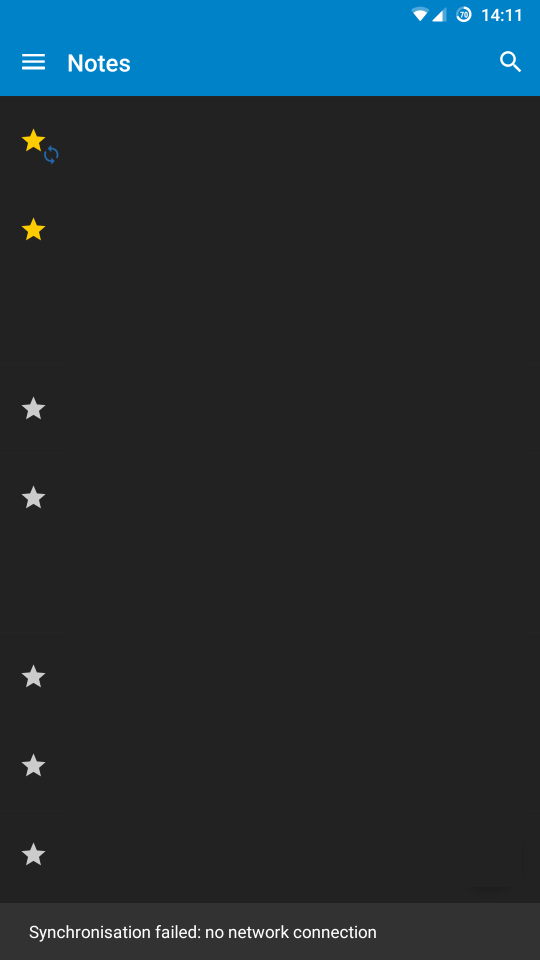
"synchronization failed: no network connection"
This is statement is not true, since the notes app is the only one of this opinion on my phone (including other apps that use the same nc instance). When force closing and reopening the APP, everything works fine.
 rababerladuseladim
All 28 comments
Since which version does this appear?
 stefan-niedermann
on 13 Feb 2019
stefan-niedermann
on 13 Feb 2019
No idea. I started to use the app just recently.
rababerladuseladim
on 13 Feb 2019
Can you describe your phone's state more preceisely?
- Are you using the option "Sync only on wi-fi"?
- Are you connected via wi-fi or mobile data?
- Can you reproduce this issue with specific steps which allows us also to reproduce this issue?
- Can you try with v0.22.4 if this also happens there?
Thank you
stefan-niedermann
on 14 Feb 2019
sure I can:
- not using the option to only sync on wifi
- at the time of the reported failure I was connected via wifi
- I have thought about this before my actually opening this issue but I really have no idea :-(
- new version is installed, so far it has not happened (but the issue generally occurs rather rarely, I guess about once every 20 edits)
rababerladuseladim
on 15 Feb 2019
Did the wi-fi you were connected to had an, special characteristics, like a login-wall, or was it some public wi-fi?
Or is it a completely default network?
Maybe any other special environement, like VPN?
stefan-niedermann
on 15 Feb 2019
The WiFi is distributed by my fritz.box. No special characteristics.
On 15 February 2019 09:26:32 CET, Niedermann IT-Dienstleistungen notifications@github.com wrote:
Did the wi-fi you were connected to had an, special characteristics,
like a login-wall, or was it some public wi-fi?Or is it a completely default network?
Maybe any other special environement, like VPN?
--
You are receiving this because you authored the thread.
Reply to this email directly or view it on GitHub:
https://github.com/stefan-niedermann/nextcloud-notes/issues/537#issuecomment-463950406
rababerladuseladim
on 15 Feb 2019
It still occurs with Version 0.24.2. Force closing of the APP can be prevented by a forced change of connection, though. After deactivating wifi, sync went smoothly.
rababerladuseladim
on 18 Feb 2019
I have exactly the same issue. Happens on home wifi and also on mobile network.
Force closing and reopening the app always fixes the issue.
I feel like this issue almost always occurs after not using the app for some time.
 akuntsch
on 2 May 2019
akuntsch
on 2 May 2019
Thank you for reporting. I am still not able to reproduce the behavior at this point. Sorry, but to fix this issue, i need exact steps how to provocate the error...
stefan-niedermann
on 2 May 2019
I have that same issue, and it's been present as long as I can remember using the app (years, by now).
It's occurring after switching from WLAN to mobile, and vice versa, AFAIK, but not always.
So I'll try to gather more data of the circumstances.
 mazimmer
on 10 Aug 2019
mazimmer
on 10 Aug 2019
Can you all please recheck with a version >= v2.0.0?
Available on F-Droid and Play Store beta track (https://play.google.com/apps/testing/it.niedermann.owncloud.notes)
The network stack has been completely removed and changed to the official files app.
stefan-niedermann
on 29 Dec 2019
Unfortunately the issue persists. It just occurred in V2.3.0 for me.
rababerladuseladim
on 4 Jan 2020
Interesting. To find out more about those issues, i enhanced the exception handling in version 2.4.6 (recently released). There should now a snackbar appear form where you can open a detailed error message. Those stack traces would be very helpful.
stefan-niedermann
on 11 Jan 2020
Unfortunately, the snackbar is not extendable upon the error occurring. Notes version 2.4.8.
rababerladuseladim
on 21 Jan 2020
I did some other changes regarding this notification in version 2.10.0.
The app now better checks the "Sync on Wi-Fi only"-preference. Please test again as soon as the app version is available.
If even this does not work, i need one of you to debug this issue because i simply can't reproduce it 🤷♂
stefan-niedermann
on 31 Jan 2020
@akuntsch @rababerladuseladim @mazimmer
Did anyone tried it already with v2.10.0 or v2.10.1?
It's available on F-Droid and on the Play Store Beta track.
stefan-niedermann
on 14 Feb 2020
I am using 2.10.1 and ran into the issue just yesterday. It seems to happen less than a couple of months ago, though.
On 14 February 2020 09:31:16 CET, Niedermann IT-Dienstleistungen notifications@github.com wrote:
@akuntsch @rababerladuseladim @mazimmer
Did anyone tried it already with
v2.10.0orv2.10.1?It's available on F-Droid and on the Play Store Beta
track.--
You are receiving this because you were mentioned.
Reply to this email directly or view it on GitHub:
https://github.com/stefan-niedermann/nextcloud-notes/issues/537#issuecomment-586152280
rababerladuseladim
on 14 Feb 2020
I know it's a pain in the neck, but how is it with v2.11.8? I enhanced the logic about when the snackbar is shown.
@akuntsch @rababerladuseladim @mazimmer
stefan-niedermann
on 15 Apr 2020
@stefan-niedermann Didn't have the issue in a while but I also changed phones not too long ago and thus did a fresh install etc. Tbh I also didn't use the app that much lately. If I ever get the error again, I'll post an update here.
akuntsch
on 15 Apr 2020
Thank you for the response, though!
stefan-niedermann
on 15 Apr 2020
First of all, thank you for not giving up on this issue. Unfortunately, the problem is still present in v2.11.8. Can I help in any way to debug this issue? I have no android development experience but am comfortable with the linux shell and have basic experience with adb.
rababerladuseladim
on 16 Apr 2020
@rababerladuseladim i created a debug-version of the app that collects data and displays it all instead of the snackbar as a dialog. You will notice the dialog, the title says "TEST-DIALOG". It will have a "copy"-button.
You can install the debug-version parallel to the normal app.
https://github.com/stefan-niedermann/nextcloud-notes/suites/607237039/artifacts/4578419
stefan-niedermann
on 17 Apr 2020
Tried to access notes while out of the house and ran into the error:
NoteServerSyncHelper contructor
- syncOnlyOnWifi = prefs.getBoolean(syncOnlyOnWifiKey, false); (false)
updateNetworkStatus
- activeInfo.isConnected() returned true
- setting networkConnected to true
-- isSyncPossible (true) = !syncOnlyOnWifi (true) || networInfo.isConnected() (true)
-- isSyncPossible = !syncOnlyOnWifi || networInfo.isConnected()
--- Log.d(Network connection established)
updateNetworkStatus
- activeInfo.isConnected() returned true
- setting networkConnected to true
-- isSyncPossible (true) = !syncOnlyOnWifi (true) || networInfo.isConnected() (true)
-- isSyncPossible = !syncOnlyOnWifi || networInfo.isConnected()
--- Log.d(Network connection established)
updateNetworkStatus
- activeInfo.isConnected() returned true
- setting networkConnected to true
-- isSyncPossible (true) = !syncOnlyOnWifi (true) || networInfo.isConnected() (false)
-- isSyncPossible = !syncOnlyOnWifi || networInfo.isConnected()
--- Log.d(Network connection established)
updateNetworkStatus
- activeInfo.isConnected() returned true
- setting networkConnected to true
-- isSyncPossible (true) = !syncOnlyOnWifi (true) || networInfo.isConnected() (false)
-- isSyncPossible = !syncOnlyOnWifi || networInfo.isConnected()
--- Log.d(Network connection established)
updateNetworkStatus
- activeInfo.isConnected() returned true
- setting networkConnected to true
-- isSyncPossible (true) = !syncOnlyOnWifi (true) || networInfo.isConnected() (true)
-- isSyncPossible = !syncOnlyOnWifi || networInfo.isConnected()
--- Log.d(Network connection established)
updateNetworkStatus
- activeInfo.isConnected() returned true
- setting networkConnected to true
-- isSyncPossible (true) = !syncOnlyOnWifi (true) || networInfo.isConnected() (true)
-- isSyncPossible = !syncOnlyOnWifi || networInfo.isConnected()
--- Log.d(Network connection established)
updateNetworkStatus
- activeInfo is null
- NetworkErrorException
NetworkInfo is null
updateNetworkStatus
- activeInfo.isConnected() returned true
- setting networkConnected to true
-- isSyncPossible (true) = !syncOnlyOnWifi (true) || networInfo.isConnected() (false)
-- isSyncPossible = !syncOnlyOnWifi || networInfo.isConnected()
--- Log.d(Network connection established)
updateNetworkStatus
-- Log.d(No network connection.)
updateNetworkStatus
- activeInfo is null
- NetworkErrorException
NetworkInfo is null
updateNetworkStatus
-- Log.d(No network connection.)


==========================

Sync only on wifi: falseNetworkInfo activeInfo.isConnected(): trueNetworkInfo networkInfo.isConnected() TYPE_WIFI: false
So, in the end of the day, we will have to switch to ConnectivityManager.NetworkCallback. Detecting the network state seems to make some troubles on a few devices and the current method to get the network state is also marked as deprecated.
The problem is, that the new recommended way to get the network state is API 24+ - which means we have to implement and maintain backward compatibility ourself.
Maybe this task might be interesting for you and your companions, too, @Isaac-Graham ? A good starting point might be this medium article, though it's in kotlin, not in java.
stefan-niedermann
on 5 May 2020
Sounds interesting. But I am normalizing database. I will ask whether my teammates are available to this issue.
 Isaac-Graham
on 5 May 2020
Isaac-Graham
on 5 May 2020
Same here. After some time it just stops syncing with with displaying the message at the bottom. You can remove account and create it again this doesn't help. Simple force stop the app sorts the problem. Not sure how to track the issue. Version 2.16.7
 cieska
on 17 Aug 2020
cieska
on 17 Aug 2020
I think the reason is the way we are detecting the network stack as i described above. Pull Requests are welcome 😉.
stefan-niedermann
on 17 Aug 2020
Thank you @korelstar for the PR, will be released with v2.16.8. @ all other people of this issue: Please let us know if the issue still happens with the new version.
stefan-niedermann
on 17 Aug 2020
Related issues
 karlprieb
·
7Comments
karlprieb
·
7Comments
 returntrip
·
4Comments
returntrip
·
4Comments
 OpenWick
·
4Comments
OpenWick
·
4Comments
 danicotillas
·
7Comments
danicotillas
·
7Comments
 jancborchardt
·
4Comments
jancborchardt
·
4Comments