Nextcloud-deck: LDAP Users not shown
How to use GitHub
- Please use the 👍 reaction to show that you are interested into the same feature.
- Please don't comment if you have no relevant information to add. It's just extra noise for everyone subscribed to this issue.
- Subscribe to receive notifications on status change and new comments.
Describe the bug
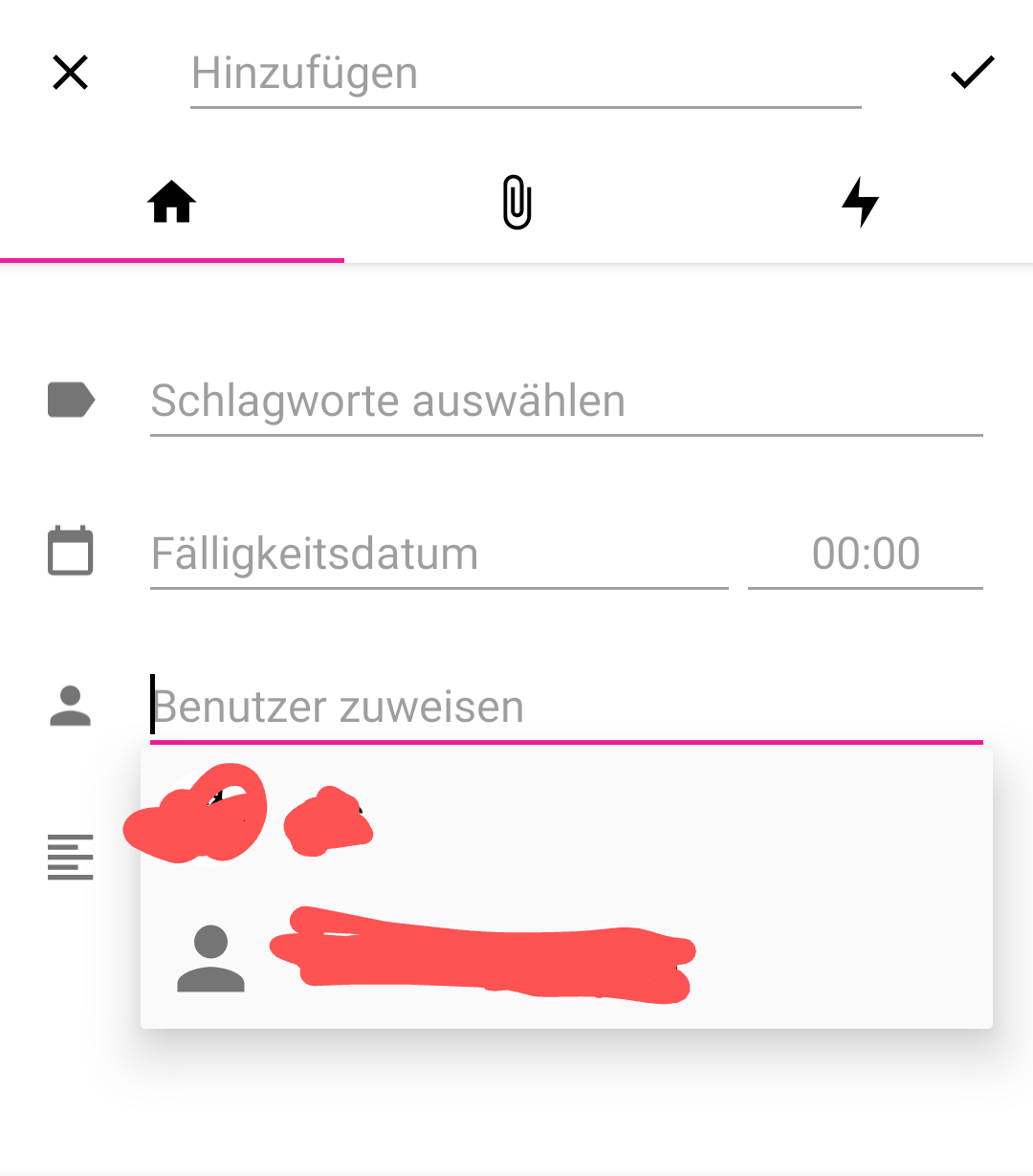
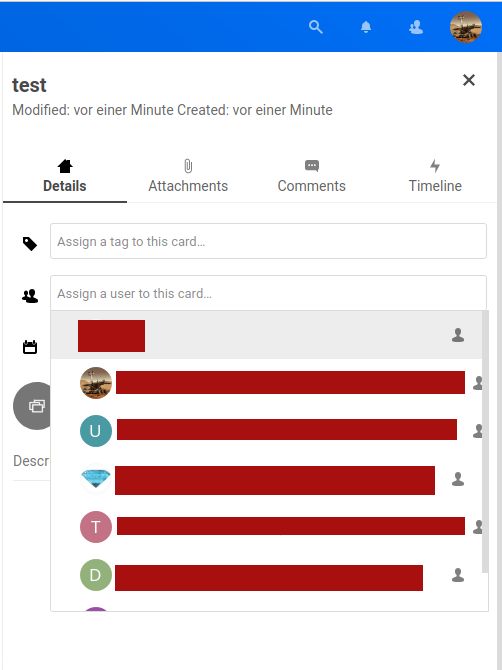
When trying to add a user to a card only the user who is owner of the board and the group he shared the board with is shown. In the webinterface one also can see the users of the group.
_Important: Users and groups come from the LDAP backend_
To reproduce
Issue is reproducible with an account from try.nextcloud.com:
Does not have LDAP backend/more users than one
Steps to reproduce the behavior:
- Click "+" button to create a new card
- Try to add a user to the card
- Only the board owner and the group can be added
Expected behavior
Also all members of the groups that the board is shared with are listed (as in the webinterface)
Screenshots
In Android App:
In Browser:
Versions
- Nextcloud: 18.0.6
- Nextcloud Deck: 1.0.5
- Nextcloud Android: 3.12.1
- Nextcloud Android Deck: 1.8.2
Smartphone (please complete the following information):
- Device: Nokia 7 plus
- Android-Version: 10
- App-Store:
- [ ] Google Play Store
- [x] F-Droid
Stacktrace
 q-wertz
All 49 comments
@q-wertz yeah, we are aware of multiple issues with a LDAP backend. 😒
Sorry for being brash, but might it be possible that you could help us with providing 2-3 temporary test accounts 👥 on your instance with a correct LDAP setup?
We unfortunately neither have the resources nor the knowledge to set up a complete LDAP configuration with one of our testing instances. We currently try to solve those kind of issues blindly by trial & error, but this is not really successful as you can see. 🙈
 stefan-niedermann
on 28 Jul 2020
stefan-niedermann
on 28 Jul 2020
There is only one thing I can add to @stefan-niedermann s message: Sorry for that! And maybe: thanks in advance!
 desperateCoder
on 28 Jul 2020
desperateCoder
on 28 Jul 2020
I think this is a more specific version of this one: #492
The LDAP-thingy isn't the main problem, group-handling is. LDAP itself is an other pain point. I started implementing group-handling today, see PR #639
desperateCoder
on 2 Aug 2020
Oh, and @q-wertz see this one: https://github.com/stefan-niedermann/nextcloud-deck/issues/492#issuecomment-650792812
Can you confirm, you have the same result as @kbeerepoot? If so, LDAP isn't the problem here at all.
desperateCoder
on 2 Aug 2020
@q-wertz @kbeerepoot see this.: APK: (∩ ͡° ͜ʖ ͡°)⊃━☆゚. *
Does this version fix the group handling for you?
It's safe to install this APK, this won't overwrite your current app, but install an additional one labeled with "dev". Install, choose account, (hopefully) enjoy!
desperateCoder
on 2 Aug 2020
@q-wertz @kbeerepoot see this.: APK: (∩ ͡° ͜ʖ ͡°)⊃━☆゚. *
Does this version fix the group handling for you?
It's safe to install this APK, this won't overwrite your current app, but install an additional one labeled with "dev". Install, choose account, (hopefully) enjoy!
Having some problems installing the APK, probably my fault but I do not know how to solve it right now. I'll wait and see how things will go for q-wertz ...
 kbeerepoot
on 2 Aug 2020
kbeerepoot
on 2 Aug 2020
@kbeerepoot thats a pitty, I'd like to help if you want, just tell me what's wrong.
Waiting for @q-wertz is a valid option, but for me you two have different problems with the same root cause, that's why I'd like you to have tried it as well... @q-wertz wants to assign, you want to filter... If you'd like to do me a favor, it would be great if you can also try it out. Any problems installing the app can be fixed, i guess.
Most likely there is an other version of the dev app installed or your phone blocks any other source for APKs than the play store (?). If you tell me what the phone tells you didn't work, we can see how to resolve this. If you don't want to, thats fine too, but I can't guarantee the fix will work for you, too :sweat_smile:
desperateCoder
on 2 Aug 2020
@kbeerepoot thats a pitty, I'd like to help if you want, just tell me what's wrong.
Read below ...
Waiting for @q-wertz is a valid option, but for me you two have different problems with the same root cause, that's why I'd like you to have tried it as well... @q-wertz wants to assign, you want to filter... If you'd like to do me a favor, it would be great if you can also try it out. Any problems installing the app can be fixed, i guess.
Strange, in my comment from June 29 in #492 you can read that I actually COULD assign from within the app, but needed to search for the name(s) to assign TO. A quick check now revealed that I can not assign to specific names from within the app anymore, but only to items in the choice list (which in my case are only the owner and the assigned group).
Most likely there is an other version of the dev app installed or your phone blocks any other source for APKs than the play store (?). If you tell me what the phone tells you didn't work, we can see how to resolve this. If you don't want to, thats fine too, but I can't guarantee the fix will work for you, too 😅
It is possible that there is another version of the dev app installed, but I would not exactly know how to find out. I als have F-Droid installed and working on my phone, but I do not know if Play Store and F-Droid are part of a limited list of sources. For some reason trying to install the dev app consistently started up another, non-related app, which I have subsequently removed but a new try seems to last forever ( ... Preparing ...)
kbeerepoot
on 2 Aug 2020
@q-wertz @kbeerepoot see this.: APK: (∩ ͡° ͜ʖ ͡°)⊃━☆゚. *
Does this version fix the group handling for you?
It's safe to install this APK, this won't overwrite your current app, but install an additional one labeled with "dev". Install, choose account, (hopefully) enjoy!
Sorry I was on holidays over the weekend.
When trying to install the test version I get the following error message (after selecting my user account):
App Version: 1.9.5

App Version Code: 1009005

App Flavor: dev

Deck Server Version: 0.6.4

Files App Version Code: 30120190

---

OS Version: 4.4.192-perf+(00WW*4*15F)

OS API Level: 29

Device: B2N_sprout

Manufacturer: HMD Global

Model (and Product): Nokia 7 plus (Onyx_00WW)

---

java.lang.NullPointerException: Attempt to invoke virtual method 'long java.lang.Long.longValue()' on a null object reference

    at it.niedermann.nextcloud.deck.persistence.sync.adapters.db.DataBaseAdapter.deleteGroupMembershipsOfGroup(DataBaseAdapter.java:370)

    at it.niedermann.nextcloud.deck.persistence.sync.helpers.providers.AccessControlDataProvider.handleGroupMemberships(AccessControlDataProvider.java:113)

    at it.niedermann.nextcloud.deck.persistence.sync.helpers.providers.AccessControlDataProvider.createInDB(AccessControlDataProvider.java:105)

    at it.niedermann.nextcloud.deck.persistence.sync.helpers.providers.AccessControlDataProvider.createInDB(AccessControlDataProvider.java:19)

    at it.niedermann.nextcloud.deck.persistence.sync.helpers.SyncHelper$1.onResponse(SyncHelper.java:49)

    at it.niedermann.nextcloud.deck.persistence.sync.helpers.SyncHelper$1.onResponse(SyncHelper.java:34)

    at it.niedermann.nextcloud.deck.persistence.sync.helpers.providers.AccessControlDataProvider.getAllFromServer(AccessControlDataProvider.java:59)

    at it.niedermann.nextcloud.deck.persistence.sync.helpers.SyncHelper.doSyncFor(SyncHelper.java:34)

    at it.niedermann.nextcloud.deck.persistence.sync.helpers.providers.BoardDataProvider.goDeeper(BoardDataProvider.java:83)

    at it.niedermann.nextcloud.deck.persistence.sync.helpers.providers.BoardDataProvider.goDeeper(BoardDataProvider.java:23)

    at it.niedermann.nextcloud.deck.persistence.sync.helpers.SyncHelper$1.onResponse(SyncHelper.java:63)

    at it.niedermann.nextcloud.deck.persistence.sync.helpers.SyncHelper$1.onResponse(SyncHelper.java:34)

    at it.niedermann.nextcloud.deck.api.RequestHelper$ResponseConsumer.accept(RequestHelper.java:62)

    at io.reactivex.internal.observers.LambdaObserver.onNext(LambdaObserver.java:63)

    at io.reactivex.internal.operators.observable.ObservableSubscribeOn$SubscribeOnObserver.onNext(ObservableSubscribeOn.java:58)

    at io.reactivex.internal.operators.observable.ObservableMap$MapObserver.onNext(ObservableMap.java:62)

    at io.reactivex.internal.operators.observable.ObservableFromPublisher$PublisherSubscriber.onNext(ObservableFromPublisher.java:56)

    at com.nextcloud.android.sso.api.NextcloudAPI.lambda$performRequestObservableV2$1$NextcloudAPI(NextcloudAPI.java:98)

    at com.nextcloud.android.sso.api.-$$Lambda$NextcloudAPI$HPzOdi9LOc_f-wA9GNnhc9LKQSM.subscribe(Unknown Source:6)

    at io.reactivex.internal.operators.observable.ObservableFromPublisher.subscribeActual(ObservableFromPublisher.java:31)

    at io.reactivex.Observable.subscribe(Observable.java:12284)

    at io.reactivex.internal.operators.observable.ObservableMap.subscribeActual(ObservableMap.java:32)

    at io.reactivex.Observable.subscribe(Observable.java:12284)

    at io.reactivex.internal.operators.observable.ObservableSubscribeOn$SubscribeTask.run(ObservableSubscribeOn.java:96)

    at io.reactivex.Scheduler$DisposeTask.run(Scheduler.java:578)

    at io.reactivex.internal.schedulers.ScheduledRunnable.run(ScheduledRunnable.java:66)

    at io.reactivex.internal.schedulers.ScheduledRunnable.call(ScheduledRunnable.java:57)

    at java.util.concurrent.FutureTask.run(FutureTask.java:266)

    at java.util.concurrent.ScheduledThreadPoolExecutor$ScheduledFutureTask.run(ScheduledThreadPoolExecutor.java:301)

    at java.util.concurrent.ThreadPoolExecutor.runWorker(ThreadPoolExecutor.java:1167)

    at java.util.concurrent.ThreadPoolExecutor$Worker.run(ThreadPoolExecutor.java:641)
You marked this as outdated:
Oh, and @q-wertz see this one: #492 (comment)
Can you confirm, you have the same result as @kbeerepoot? If so, LDAP isn't the problem here at all.
I tested it anyways and can confirm, that I also cannot see the users in the filter list...
I only see the (dummy) user (local one) that created the board and the LDAP group the board is shared with
q-wertz
on 3 Aug 2020
When trying to install the test version I get the following error message (after selecting my user account):
I just fixed that, pretty dumb mistake... Please try this one: APK: (╯°□°)╯︵ ┻━┻
(you might need to uninstall your current dev version first...)
I tested it anyways and can confirm, that I also cannot see the users in the filter list...
Ok, but did you also try the steps in this comment? https://github.com/stefan-niedermann/nextcloud-deck/issues/492#issuecomment-650792812 @kbeerepoot was able to get a user into the list by doing them. If it works for you as well, we have the same root cause here, but i think it will be the same. I marked it as outdated, because if the provided APK fixes the issue for you, it is a valid evidence, too.
@kbeerepoot
For some reason trying to install the dev app consistently started up another, non-related app, which I have subsequently removed but a new try seems to last forever ( ... Preparing ...)
Wow, strange?! I swear I have nothing to do with this! :sweat_smile: So you won't get an error i guess? It is quite hard to tell whats wrong then... weird.
@q-wertz:
EDIT: I forgot the link to the APK, just fixed it.
desperateCoder
on 3 Aug 2020
When trying to install the test version I get the following error message (after selecting my user account):
I just fixed that, pretty dumb mistake... Please try this one: APK: (╯°□°)╯︵ ┻━┻ (you might need to uninstall your current dev version first...)
I tried the new version and now I get the following errors (the first one only appeared once, maybe forget it):
Full Crash:

App Version: 1.9.5

App Version Code: 1009005

App Flavor: dev

Files App Version Code: 30120190

---

OS Version: 4.4.192-perf+(00WW*4*15F)

OS API Level: 29

Device: B2N_sprout

Manufacturer: HMD Global

Model (and Product): Nokia 7 plus (Onyx_00WW)

---

java.lang.IllegalStateException: FragmentManager has been destroyed

    at androidx.fragment.app.FragmentManager.enqueueAction(FragmentManager.java:1737)

    at androidx.fragment.app.BackStackRecord.commitInternal(BackStackRecord.java:321)

    at androidx.fragment.app.BackStackRecord.commit(BackStackRecord.java:286)

    at androidx.fragment.app.DialogFragment.show(DialogFragment.java:181)

    at it.niedermann.nextcloud.deck.ui.ImportAccountActivity$1$1$1.lambda$onError$0$ImportAccountActivity$1$1$1(ImportAccountActivity.java:158)

    at it.niedermann.nextcloud.deck.ui.-$$Lambda$ImportAccountActivity$1$1$1$0lV90b-mi2iQIlg2aiUfCfqaSjQ.run(Unknown Source:6)

    at android.os.Handler.handleCallback(Handler.java:883)

    at android.os.Handler.dispatchMessage(Handler.java:100)

    at android.os.Looper.loop(Looper.java:214)

    at android.app.ActivityThread.main(ActivityThread.java:7397)

    at java.lang.reflect.Method.invoke(Native Method)

    at com.android.internal.os.RuntimeInit$MethodAndArgsCaller.run(RuntimeInit.java:492)

    at com.android.internal.os.ZygoteInit.main(ZygoteInit.java:935)
App Version: 1.9.5

App Version Code: 1009005

App Flavor: dev

Deck Server Version: 0.6.4

Files App Version Code: 30120190

---

OS Version: 4.4.192-perf+(00WW*4*15F)

OS API Level: 29

Device: B2N_sprout

Manufacturer: HMD Global

Model (and Product): Nokia 7 plus (Onyx_00WW)

---

java.lang.NullPointerException: Attempt to invoke virtual method 'java.util.List it.niedermann.nextcloud.deck.model.ocs.user.GroupMemberUIDs.getUids()' on a null object reference

    at it.niedermann.nextcloud.deck.persistence.sync.helpers.providers.AccessControlDataProvider.handleGroupMemberships(AccessControlDataProvider.java:113)

    at it.niedermann.nextcloud.deck.persistence.sync.helpers.providers.AccessControlDataProvider.createInDB(AccessControlDataProvider.java:104)

    at it.niedermann.nextcloud.deck.persistence.sync.helpers.providers.AccessControlDataProvider.createInDB(AccessControlDataProvider.java:18)

    at it.niedermann.nextcloud.deck.persistence.sync.helpers.SyncHelper$1.onResponse(SyncHelper.java:49)

    at it.niedermann.nextcloud.deck.persistence.sync.helpers.SyncHelper$1.onResponse(SyncHelper.java:34)

    at it.niedermann.nextcloud.deck.persistence.sync.helpers.providers.AccessControlDataProvider.getAllFromServer(AccessControlDataProvider.java:58)

    at it.niedermann.nextcloud.deck.persistence.sync.helpers.SyncHelper.doSyncFor(SyncHelper.java:34)

    at it.niedermann.nextcloud.deck.persistence.sync.helpers.providers.BoardDataProvider.goDeeper(BoardDataProvider.java:83)

    at it.niedermann.nextcloud.deck.persistence.sync.helpers.providers.BoardDataProvider.goDeeper(BoardDataProvider.java:23)

    at it.niedermann.nextcloud.deck.persistence.sync.helpers.SyncHelper$1.onResponse(SyncHelper.java:63)

    at it.niedermann.nextcloud.deck.persistence.sync.helpers.SyncHelper$1.onResponse(SyncHelper.java:34)

    at it.niedermann.nextcloud.deck.api.RequestHelper$ResponseConsumer.accept(RequestHelper.java:62)

    at io.reactivex.internal.observers.LambdaObserver.onNext(LambdaObserver.java:63)

    at io.reactivex.internal.operators.observable.ObservableSubscribeOn$SubscribeOnObserver.onNext(ObservableSubscribeOn.java:58)

    at io.reactivex.internal.operators.observable.ObservableMap$MapObserver.onNext(ObservableMap.java:62)

    at io.reactivex.internal.operators.observable.ObservableFromPublisher$PublisherSubscriber.onNext(ObservableFromPublisher.java:56)

    at com.nextcloud.android.sso.api.NextcloudAPI.lambda$performRequestObservableV2$1$NextcloudAPI(NextcloudAPI.java:98)

    at com.nextcloud.android.sso.api.-$$Lambda$NextcloudAPI$HPzOdi9LOc_f-wA9GNnhc9LKQSM.subscribe(Unknown Source:6)

    at io.reactivex.internal.operators.observable.ObservableFromPublisher.subscribeActual(ObservableFromPublisher.java:31)

    at io.reactivex.Observable.subscribe(Observable.java:12284)

    at io.reactivex.internal.operators.observable.ObservableMap.subscribeActual(ObservableMap.java:32)

    at io.reactivex.Observable.subscribe(Observable.java:12284)

    at io.reactivex.internal.operators.observable.ObservableSubscribeOn$SubscribeTask.run(ObservableSubscribeOn.java:96)

    at io.reactivex.Scheduler$DisposeTask.run(Scheduler.java:578)

    at io.reactivex.internal.schedulers.ScheduledRunnable.run(ScheduledRunnable.java:66)

    at io.reactivex.internal.schedulers.ScheduledRunnable.call(ScheduledRunnable.java:57)

    at java.util.concurrent.FutureTask.run(FutureTask.java:266)

    at java.util.concurrent.ScheduledThreadPoolExecutor$ScheduledFutureTask.run(ScheduledThreadPoolExecutor.java:301)

    at java.util.concurrent.ThreadPoolExecutor.runWorker(ThreadPoolExecutor.java:1167)

    at java.util.concurrent.ThreadPoolExecutor$Worker.run(ThreadPoolExecutor.java:641)

    at java.lang.Thread.run(Thread.java:919)
I tested it anyways and can confirm, that I also cannot see the users in the filter list...
Ok, but did you also try the steps in this comment? #492 (comment) @kbeerepoot was able to get a user into the list by doing them. If it works for you as well, we have the same root cause here, but i think it will be the same. I marked it as outdated, because if the provided APK fixes the issue for you, it is a valid evidence, too.
Sharing to the user from the app is not possible as the user does not appear in the users/groups list.
I shared it from the web version to some other user than myself, after synchronizing I can see the user in the card but I cannot filter for him (still not shown in tab Benutzer)
q-wertz
on 3 Aug 2020
please, don't ask me what the first stacktrace is all about, i read "fragment" and feel the need to summon @stefan-niedermann ...
But the second one is just another stupidity of mine, fixed. please give it another try: APK: ¯\_ಠ_ಠ_/¯
desperateCoder
on 3 Aug 2020
But the second one is just another stupidity of mine, fixed. please give it another try: APK: ¯_ಠ_ಠ_/¯
Thanks for the new version. Installation and connecting to account works.
But I still cannot see the other users... Neither assign something to them nor filter for them...
Maybe @kbeerepoot can try it
q-wertz
on 3 Aug 2020
I hope it works out for @kbeerepoot, your message did hurt more, than i want to admit. Last sunday shouldn't be wasted...
@stefan-niedermann any chance we can release this after having tested it in different constellations with groups and stuff, so @kbeerepoot can access the new code?
Regarding to you @q-wertz, I am not willing to give up. Maybe this is, where LDAP kicks in, so maybe we could build some "broken" versions for you, to get behind the data you are getting and see, how we can handle it - if you want to help out a very frustrated developer of course!
desperateCoder
on 3 Aug 2020
But the second one is just another stupidity of mine, fixed. please give it another try: APK: ¯_ಠ_ಠ_/¯
Thanks for the new version. Installation and connecting to account works.
But I still cannot see the other users... Neither assign something to them nor filter for them...Maybe @kbeerepoot can try it
Unfortunately I still have a problem installing the APK, that I'm not being able to solve. I'll have to wait till a version with the solution arrives in F-droid.
Again I like to draw attention to my post on June 29 in #492 where I stated that I actually could assign cards to specific users from within the app, but had to search for them by starting to type their (user-?)name in the field and applicable users would pop
up. This is not possible anymore in the app ...
kbeerepoot
on 4 Aug 2020
I hope it works out for @kbeerepoot, your message did hurt more, than i want to admit. Last sunday shouldn't be wasted...
@stefan-niedermann any chance we can release this after having tested it in different constellations with groups and stuff, so @kbeerepoot can access the new code?Regarding to you @q-wertz, I am not willing to give up. Maybe this is, where LDAP kicks in, so maybe we could build some "broken" versions for you, to get behind the data you are getting and see, how we can handle it - if you want to help out a very frustrated developer of course!
Can imagine that this is really frustrating. Of course I can help you :)
I also installed Deck now on my private Server (without LDAP) but there I also cannot see the other users from the group... (But now I can check the non LDAP setup for you :wink: )
Typing the name does not make the user visible (as it was at some old version according to @kbeerepoot ).
Don't know if it is important for you but the Server which runs with LDAP is still on the old NC version 18. The non LDAP is on 19.0.1
q-wertz
on 4 Aug 2020
@q-wertz oh boy, for me this works kind of fine, but hold on, we'll find a way to get behind this.
What does the following call get you?
curl -X GET 'https://<<yourUserName>>:<<yourPassword>>@<<yourDomain>>/ocs/v2.php/cloud/groups/<<assignedGroupName>>?format=json' -H 'Accept: application/json' -H 'OCS-APIRequest: true' -H 'Content-Type: application/json;charset=utf-8'
(please replace the four variables!)
You can do this for both of your instances, would be quite interesting
desperateCoder
on 4 Aug 2020
What does the following call get you?
curl -X GET 'https://<<yourUserName>>:<<yourPassword>>@<<yourDomain>>/ocs/v2.php/cloud/groups/<<assignedGroupName>>?format=json' -H 'Accept: application/json' -H 'OCS-APIRequest: true' -H 'Content-Type: application/json;charset=utf-8'(please replace the four variables!)
You can do this for both of your instances, would be quite interesting
On both setups with the standard user:
{"ocs":{"meta":{"status":"failure","statuscode":997,"message":"Logged in user must be at least a sub admin"},"data":[]}}
When using an admin account NextcloudAdmin (private setup):
{"ocs":{"meta":{"status":"ok","statuscode":200,"message":"OK"},"data":{"users":["NextcloudAdmin","User1","User2","User3","User4","User5","User6"]}}}
Looks like a group permission problem... I think I cannot see the other users of my group directly. The web application somehow accesses this information in a different way.
q-wertz
on 4 Aug 2020
Ok, so that's why the second NPE could even occurr, and that's why my fix does mostly nothing for you. Seems like I need more input here, maybe @juliushaertl may have a hint, how we can access the data?
desperateCoder
on 4 Aug 2020
@desperateCoder Digged into the deck API.
curl -X GET 'https://USER:PASSWORD@URL/index.php/apps/deck/api/v1.0/boards/BOARDID'
returns all users that are in the board as users (also see https://github.com/nextcloud/deck/blob/05ef0b5a654c779ebcb189e9dd7683e2f799987e/docs/API.md#get-boardsboardid---get-board-details)
q-wertz
on 4 Aug 2020
Holy... I had your password for a second.... You need to watch that you don't post it 🤣
desperateCoder
on 4 Aug 2020
Yes I'm already changing it... stupid me. wanted to paste a link but my paste was an old one :facepalm:
I pasted the link now
q-wertz
on 4 Aug 2020
Dont panic I tried to remove it quickly, but you were faster.
If you run this curl, what do you get? I mean, I think I use /boards to get the info and handle the users there. But do I get the users in the group as well?
desperateCoder
on 4 Aug 2020
Thanks. Password is changed :sweat_smile:
As I understand it I really get the users that have access to the board (as I only added groups).
Also see the ACL rules. LDAPUser1 and LDAPUser2 are part of the group LDAPGroup1
{
    "title": "Toller_Titel",
    "owner": {
        "primaryKey": "LocalUser",
        "uid": "LocalUser",
        "displayname": "LocalUser",
        "type": 0
    },
    "color": "837d0d",
    "archived": false,
    "labels": [
        {
            "title": "Finished",
            "color": "31CC7C",
            "boardId": 24,
            "cardId": null,
            "lastModified": 1593899762,
            "id": 116
        },
        {
            "title": "To review",
            "color": "317CCC",
            "boardId": 24,
            "cardId": null,
            "lastModified": 1593899762,
            "id": 117
        },
        {
            "title": "Action needed",
            "color": "FF7A66",
            "boardId": 24,
            "cardId": null,
            "lastModified": 1593899762,
            "id": 118
        },
        {
            "title": "Later",
            "color": "F1DB50",
            "boardId": 24,
            "cardId": null,
            "lastModified": 1593899762,
            "id": 119
        },
    ],
    "acl": [
        {
            "participant": {
                "primaryKey": "LDAPGroup1",
                "uid": "LDAPGroup1",
                "displayname": "LDAPGroup1",
                "type": 1
            },
            "type": 1,
            "boardId": 24,
            "permissionEdit": true,
            "permissionShare": false,
            "permissionManage": true,
            "owner": false,
            "id": 30
        }
    ],
    "permissions": {
        "PERMISSION_READ": true,
        "PERMISSION_EDIT": true,
        "PERMISSION_MANAGE": true,
        "PERMISSION_SHARE": false
    },
    "users": [
        {
            "primaryKey": "LocalUser",
            "uid": "LocalUser",
            "displayname": "LocalUser",
            "type": 0
        },
        {
            "primaryKey": "LDAPUser1",
            "uid": "LDAPUser1",
            "displayname": "Bli Blablubb ([email protected])",
            "type": 0
        },
        {
            "primaryKey": "LDAPUser2",
            "uid": "LDAPUser2",
            "displayname": "Bli Blablubb2 ([email protected])",
            "type": 0
        }
    ],
    "stacks": [],
    "deletedAt": 0,
    "lastModified": 1596543445,
    "id": 24
}
In this case I used:
curl -X GET 'https://LDAPUser1:PASSWORD@URL/index.php/apps/deck/api/v1.0/boards/24'
Ok, seeing this, LDAP ist definetly mit the problem here, but the users endpoint is. Can you confirm that the users in the list are actually all users in the group? Or are there users in the group that are missing in the list?
Quick test would be adding an user to the group and look up, if the new group member appears in the list afterwards
desperateCoder
on 4 Aug 2020
I can confirm that all users from the LDAPGroup1 are in the list.
The uid/primary keys are the values from the column owncloud_name in oc_ldap_user_mapping nextcloud mysql table (and not the ldap_dn's)
q-wertz
on 4 Aug 2020
Well, I guess we found something here. Thank you so much for your help so far! I'll see, how I can improve this whole thing, as soon as I have some free time for this. Again: thanks!!
desperateCoder
on 4 Aug 2020
No problem. Thanks for this app and your work :smiley:
As soon as you have a test version let me know.
q-wertz
on 4 Aug 2020
Aaaaaw man, thaks for your donation! ❤️
We absolutely appreciate that, thankful users are the most kick-ass thing here. The main thing we get are issues, so this is really a big deal for us, thank you, also from @stefan-niedermann who makes our app all fancy and shiny!
desperateCoder
on 4 Aug 2020
Alright buddy, I got something for you: APK: [̲̅$̲̅(̲̅ιο̲̅̅)̲̅$̲̅]
Please make sure you uninstalled the old dev-app first, otherwise android will crash the hell out of the app. (-> Database migration scripts)
With your hint and the confirmation of the server-app-developer I'm pretty confident we can get this to work, even if you still get some errors at first, I think the concept is valid. Thanks for the hint regarding to the users in the board! Turns out I had the data all the time, but didn't use it :sweat:
I really hope this works. If not, I'll make it to.
desperateCoder
on 5 Aug 2020
Thank you :)
On the LDAP Setup (still on NC Version 18) I get the error that the there is no Deck installed or the Deck version could not be found when trying to connect.
Private Server (newest version) throws:
App Version: 1.9.6

App Version Code: 1009006

App Flavor: dev

Deck Server Version: 0.6.4

Files App Version Code: 30120190

---

OS Version: 4.4.192-perf+(00WW*4*15F)

OS API Level: 29

Device: B2N_sprout

Manufacturer: HMD Global

Model (and Product): Nokia 7 plus (Onyx_00WW)

---

java.lang.NullPointerException: Attempt to invoke virtual method 'long java.lang.Long.longValue()' on a null object reference

    at it.niedermann.nextcloud.deck.persistence.sync.adapters.db.DataBaseAdapter.deleteBoardMembershipsOfBoard(DataBaseAdapter.java:374)

    at it.niedermann.nextcloud.deck.persistence.sync.helpers.providers.BoardDataProvider.handleUsers(BoardDataProvider.java:54)

    at it.niedermann.nextcloud.deck.persistence.sync.helpers.providers.BoardDataProvider.createInDB(BoardDataProvider.java:42)

    at it.niedermann.nextcloud.deck.persistence.sync.helpers.providers.BoardDataProvider.createInDB(BoardDataProvider.java:23)

    at it.niedermann.nextcloud.deck.persistence.sync.helpers.SyncHelper$1.onResponse(SyncHelper.java:49)

    at it.niedermann.nextcloud.deck.persistence.sync.helpers.SyncHelper$1.onResponse(SyncHelper.java:34)

    at it.niedermann.nextcloud.deck.api.RequestHelper$ResponseConsumer.accept(RequestHelper.java:62)

    at io.reactivex.internal.observers.LambdaObserver.onNext(LambdaObserver.java:63)

    at io.reactivex.internal.operators.observable.ObservableSubscribeOn$SubscribeOnObserver.onNext(ObservableSubscribeOn.java:58)

    at io.reactivex.internal.operators.observable.ObservableMap$MapObserver.onNext(ObservableMap.java:62)

    at io.reactivex.internal.operators.observable.ObservableFromPublisher$PublisherSubscriber.onNext(ObservableFromPublisher.java:56)

    at com.nextcloud.android.sso.api.NextcloudAPI.lambda$performRequestObservableV2$1$NextcloudAPI(NextcloudAPI.java:98)

    at com.nextcloud.android.sso.api.-$$Lambda$NextcloudAPI$HPzOdi9LOc_f-wA9GNnhc9LKQSM.subscribe(Unknown Source:6)

    at io.reactivex.internal.operators.observable.ObservableFromPublisher.subscribeActual(ObservableFromPublisher.java:31)

    at io.reactivex.Observable.subscribe(Observable.java:12284)

    at io.reactivex.internal.operators.observable.ObservableMap.subscribeActual(ObservableMap.java:32)

    at io.reactivex.Observable.subscribe(Observable.java:12284)

    at io.reactivex.internal.operators.observable.ObservableSubscribeOn$SubscribeTask.run(ObservableSubscribeOn.java:96)

    at io.reactivex.Scheduler$DisposeTask.run(Scheduler.java:578)

    at io.reactivex.internal.schedulers.ScheduledRunnable.run(ScheduledRunnable.java:66)

    at io.reactivex.internal.schedulers.ScheduledRunnable.call(ScheduledRunnable.java:57)

    at java.util.concurrent.FutureTask.run(FutureTask.java:266)

    at java.util.concurrent.ScheduledThreadPoolExecutor$ScheduledFutureTask.run(ScheduledThreadPoolExecutor.java:301)

    at java.util.concurrent.ThreadPoolExecutor.runWorker(ThreadPoolExecutor.java:1167)

    at java.util.concurrent.ThreadPoolExecutor$Worker.run(ThreadPoolExecutor.java:641)

    at java.lang.Thread.run(Thread.java:919)
Wow. I need to drink less... or more... don't know. Fixed: APK: ☉ ‿ ⚆
On the LDAP Setup (still on NC Version 18) I get the error that the there is no Deck installed or the Deck version could not be found when trying to connect.
Uhm... this is quite weird, because the other (broken dev-) versions worked fine, right? I didn't change anything there, I'd guess this was kind of a server-hickup or something, just retry. If it still doesn't work, please double-check, that the server-Deck-app is fine by accessing it via Web-UI.
desperateCoder
on 5 Aug 2020
Wow. I need to drink less... or more... don't know. Fixed: APK: ☉ ‿ ⚆
YESSS !! I don't exactly know how, but :
- I got the dev version downloaded
- I got the dev version installed
- I got the dev version working
- I can see the actual users in the filter list. It's working !!
but :
- assigning from within the app does not seem to be working flawless yet. When I select (bring the cursor to) the assignment field a choice list of three users pops up, where there should be at least one user more, and the group and owner are no longer in the choice list (which might be intentional, I don't know).
Well, at least there is progress ... Lots of thanks for the efforts, @desperateCoder and @q-wertz !!
kbeerepoot
on 5 Aug 2020
- I got the dev version downloaded
- I got the dev version installed
- I got the dev version working
- I can see the actual users in the filter list. It's working !!
By the way, does this mean I have to close #492 now?
Or do I wait till the real new app version is released?
Or will someone else close it for me?
kbeerepoot
on 5 Aug 2020
Well, at least there is progress ...
Agreed! May not be perfect yet, but at least we see some improvements!
assigning from within the app does not seem to be working flawless yet. When I select (bring the cursor to) the assignment field a choice list of three users pops up, where there should be at least one user more, and the group and owner are no longer in the choice list (which might be intentional, I don't know).
Would you please try to type a not-listed name into the assignment-field? May be the groupname as well, I hope, the users and groups will show up then.
Lots of thanks for the efforts, @desperateCoder and @q-wertz !!
Your're very welcome! :blush:
By the way, does this mean I have to close #492 now?
Or do I wait till the real new app version is released?
Or will someone else close it for me?
I'd like to wait until @q-wertz approves and you find your missing users. If you are happy with the result, I am too. As soon as we all are satisfied with the solution, I'll close both issues and this is going to be released. But thanks for worrying :smile:, @stefan-niedermann _loves_ housekeeping :trollface:
desperateCoder
on 5 Aug 2020
assigning from within the app does not seem to be working flawless yet. When I select (bring the cursor to) the assignment field a choice list of three users pops up, where there should be at least one user more, and the group and owner are no longer in the choice list (which might be intentional, I don't know).
Would you please try to type a not-listed name into the assignment-field? May be the groupname as well, I hope, the users and groups will show up then.
Unfortunately that only partly seems to work. It works for the groupname and the owner, but not for the not-listed user that DOES have access to the board.
Bringing the cursor to the assignment field will initially bring up a list of no more than three (3) users that are not already assigned to the card. Starting to type ANYTHING in the field will change that list, sometimes bringing up the owner or the group, but the logic of WHAT it brings up WHEN escapes me at the moment. I would hope it would at least bring up the name of the missing member of the group that does have access rights to the board, but nothing seems to give THAT result.
I'd like to wait until @q-wertz approves and you find your missing users. If you are happy with the result, I am too. As soon as we all are satisfied with the solution, I'll close both issues and this is going to be released. But thanks for worrying 😄, @stefan-niedermann _loves_ housekeeping :trollface:
The reason I asked is because #492 only corncerns the filter, which DOES seem to work flawlessly in the dev-version of the app. Maybe some code comparison between the filter system and the assignment list could solve the problem (forgive me if I sound too obvious or stupid) ?
kbeerepoot
on 5 Aug 2020
Maybe some code comparison between the filter system and the assignment list could solve the problem (forgive me if I sound too obvious or stupid) ?
The assignment field in the web(browser)version does not seem to have any problem.
kbeerepoot
on 5 Aug 2020
Wow. I need to drink less... or more... don't know. Fixed: APK: ☉ ‿ ⚆
Sorry for the delay. On my private setup (non LDAP):
I have the similar behaviour as @kbeerepoot . When trying to assign to an user:
- only three users are shown in the list (myself, the board-owner, one other (alphabetically the first one of the grouplist if this is of importance for you)
- difference to @kbeerepoot is that I can see the board owner (which is also in the group in my case)
- when I type in a username it does not appear in the list...
- assigning is working on my side :+1: :tada:
When filtering:
- I can see the group (last entry)
- I see all 7 users of the group (including owner)
- I also added 3 more users to see if it is a "scrollbar" problem, but in the filtering list the possibility to scroll appears and I can also see more users as fitting on my screen
- filter is working for me :+1: :tada:
I think there might be an issue with the interface of the assign select (list is to long to be shown -> cutted/missing scrollbar/etc.).
Thanks for your hard work :blush:
On the LDAP Setup (still on NC Version 18) I get the error that the there is no Deck installed or the Deck version could not be found when trying to connect.
Uhm... this is quite weird, because the other (broken dev-) versions worked fine, right? I didn't change anything there, I'd guess this was kind of a server-hickup or something, just retry. If it still doesn't work, please double-check, that the server-Deck-app is fine by accessing it via Web-UI.
I think this might be because I changed the password... Will try to figure it out... Something is messy.
q-wertz
on 6 Aug 2020
Ok, so i just had another look and it was obviously dumb to add my new data to the "proposal" (initial assignment proposals without search, full user-filter list), but not the "user search" filter when you type the username to assign.
Fixed: APK: (ᕗ ͠° ਊ ͠° )ᕗ
I think this might be because I changed the password... Will try to figure it out... Something is messy.
I think you got a point there! The easy way: Remove your account from the Files (!) app, readd it, try again in Deck app. Guess that will work.
@kbeerepoot Thank you too for testing and sharing your experiences! I'm glad it worked out for you as well installing the dev app :smiley: I hope the new version finally works for you
Thanks for your hard work :blush:
Isn't that hard when you have responding, interested and involved users trying to help out where they can... Thanks for that! You two deserve a :beer:! And sorry that it took so many iterations, it isn't always easy to code blindly... :sweat_smile:
desperateCoder
on 6 Aug 2020
Ok, so i just had another look and it was obviously dumb to add my new data to the "proposal" (initial assignment proposals without search, full user-filter list), but not the "user search" filter when you type the username to assign.
Fixed: APK: (ᕗ ͠° ਊ ͠° )ᕗ
Works now :) The only confusing thing is, that one has to type in the name and only then it is suggested (otherwise 3 are suggested (based on something I don't know)). Would it be possible to have a list of all users which is scrollable?
I think this might be because I changed the password... Will try to figure it out... Something is messy.
I think you got a point there! The easy way: Remove your account from the Files (!) app, readd it, try again in Deck app. Guess that will work.
The behavior of the Nextcloud App here is really strange... I can still access the account, no error message is thrown (and the client constantly fills my Login failed log on the server) but when I tried to delete it the app went wild...
Thank you very much for this fix :blush:
q-wertz
on 6 Aug 2020
If i may jump in at this point: Thank you for your responsiveness - it really makes it way more easier to fix bug when people actually repond 😉
The only confusing thing is, that one has to type in the name and only then it is suggested (otherwise 3 are suggested (based on something I don't know))
I think we will keep this. It has various advantages over just showing a complete list. We thought well about it, and it just makes more sense to show proposals which are more likely in the first place. For example we can show users who are assigned to many cards at the top. This is no longer useful as soon as you start typing, because you are looking for a special user and scanning is then easier with a sorted list. I will take the feedback and discuss the behavior with the Nextcloud GmbH Design group, but for this issue it is out of scope 🙂
stefan-niedermann
on 6 Aug 2020
If i may jump in at this point: Thank you for your responsiveness - it really makes it way more easier to fix bug when people actually repond wink
You're welcome. Thanks for the fast help :)
The only confusing thing is, that one has to type in the name and only then it is suggested (otherwise 3 are suggested (based on something I don't know))
I think we will keep this. It has various advantages over just showing a complete list. We thought well about it, and it just makes more sense to show proposals which are more likely in the first place. For example we can show users who are assigned to many cards at the top. This is no longer useful as soon as you start typing, because you are looking for a special user and scanning is then easier with a sorted list. I will take the feedback and discuss the behavior with the Nextcloud GmbH Design group, but for this issue it is out of scope slightly_smiling_face
Ok :+1: I completely understand that point and it really makes sense.
(I just always have problems remembering names so I often scroll through the list to remember the name of my college who is just sitting next to me :roll_eyes: :facepalm: :rofl: )
q-wertz
on 6 Aug 2020
I have the similar behaviour as @kbeerepoot . When trying to assign to an user:
- only three users are shown in the list (myself, the board-owner, one other (alphabetically the first one of the grouplist if this is of importance for you)
In my case also only three users, but not alphabetically. And a person already assigned to the card will not show up in the list of three ...
- difference to @kbeerepoot is that I can see the board owner (which is also in the group in my case)
Aha, there is the important difference! In my case the board owner is not a member of the group, and that is because all my boards are made by an admin and only THEN shared TO a specific group
- when I type in a username it does not appear in the list...
Same here
- assigning is working on my side 👍 🎉
And also with me, assigning will work (though with limited choice)
When filtering:
- I can see the group (last entry)
- I see all 7 users of the group (including owner)
- I also added 3 more users to see if it is a "scrollbar" problem, but in the filtering list the possibility to scroll appears and I can also see more users as fitting on my screen
- filter is working for me 👍 🎉
Actually, I am now thinking : maybe the filter interface in the web(browser)version shoud work the same way as in the app. The web version now shows one long list of three categories instead of a tabbed version as in the app.
kbeerepoot
on 6 Aug 2020
Works now :)
:tada: :tada: :tada: Glad to hear! I just hope it works for @kbeerepoot as well :blush:
[...] but when I tried to delete it the app went wild...
But did you get it to work then? Would be interesting, if the LDAP stuff breaks anything...
I often scroll through the list to remember the name of my college who is just sitting next to me
:rofl: we feel you! hint: the Filter dialogue doesn't have the limitation of 3 :wink:
when I type in a username it does not appear in the list...
Same here
@kbeerepoot did you try the newest version? APK: (ᕗ ͠° ਊ ͠° )ᕗ
Still won't work for you?
desperateCoder
on 6 Aug 2020
@kbeerepoot did you try the newest version? APK: (ᕗ ͠° ਊ ͠° )ᕗ
Still won't work for you?
Deleted the old version and installed the new version of the dev-app. IT WORKS !! And, as intended, it will only let me assign the card to users that have access to the board. (I am not 100 % sure of it, but I have this nagging feeling in the back of my head that a way older version would actually show users that did not even have access to the board. Though I never tried what would be the result of that back then.
@desperateCoder and @q-wertz : Thanks again from the bottom of my heart! I wish some other issues close to my heart (in other apps) could get the same dedicated attention (the list view in the Calendar app of the web version, for example)
kbeerepoot
on 6 Aug 2020
But did you get it to work then? Would be interesting, if the LDAP stuff breaks anything...
Sorry I forgot to mention this. Yes it also works there :tada:
So it was never a problem of LDAP...
I had a little struggle adding the account in the Deck App (took very long, then I aborted it but it was there...) but that's maybe a new feature of my "broken" phone setup now...
q-wertz
on 6 Aug 2020
Well, then I'd like to say thanks again @q-wertz and @kbeerepoot, you each have the honor to close your opened issue regarding groups.
@stefan-niedermann you may look over this feature and merge it into master. Any idea, when this is going to be released?
desperateCoder
on 6 Aug 2020
Just for information:
Version 1.9.7 fixes this
q-wertz
on 12 Aug 2020
Related issues
 R4U5CH1337
·
3Comments
R4U5CH1337
·
3Comments
 lachmanfrantisek
·
7Comments
lachmanfrantisek
·
7Comments
 cddf
·
4Comments
cddf
·
4Comments
 ilippert
·
7Comments
ilippert
·
7Comments
 treuss
·
3Comments
treuss
·
3Comments
Most helpful comment
Just for information:
Version 1.9.7 fixes this