Nextcloud-deck: Empty Add column view refers to a "three dots menu" that is not visible
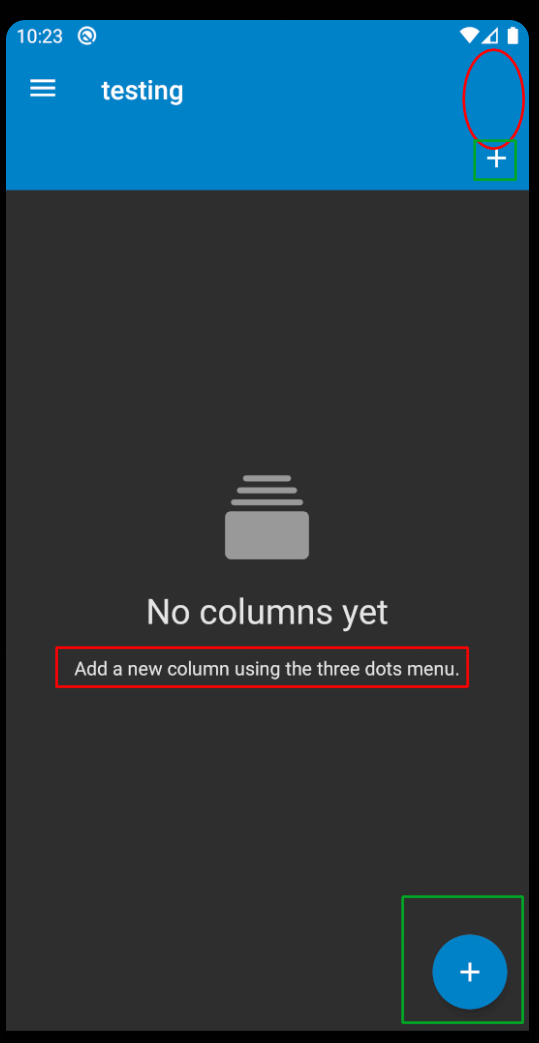
When opening the app and creating a new board from an empty account the "No columns yet" empty view refers to "using the three dots menu". There is no 3 three dots menu at this stage in the view, just the + icon for the boards and the fab + button in the bottom right corner.
To Reproduce
Steps to reproduce the behavior:
- open the app and sign into a blank account
- create a new board
- on the view that loads for an empty board, the description of actions to perform to add a new column refers to the three dots menu.
Expected behavior
There should be a three dots menu visible somewhere
Screenshots
Smartphone (please complete the following information):
- Device: Pixel 3A emulated
- Android-Version: 10.0, API 29
 randy-jr-olive
All 24 comments
I noticed this as I was looking through the code for how the color picker works (that's an issue I'd like to work on). I'm new to Android Dev (not new to software dev, just android).
I would like to fix this text string issue, it seems like a simple fix, just change out the strings.xml reference to correctly refer to the + button, instead of the three dots menu.
However, there is a design question here, where that three button menu could be added, even to the empty view. It does exist when there are existing boards, and it provides the options to rename or delete a board. It could also have an option to add a new board as well.
I leave it open to suggestions, I'm willing to try doing either of those, or looking at other solutions.
randy-jr-olive
on 22 Dec 2019
Hi @randy-jr-olive!
Woah, that's quite weird... One thing you could try to fix this for you right now: log in at the web UI and just open the deck web-app. If that fixes your issue, I guess it is related to an other bug we are facing currently (link will follow up in a minute...)
 desperateCoder
on 22 Dec 2019
desperateCoder
on 22 Dec 2019
Here you go: https://github.com/nextcloud/deck/issues/1262
Regarding to the UI, I'd suggest talking to @stefan-niedermann, since he wrote the most of the UI, I'm just the server-dude. What's your opinion @stefan-niedermann? I don't care at all :smile:
desperateCoder
on 22 Dec 2019
@randy-jr-olive: in fact there _should_ be a three-dot-menu. See our screenshots, the red circle in your screenshot is the place, it should actually be... So the string is technically correct, but where the heck is the menu button? As mentioned, I'd try to open the Web-Deck-App once, this may fix enough for you to be able to work on the color chooser.
But we should keep this one in mind, since this is not really user friendly yet.
desperateCoder
on 22 Dec 2019
@desperateCoder I've tried opening the web deck app, then also logging into and out of the web UI and re-opened the web deck app. The three dot menu is still missing in this one case. However, it does display correctly once there is a column in the board. It only seems to be missing when there is no columns yet.
randy-jr-olive
on 22 Dec 2019
I will have a look asap, currently busy, sry
 stefan-niedermann
on 22 Dec 2019
stefan-niedermann
on 22 Dec 2019
One question: could you please check whether or not this also happened with version 0.0.14? this might help us to fix the problem easier. i'm pretty sure, this used to work in the past
stefan-niedermann
on 22 Dec 2019
I can do that, is there an easy way to roll this back in android studio to that version?
randy-jr-olive
on 22 Dec 2019
@randy-jr-olive lower right corner, there should be the git button where now should be displayed "master" (i guess). just look for a tag with the version label
desperateCoder
on 22 Dec 2019
Or on F-Droif simply deinstall, scroll down to "versions" and install 0.0.14
stefan-niedermann
on 22 Dec 2019
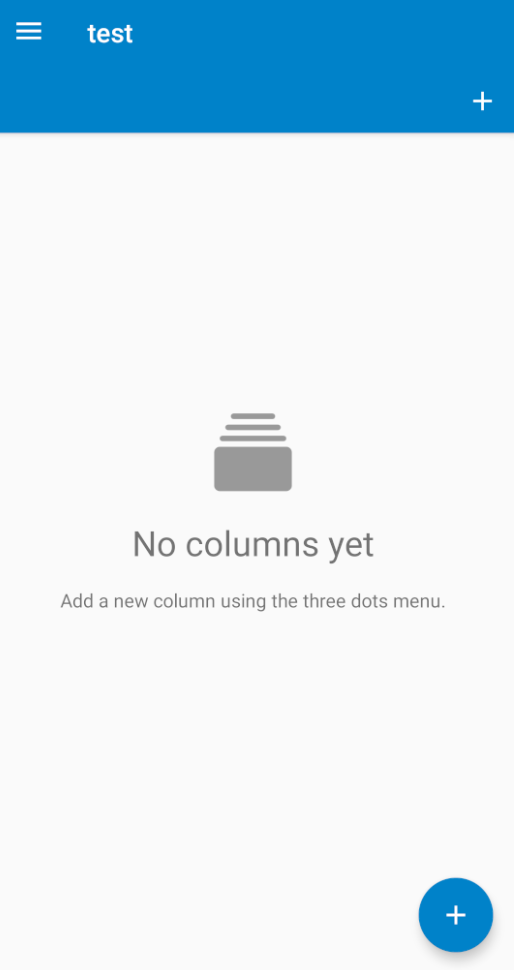
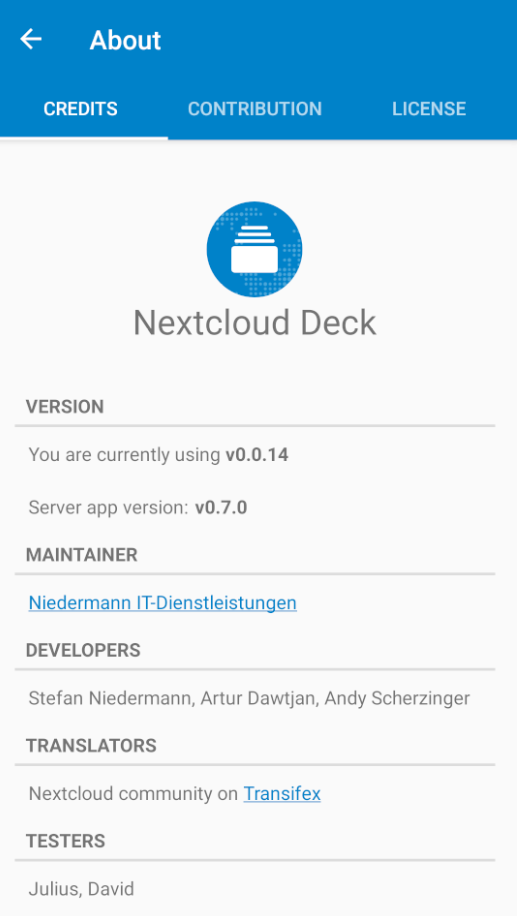
I've checked it from android studio checking out the tag 0.0.14
I've reinstalled the app in the emulator and it shows version v0.0.14
The three dot menu is still missing here for me. I also tried opening the web app with this version as well, that had no effect.
randy-jr-olive
on 22 Dec 2019
@desperateCoder I've tried opening the web deck app, then also logging into and out of the web UI and re-opened the web deck app. The three dot menu is still missing in this one case. However, it does display correctly once there is a column in the board. It only seems to be missing when there is no columns yet.
Nice, thanks for your research! seems to be a job for @stefan-niedermann.
Did i get you right? Are you able to work on your original issue now?
Big thanks for your interest in our project and your contribution by the way!
desperateCoder
on 22 Dec 2019
@desperateCoder I'm just getting into all this, and I'm interested in working on both these issues. I see this as maybe an easy first fix to get familiar with the code before I try to take on adding a new feature.
randy-jr-olive
on 22 Dec 2019
We're very grateful for that, anytime you need help, just tell us!
desperateCoder
on 22 Dec 2019
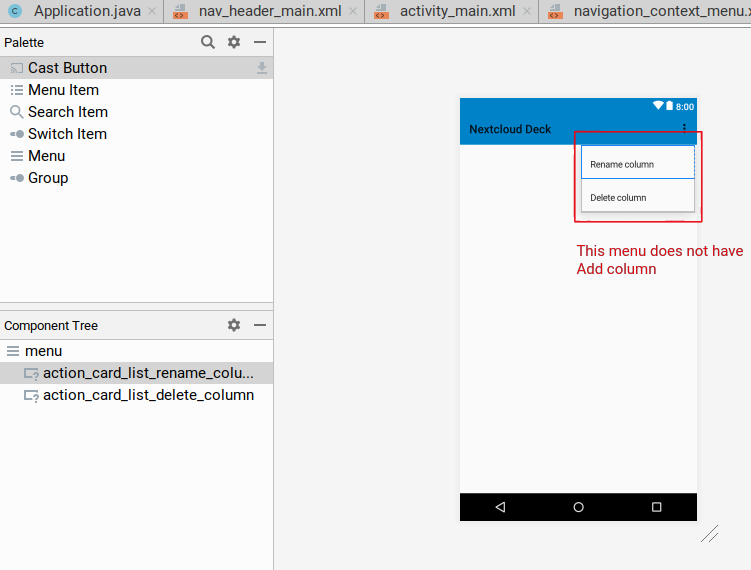
The issue here appears to be that the menu view that gets loaded for the new board (MainActivity.java line 438) there is no option for adding a new board. Further, since the 2 options that are there will only display a menu if currentBoardHasStacks is true.
menu.findItem(R.id.action_card_list_rename_column).setVisible(currentBoardHasStacks);
menu.findItem(R.id.action_card_list_delete_column).setVisible(currentBoardHasStacks);
I see a possible solution to be:
1) add an option to Add column to the menu view
2) add this item to the menu, as was done with the 2 items listed above
3) set it to the opposite of currentBoardHasStacks - meaning: it will only display when there are _no_ stacks to show.
If this works for you, I can make those changes now.
randy-jr-olive
on 22 Dec 2019
Oh boy, i've been so blended. Of course it's just a matter of text. We moved some tome ago the option "Use the three dot menu". There is a "+" -sign in the second row currently to add a stack. We should just change the wording.
stefan-niedermann
on 22 Dec 2019
Do you want to create a PR to change the wording? The other languages will autmoatically be translated via transifex, just the default (fallback) language needs to be changes.
stefan-niedermann
on 22 Dec 2019
I can do that, if it's as simple as swapping out all the instances of
<string name="add_a_new_column_using_the_three_dots_menu">Add a new column using the three dots menu.</string>
with
<string name="add_a_new_column_using_the_button">Add a new column using the + button</string>
randy-jr-olive
on 22 Dec 2019
Thank you very much, your PR will be very welcome :)
And sorry for wasting your time (checking old versions and so on) !!
stefan-niedermann
on 22 Dec 2019
I'll take care of that. Absolutely no worries, it was a challenge figuring out where to dive into the code and poke around. That was as good a starting point as any :)
randy-jr-olive
on 22 Dec 2019
Would be great to keep you as a contributor :) maybe you have time to take care of an issue in the future, too 🚀 :)
stefan-niedermann
on 22 Dec 2019
I'll take care of that. Absolutely no worries, it was a challenge figuring out where to dive into the code and poke around. That was as good a starting point as any :)
Man, you canadians are just as polite as anyone says :laughing:
desperateCoder
on 22 Dec 2019
@desperateCoder where the fuck did you know that @randy-jr-olive is an canadian?! 😆
stefan-niedermann
on 22 Dec 2019
@stefan-niedermann

desperateCoder
on 22 Dec 2019
Related issues
 timkrief
·
3Comments
timkrief
·
3Comments
 treuss
·
3Comments
treuss
·
3Comments
 mbousq
·
5Comments
stefan-niedermann
·
5Comments
mbousq
·
5Comments
stefan-niedermann
·
5Comments
 loicvh
·
3Comments
loicvh
·
3Comments
Most helpful comment
@desperateCoder I'm just getting into all this, and I'm interested in working on both these issues. I see this as maybe an easy first fix to get familiar with the code before I try to take on adding a new feature.