Next-translate: Having getServerSideProps in with-server doesn't work
I don't need Automatic Static Optimization for now so I decided to go with custom server implementation but my pages have a getServerSideProps to load some information from the database.
But there is unexpected behavior with this implementation because when I implemented the change language functionality I found that requesting getServerSideProps from the client doesn't work at all.
Here is a simple page that I added to with-server example:
import React from 'react'
import Link from 'next-translate/Link'
import useTranslation from 'next-translate/useTranslation'

import Header from '../components/header'

export default function Home() {
  const { t } = useTranslation()
  const description = t('home:description')

  return (
    <>
      <Header />
      <p>{description}</p>
        <Link href="/test" lang={'es'}>
        <a>ES</a>
      </Link>
      <br />
      <Link href="/test" lang={'en'}>
        <a>EN</a>
      </Link>
    </>
  )
}

export const getServerSideProps = async () => {
  return {
    props: { foo: 'bar' },
  }
}
For example, I open the page in English but I want to change it then to Spanish.
This would trigger a client-side request to get the information from getServerSideProps - the URL of the request is http://localhost:3000/_next/data/development/es/test.json
But it fails with 404 and this trigger page refresh and then everything the corrected language is loaded. This behavior is observed with next 9.4.
I decided to upgrade to next 9.5 and keeping the same code has a totally different result. The client-side router omit the language in URL requesting getServerSideProps and it returns 200, but there is no language and next-translate fallback to default language.
I'm looking for a solution about this issue or maybe an alternative way to setup my project
 yotov
yotov
All 9 comments
@yotov Did you follow this guide? Here in Vinissimus currently we are using the "custom server" approach + Next.js 9.5 without any trouble.
If you can share a reproducible example, this will be very useful for us 👏 Thank you
 aralroca
on 31 Jul 2020
aralroca
on 31 Jul 2020
@aralroca yes I follow the provided guide. And here (https://github.com/yotov/next-translate-with-server) I created a simple demo based on the with-server from examples folders.
It uses [email protected] and [email protected]
You could clone the code and start the server. And these are the steps to reproduce the bug:
- Open http://localhost:3000/es ( this is the default language by config )
you can see in the console there is "es" due to console.log(req.lang);
Then click on English
you can see from the developer tool that the browser calls /_next/data/development/index.json to get the information from getServerSideProps and now in the console, it outputs undefined.
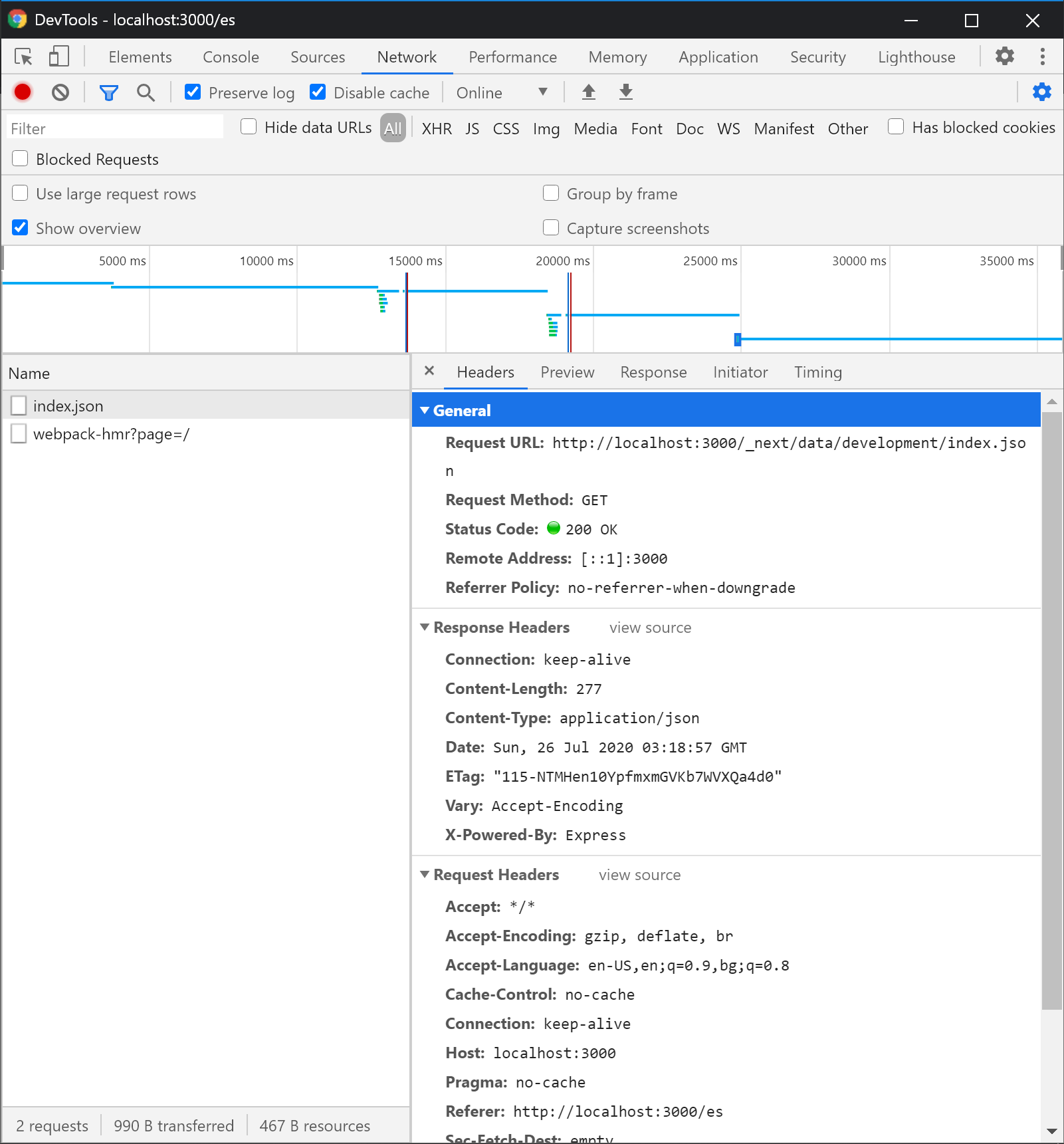
and also the returned result includes translations for Spanish

Now you could refresh the page and you could see that it is in English which is the expected result
But then you could click on "Open foo page in en" and the foo page is loaded but it is in Spanish because again there is a call to /_next/data/development/foo.json and there is no language which causes next-translate to fallback to the default language
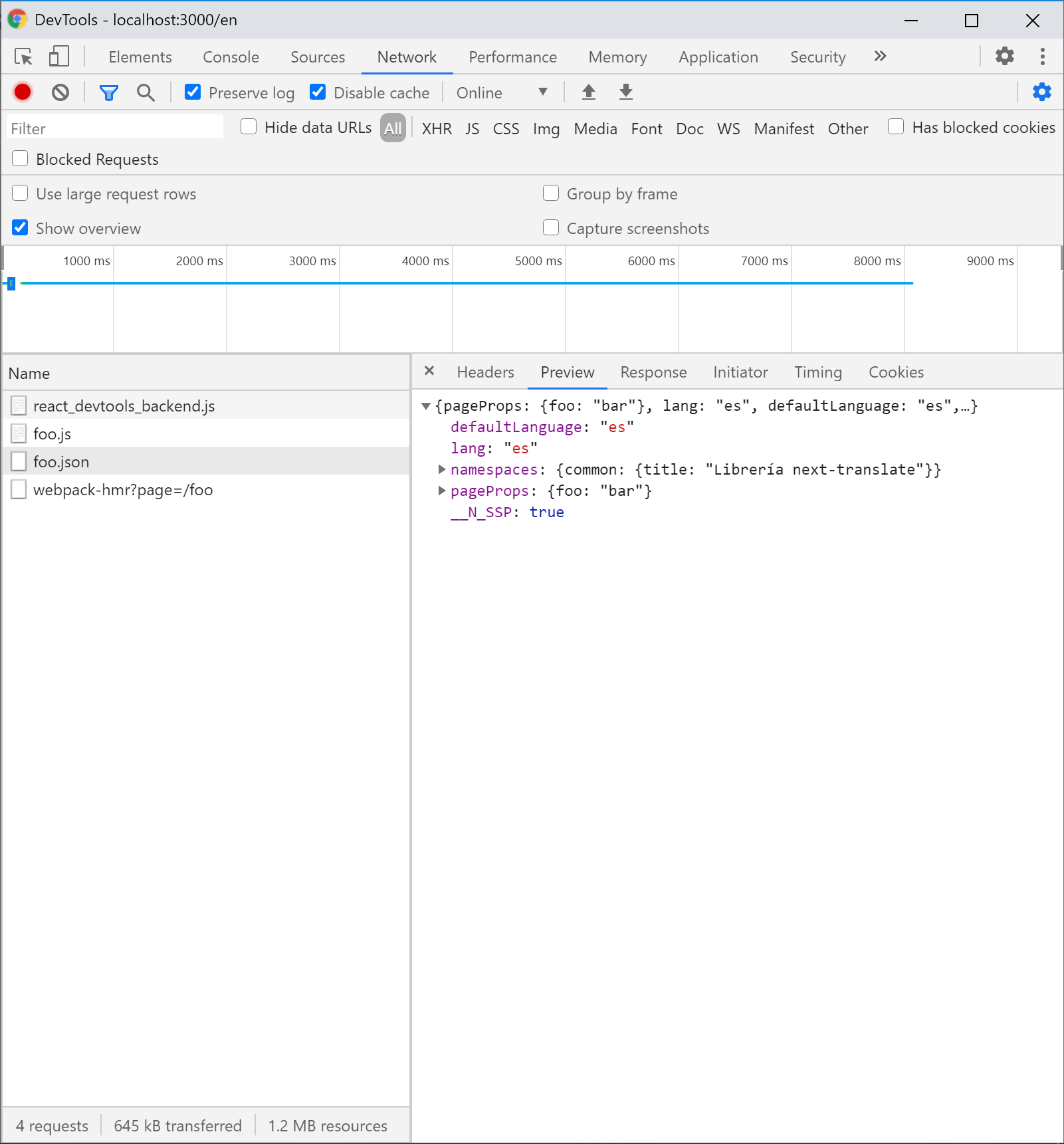
Step 2 and Step 4 are not working correctly. Until [email protected] this bug was not so obvious because the ajax requests include the language but returned a 404 and that causes the next to reload the page.
yotov
on 31 Jul 2020
Same problem. I think this problem is next.js. you can use getInitialProps and next-translate 0.17.2-canary.5 instead.
I don't know why in the latest version of next.js, the request in getServerSideProps is processed as a JSON file, and getInitialProps is a normal request.
I have tried to redirect _next/data/development/foo.json to _next/data/development/es/foo.json, it can be accessed normally, but because the language information is saved in the JOSN file, it may cause the page switching Change the language to the default information. So this scheme was abandoned.
 kleinsea
on 4 Aug 2020
kleinsea
on 4 Aug 2020
The problem comes in the next Next.js versions, seems that their changed the way to do the getInitialProps. As a temporal solution you can just add the ?lang=en to the href. This should work.
Instead of:
<Link href="/" lang="en">
     <a>English</a>
 </Link>
Do:
<Link href="/?lang=en" lang="en">
    <a>English</a>
 </Link>
Of course, this should be temporal as a workaround. This should be fixed inside the next-translate/Link component for the next release.
aralroca
on 20 Aug 2020
@aralroca yes the proposed workaround would fix the problem, but also would add lang in query params to the loaded page. I found another workaround using your idea to pass lang as a query param. Instead of modifying all links, I replaced the _getServerData method in next/router with my own implementation that adds the current language.
useEffect(() => {
    const _getServerData = nextRouter.router._getServerData;
    if (!_getServerData.patched) {
      console.log("Patching _getServerData");
      nextRouter.router._getServerData = function (href) {
        return _getServerData.call(
          this,
          href.includes("?") ? href + "&lang=" + lang : href + "?lang=" + lang
        );
      };
      nextRouter.router._getServerData.patched = true;
    }
  }, []);
@yotov as a workaround looks ok! I opened a PR https://github.com/vinissimus/next-translate/pull/254 that it should fix this without the need of any workaround.
If you can try it once it is merged... And confirm that is working for you! I will upload it in the 0.17.3-canary.2 prerelease
aralroca
on 21 Sep 2020
@yotov it's already on 0.17.3-canary.2 prerelease! If you can confirm that is working fine for you would be very useful 🙏 Thanks!
aralroca
on 21 Sep 2020
@aralroca yes I can confirm that it works as expected. If I understand the PR correctly it looks like nextjs uses href only when requesting the information from the client-side, but the real link of the A tag is determined by the as prop?
yotov
on 21 Sep 2020
yes, exactly, the as when is not defined is the same as href without the ?lang=en
aralroca
on 21 Sep 2020
Related issues
 tericcabrel
·
3Comments
tericcabrel
·
3Comments
 alexnm2566
·
5Comments
alexnm2566
·
5Comments
 equinusocio
·
3Comments
equinusocio
·
3Comments
 shunkakinoki
·
4Comments
shunkakinoki
·
4Comments
 yotovtsvetomir
·
5Comments
yotovtsvetomir
·
5Comments