Next-translate: Bug when wrapping index in folder
Hello, we found a bug just before the deploy that blocks us from using this lib :(.
If we wrap the pages_/index.tsx inside a folder, like index/index.tsx it will break on all the languages but default one when building static. Navigating to site.com/es throws a weird error on compiled js files.
How to reproduce
- Configure two or more languages
- Wrap your index page inside a folder
pages_/index/index.tsx - Build static and export
- Run a local server inside the dist folder and manually navigate to the index of any of the non-default language, like
localhost:3000/es/
Output
dist/
├── index.html
├── my-page.html
├── es.html
├── es/
└── └── my-page.html
Expected output
dist/
├── index.html
├── my-page.html
├── es/
├── └── index.html
└── └── my-page.html
 equinusocio
All 30 comments
It would be great to provide more info: next-translate version, config, your pages tree 👏
I tried to reproduce it but I get a different result in my case:
Generated pages from _pages:
pages
├── es
│   ├── index
│   │   └── index.js
├── index
│   └── index.js
out after yarn build && yarn export
out
├── es
│   ├── index.html
├── favicon.ico
├── index.html
 aralroca
on 9 Jun 2020
aralroca
on 9 Jun 2020
Yeah, sorry.
v0.17.1
Script:
"build": "next-translate && next build && next export -o dist/",
i18n.json
{
  "allLanguages": ["en", "it"],
  "defaultLanguage": "en",
  "currentPagesDir": "pages_",
  "finalPagesDir": "pages",
  "localesPath": "locales",
  "pages": {
    "*": ["common"],
    "/": ["home"],
    "/covid-tech": ["covid-tech"]
  }
}
pages_ structure is:
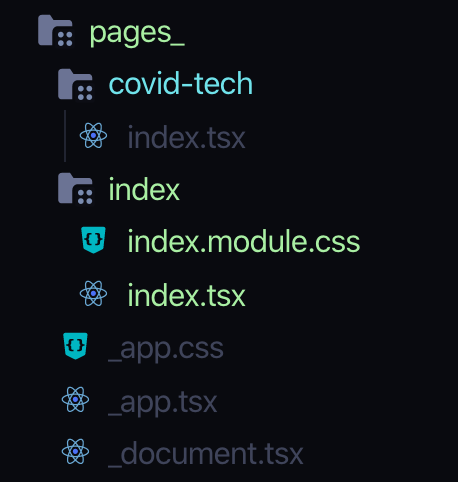
The issue is not the output. With this structure the generated files are ok, but as mentioned above if we navigate to a language, we get this weird error:
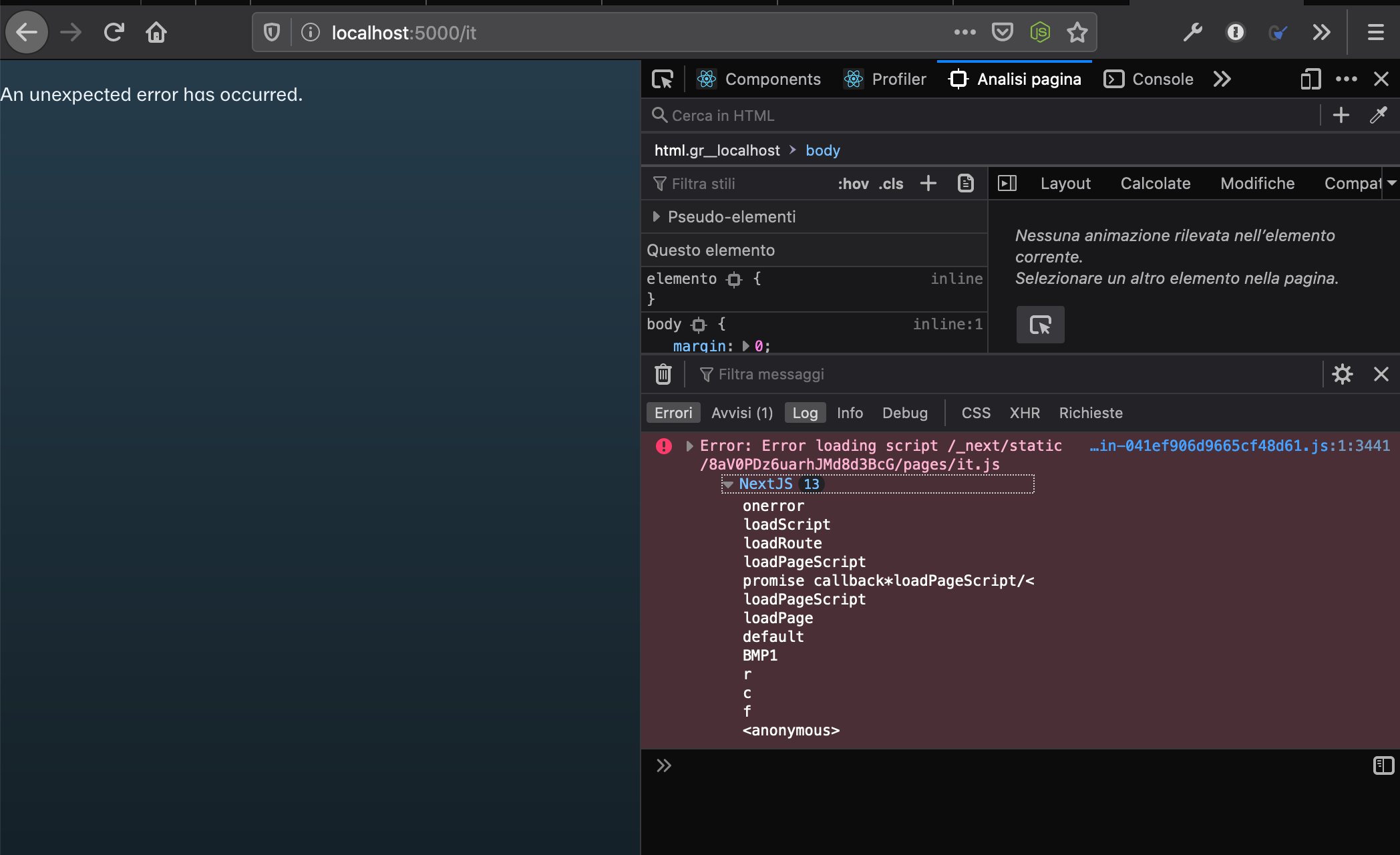
This forces us to revert the structure to a flat index, that works as expected, but the flat index doesn't generate an index.html inside the language folder.
Additional bug
With the index as a folder, the above configuration doesn't work anymore (keys are not replaced) for the default language path. We have to set / to /index, like so:
  "pages": {
    "*": ["common"],
    "/index": ["home"],
    "/covid-tech": ["covid-tech"]
  }
I think the issue is related to the module.css. Looks that we are not ignoring css and scss files on the build step:
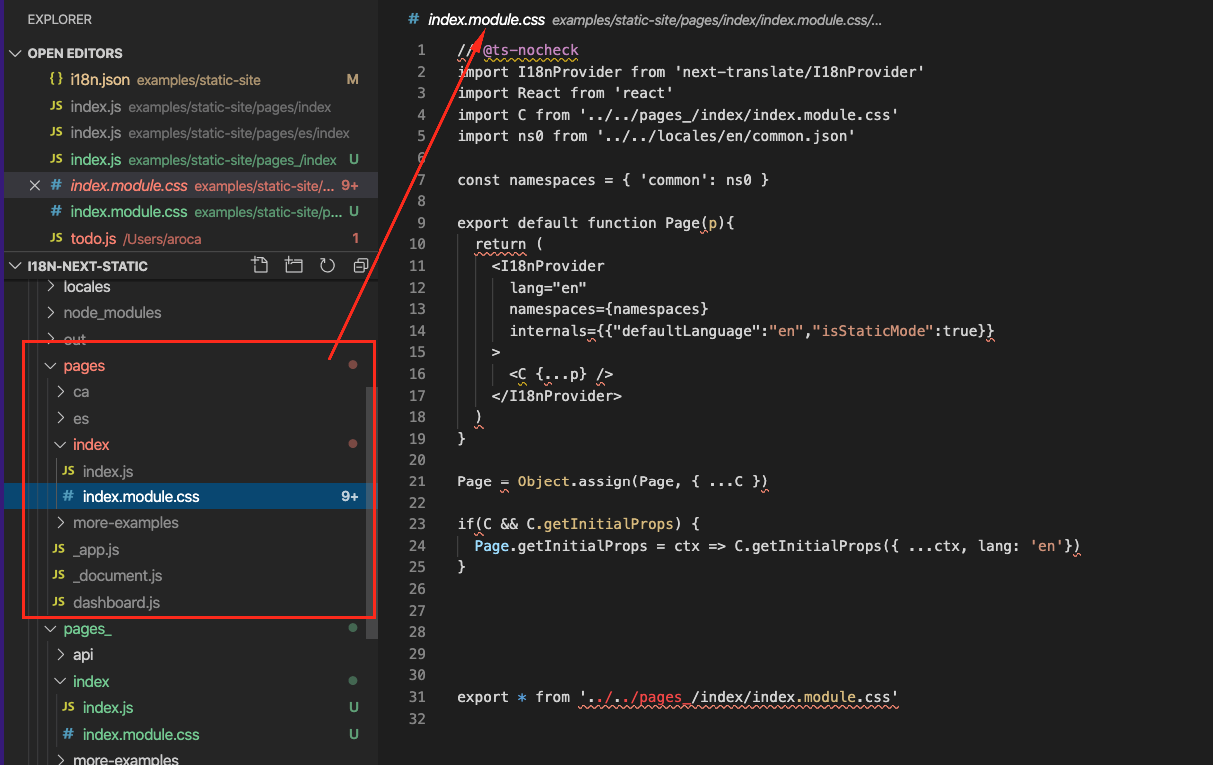
To confirm this, try to move the index.module.css outside pages_ folder. I guess this should work.
aralroca
on 9 Jun 2020
Nope :( it doesn't seem to solve the issue. I tried:
- To move the css inside the src folder
- Same as the first point, but removing also the
modulefrom the filename - Deleting the file entirely
Nothing is changing 😞. It doesn't seem related to the css.
equinusocio
on 9 Jun 2020
I've added an additional bug in this comment, but don't know if it's related to this one.
equinusocio
on 9 Jun 2020
Ok, looks that the css and scss that I detected was an extra bug, but it's not causing any issue because there aren't imports to these css and scss files. I'm going to keep researching about this 👍 Thanks to report it
aralroca
on 9 Jun 2020
Similar issue: https://github.com/vercel/next.js/issues/6285
aralroca
on 9 Jun 2020
As temp fix, using the flat index, we defined a postbuild script that move the it.html file under it/ and rename it to index.html.
equinusocio
on 9 Jun 2020
Can you provide me your generated pages structure? (not pages_)
aralroca
on 9 Jun 2020
This is with wrapped index

equinusocio
on 9 Jun 2020
This bug seems related to the index page only. Other first-level pages are working as expected even if declared as a folder.
equinusocio
on 9 Jun 2020
@equinusocio I prereleased 0.17.2-canary.1, can you confirm if it works now in your case? 👏
aralroca
on 9 Jun 2020
@aralroca Now I get an error while building:
Failed to compile.

./pages/_app.tsx
Module not found: Can't resolve './_app.css' in '/Users/equinusocio/Repositories/site/pages'
That's because pages_/_app.css is missing from the generated pages folder. Maybe any scss, sass, css, pcss files can be just copied and ignored by next-translate?
equinusocio
on 9 Jun 2020
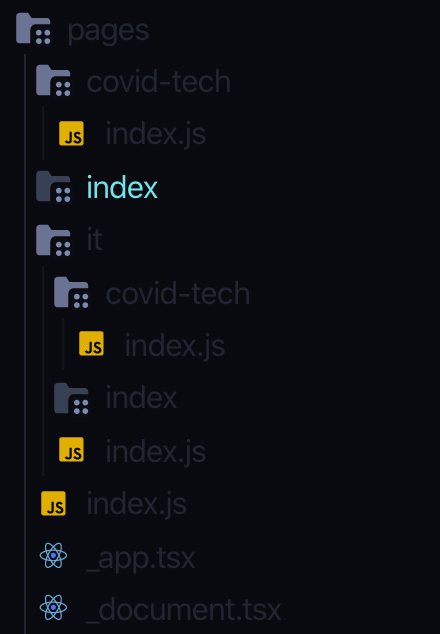
Also, all of the index folders inside pages are completely empty:
equinusocio
on 9 Jun 2020
@aralroca Now I get an error while building:
Failed to compile.

./pages/_app.tsx
Module not found: Can't resolve './_app.css' in '/Users/equinusocio/Repositories/site/pages'
That's because
pages_/_app.cssis missing from the generatedpagesfolder. Maybe anyscss, sass, css, pcssfiles can be just copied and ignored bynext-translate?
This is for this PR: https://github.com/vinissimus/next-translate/pull/199/files#diff-36623fc600500d3dce3052db8e970da1R126
But I don't understand why it is given you an error... Do you have some import in your code from /pages instead of pages_?
Perhaps we can change to just copy and not ignore 👍
aralroca
on 9 Jun 2020
Also, all of the index folders inside
pagesare completely empty:
Yep... index folder is empty, this is because the /index/index.js is moved one level up /index.js, and /somefolder/index/index.js to /somefolder/index.js. Then, inside /somefolder/index.js it has the import to the original pages_/somefolder/index/index.js.
Before I tested using /somefolder/index/index.js and it's not working navigating to /es, so you needed to add /es/index and this is why I moved up.
aralroca
on 9 Jun 2020
I'm getting the same issue. All subdirectories with index.js files simply call 404 requests. Bumping this for solidarity.
 thissell
on 10 Jun 2020
thissell
on 10 Jun 2020
Hi @aralroca nothing strange in my imports, just some import from modules.
Since this bug occurs only for the index file, I would suggest to just change the output path and the names of the index files for each non-default language, when using a flat index. This will not require people to wrap the index inside a folder (to generate dist/it/index.html)
I've tested by doing manually doing it after the build process. So, with a flat index file, instead of generating this:
dist
├── 404.html
├── covid-tech.html
├── index.html
├── it.html
├── es.html
├── it
│   └── covid-tech.html
├── es
└── └── covid-tech.html
You could generate this (it should work without changing anything else)
dist/
├── 404.html
├── covid-tech.html
├── index.html
├── it
│   ├── covid-tech.html
│   └── index.html
├── es
│   ├── covid-tech.html
└── └── index.html
Each [lang].html index file is moved inside each language folder and renamed to index.html (i think this is also a more common pattern since servers generally look for an index file inside the folder). You can then add a note to the readme to tell people to not wrap the index inside a folder (for the moment), I think it's not a big issue.
This change will also avoid the additional bug here
equinusocio
on 10 Jun 2020
Since this bug occurs only for the index file, I would suggest to just change the output path and the names of the index files for each non-default language, when using a flat index. This will not require people to wrap the index inside a folder (to generate
dist/it/index.html)
@equinusocio In this library, we are not doing anything during next build && next export. The only part is pre-generating the pages folder correctly. Then, the responsible to generate the dist folder is Next.js. Better tell me how you expect the transformation from pages_ to pages, let's see what we can do. But we can't go any further, and perhaps this issue should be reopened: https://github.com/vercel/next.js/issues/6285
I've tested by doing manually doing it after the build process. So, with a flat index file, instead of generating this:
dist
├── 404.html
├── covid-tech.html
├── index.html
├── it.html
├── es.html
├── it
│   └── covid-tech.html
├── es
└── └── covid-tech.html
Apparently this should work without the need to switch to index.html, shouldn't be? I generated a similar structure after next build && next export and it runs without any problem.
I'm getting the same issue. All subdirectories with index.js files simply call 404 requests. Bumping this for solidarity.
@thissell is also happening to you in 0.17.2-canary.1 version?
aralroca
on 10 Jun 2020
Yes, but strangely enough I tried working with just a boilerplate next.js server as is and it's giving me the same issue, which is making me think it might be an issue with the latest next edition and not this in specific.
thissell
on 10 Jun 2020
@thissell @equinusocio I see that in Next.js 9.4.5-canary.8 version there is a PR changing this /index/index.js behavior.
Which Next.js version do you have? Can you try a Next.js version >= than 9.4.5-canary.8?
If it's a Next.js issue, maybe we can revert a part of this PR: https://github.com/vinissimus/next-translate/pull/200 to keep the /index/index.js structure again.
@equinusocio I did another pre-release, 0.17.2-canary.2 with the change that you proposed (just copy the css/scss files instead of ignore them).
aralroca
on 10 Jun 2020
I tried next 9.4.5-canary.8 + 0.17.1, 0.17.1-canary.1 and 0.17.1-canary.2 with the index folder. The default lang index.html is missing from the dist root:
pages_ and page:

dist

equinusocio
on 10 Jun 2020
Tried 0.17.2-canary.2 but seem to be running into an issue Error: Cannot find module '../_helpers/getPageNamespaces'
 ay8s
on 13 Jun 2020
ay8s
on 13 Jun 2020
@ay8s it would be very useful if you create a reproducible example 👏
aralroca
on 13 Jun 2020
canary.2 isn't showing that error now, think I just needed more coffee.
I'm using 0.17.2 and next 9.4.5-canary.12 in this branch... https://github.com/sportstimes/f1/tree/feature/static-index but end up with "Error: The provided path / does not match the page: /es.". when navigating to /es
Not sure if this is the same error being discussed in this issue, but sounds related.
ay8s
on 15 Jun 2020
@ay8s when I run your project I got an error on utils/generate-calendars.js, but after commenting the line 192 (fs.writeFileSync(path, value)), looks that everything works well. I can navigate from / to /es or other languages without any error...
aralroca
on 15 Jun 2020
Weird, was this with the features/static branch @aralroca?
I'm not quite seeing that when running npm run dev locally.
```npm run dev
[email protected] dev /Users/andrewyates/Web/Personal/f1
next-translate && next dev
Building pages | from pages_ to pages
🔨 /generate [ 'common', 'calendar', 'generate' ]
🔨 / [ 'common', 'calendar', 'calendar' ]
🔨 /timezone/[timezone] [ 'common', 'calendar' ]
🔨 /timezones [ 'common', 'calendar', 'timezones' ]
🔨 /year/[year] [ 'common', 'calendar' ]
🔨 /years [ 'common', 'calendar', 'years', 'calendar' ]
ready - started server on http://localhost:3000
Defining routes from exportPathMap
Browserslist: caniuse-lite is outdated. Please run next command npm update
warn - static/development/pages/_app.js is 2.73 MB, and won't be precached. Configure maximumFileSizeToCacheInBytes to change this limit.
static/runtime/main.js is 4.35 MB, and won't be precached. Configure maximumFileSizeToCacheInBytes to change this limit.
info - ready on http://localhost:3000
wait - compiling...
warn - GenerateSW has been called multiple times, perhaps due to running webpack in --watch mode. The precache manifest generated after the first call may be inaccurate! Please see https://github.com/GoogleChrome/workbox/issues/1790 for more information.
static/development/pages/_app.js is 2.73 MB, and won't be precached. Configure maximumFileSizeToCacheInBytes to change this limit.
static/runtime/main.js is 4.35 MB, and won't be precached. Configure maximumFileSizeToCacheInBytes to change this limit.
info - ready on http://localhost:3000
```
Do you happen to have the error itself to hand? If you're using the same branch.
ay8s
on 15 Jun 2020
@aralroca I resolved the error with fs.writeFileSync, unfortunately when deploying to Vercel I seem to still get the error "Error: The provided path / does not match the page: /es."
ay8s
on 17 Jun 2020
About the error you shared, it looks a memory problem caused by the service worker: GenerateSW has been called multiple times.
This other error Error: The provided path / does not match the page: /es. I don't have an idea. I'm going to try to reproduce it later.
aralroca
on 17 Jun 2020
Next 9.5 is out. I will try it with latest next-translate official release
equinusocio
on 27 Jul 2020
Related issues
 BjoernRave
·
6Comments
BjoernRave
·
6Comments
 SpicyPete
·
4Comments
SpicyPete
·
4Comments
 OmarZeidan
·
3Comments
OmarZeidan
·
3Comments
 HsnVahedi
·
3Comments
HsnVahedi
·
3Comments
 Fghurayri
·
4Comments
Fghurayri
·
4Comments