Next-pwa: __WB_DISABLE_DEV_LOGS not working
Summary
I want to disable the workbox log in development mode.
Even putting it as true, it still keeps showing up.
How To Reproduce
Steps to reproduce the behavior:
- Create folder "worker"
- Create file "index.js"
- Add "self.__WB_DISABLE_DEV_LOGS = true;"
Expected Behaviors
I need the debug to be removed by adding true to __WB_DISABLE_DEV_LOGS
Screenshots

 matheusqro
All 8 comments
Use disable for development
module.exports = withPWA({
future: {
webpack5: true
},
pwa: {
disable: process.env.NODE_ENV === 'development',
dest: 'public'
}
})
 xkelxmc
on 30 Mar 2021
xkelxmc
on 30 Mar 2021
Can you first try next-pwa 5.1.3?
 shadowwalker
on 3 Apr 2021
shadowwalker
on 3 Apr 2021
I am encountering this issue too. I am using next-pwa 5.1.3.
 EpicHigh
on 3 Apr 2021
EpicHigh
on 3 Apr 2021
Try another way, set in your pwa config: mode: 'production'
shadowwalker
on 4 Apr 2021
Thank you for your response. It's not working.
Here's my PWA config.
pwa: {
disable: process.env.NODE_ENV === 'development',
register: true,
dest: 'public',
runtimeCaching,
mode: 'production'
}
I could reproduce this error. But it works perfectly after I clean everything up and rebuild under development mode. I think you can fix this too.
- Exit development process if you are still running
yarn devornext - Create custom worker
worker/index.jsorworker/index.tsand addself.__WB_DISABLE_DEV_LOGS = trueon the top of the file. - Remove
.nextfolder - Run
yarn dev - Open browser and navigate to your app and under
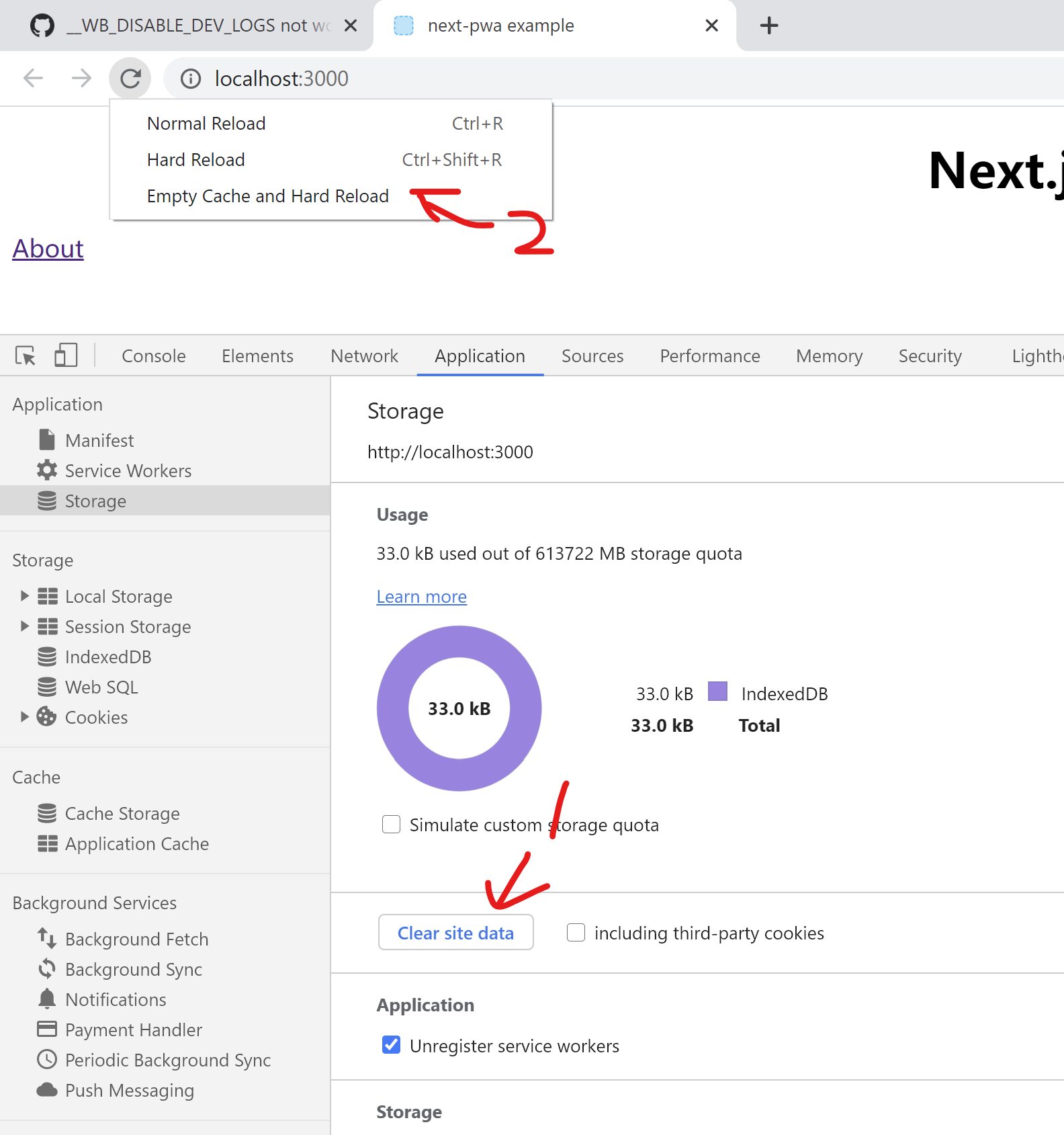
Applicationtab in development tools, click 'Clear site data', then right click the refresh button and click 'Empty Cache and Hard Reload' - Everything should work as expected now, workbox does not produce logs to your console now.
@EpicHigh tips for your pwa config, you should update your config to this: (minimal is enough)
pwa: {
  dest: 'public'
}
Wow, I appreciate that. Thank you for your help. It's work as expected.
EpicHigh
on 4 Apr 2021
@shadowwalker Thanks :)
matheusqro
on 4 Apr 2021
Related issues
 loyep
·
3Comments
loyep
·
3Comments
 vishwasnavadak
·
8Comments
vishwasnavadak
·
8Comments
 marcofranssen
·
5Comments
marcofranssen
·
5Comments
 jonahsnider
·
4Comments
jonahsnider
·
4Comments
 LucasMallmann
·
4Comments
LucasMallmann
·
4Comments
Most helpful comment
I could reproduce this error. But it works perfectly after I clean everything up and rebuild under development mode. I think you can fix this too.
yarn devornextworker/index.jsorworker/index.tsand addself.__WB_DISABLE_DEV_LOGS = trueon the top of the file..nextfolderyarn devApplicationtab in development tools, click 'Clear site data', then right click the refresh button and click 'Empty Cache and Hard Reload'@EpicHigh tips for your pwa config, you should update your config to this: (minimal is enough)