Next-pwa: Wrong path in precaching from workbox
When I visit my exported site (by locally serving the /out directory) I get this error:
workbox-07643d7a.js:1 Uncaught (in promise) bad-precaching-response: bad-precaching-response :: [{"url":"http://localhost:3000/public/pwa/android-chrome-144x144.png","status":404}]
    at D (http://localhost:3000/workbox-07643d7a.js:1:11361)
    at async Promise.all (index 0)
    at async D.install (http://localhost:3000/workbox-07643d7a.js:1:10780)
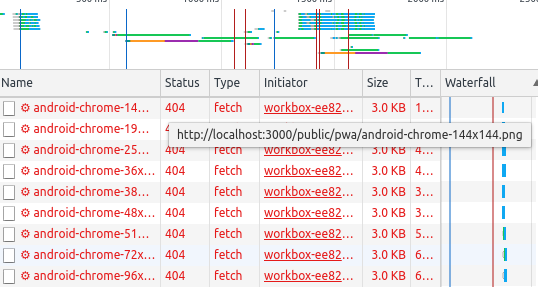
It seems to be looking in the /public/pwa/ directory for the icons when they are in fact in the `/pwa/ directory.
My manifest.json is also in the /pwa/ directory and looks like this:
{
  "name": "Name",
  "short_name": "Name",
  "description": "description",
  "dir": "auto",
  "lang": "en-US",
  "display": "standalone",
  "orientation": "any",
  "start_url": "/?homescreen=1",
  "background_color": "#fff",
  "theme_color": "#000",
  "icons": [
    {
      "src": "/pwa/android-chrome-36x36.png",
      "sizes": "36x36",
      "type": "image/png"
    },
   ...
  ]
}
How come this it's looking for icons in the starting in public?
Many thanks for any advice?
I'm using version 2..1.2 of this module with next 9.2.1
 bravokiloecho
All 13 comments
Can you share your next.config.js file and the sw.js file generated after the build?
 shadowwalker
on 15 Feb 2020
shadowwalker
on 15 Feb 2020
@bravokiloecho
shadowwalker
on 15 Feb 2020
This is the next config:
// Next plugins
const withPlugins = require('next-compose-plugins')
const withPWA = require('next-pwa')
// Webpack plugins
const FaviconsWebpackPlugin = require('favicons-webpack-plugin')
const dotenv = require('dotenv')
// Extract environment variables from local .env file
dotenv.config()
// SETUP FAVICON PLUGIN
const faviconPlugin = new FaviconsWebpackPlugin({
logo: './public/icons/icon.svg',
outputPath: '../public/pwa',
prefix: 'pwa/',
cache: true,
inject: false,
favicons: {
appName: 'Name',
appDescription: 'description',
developerName: 'Name',
developerUrl: 'https://test.com',
background: '#fff',
theme_color: '#000',
},
})
// NEXT CONFIG
const nextConfig = {
// Don't show if page can be optimised automatically
// https://nextjs.org/docs/api-reference/next.config.js/static-optimization-indicator
devIndicators: {
autoPrerender: false,
},
// Custom webpack
webpack: (config) => {
config.plugins.push(faviconPlugin)
return config
},
}
module.exports = withPlugins([
// add a plugin with specific configuration
[withPWA, {
pwa: {
dest: 'public',
},
}],
], nextConfig)
// SETUP FAVICON PLUGIN
const faviconPlugin = new FaviconsWebpackPlugin({
logo: './public/icons/icon.svg',
outputPath: '../public/pwa',
prefix: 'pwa/',
cache: true,
...
Looks like the the favicons are generated in public/public/pwa, you may want to try to change outputPath to ../../public/pwa
shadowwalker
on 18 Feb 2020
I don't think that was the issue.
It seems like the workbox script is looking for the PWA icons in /public/pwa/ when they are actually in /pwa/ (see image below). I've tried setting the scope prop manually to / but that didn't do anything..
bravokiloecho
on 18 Feb 2020
It looks like it's trying to read the outputPath from the favicons-webpack-plugin but this is not helping! Is there any reason why it's interacting wit this?
bravokiloecho
on 18 Feb 2020
Are you using custom server to host files in public folder? Or just use next start to start the server?
I couldn't see a reason this should happen. Have you also tried clear all site data in dev tools and do a hard reload?
shadowwalker
on 18 Feb 2020
I also have the same problem, I use Next.js 9+ and serve service worker from public folder.
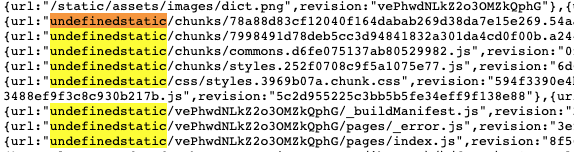
In /sw.js, there is undefined like this
I think the correct path should be _next/static/chunk/...
I'm using "next": "^9.2.0",
next.config.js
module.exports = withPWA({
pwa: {
dest: 'public'
},
...
/public/manifest.json
{
"name": "Next Dict",
"short_name": "Next Dict",
"theme_color": "#c40012",
"background_color": "#c40012",
"display": "standalone",
"Scope": "/",
"start_url": "/",
...
}
 haoict
on 19 Feb 2020
haoict
on 19 Feb 2020
I found a temporary fix for above issue.
In next.config.js, I set
withPWA({
pwa: {
dest: 'public',
modifyURLPrefix: {
'undefinedstatic/': '_next/static/'
}
},
so it replaces undefinedstatic/ with correct path _next/static/.
Probably WorkboxPlugin.GenerateSW can not set correct _next build folder, so it is undefined
haoict
on 19 Feb 2020
@haoict are you defining additional webpack configuration in your next.config.js?
@bravokiloecho I might have a clue of the problem now, will try to repro and fix it.
shadowwalker
on 20 Feb 2020
@shadowwalker oh.. yeah. I think I have this custom configuration that causes the issue.
const { ASSET_HOST } = process.env;
// for those who using CDN
const assetPrefix = ASSET_HOST || '';
module.exports = withPWA({
webpack: (config, { dev }) => {
config.node = { fs: 'empty' };
config.output.publicPath = `${assetPrefix}${config.output.publicPath}`; <= HERE
}
})
I think I should remove it. Thank you XD
haoict
on 20 Feb 2020
@bravokiloecho Please add following to next.config.js pwa configuration unblock you for now:
module.exports = withPlugins([
  [withPWA, {
    pwa: {
      dest: 'public',
      modifyURLPrefix: {
        'static/': '_next/static/',
        '../public/': '/'
      }
    },
  }],
], nextConfig)
@bravokiloecho The issue is fixed now, update the version of next-pwa then run yarn build, if you want to precache all the icons generated, run yarn build one more time, it will pick up the files generated in public folder.
@haoict Also I fix the issue with publicPath, it more fault tolerant now.
shadowwalker
on 20 Feb 2020
Related issues
 paales
·
4Comments
paales
·
4Comments
 harshzalavadiya
·
3Comments
harshzalavadiya
·
3Comments
 rrjanbiah
·
6Comments
rrjanbiah
·
6Comments
 TrejoCode
·
6Comments
TrejoCode
·
6Comments
 louisbirla
·
5Comments
louisbirla
·
5Comments
Most helpful comment
@bravokiloecho Please add following to
next.config.jspwa configuration unblock you for now: