Next-plugins: Cannot load CSS modules 'unknow property 'minimize'
Hey there, I'm having a bad time trying to use the react-datepicker module. I'm not able to load the CSS module related to it :
MyFile.js:
import DatePicker from "react-datepicker";
import 'react-datepicker/dist/react-datepicker-cssmodules.css';
I understood that I needed a loader to do that, and so I tried to implement the withCSS from next (@zeit/next-css).
My net config looks like that :
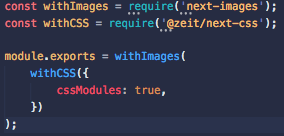
When I run the build I get the following Error :
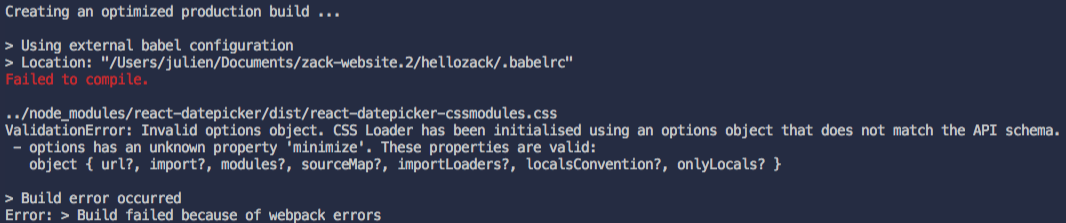
I don't know where the 'minimize' property is coming from and I'm really stuck here ...
Can you please help me to figure it out what is wrong with my code ?
Thanks a lot
 Jupoulet
All 9 comments
We have same problem. Do you have any solution about that problem ?
 esraltintas
on 23 Jul 2019
esraltintas
on 23 Jul 2019
I ended up doing this : https://github.com/zeit/next.js/issues/299
Works fine for me
Jupoulet
on 23 Jul 2019
I was able to reproduce this issue. I resolved it by updating next-css to '^1.0.2-canary.2' and downgrading css-loader to '^1.0.0'. Lastly, I removed the css-loader options being passed in 'withCSS({})' from my next.config.js.
It was really weird because my project worked without any issues with these same versions just a few days ago. Wonder what changed. In any case, hope my above solution saves a headache or two.
 Dark-Arcana
on 25 Jul 2019
Dark-Arcana
on 25 Jul 2019
It's because zeit/next-css is using an ancient version of css-loader. Newer versions of css-loader don't like the minimize option being specified in the css-loader-config.js file... I think I might need to submit a PR.
 dementeddevil
on 20 Aug 2019
dementeddevil
on 20 Aug 2019
newer css-loader don't need minimize option, and i guess that your project's node_modules had newer css-loader, rm it or submit PR to solve it~
 chenzesam
on 21 Aug 2019
chenzesam
on 21 Aug 2019
This just suddenly appeared for me as well. Do not know what i've changed really.
It worked for me as well to add
"css-loader": "^1.0.0"
And use the canary build. Not sure i needed the canary though?
 olaj
on 19 Sep 2019
olaj
on 19 Sep 2019
I'm seeing this in my project after I upgraded next to version 9.1 (for the /public folder support)
    "next": "^9.1.0",
    "@zeit/next-stylus": "^1.0.1",
Adding "css-loader": "^1", seems to fix the problem, for now.
I found this patch https://github.com/zeit/next.js/pull/8996 and tried installing the latest canary version ("next": "^9.1.2-canary.1") instead of css-loader, but that did not fix the problem.
 maranomynet
on 10 Oct 2019
maranomynet
on 10 Oct 2019
I'm seeing this in my project as well, using:
@zeit/[email protected]
[email protected]
[email protected]
Upgrading next to 9.0.8, or any version of 9.1.x (we did not try the canary build), gives us a different error:
Module not found: Can't resolve 'module' in '/project/node_modules/cosmiconfig/node_modules/resolve-from'
The full dependency graph there is @zeit/next-css > postcss-loader > postcss-load-config > cosmiconfig > resolve-from
I just noticed that @zeit/[email protected] uses [email protected], which supports minimize, but @zeit/[email protected] uses [email protected], which does not support minimize, but css-loader-config still passes that value anyway.
And, perhaps a bit unrelated, but [email protected] is over a year old, [email protected] is current. Maybe digging some more would shed some light on why this package is using such an old version.
 w33ble
on 11 Oct 2019
w33ble
on 11 Oct 2019
Hi, thanks for creating an issue. We currently recommend using https://nextjs.org/docs/basic-features/built-in-css-support as the plugins have been deprecated in favor of the built-in support.
 timneutkens
on 18 Dec 2020
timneutkens
on 18 Dec 2020
Related issues
 jesperlindstrom
·
4Comments
jesperlindstrom
·
4Comments
 crdo
·
4Comments
crdo
·
4Comments
 antonioOrtiz
·
4Comments
antonioOrtiz
·
4Comments
 wcalderipe
·
4Comments
wcalderipe
·
4Comments
 Jungwoo-An
·
4Comments
Jungwoo-An
·
4Comments
Most helpful comment
This just suddenly appeared for me as well. Do not know what i've changed really.
It worked for me as well to add
And use the canary build. Not sure i needed the canary though?