Next-plugins: next-source-maps only generates server's source map
I've added next-source-maps to my project however it is only generating the map to the server.
I could have some help here since I don't know if i'm doing something wrong or if it is a bug on the plugin.
source-maps.js
const webpack = require('webpack')
const withSourceMaps = require('@zeit/next-source-maps')

module.exports = (nextConfig = {}) => {
  return Object.assign(
    {},
    nextConfig,
    withSourceMaps({
      webpack(config, options) {
        const { dev, isServer, buildId } = options
        if (!dev) {
          config.plugins.push(
            new webpack.DefinePlugin({
              'process.env.SENTRY_RELEASE': JSON.stringify(buildId),
            })
          )
        }
        if (!isServer) {
          config.resolve.alias['@sentry/node'] = '@sentry/browser'
        }
        return config
      },
    })
  )
}
next.config.js
const withPlugins = require('next-compose-plugins')
const withSourceMaps = require('./plugins/source-maps')

module.exports = withPlugins(
  [withSourceMaps],
  {
    // my next config
  }
)
I'm using [email protected]
If I import the next plugin like the documentation:
const withSourceMaps = require('@zeit/next-source-maps')()
I get an error saying that withSourceMaps is not a function.
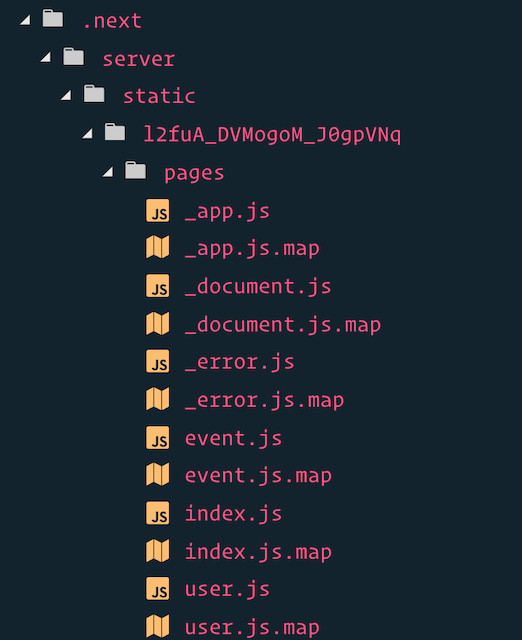
So I have to import without the function call and this is the result:
Static files
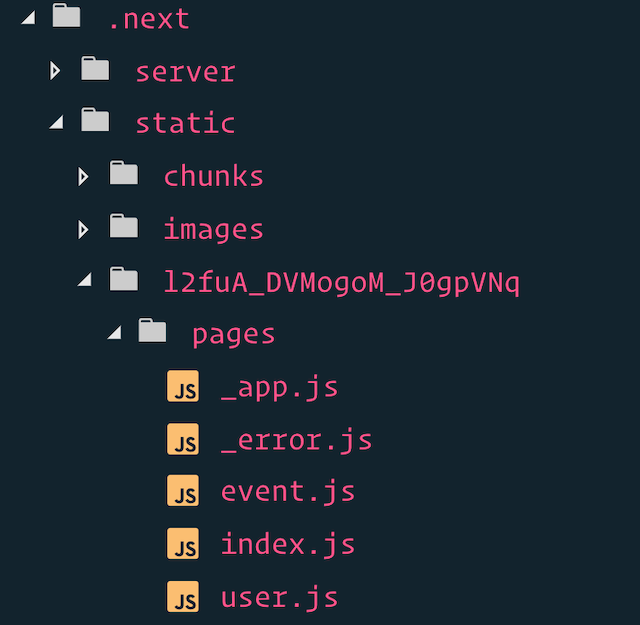
Server files
 lucasfeliciano
All 19 comments
I'm seeing the same
 bhurlow
on 10 Jan 2019
bhurlow
on 10 Jan 2019
the issue appears to be here: https://github.com/zeit/next.js/blob/canary/packages/next/build/webpack-config.js#L75
and here https://github.com/zeit/next.js/blob/canary/packages/next/build/webpack-config.js#L189
bhurlow
on 10 Jan 2019
I realised that is because the working version of next-source-maps is on the canary branch.
So I had to install it like npm i @zeit/[email protected]
After that it is working.
When are you guys planing to release it ?
lucasfeliciano
on 11 Jan 2019
I have [email protected] and @zeit/[email protected]
next.config.js
const withPlugins = require('next-compose-plugins');
const typescript = require('@zeit/next-typescript')
const less = require('@zeit/next-less')
const sourceMaps = require('@zeit/next-source-maps')

module.exports = withPlugins([
  [sourceMaps],
  [less, {
    cssModules: true,
    cssLoaderOptions: {
      importLoaders: 1,
    },
  }],
  [typescript],
]);
No source maps are generated for both server and client code
But sources are generated, if I remove this condition in sources of next-source-maps:
https://github.com/zeit/next-plugins/blob/6786c6c431d896757b870f112f89e1fcf7ac7ae6/packages/next-source-maps/index.js#L13
I don't do PR, as, be honest, I don't know what is the impact
 davydkov
on 23 Feb 2019
davydkov
on 23 Feb 2019
I actually get heap of out memory errors with 0.0.4
<--- Last few GCs --->

[251:0x5587163d8320]   666772 ms: Mark-sweep 1379.1 (1445.2) -> 1379.1 (1446.2) MB, 802.3 / 0.0 ms  allocation failure GC in old space requested
[251:0x5587163d8320]   667575 ms: Mark-sweep 1379.1 (1446.2) -> 1379.1 (1415.2) MB, 802.6 / 0.0 ms  last resort GC in old space requested
[251:0x5587163d8320]   668381 ms: Mark-sweep 1379.1 (1415.2) -> 1379.1 (1415.2) MB, 805.3 / 0.0 ms  last resort GC in old space requested


<--- JS stacktrace --->

==== JS stack trace =========================================

Security context: 0x1758b47a57c1 <JSObject>
    0: builtin exit frame: lastIndexOf(this=0x1133992b7569 <Very long string[3799404]>,0x1a802228b8d1 <String[1]\: \n>)

    1: G(aka G) [/tmp/1797e0ae/client/node_modules/terser/dist/bundle.min.js:1] [bytecode=0x18da51d63129 offset=15](this=0x1d52b18022d1 <undefined>)
    2: /* anonymous */(aka /* anonymous */) [/tmp/1797e0ae/client/node_modules/terser/dist/bundle.min.js:1] [bytecode=0xc5c07326...
 aequasi
on 11 Mar 2019
aequasi
on 11 Mar 2019
I have the same problem as @aequasi and I am not able to make this plugin work :/
 jordan-jarolim
on 25 Jun 2019
jordan-jarolim
on 25 Jun 2019
you guys shoud invoke the sourceMaps required like so:
const sourceMaps = require('@zeit/next-source-maps')()
 AdhamMoussa
on 3 Jul 2019
AdhamMoussa
on 3 Jul 2019
@aequasi
I actually get
heap of out memoryerrors with 0.0.4
Increase the default node max-old-space-size option
export NODE_OPTIONS="--max-old-space-size=4096"
 Squirre1
on 11 Jul 2019
Squirre1
on 11 Jul 2019
0.0.4-canary.1 works for me. Just to put it here, since there's an API change between 0.0.3 and 0.0.4, which is really confusing
 zen0wu
on 22 Jul 2019
zen0wu
on 22 Jul 2019
Using cannary and the problem persists.
Tried to remove the code
https://github.com/zeit/next-plugins/blob/6786c6c431d896757b870f112f89e1fcf7ac7ae6/packages/next-source-maps/index.js#L13
And didnt worked also, static source maps don't get generated
 wallynm
on 18 Sep 2019
wallynm
on 18 Sep 2019
@wallynm 0.0.4-canary.1 works for me
 Mokto
on 18 Sep 2019
Mokto
on 18 Sep 2019
It's not working for me either. I'm doing static export
@wallynm did you solve this?
 WoLfulus
on 7 Oct 2019
WoLfulus
on 7 Oct 2019
Nope, didn't solve at all. What i've discovered is the server build folder is generating .map files, but the static ones don't.
I'm using custom next.js config with NodeJS. I can try to create an test repository if necessary, what's your configuration @WoLfulus?
Currently were using 9.0.6, i gonna test 9.0.7 to see if we had some improvement.
wallynm
on 7 Oct 2019
I did manage to get this working, but I have no idea how.
Basically what I did was:
- Update to
"@zeit/next-source-maps": "0.0.4-canary.1" const withSourceMaps = require("@zeit/next-source-maps")();module.exports = withSourceMaps({ config })
But I'm pretty sure it didn't work from the start. Maybe it had something to do with .next folder, I deleted .next folder and built it again making sure to pass NODE_ENV=production
After that I was able to see .map files in dist folder.
WoLfulus
on 7 Oct 2019
Using @zeit/next-source-maps": "0.0.4-canary.1
I'm currently using this config at export:
const withSourceMaps = require("@zeit/next-source-maps")

const configNext = {
    ...
}

module.exports = withPlugins([
  [withSourceMaps],
  [withTM, withTranspileModules],
  [withBundleAnalyzer, configBundleAnalyzer],
  withSass
], configNext)
@WoLfulus i don't know if it's right but after seeing your updates i've auto-executed withSourceMaps() config before export and it generated my sourcemaps, still need to see if they are corrected mapped all methods, but at least generated .map files.
Updated config:
module.exports = withPlugins([
  [withTM, withTranspileModules],
  [withBundleAnalyzer, configBundleAnalyzer],
  withSass,
  withSourceMaps()
], configNext)
Before i was exporting without execute withSourcemaps method.
wallynm
on 7 Oct 2019
Yeah, you should execute (in my case I executed it just after the require call. Executing it returns a new function which is meant to be the plugin itself (I had to dig into the code to see what was happening)
Glad it worked out ;)
WoLfulus
on 8 Oct 2019
Upgrading to the 0.0.4 canary and using like:
const withSourceMaps = require("@zeit/next-source-maps")(); then wrapping my config (pretty weird syntax) worked for me.
 elsigh
on 13 Dec 2019
elsigh
on 13 Dec 2019
const sourceMaps = require('@zeit/next-source-maps')()
why is that ? it's weird!
 afsanefda
on 8 Jan 2020
afsanefda
on 8 Jan 2020
Related issues
 sebas-deedee
·
3Comments
sebas-deedee
·
3Comments
 znarf
·
3Comments
znarf
·
3Comments
 elliottsj
·
3Comments
elliottsj
·
3Comments
 mitaxe
·
4Comments
mitaxe
·
4Comments
 Jungwoo-An
·
4Comments
Jungwoo-An
·
4Comments
Most helpful comment
I realised that is because the working version of
next-source-mapsis on the canary branch.So I had to install it like
npm i @zeit/[email protected]After that it is working.
When are you guys planing to release it ?