Next.js: [BUG] I use quiet: true but console in chrome and in terminal not empty
Bug report
Describe the bug
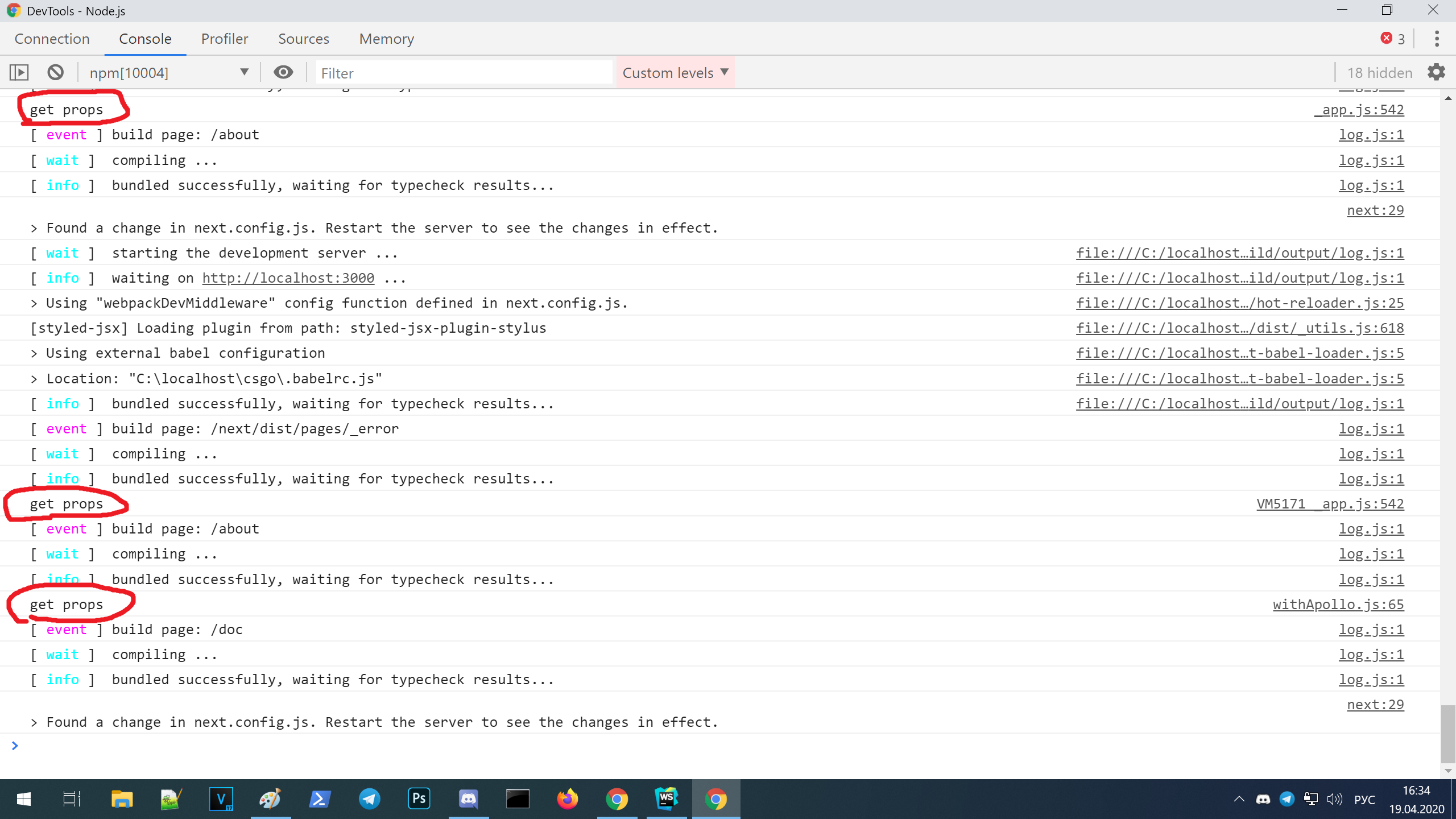
I use quiet: true but console in chrome and in terminal not empty
next.config.js
module.exports = {
  quiet: true
}
Steps to reproduce the behavior, please provide code snippets or a repository:
- add
quiet: trueto next.config.js - run next.js project
- console will not empty
Expected behavior
console will be clear, cuz quiet = true, no webpack output, no info output, no events, no chunks, no "server startes in port 3000" output.
Screenshots

System information
- all systems
Additional context
since next.js uses a lot of other libraries under the hood that write to the console both the browser and the server. Next.js should have a common unified interface for setting console output. and next.js would transparently pass these options to the libraries it uses
 MaxmaxmaximusGitHub
All 6 comments
Not a bug. It appears that next uses its own custom configured webpack-dev-server. Therefore passing devServer arguments won't work. Instead, this feature will most likely need to be requested. That said, it appears RFC #4808 was created several years ago to address the same issue #8422 as you've mentioned above.
 mattcarlotta
on 21 Apr 2020
mattcarlotta
on 21 Apr 2020
Therefore passing devServer arguments won't work
I do not use the arguments webpack dev server, I use the configuration next.js, therefore this is a bug, the anomalous behavior is not expected
module.exports = {
  quiet: true
}
it's not a webpack option, webpack options are passed in the webpack property:
module.exports = {
  webpack: function (config) {
    return config // webpack options there
  }
  quiet: true // this not webpack option, next.js option
}
Looking at an older version (v8.1.0), you're right, it looks like they are still using a custom dev-server (and not webpack-dev-server); however, the quiet option (scroll down to supported options) parameter is stated as only hiding error messages derived from the server (next-dev-server). As far as I can tell, it never silenced the event messages on the client nor server, but only emitted errors from a server response: 1, 2. This holds true for v9.3.5 as well.
As for the HMR messages, they have never been silenced in v8.1.0 nor v9.3.5, and as mentioned by Tim, they're shown for a better development experience. Without them, you may not be aware of whether or not the files have been compiled/recompiled. That said, the logs are hard coded in development, so you can't modify/customize them. That's why RFC #4808 has been proposed (for custom event logging).
mattcarlotta
on 22 Apr 2020
Taking a closer look, it appears you may be debugging from the server-side stdout in chrome's DevTools. When you view the DevTools attached to the top (localhost:3000) instead of npm, you'll only see the console.logs you've written within your source code (including a few HMR messages); otherwise, no server-side event (start, build, waiting, etc) messages will be displayed.
For example:

mattcarlotta
on 22 Apr 2020
@mattcarlotta command "next" run many node processes, webpack, server e.t.c. how i can run server instance in debug mode? Help me please =(
MaxmaxmaximusGitHub
on 24 Apr 2020
I don't use webstorm, so I can't help you there. Instead, I use vscode and I followed this guide: https://dev.to/vvo/5-steps-to-debugging-next-js-node-js-from-vscode-or-chrome-devtools-497o#mandatory-introduction-why-even-bother.
On that note, I never run terminals through my IDE. Too difficult to manage (especially when dealing with external microservices).
mattcarlotta
on 24 Apr 2020
Related issues
 YarivGilad
·
3Comments
YarivGilad
·
3Comments
 renatorib
·
3Comments
renatorib
·
3Comments
 swrdfish
·
3Comments
swrdfish
·
3Comments
 rauchg
·
3Comments
rauchg
·
3Comments
 pie6k
·
3Comments
pie6k
·
3Comments
Most helpful comment
Taking a closer look, it appears you may be debugging from the server-side stdout in chrome's
DevTools. When you view the DevTools attached to thetop(localhost:3000) instead ofnpm, you'll only see theconsole.logs you've written within your source code (including a few HMR messages); otherwise, no server-side event (start, build, waiting, etc) messages will be displayed.For example:
