Next.js: Fetch API cannot load file:///path/to/react-dom-server.node.development.js. URL scheme must be "http" or "https" for CORS request.
Bug Report
Describe the bug
Cannot fetch on client successfully, encountering CORS issue, similar to #6374.
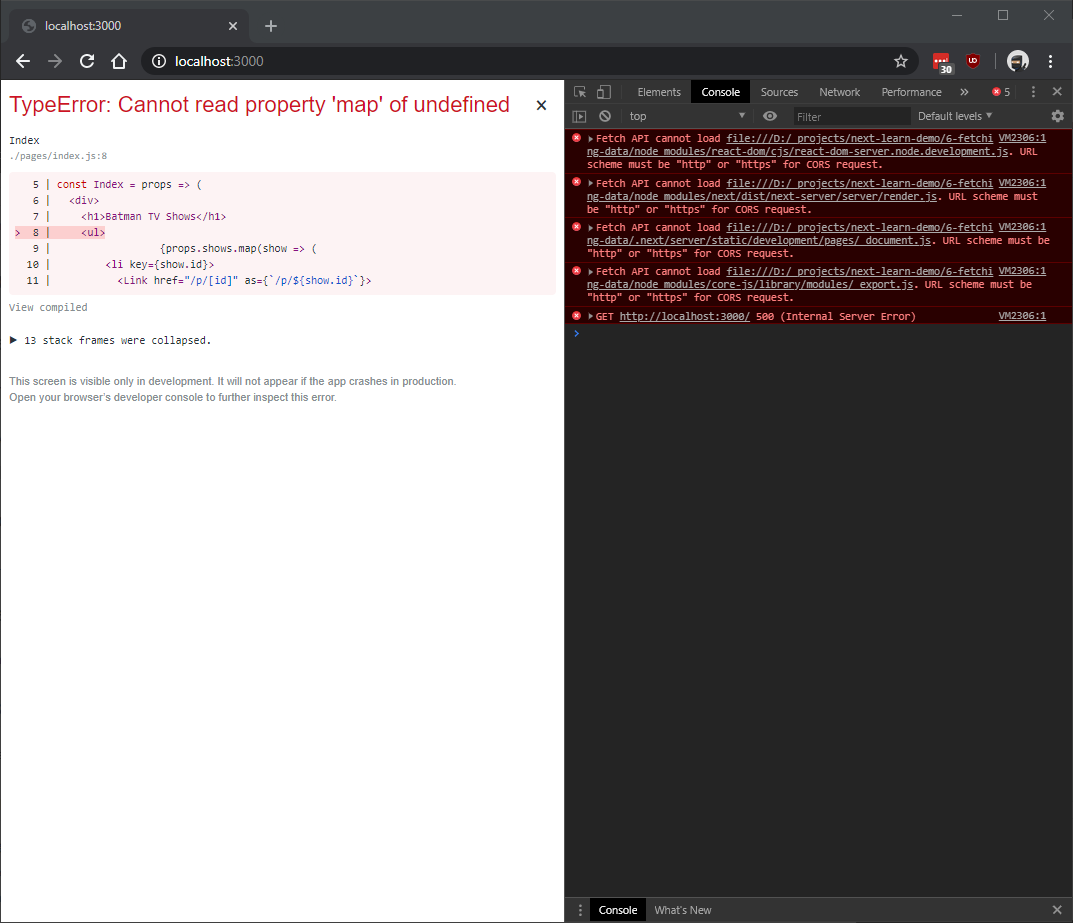
Fetch API cannot load file:///D:/_projects/next-learn-demo/6-fetching-data/node_modules/react-dom/cjs/react-dom-server.node.development.js. URL scheme must be "http" or "https" for CORS request.
To Reproduce
- Clone https://github.com/jdmallen/next-learn-demo
- Checkout branch
fetch-cors-bug. - Navigate to
./6-fetching-data - Execute
npm i && npm run dev
Expected Behavior
Runs script on client.
Screenshots
System Information
- Windows 10 1809
- Chrome 79.0.3945.117 (Official Build) (64-bit)
- Next 9.1.7
- Project dependencies:
"isomorphic-unfetch": "^3.0.0",
"next": "^9.0.0",
"react": "^16.8.4",
"react-dom": "^16.8.4"
Additional context
All I did was change MyLayout to use a higher order function withLayout as suggested in your tutorial here and update each file to use it as shown in this fork.
Without withLayout-- i.e. just using <Layout>...</Layout> component-- it works as expected.
Related to issue #6374, but this time only using packages referenced by your tutorial. Please advise. Thanks!
 jdmallen
All 6 comments
The error overlay tries to fetch sourcemaps to apply them on the stacktrace however sometimes it can't find the sourcemap.
 timneutkens
on 15 Jan 2020
timneutkens
on 15 Jan 2020
I'm pretty sure the undefined property map is actually the props.shows.map on line 9 in the screenshot. The failure to load some of the scripts is causing props and/or shows to return undefined. This is supported by the fact that removing everything between the <ul> tags also fixes the error.
jdmallen
on 15 Jan 2020
This 404s are expected for the error overlay.
@lfades can you confirm this learn demo doesn't crash on boot?
 Timer
on 3 Feb 2020
Timer
on 3 Feb 2020
I get the same error when I'm using HOC's
 dkrefta
on 21 Feb 2020
dkrefta
on 21 Feb 2020
Getting the same with fetching-data-for-pages
Next.js Version: 9.3.2
 mafshin
on 28 Mar 2020
mafshin
on 28 Mar 2020
Next.js no longer uses this error overlay, so the problem should be solved!
Timer
on 10 Sep 2020
Related issues
 rauchg
·
3Comments
rauchg
·
3Comments
 YarivGilad
·
3Comments
YarivGilad
·
3Comments
 pie6k
·
3Comments
pie6k
·
3Comments
 sospedra
·
3Comments
sospedra
·
3Comments
 DvirSh
·
3Comments
DvirSh
·
3Comments
Most helpful comment
Getting the same with fetching-data-for-pages
Next.js Version: 9.3.2