Next.js: After refresh, browser back button is not working.
Bug report
Describe the bug
After refresh, browser back button is not working.
To Reproduce
It even reproduces on now.sh!
- Go to https://zeit.co/home
- Click on top left "pricing" navigation button
- Browser refresh with
cmd+r - Browser back button -> It just stays still.
Expected behavior
It should go back to '/home'
Screenshots

System information
- OS: macOS Catalina 10.15
- Browser : Chrome(Version 78.0.3904.97 (Official Build) (64-bit)) and safari(Version 13.0.2 (15608.2.30.1.1)) both reproduces this issue.
- Version of Next.js: I checked the latest version also reproduces this issue.
Additional context
I can also reproduce with this example repo, which uses the latest next.js
npx create-next-app --example hello-world hello-world-app
 dengdengyee
All 10 comments
Thanks for reporting this!
 Timer
on 12 Nov 2019
Timer
on 12 Nov 2019
checked it on 8.1.1-canary.39 works there. so it only broke recently.
 Devisione
on 17 Nov 2019
Devisione
on 17 Nov 2019
9.1.4-canary.7 works fine!
Devisione
on 18 Nov 2019
9.2.2 also has this bug ~
 kxcy001123
on 4 Mar 2020
kxcy001123
on 4 Mar 2020
@kxcy001123 we have a regression test for this now which is passing. Can you provide additional details where you are seeing this behavior?
 ijjk
on 4 Mar 2020
ijjk
on 4 Mar 2020
i am using next.js with ant-design ui.
import { Layout } from 'antd';
 const Index = () => {
  console.log('pages index');

  return (
    <div>
      <Layout>
        <Link href="/userList">
          <span>userList</span>
        </Link>
      </Layout>
    </div>
  );
};
it is not working
but:
const Index = () => {
  console.log('pages index');

  return (
    <div>
      <div>
        <Link href="/userList">
          <span>用户列表页</span>
        </Link>
      </div>
    </div>
  );
};
it is ok;
i dont understand

kxcy001123
on 5 Mar 2020
https://github.com/zeit/next.js/issues/9378#issuecomment-594993962
i knew it
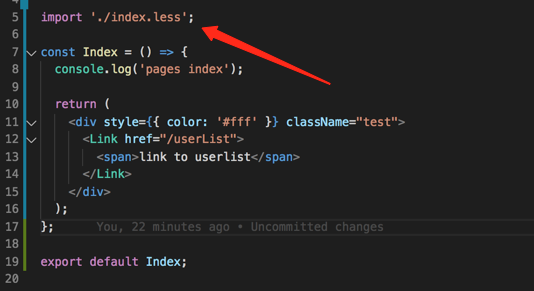
if some css in index.tsx. this bug can be reproduced
kxcy001123
on 5 Mar 2020
@kxcy001123 it sounds like the error you are seeing is this one: https://github.com/zeit/next-plugins/issues/282 which is resolved for CSS and SCSS with the built-in support. It looks you are using LESS though which requires the workaround of importing a .less file in _app
ijjk
on 5 Mar 2020
@kxcy001123 it sounds like the error you are seeing is this one: zeit/next-plugins#282 which is resolved for CSS and SCSS with the built-in support. It looks you are using LESS though which requires the workaround of importing a
.lessfile in_app
resolve my problem, ths
kxcy001123
on 5 Mar 2020
Not really a NextJS issue but hopefully could help someone how's reading this 👀
The backward navigation of my app would stop working out of the blue: I would hit back (either browser of router.back()), the url would change but the page would not.
After hours of debugging and many coffees later I realised that a library I am using was setting history.state to null for the route where history.back would stop working. Removing that logic restored the correct behaviour.
Definitely a problem caused by external logic but I am wondering whether Next could be louder about it and possibly log an error 🤔 - thoughts?
 steedems
on 4 Nov 2020
steedems
on 4 Nov 2020
Related issues
 matthewmueller
·
102Comments
matthewmueller
·
102Comments
 Knaackee
·
122Comments
Knaackee
·
122Comments
 poyiding
·
73Comments
poyiding
·
73Comments
 nickredmark
·
60Comments
Timer
·
87Comments
nickredmark
·
60Comments
Timer
·
87Comments
Most helpful comment
Thanks for reporting this!