Next.js: next start command is not reflecting changes
Bug report
Describe the bug
I run next start command using yarn start or npm run start, but I notice that my changes are not reflecting on my local web. Even a newly added console.log is not showing.
I then tried to yarn build then yarn start, and the console.log is showing now. But my next start isn't really doing anything then, I don't get the Hot reloading feature here from next.js.
To Reproduce
I really don't know how to reproduce this, as this case/bug is really came out of nowhere. Yesterday was fine, today I tried and this happened. (Sorry)
Expected behavior
I expect it to reflect the changes I made.
Screenshots
When I yarn start, I get this normal message.
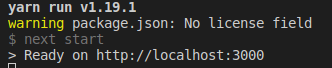
Nothing wrong there, but when I access the localhost:3000 usually I'll get the message like trying to building the page and all, but now it didn't do the same behavior and keep on showing those message without adding a new one (Even when I tried to access other pages, my local web only showing my latest built project, and the message on next start is always the same)
System information
- OS: Linux Ubuntu 18.04
- Browser (if applies) Chrome
- Version of Next.js: 9.1.1
Additional context
I've tried to remove the node_modules folder then do yarn again.
I've tried to remove next cache folder.
I've tried to remove dist folder.
I've tried killall -9 node in case I'm actually pointing to another local server (Which is actually impossible as same port will definitely raise an error)
I only use next-css for additional next config on next.config.js file.
const withCSS = require("@zeit/next-css");
module.exports = withCSS({
  cssModules: true,
  cssLoaderOptions: {
    importLoaders: 1,
    localIdentName: "[local]___[hash:base64:5]",
    url: false
  },
  webpack(config, options) {
    config.resolve.modules = ["node_modules", "."];
    return config;
  }
});
 michael-harley
All 2 comments
Hi @michael-harley 👋 In Next.js, the development server is launched using next dev (or just next). See https://github.com/zeit/next.js#manual-setup or https://github.com/zeit/next.js/tree/canary/examples/hello-world
next start is for launching a production server, which intentionally works as you describe.
 kachkaev
on 2 Nov 2019
kachkaev
on 2 Nov 2019
Hi @michael-harley In Next.js, the development server is launched using
next dev(or justnext). See https://github.com/zeit/next.js#manual-setup or https://github.com/zeit/next.js/tree/canary/examples/hello-world
next startis for launching a production server, which intentionally works as you describe.
Oh my... Yes you are right, thanks for pointing that out as I've never actually use the production verison.
I just noticed (after you said that) that I've actually never use yarn start on next.js, and only use yarn start for create-react-app's project. (Might be tired from working a lot, sorry, and actually waste an hour because of this)
My bad, and thank you.
michael-harley
on 2 Nov 2019
Related issues
 renatorib
·
3Comments
renatorib
·
3Comments
 YarivGilad
·
3Comments
YarivGilad
·
3Comments
 pie6k
·
3Comments
pie6k
·
3Comments
 kenji4569
·
3Comments
kenji4569
·
3Comments
 lixiaoyan
·
3Comments
lixiaoyan
·
3Comments
Most helpful comment
Hi @michael-harley 👋 In Next.js, the development server is launched using
next dev(or justnext). See https://github.com/zeit/next.js#manual-setup or https://github.com/zeit/next.js/tree/canary/examples/hello-worldnext startis for launching a production server, which intentionally works as you describe.