Next.js: How to deploy nextjs with redirection in getInitialProps
Question about Next.js
How to actually deploy an auth with next js while accessing it in getInitialProps?
I have a code that is exactly looked like this.
https://github.com/zeit/next.js/blob/canary/examples/with-cookie-auth/utils/auth.js
But when I tried to next build && next export -o dist
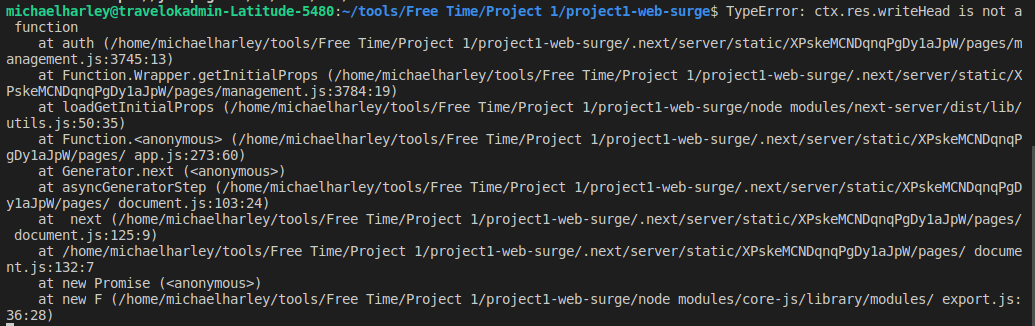
It always gives this error TypeError: ctx.res.writeHead is not a function
Please do help if you know the solution.
Thanks.
System
Next js: 9.0.3
 michael-harley
All 4 comments
My code is exactly the same as above with-cookie-auth example.
And it is the same as the wiki on Next Js.
https://github.com/zeit/next.js/wiki/Redirecting-in-%60getInitialProps%60
But how do I use next build for this case?
"scripts": {
"dev": "next",
"build": "next build",
"export": "next build && next export -o dist",
"start": "next start",
"serve": "npm run export && serve ./dist",
"deploy": "npm run export && npx surge --domain `cat CNAME` dist"
}
My command is yarn deploy
michael-harley
on 4 Oct 2019
Please follow the issue template.
https://github.com/zeit/next.js/issues/new/choose
https://github.com/zeit/next.js/issues/new?template=8.Question_about_next.md
# Question about Next.js
GitHub Issues are reserved for Bug reports and Feature requests. The best place to get your question answered is to post it on https://spectrum.chat/next-js.
Note that you're trying to do server-side authentication on a statically exported website. You'll probably want to take an approach like the auth0 example with client-side fetches https://github.com/zeit/next.js/tree/canary/examples/auth0
 timneutkens
on 5 Oct 2019
timneutkens
on 5 Oct 2019
But when I tried to
next build && next export -o dist
It always gives this errorTypeError: ctx.res.writeHead is not a function
Afaik, there's no {req, res} when you use the next export script. I think it is written in the docs.
I'm myself trying to get access to the client's first page request to capture req.headers.cookie and send it to react's context store provider for an auth initial page load. But getInitialProps just doesn't give {req,res}.
Please do help if you know the solution.
And I've found no other way but leaving next build && next export for the npm start script or a custom server, which I can't afford as I'm using Netlify's static host.
 Delkathes
on 6 Oct 2019
Delkathes
on 6 Oct 2019
But when I tried to
next build && next export -o dist
It always gives this errorTypeError: ctx.res.writeHead is not a functionAfaik, there's no
{req, res}when you use thenext exportscript. I think it is written in the docs.
I'm myself trying to get access to the client's first page request to capturereq.headers.cookieand send it to react's context store provider for an auth initial page load. ButgetInitialPropsjust doesn't give{req,res}.Please do help if you know the solution.
And I've found no other way but leaving
next build && next exportfor thenpm startscript or a custom server, which I can't afford as I'm using Netlify's static host.
Thanks, it helps me to know that this is an issue that others had too.
I'll just change redirection from getInitialProps to componentDidMount.
It's just too bad that I can't use next.js feature.
This is how I do it now. If you are having the same problem as me.
import React from "react";
import Router from "next/router";
import nextCookie from "next-cookies";
import cookie from "js-cookie";

export const login = ({ token }) => {
  cookie.set("token", token, { expires: 1 });
  Router.push("/dashboard-data-armada");
};

export const getToken = () => {
  return cookie.get("token");
};

export const auth = (ctx = {}) => {
  const { token } = nextCookie(ctx);

  /*
   * If `ctx.req` is available it means we are on the server.
   * Additionally if there's no token it means the user is not logged in.
   */
  if (ctx.req && !token) {
    ctx.res.writeHead(302, { Location: "/" });
    ctx.res.end();
  }

  // We already checked for server. This should only happen on client.
  if (!token) {
    Router.push("/");
  }

  return token;
};

export const logout = () => {
  cookie.remove("token");
  // to support logging out from all windows
  window.localStorage.setItem("logout", Date.now());
  Router.push("/");
};

export const withAuthSync = WrappedComponent => {
  class Wrapper extends React.Component {
    syncLogout = event => {
      if (event.key === "logout") {
        console.log("logged out from storage!");
        Router.push("/");
      }
    };

    componentDidMount() {
      window.addEventListener("storage", this.syncLogout);

      auth();
    }

    componentWillUnmount() {
      window.removeEventListener("storage", this.syncLogout);
      window.localStorage.removeItem("logout");
    }

    render() {
      return <WrappedComponent {...this.props} />;
    }
  }

  return Wrapper;
};
Related issues
 knipferrc
·
3Comments
knipferrc
·
3Comments
 pie6k
·
3Comments
pie6k
·
3Comments
 DvirSh
·
3Comments
DvirSh
·
3Comments
 ghost
·
3Comments
ghost
·
3Comments
 YarivGilad
·
3Comments
YarivGilad
·
3Comments
Most helpful comment
Thanks, it helps me to know that this is an issue that others had too.
I'll just change redirection from
getInitialPropstocomponentDidMount.It's just too bad that I can't use next.js feature.
This is how I do it now. If you are having the same problem as me.