Next.js: [Next.js 9] Setting `quiet: true` flag doesn't seem to work anymore
Bug report
Describe the bug
Using custom server with quiet: true flag set doesn't affect logging.
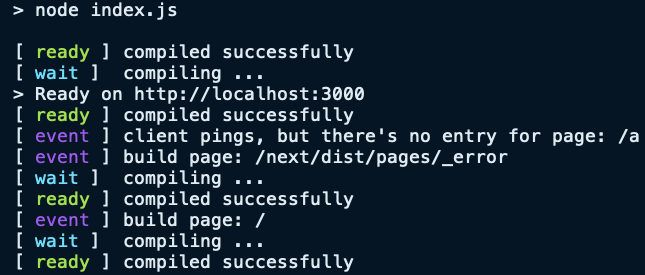
It still shows a bunch of next.js specific logs in stdout even after setting the flag:
> node index.js

[ ready ] compiled successfully
[ wait ]  compiling ...
> Ready on http://localhost:3000
[ ready ] compiled successfully
[ event ] client pings, but there's no entry for page: /a
[ event ] build page: /next/dist/pages/_error
[ wait ]  compiling ...
[ ready ] compiled successfully
[ event ] build page: /
[ wait ]  compiling ...
[ ready ] compiled successfully
To Reproduce
- Run
npx create-next-app - Create a file
index.jsin the project root and fill out the content as stated in the document - Replace the line
const app = next({dev});byconst app = next({dev, quiet: true}); - Run
node index.js - See the output
Expected behavior
I expected next.js to disable log outputs in stdout by setting quiet: true flag.
Screenshots
System information
- OS: macOS
- chrome
- Next.js v9.0.3
- Node v12.6.0
Related issues
 preco21
All 7 comments
Hey, quiet: true is just for error logs, you can read about it in the documentation.
 huv1k
on 20 Aug 2019
huv1k
on 20 Aug 2019
Ah, that’s true. I didn’t notice that.
Apart from that, I still wonder if there’s a way to disable logging in custom server.
Any thoughts?
Maybe I have to file another issue?
preco21
on 20 Aug 2019
Hi @preco21 what's the reason for wanting to disable it? The particular lines that you posted are development-only and contribute to a good dx.
 timneutkens
on 20 Aug 2019
timneutkens
on 20 Aug 2019
@timneutkens The reason is because, I use standard output as a main logging point in the development environment. And this is what next.js also consumes to. In turn, you will end up having mixed log output in your terminal that can confuse you from reading the output of other logs.
preco21
on 22 Aug 2019
But in that case you could just pipe to /dev/null right? next > /dev/null
timneutkens
on 22 Aug 2019
The real issue is that, since you are using custom server logic and the standard output stream is shared by both next and your server, there’s no ideal way to selectively pipe next logs to /dev/null. You will always have to lose all your logs along with next’s in that way.
preco21
on 23 Aug 2019
Same as #4808
timneutkens
on 2 Jan 2020
Related issues
 formula349
·
3Comments
formula349
·
3Comments
 kenji4569
·
3Comments
kenji4569
·
3Comments
 knipferrc
·
3Comments
timneutkens
·
3Comments
knipferrc
·
3Comments
timneutkens
·
3Comments
 ghost
·
3Comments
ghost
·
3Comments
Most helpful comment
The real issue is that, since you are using custom server logic and the standard output stream is shared by both next and your server, there’s no ideal way to selectively pipe next logs to
/dev/null. You will always have to lose all your logs along with next’s in that way.