Next.js: The page first (ssr) load has broken css (often but not always)
Bug report
Describe the bug
I'm working on the http://weally.org project, you can see that the css is loaded on the first display, then it disappears (this is maybe too fast in production mode but we see it clearly in dev mode)
To Reproduce
Simply go to http://weally.org and see the broken css, if you click on a link that changes the route, everything start working fine
Expected behavior
System information
- server OS: ubuntu
- Browser (if applies) chrome
- Version of Next.js: [e.g. 6.0.2]
Additional context
I referred to the material-ui docs, here are my implementations:
_document.js
import React from 'react';
import Document, {Head, Main, NextScript} from 'next/document';
import {ServerStyleSheets} from '@material-ui/styles';
import theme from '../src/theme';

class MyDocument extends Document {
    render() {
        return (<html lang="en">
        <Head>
            <meta charSet="utf-8"/>
            {/* Use minimum-scale=1 to enable GPU rasterization */}
            <meta
                    name="viewport"
                    content="minimum-scale=1, initial-scale=1, width=device-width, shrink-to-fit=no"
            />
            {/* PWA primary color */}
            <meta name="theme-color" content={theme.palette.primary.main}/>
            <link rel="stylesheet" href="https://fonts.googleapis.com/icon?family=Material+Icons"/>
            <link
                    rel="stylesheet"
                    href="https://fonts.googleapis.com/css?family=Roboto:300,400,500,700&display=swap"
            />
            <link rel="icon" href="/static/images/favicon.ico"/>
            <script language="JavaScript" type="text/javascript" src="/static/js/scripts.js">
            </script>
            <meta property="og:url" content={`https://weally.org`}/>
            <meta property="og:type" content="website"/>
            <meta property="og:title" content="Allied together, our complaints are powerful"/>
            <meta property="og:description" content="Make your complaint about any company visible to the entire world on WeAlly.org. We can finally look at the problems companies have with their customers, complain on WeAlly and join the responsible citizens"/>
            <meta property="og:image" content={'https://weally.org/static/images/fb_splash.jpg'}/>

        </Head>
        <body>
        <Main/>
        <NextScript/>
        </body>
        </html>);
    }
}

MyDocument.getInitialProps = async ctx => {
    // Resolution order
    //
    // On the server:
    // 1. app.getInitialProps
    // 2. page.getInitialProps
    // 3. document.getInitialProps
    // 4. app.render
    // 5. page.render
    // 6. document.render
    //
    // On the server with error:
    // 1. document.getInitialProps
    // 2. app.render
    // 3. page.render
    // 4. document.render
    //
    // On the client
    // 1. app.getInitialProps
    // 2. page.getInitialProps
    // 3. app.render
    // 4. page.render

    // Render app and page and get the context of the page with collected side effects.
    const sheets = new ServerStyleSheets();
    const originalRenderPage = ctx.renderPage;

    ctx.renderPage = () => originalRenderPage({
        enhanceApp: App => props => sheets.collect(<App {...props} />),
    });

    const initialProps = await Document.getInitialProps(ctx);

    return {
        ...initialProps, // Styles fragment is rendered after the app and page rendering finish.
        styles: (<React.Fragment>
            {initialProps.styles}
            {sheets.getStyleElement()}
        </React.Fragment>),
    };
};

export default MyDocument;
_app.js
import App, {Container} from 'next/app'
import React from 'react'
import withApolloClient from '../lib/with-apollo-client'
import {ApolloProvider} from 'react-apollo'
import CssBaseline from '@material-ui/core/CssBaseline';
import theme from '../src/theme';
import {ThemeProvider} from '@material-ui/styles';
import {appWithTranslation} from '../lib/nextI18n'

class MyApp extends App {
    componentDidMount() {
        // Remove the server-side injected CSS.
        const jssStyles = document.querySelector('#jss-server-side');
        if (jssStyles) {
            jssStyles.parentNode.removeChild(jssStyles);
        }
    }

    render() {
        const {Component, pageProps, apolloClient} = this.props
        return (<Container>
            <ThemeProvider theme={theme}>
                <CssBaseline/>
                <ApolloProvider client={apolloClient}>
                    <Component {...pageProps} />
                </ApolloProvider>
            </ThemeProvider>
        </Container>)
    }
}

export default withApolloClient(appWithTranslation(MyApp))
Just for additional info if needed, the layout component you're seeing is this:
ClientLayout.js
import React, {Component} from 'react'
import Grid from "@material-ui/core/Grid";
import gql from "graphql-tag";
import classNames from 'classnames';
import Divider from "@material-ui/core/Divider";
import Typography from "@material-ui/core/Typography";
import {withTranslation} from '../../lib/nextI18n'
import {Query, withApollo} from "react-apollo";
import {withStyles} from "@material-ui/core";
import MenuDrawer from "./MenuDrawer";
import Header from "./Header";
import {Views} from "../../src/util";
import Link from "next/link";
import AddComplaint from "../issue/AddComplaint";
import {IndiegogoUrl} from '../../server/src/constants/other'
import { initGA, logPageView } from '../../src/utils/analytics'
const styles = (theme) => {
return ({
root: {
display: 'flex',
flexFlow: 'column'
},
bgImgContainer: {
height: '250px',
overflowY: 'hidden'
},
bg: {
width: '100%',
textAlign: 'center'
},
pageContentContainer: {
width: '100%',
backgroundColor: '#f1f1f1',
},
pageContent: {
width: '100%',
maxWidth: '1280px',
margin: '0 auto'
},
mainViewsButtons: {
backgroundColor: 'white',
width: '100%',
maxWidth: '1100px',
height: theme.spacing(12),
margin: '-30px auto ' + theme.spacing(4) + 'px auto !important',
alignItems: 'center',
justifyContent: 'space-evenly'
},
menuButton: {
cursor: 'pointer',
textAlign: 'center',
flexGrow: 1
},
selectedKind: {
backgroundColor: '#19878721'
},
menuButtonImg: {
maxHeight: '58px'
},
buttonText: {
display: 'block'
},
divider: {
margin: theme.spacing(2) + 'px 0',
height: 'calc(100% - ' + theme.spacing(4) + 'px)'
},
addIssueTrigger: {
},
footer: {
backgroundColor: '#f1f1f1',
},
footerContent: {
maxWidth: '1280px',
margin: theme.spacing(4) + 'px auto',
},
topic: {
marginTop: theme.spacing(1)
},
legal: {
marginTop: theme.spacing(4),
marginButtom: theme.spacing(2)
},
logo: {
width: theme.spacing(16)
},
footerDivider: {
margin: 'auto ' + theme.spacing(0.5) + 'px',
height: '1em',
width: '1px'
}
})
};
const LOCAL_CACHE = gql`
query localCache {
kind @client
name @client
eid @client
issueId @client
view @client,
lat @client,
lng @client
}`;
class ClientLayout extends Component {
constructor(props) {
super(props);
this.handleChange = this.handleChange.bind(this);
}
componentDidMount() {
if (!window.GA_INITIALIZED) {
initGA()
window.GA_INITIALIZED = true
}
logPageView()
}
handleChange = name => event => {
this.setState({
[name]: event.target.value,
})
};
render() {
const {t, view, classes, children} = this.props;
return (<Query query={LOCAL_CACHE}>
{({data: cache, client}) => {
const childrenWithProps = React.Children.map(children, function (child) {
return React.cloneElement(child, {
cache,
client,
t
})
});
const {kind} = cache
return (<Grid container className={classes.root}>
<Grid item container direction="column" className={classes.content}>
<Grid item className={classes.pageHeader}>
<Header cache={cache} client={this.props.client}
onMenuButtonClick={this.handleDrawerOpen} view={this.props.view}/>
</Grid>
<Grid item className={classes.bgImgContainer}>
<img src="/static/images/bg.jpg" className={classes.bg}/>
{(this.isShowAddComplaintButton()) && <AddComplaint cache={this.props.cache} className={classes.addIssueTrigger}/>}
</Grid>
<Grid item className={classes.pageContentContainer}>
<Grid container item className={classes.mainViewsButtons}>
<Link href={Views.MyIssues.path}>
<Grid item className={classNames(classes.menuButton, {[classes.selectedKind]: view === Views.MyIssues})}>
<img src="/static/images/my_issues.svg" className={classes.menuButtonImg}/>
<Typography variant="button" className={classes.buttonText}>{t('common.drawer.issues')}</Typography>
</Grid>
</Link>
<Divider className={classes.divider}/>
<Link href={Views.Kind.path}>
<Grid item className={classNames(classes.menuButton, {[classes.selectedKind]: kind === "service"})}>
<img src="/static/images/service.svg" className={classes.menuButtonImg}/>
<Typography variant="button" className={classes.buttonText}>{t('common.drawer.service')}</Typography>
</Grid>
</Link>
<Divider className={classes.divider}/>
<Grid item className={classNames(classes.menuButton, {[classes.selectedKind]: false})}>
<a href={IndiegogoUrl} target='_blank'>
<img src="/static/images/city.svg" className={classes.menuButtonImg}/>
<Typography variant="button" className={classes.buttonText}>{t('common.drawer.city')}</Typography>
</a>
</Grid>
<Divider className={classes.divider}/>
<Grid item className={classNames(classes.menuButton, {[classes.selectedKind]: false})}>
<a href={IndiegogoUrl} target='_blank'>
<img src="/static/images/product.svg" className={classes.menuButtonImg}/>
<Typography variant="button" className={classes.buttonText}>{t('common.drawer.product')}</Typography>
</a>
</Grid>
</Grid>
<div className={classes.pageContent}>
{childrenWithProps}
</div>
</Grid>
</Grid>
<Grid item className={classes.footer}>
<div className={classes.footerContent}>
<Typography variant="h4">Weally specializes in helping people get their rights</Typography>
<span><Typography variant="body1">The market in the human history was regulated by the <i>word of mouth</i> : when a business was not reliable, people were telling it to each
others, and the business was obliged to adopt a more satisfying service or bankrupted</Typography></span>
<span><Typography variant="body1">We believe that by ensuring the complaints are transmitted to the responsible units in a public manner, we will oblige the shops to put more energy in avoiding issues to happen</Typography></span>
<span><Typography variant="body1">We also give the <i>right of reply</i> to the responsible entities, by publishing their answers to complaints publicly</Typography></span>
<div className={classes.topic}><Typography variant="subtitle2">Our method</Typography></div>
<span><Typography variant="body1">We are not a review website where you put a rank and leave: the story starts with us at the moment you give your rank : we follow your issue until the end by giving an opportunity to the company to propose you a satisfying compensation. But as long as they didn't, your complaint along with other unsolved issues will remain on the <i>wall of shame</i> of that company, and influence their rank on google</Typography></span>
<span><Typography variant="body1">For example, if you're not satisfied with your travel experience, you have the choice between just putting a bad rank on tripadvisor.com, or submitting a complaint on <a href='https://weally.org'>weally.org</a> giving your travel agency the opportunity to propose you a compensation, and have this complaint closed. You and only you can close your complaint.</Typography></span>
<div className={classes.topic}><Typography variant="subtitle2">Our target</Typography></div>
<span><Typography variant="body1">Every person who is responsible for a consequent number of persons is in our target: we started by service companies, but we want to extend to city political entities, and mass production brands, we're raising money on Indiegogo for that purpose</Typography></span>
<div className={classes.legal}>
<span>
<img src="/static/images/logo_blue.svg" className={classes.logo}/>
<Typography variant="body1">together our complaints are powerful</Typography>
</span>
<Grid container>
<Grid item><Typography variant="caption">2019 WeAlly</Typography></Grid>
<Grid item><Typography variant="caption"><Link href="/legal/terms">Terms of Use</Link></Typography></Grid>
<Divider className={classes.footerDivider}/>
<Grid item><Typography variant="caption"><Link href="/legal/privacy_policy">Privacy Policy</Link></Typography></Grid>
</Grid>
</div>
</div>
</Grid>
</Grid>)
}}
</Query>)
}
isShowAddComplaintButton() {
const {view} = this.props
return view === Views.Entity || view === Views.Issue;
}
}
export default withApollo(withStyles(styles, {withTheme: true})(withTranslation()(ClientLayout)))
Sorry if strings are not initialized, we had to launch in a hurry (indiegogo was stopping my country the 12th august)
 ziedHamdi
All 18 comments
Also have this issue! Looks like it is in development only
 infodusha
on 20 Aug 2019
infodusha
on 20 Aug 2019
me too
 straxico
on 20 Aug 2019
straxico
on 20 Aug 2019
@infodusha @straxico Please provide a full reproduction instead of "Same issue" or "Me too".
Probably good to read this thread: https://twitter.com/timneutkens/status/1154351050700333056
@ziedHamdi I can't reproduce what you're explaining, css is inlined in the server-rendered response as far as I can see.
 timneutkens
on 21 Aug 2019
timneutkens
on 21 Aug 2019
Hi @timneutkens,
Sorry for the delay, I was on holidays. Can you please try to hard refresh the page Ctrl+R?
This is my screen capture:
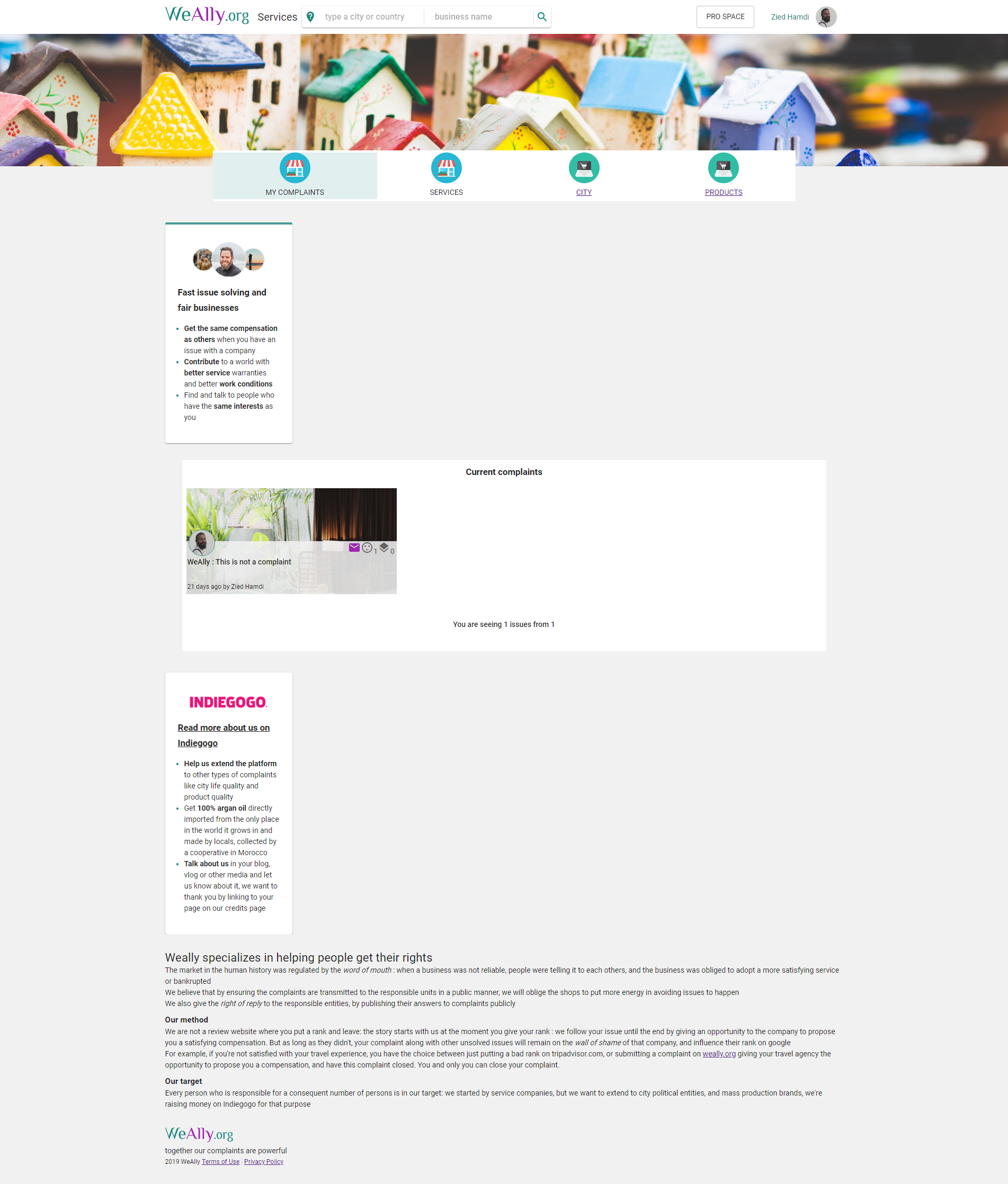
There's a style that is declared but unresolved in the middle panel, but that is weiredly not missing for the other two panels (left and right). When I click on any Link in the app, things start working as expected (somehow the missing styles becomes present)
ziedHamdi
on 4 Sep 2019
Seems like it uses next/dynamic for the particular block 🤔
timneutkens
on 4 Sep 2019
However I'm seeing the seemingly correct result:

timneutkens
on 4 Sep 2019
The blocks are staticly declared:
const styles = (theme) => {
    return ({
        container: {
            display: 'flex',
            flexDirection: 'row',
            flexFlow: 'row',
        },
        leftPanel: {
            flexGrow: 0,
            minWidth: '240px',
            maxWidth: '240px',
            marginTop: theme.spacing(1) + 'px !important'
        },
        centerPanel: {
            flexGrow: 1,
            minWidth: '240px',
            maxWidth: 'calc(100% - '+ (480 + theme.spacing(4))+'px )',
            marginTop: theme.spacing(1) + 'px !important',
            margin: theme.spacing(2) + 'px !important'
        },
        rightPanel: {
            flexGrow: 0,
            minWidth: '240px',
            maxWidth: '240px',
            marginTop: theme.spacing(1) + 'px !important'
        },
and used here
                    <Grid item className={classes.leftPanel}>
                        <InfoPaperComp title={t('service.panel.left.info.title')}
                                                     image="/static/images/leftInfoPanel.jpg">
                            <ul className={classes.ul}>
                                <li className={classes.li}><Typography variant="body1" className={classes.liText}
                                                                                                             dangerouslySetInnerHTML={{__html: t('service.panel.left.info.li1')}}></Typography>
                                </li>
                                <li className={classes.li}><Typography variant="body1" className={classes.liText}
                                                                                                             dangerouslySetInnerHTML={{__html: t('service.panel.left.info.li2')}}></Typography>
                                </li>
                                <li className={classes.li}><Typography variant="body1" className={classes.liText}
                                                                                                             dangerouslySetInnerHTML={{__html: t('service.panel.left.info.li3')}}></Typography>
                                </li>
                            </ul>
                        </InfoPaperComp>
                    </Grid>

                    <Grid item className={classes.centerPanel}>
                        {childrenWithProps}
                    </Grid>
                    <Grid item className={classes.rightPanel}>...
Seems like it uses
next/dynamicfor the particular block 🤔
Where do I find more info about this next/dynamic? is there a way I can make it static?
ziedHamdi
on 13 Sep 2019
Here's another sample of css not working in ssr : https://weally.org/entity/5d7975bac84a2d29f701ca9e (when you Ctrl+R the page, it displays awfully)
ziedHamdi
on 13 Sep 2019
Also have this issue! Looks like it is in development only
I also thought it is only a developement issue since when I was compiling and running locally, I wasn't noticing the error.
But as soon as I deployed the solution, problems started
ziedHamdi
on 1 Oct 2019
I'm actually concentrating on this bug, I simplified the code of the render method to this:
return (<Grid container className={classes.container}>
                    <Hidden smDown>
                        <Grid item className={classes.leftPanel}>
                            <LeftInfoPanel/>
                        </Grid>
                    </Hidden>

                    <Grid item className={classes.leftPanel}>
                        <div>test</div>
                        {/*{childrenWithProps}*/}
                    </Grid>

                    <Hidden smDown>
                        <Grid item className={classes.rightPanel}>
                            <RightInfoPanel/>
                        </Grid>
                    </Hidden>
                </Grid>)
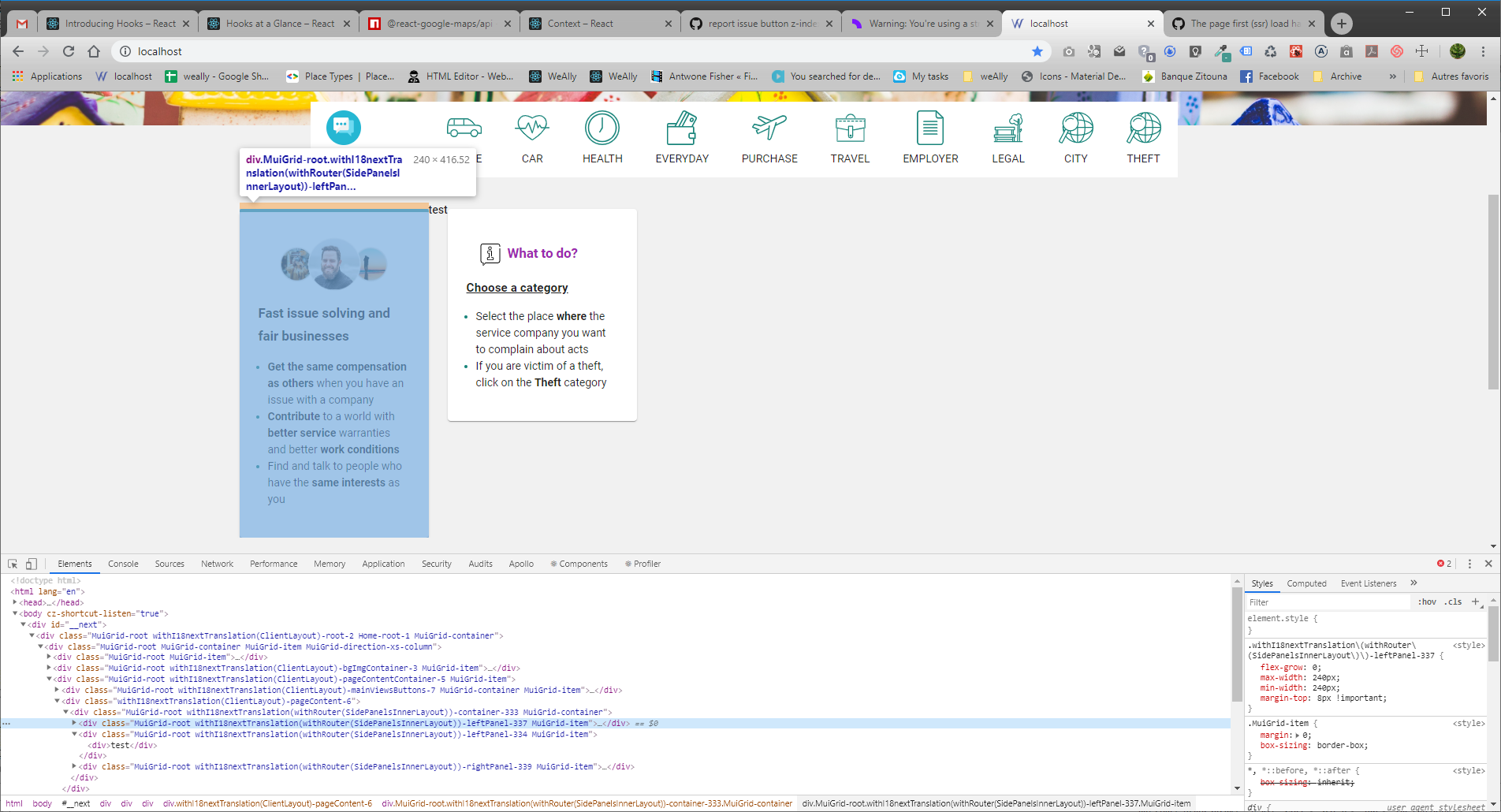
The very weird thing is that even if I'm using the same style for both left and center panel, I get two styles generated, and consistently (but I have no clue why), the center panel has its style missing. I even tried to remove the dynamic rendering of {children} to see if it's because of that delayed rendering that the style is missing, but no...
for the example above, I have a screen capture where the style xxx-leftPanel-337 is present, but the xxx-leftPanel-334 which is the same style but applied to the central panel is missing
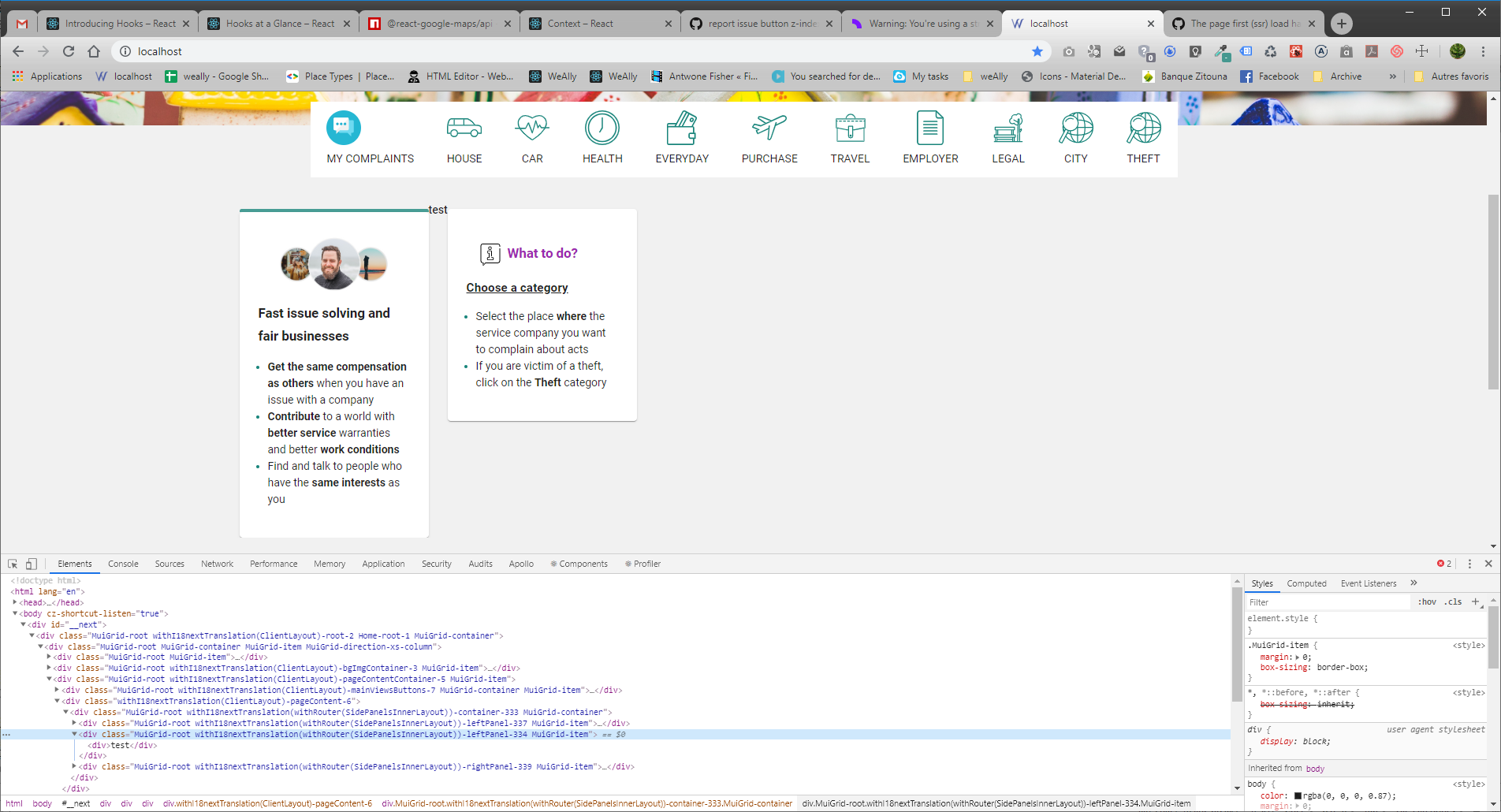
here's the left panel's style that is ok
ziedHamdi
on 29 Oct 2019
I'm still investigating, but it showed up that if I remove the surrounding <Hidden smDown> containers, the styles stop to appear even on the left and right panels. naturally, adding one to the central panel works (for larger screens only :) )
I can set the xs size to 100px and workaround this, but I'd like to understand why the generated style isn't provided to the page unless the comp is surrounded by a <Hidden> tag? is there an optimization to download only the first page ssr styles? (and how is it that using the same style generates the css twice, this is a special way to reduce css right? (sorry I'm kidding :) )
If there's an optimization, is it possible to disable it (just to launch the project with a slower but working version)?
ziedHamdi
on 29 Oct 2019
Still not really sure what's up with this but sounds like a case where we might want to look into it under enterprise support. Feel free to email [email protected].
timneutkens
on 2 Jan 2020
@ziedHamdi if you are using dynamic from next/dynamic and if its being used inside one of your children components, try to bring it up a level to render that entire component block using next/dynamic instead of the smaller section. Depending on how many levels deep I would first start off by moving it up one level at a time, then checking all of the common browsers to see if your styles do not break. If you are using (clientstorage - sessions or local) and cookies for dynamic styles try to ensure that the server and client properties match exactly. I came to the conclusion next.js is one of those frameworks you want to establish testing initial off the bat to avoid problems like this since these are huge problems when it comes to marketing and getting new users.
 j-mendez
on 8 Feb 2020
j-mendez
on 8 Feb 2020
@ziedHamdi if you are using dynamic from
next/dynamicand if its being used inside one of your children components, try to bring it up a level to render that entire component block using next/dynamic instead of the smaller section. Depending on how many levels deep I would first start off by moving it up one level at a time, then checking all of the common browsers to see if your styles do not break. If you are using (clientstorage - sessions or local) and cookies for dynamic styles try to ensure that the server and client properties match exactly. I came to the conclusion next.js is one of those frameworks you want to establish testing initial off the bat to avoid problems like this since these are huge problems when it comes to marketing and getting new users.
Thanks for your reply,
I'm not using next/dynamic, but the feedback of people using next.js from other companies seems to put material-ui as the responsible for this issue. I'm working around this issue on important sections by surrounding it with a
ziedHamdi
on 10 Feb 2020
@ziedHamdi, on document.js, replace
from
import {ServerStyleSheets} from '@material-ui/styles';
to
import {ServerStyleSheets} from '@material-ui/core/styles';
 GitVitor
on 24 Apr 2020
GitVitor
on 24 Apr 2020
wow thank you @GitVitor. saved me after a lot of head banging
 wesleyyee
on 9 Jul 2020
wesleyyee
on 9 Jul 2020
@GitVitor You saved me! Thank you so much!
 rpyn
on 1 Sep 2020
rpyn
on 1 Sep 2020
Related issues
 YarivGilad
·
3Comments
YarivGilad
·
3Comments
 wagerfield
·
3Comments
wagerfield
·
3Comments
 kenji4569
·
3Comments
kenji4569
·
3Comments
 jesselee34
·
3Comments
timneutkens
·
3Comments
jesselee34
·
3Comments
timneutkens
·
3Comments
Most helpful comment
@ziedHamdi, on document.js, replace
from
import {ServerStyleSheets} from '@material-ui/styles';to
import {ServerStyleSheets} from '@material-ui/core/styles';