Next.js: Link component reloads the whole page in the new version(9)
Bug report
Describe the bug
The Link component reloads the whole page after migrating to NextJS 9, and using the new dynamic routing APIs.
This is how i used the Link component before
<Link
  href={{
    pathname: "/news",
    query: { id: props.id }
  }}
  prefetch
>
    <a className={classes.link}>{props.title}</a>
</Link>
and this is after migration:
<Link href={`/news/${props.id}`}>
  <a className={classes.link}>{props.title}</a>
</Link>
and this the page folder:
  news
    [id].js
this is the content of [id].js
import React from "react";
import SingleNews from "../../components/SingleNews";

const News = ({ id }) => {
  return <SingleNews id={id} />;
};

News.getInitialProps = async ({ query }) => {
  return { id: query.id };
};

export default News;
Expected behavior
For the Links to transition smoothly to other pages
System information
- OS: Kubuntu
- Browser: chrome
- Version of Next.js: 9
 yassinebridi
All 6 comments
Hi @yassinebridi, this is not a bug. href in <Link> refers to the path inside your ./pages directory -https://github.com/zeit/next.js#dynamic-routing
Try this
<Link href="/news/[id]" as={`/news/${props.id}`}>
  <a className={classes.link}>{props.title}</a>
</Link>
 delbaoliveira
on 24 Jul 2019
delbaoliveira
on 24 Jul 2019
Thanks @delbaoliveira!
 Timer
on 24 Jul 2019
Timer
on 24 Jul 2019
thanks @delbaoliveira, that worked perfectly.
yassinebridi
on 24 Jul 2019
I have the same issue with 9.0.2 and adding the as doesnt help for me. nothing is happening when i click the link. server get "compiling" and "compiled successfully" but the page doesnt change :/
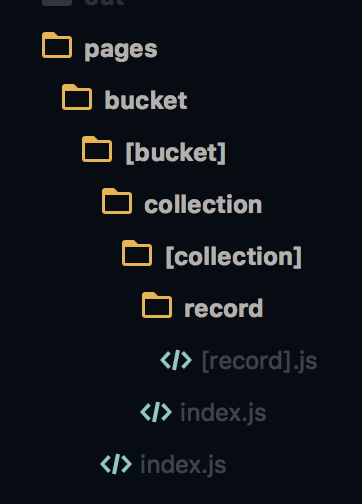
<Link
  key={item.id}
  href="/bucket/[bucket]/collection/[collection]/record/[record]"
  as={`/bucket/${bucket}/collection/${collection}/record/${item.id}`}
>link</Link>
The express server use routes like this :
const app = next({ dev: process.env.NODE_ENV !== "production" });
const handle = app.getRequestHandler();

app.prepare().then(() => {
  const server = express();
  server.get("*", (req, res) => {
    handle(req, res);
  });
});
 revolunet
on 29 Jul 2019
revolunet
on 29 Jul 2019
@revolunet if that's the entirety of your custom server, you can delete it.
Also, if you click again does the route transition occur?
Timer
on 29 Jul 2019
unfortunately i also have a proxy and some API call there.
revolunet
on 29 Jul 2019
Related issues
 YarivGilad
·
3Comments
YarivGilad
·
3Comments
 knipferrc
·
3Comments
knipferrc
·
3Comments
 pie6k
·
3Comments
pie6k
·
3Comments
 havefive
·
3Comments
havefive
·
3Comments
 flybayer
·
3Comments
flybayer
·
3Comments
Most helpful comment
Hi @yassinebridi, this is not a bug.
hrefin<Link>refers to the path inside your./pagesdirectory -https://github.com/zeit/next.js#dynamic-routingTry this