Next.js: next fails to properly kill server when found change in next.config.js
Bug report
Describe the bug
When user changes next.config.js, next runner notices changes, and tells about that:
> Ready on http://localhost:3000

> Found a change in next.config.js, restarting the server...
Then it recompiles everything successfully, but after that fails out of next with error:
Port 3000 is already in use.
Use `npm run start -- -p <some other port>`.
error Command failed with exit code 1.
In output of ps I still see node running with next-dev.
To Reproduce
- Create empty project with next.js
Add next.config.js(correct one)npx next- Change
next.config.js - See
nextfailing andnext-devstill running in background
Expected behavior
Server restarts and proceeds to work
System information
- OS: Mac OS X 10.14
- Browser: n/a
- Version of Next.js:
next.js v7.0.2 - Node version: 10.12.0
 yhaskell
All 9 comments
P.S. Tried on Debian 9.5, does not reproduce.
yhaskell
on 25 Oct 2018
This was probably fixed already 👍
 timneutkens
on 31 Dec 2018
timneutkens
on 31 Dec 2018
I'm also seeing this on Mac OS 10.14, next.js 7.0.2, node 11.5
 kmiyashiro
on 3 Jan 2019
kmiyashiro
on 3 Jan 2019
I'm also seeing this on Mac OS 10.14, next.js 7.0.2, node 11.5
"next": "^7.0.2", - Each time. The Same :-(
 fnpen
on 10 Jan 2019
fnpen
on 10 Jan 2019
Same setup as @fnpen, seeing this issue.
 andrewmartin
on 21 Jan 2019
andrewmartin
on 21 Jan 2019
Feel free to create a PR to fix this.
timneutkens
on 21 Jan 2019
Node v11.1.0
Next v8.0.0-canary.17
Works fine 👍
 DONE  Compiled successfully in 1346ms                                                                      2:44:58 PM

> Ready on http://localhost:3000

> Found a change in next.config.js, restarting the server...
✔ success server compiled in 128ms
✔ success client compiled in 847ms


 DONE  Compiled successfully in 1448ms
 teleginzhenya
on 28 Jan 2019
teleginzhenya
on 28 Jan 2019
I can confirm this is an issue.

Already up-to port 3003... If you leave it long enough it would refresh and start up again but you will not be able to kill the process with ctrl + c. Hitting ctrl + c seems like it kills the process but you will need to specify a new port.
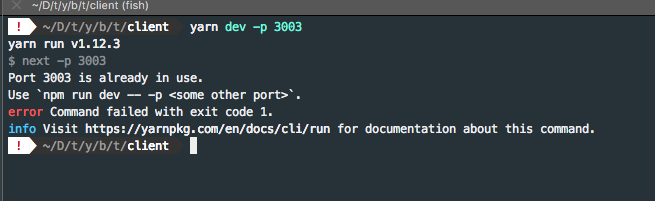
However, in spite of the 'port is already in use error', after a few seconds, it will start up on the specified port.
 vdiaz1130
on 11 Feb 2019
vdiaz1130
on 11 Feb 2019
We've changed the way the process works, it's currently out on the canary channel. We give a warning saying to restart the server as we can't restart automatically since it's now a single process. This also ties into the custom server which already didn't have this behavior.
https://github.com/zeit/next.js/blob/canary/packages/next/bin/next.ts#L83-L92
timneutkens
on 9 Mar 2019
Related issues
 olifante
·
3Comments
olifante
·
3Comments
 kenji4569
·
3Comments
kenji4569
·
3Comments
 sospedra
·
3Comments
sospedra
·
3Comments
 swrdfish
·
3Comments
swrdfish
·
3Comments
 wagerfield
·
3Comments
wagerfield
·
3Comments