Next.js: Hot reloading of linked modules doesn't work on server
Bug report
When working with next and a linked module, the hot reloading doesn't work on the server but only on the client.
Describe the bug
When you have a linked module inside the node_modules folder the module is only replaced on the client but not on the server. This means that you have to restart the whole next application in order to render the updated module on the server.
When the module is a React.Component and the output change this even results in inconsistent rendering between server and client shown in a error message in the console.
To Reproduce
Steps to reproduce the behavior, please provide code snippets or a repository:
- Setup clean next-js app
- Link a module via
npm link my-module - Import the module anywhere e.g.
pages/index - Start next-js in dev mode
- Change your linked module e.g. add
console.logor ifReact.Componentchange render method. this will trigger a reload (see terminal) - Changes are only visible in the client. server still loads the previous version of the module (probably from cache)
Expected behavior
The require.cache gets cleared properly so the linked module will be re-required also on the server. so client and server stay in sync.
 maerzhase
All 16 comments
I did some investigation on this bug and I can confirm that the linked modules are still coming from require.cache and therefore always render the old version on the server.
I added the following function to build/webpack/plugins/nextjs-require-cache-hot-reloader.js and called it each time in the afterEmit hook.
const deleteMyModule = () => {
  const myModuleIds = Object.keys(require.cache).filter(key => /my-module/.test(key));
  myModuleIds.forEach(id => delete require.cache[id]);
}
But this was not enough. In addition to achieve that the linked module will be reloaded you have to delete the page (e.g. /\.next\/server\/static\/development\/pages\/index.js/) and the /\.next\/server\/ssr-module-cache.js/ from require.cache.
When this is done it works as expected and the server also reloads the changed module and renders it accordingly.
I see different solutions to this problem. The question is if you consider that a "bug" in next-js and we should find a nice solution on supporting this behavior or we should make a small webpack plugin that solves this problem.
maerzhase
on 17 Oct 2018
Going to close this in favor of #5638
 timneutkens
on 31 Dec 2018
timneutkens
on 31 Dec 2018
Hi @timneutkens ,
Sorry for commenting on closed issue, but I don't think issue you've linked is relevant here.
The issue @maerzhase described is not related to importing external files from upper folder or even transpiling node_modules.
The issue is that server bundle doesn't rebuild when linked package content has changed.
This results in having outdated package in server bundle and up to date package in client bundle, which makes hard developing linked package.
Would you consider reopening this issue?
I'm working on creating minimal reproduction example.
 cherniavskii
on 10 Mar 2019
cherniavskii
on 10 Mar 2019
@cherniavskii what you're explaining seems to be similar to https://github.com/zeit/next.js/issues/5620 🤔
timneutkens
on 10 Mar 2019
@timneutkens Thanks for looking into this!
Indeed, it looks similar.
Meanwhile, I've created minimal reproduction example here: https://github.com/cherniavskii/nextjs-npm-link-issue
I'll try to apply suggested solution locally and check if it helps
cherniavskii
on 10 Mar 2019
@timneutkens I've applied fix suggested in https://github.com/zeit/next.js/issues/5620#issuecomment-436734690 to nextjs-require-cache-hot-reloader.js in my node_modules, then removed .next folder.
Nothing changed :/
cherniavskii
on 10 Mar 2019
@cherniavskii I had a lot of trouble working with linked modules. A reproduction would help.
Are you working in a monorepo? Or is this like an npm link situation?
I am working on upgrading my monorepo Next project to v8.0.3 right now so am fixing similar issues.
 vjpr
on 10 Mar 2019
vjpr
on 10 Mar 2019
@vjpr the issue I described refered to npm link situations.
maerzhase
on 10 Mar 2019
@cherniavskii I made a webpack plugin to temporary solve this problem in the projects i am working on: https://www.npmjs.com/package/webpack-clear-require-cache-plugin
Its probably not the cleanest solution but it gets the job done
maerzhase
on 10 Mar 2019
@vjpr same here, monorepo has nothing to do with this issue
cherniavskii
on 10 Mar 2019
@maerzhase didn't manage to make this work in my reproducing example - adding plugin has no effect
cherniavskii
on 10 Mar 2019
@cherniavskii did u see the section on how to configure it for next js? i can take a look later, atm i am afk
maerzhase
on 10 Mar 2019
@maerzhase yeah, but no success
cherniavskii
on 10 Mar 2019
@cherniavskii I created a fork from your example and added the plugin. take a look:
https://github.com/maerzhase/nextjs-npm-link-issue
maerzhase
on 10 Mar 2019
@maerzhase thanks for looking into this!
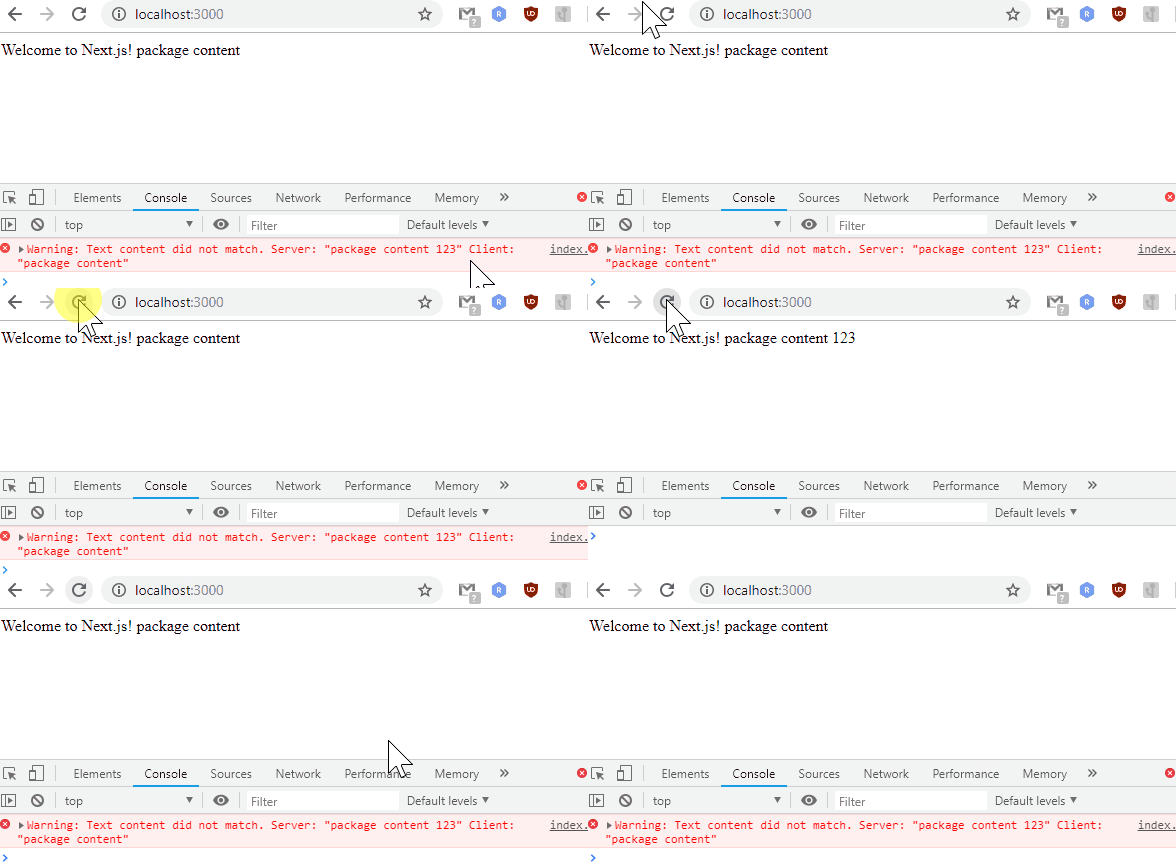
Did you try to change package/index.js file and reload page (without reloading server)?
Because it behaves just like before - server bundle doesn't get updated. See:
cherniavskii
on 11 Mar 2019
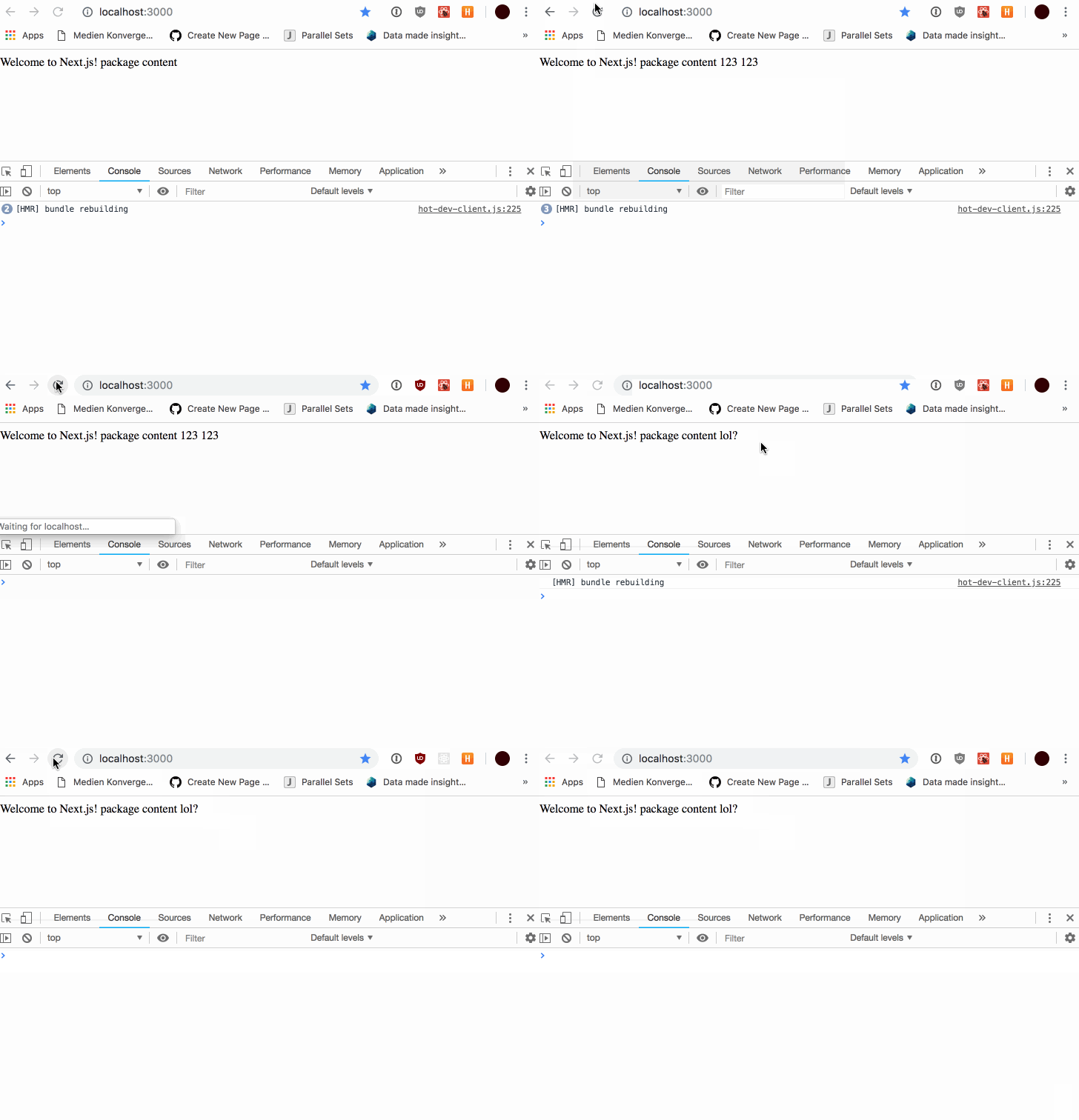
@cherniavskii hmm jeah thats exactly what i did and to me it solves the problem. now i am super confused why it would only work for me....
maerzhase
on 11 Mar 2019
Related issues
 YarivGilad
·
3Comments
YarivGilad
·
3Comments
 formula349
·
3Comments
formula349
·
3Comments
 pie6k
·
3Comments
pie6k
·
3Comments
 rauchg
·
3Comments
rauchg
·
3Comments
 lixiaoyan
·
3Comments
lixiaoyan
·
3Comments
Most helpful comment
@cherniavskii I made a webpack plugin to temporary solve this problem in the projects i am working on: https://www.npmjs.com/package/webpack-clear-require-cache-plugin
Its probably not the cleanest solution but it gets the job done